Zigbee Hop Count Calculator
Estimate mesh router hops, spacing pressure, wall loss, usable link margin, and practical max-hop status for a Zigbee path before you place powered repeaters.
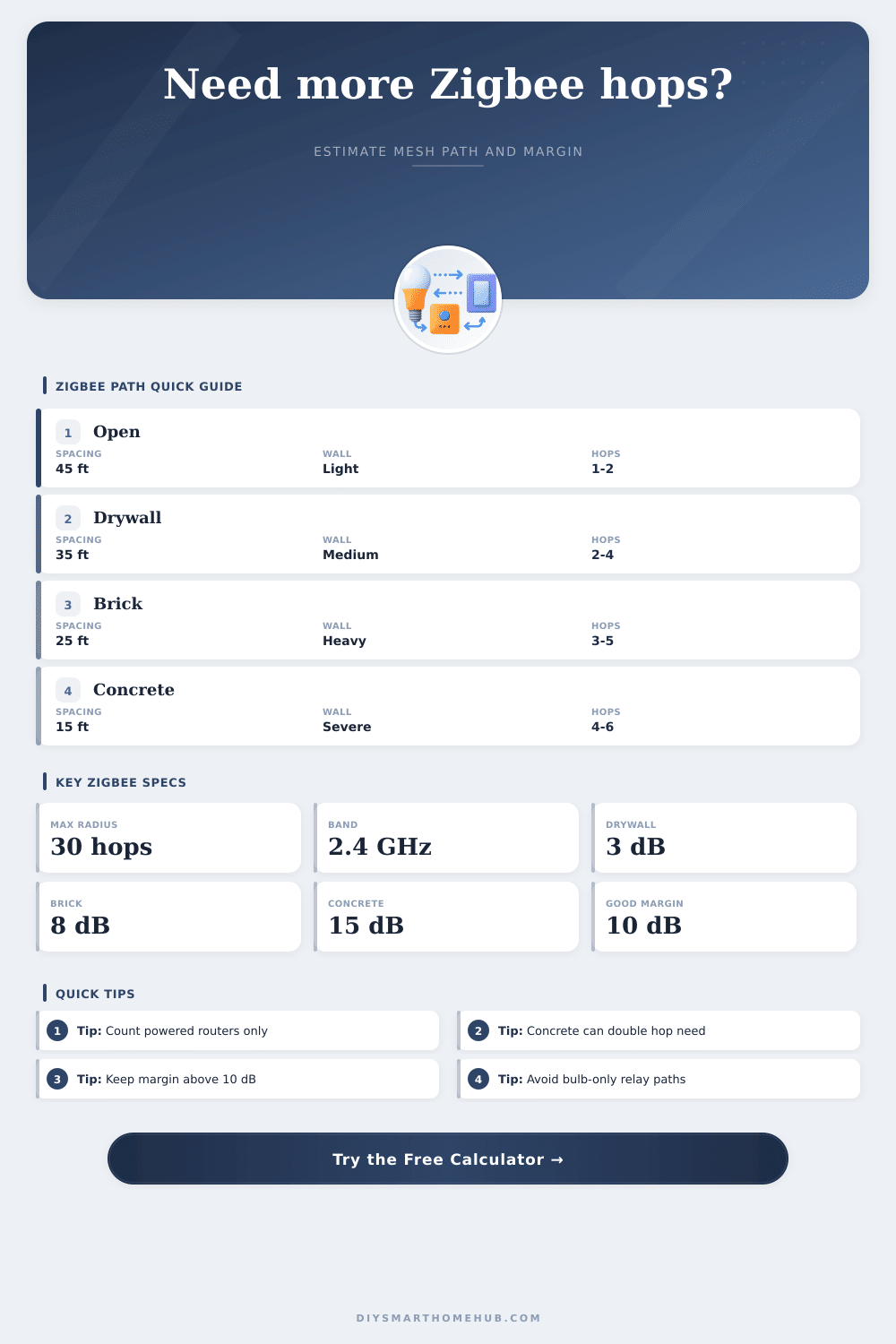
| Obstacle type | Planning loss | What it represents | Calculator use |
|---|---|---|---|
| Drywall / timber partition | 3 dB each | Light interior wall, door, or cabinet path | Small link-margin reduction |
| Brick / exterior wall | 8 dB each | Masonry, tile, dense plaster, or outside wall | Often adds one router hop |
| Concrete / metal barrier | 15 dB each | Slab, foil insulation, metal door, or panel | Strong reason for line-of-sight relay |
| Noisy 2.4 GHz environment | 5 to 12 dB | Heavy WiFi overlap, appliances, dense neighbors | Handled by selected radio profile |
| Planning condition | Typical router spacing | Practical route target | Risk note |
|---|---|---|---|
| Open room or hallway | 40 to 60 ft / 12 to 18 m | 1 to 2 hops | Usually margin-limited only at long edges |
| Normal interior drywall | 30 to 45 ft / 9 to 14 m | 2 to 4 hops | Router placement matters more than raw device count |
| Brick or exterior-wall route | 20 to 30 ft / 6 to 9 m | 3 to 5 hops | Put a powered router on each side when possible |
| Concrete, metal, or detached edge | 10 to 20 ft / 3 to 6 m | 4 to 6 hops | Path is often obstruction-limited before distance-limited |
| Device class | Relay role | Typical RF assumption | Planning note |
|---|---|---|---|
| Coordinator | Starts the mesh | 0 to 8 dBm TX, -100 dBm class RX | Good antenna position improves every first link |
| Mains plug or outlet router | Strong repeater | 5 to 10 dBm TX, good RX sensitivity | Best general-purpose hop-count reducer |
| In-wall switch or module | Fixed repeater | 0 to 8 dBm TX, variable box loss | Useful when the electrical box is not shielded |
| Smart bulb router | Possible repeater | Often smaller antenna and weaker relay behavior | Avoid making bulb-only paths for critical sensors |
| Battery sensor | Endpoint only | Does not repeat traffic | Never count battery devices as mesh routers |
| Scenario | Path distance | Wall profile | Likely router plan |
|---|---|---|---|
| One-bedroom apartment | 50 to 70 ft / 15 to 21 m | 2 to 4 drywall walls | 1 to 2 powered routers |
| Two-story townhome | 90 to 130 ft / 27 to 40 m | Drywall plus floor path | 2 to 4 powered routers |
| Garage or gate sensor | 130 to 200 ft / 40 to 61 m | Exterior wall plus open span | 3 to 5 powered routers |
| Outbuilding edge device | 220 to 300 ft / 67 to 91 m | Masonry, metal, or severe path | 5 to 8 powered routers or a better path |
Zigbee smart home network use the Zigbee protocol to connect device. The devices that use the Zigbee protocol use a mesh network to send signal from one device to another. In this network, many of the devices act as routers to help with a transmission of the signals.
The signal from one device travels to the coordinator through several router. The number of these routers between the device and the coordinator are called the hop count. Using too many router increases the hop count.
Use a Zigbee Hop Count Calculator to Plan Your Home Network
However, using too many routers also mean that there are several opportunity for the signal to fail. A Zigbee hop count calculator allow you to calculate the correct number of routers needed to ensure that the network remains reliabley. The more routers that are placed between the coordinator and the device, the more further the signal will have to travel through obstacles.
However, each time the signal passes through a router, there is a small delay in the data transfer. A Zigbee hop count calculator is necessary to determine the number of router necessary to create a reliable Zigbee network. The calculator use mathematics to determine the number of routers necessary for the data to travel from one device to another in a Zigbee network.
Although the distance between two device has a great effect on the signal strength between them, it is not the only factor that will have an impact on the signal strength. A signal can travel thirty feet through a hallway but cannot travel thirty feet through a concrete floor. To use the Zigbee hop count calculator, you will need to enter the distance between the devices, the type of obstacles between them, and the performance class of the radios.
The Zigbee hop count calculator will then generate a hop count that will ensure that each link in the network maintains a healthy signal strength. Another major factor that will impact the signal strength between two devices in the Zigbee mesh network is the loss of signal caused by walls. A drywall will cause a small loss of signal.
However, numerous drywalls will cause a great loss of signal between two devices. Other walls, such as concrete or metal, will cause a much larger loss of signal than drywall will. For instance, a metal door may cause a loss of fifteen decibel of signal strength in one instance.
This will affect the number of routers necessary for the signal to travel from one device to another in the network. The Zigbee hop count calculator will determine the total loss of signal caused by these obstacles, and it will use this information to calculate the number of hop between devices. Not all devices in a smart home can act as a router.
Most devices that use the Zigbee protocol are battery-powered sensors. These sensors will not have the power to act as a router and pass data to other devices in the network. Only mains-powered devices can act as routers.
If you purchase only battery-powered sensor, you will not have a mesh network that can pass signals from device to device. You will have to include at least one mains-powered router in your Zigbee network for it to work. The results of the Zigbee hop count calculator will determine the distance between the routers.
If the calculator tell you that signals can travel thirty-five feet through your walls, the routers must not be placed further than thirty-five feet from each other. If the distance between two routers is too great, the signal will be too weakly for the link between the two devices to remain active. The Zigbee hop count calculator will calculate the appropriate distance between each router in your Zigbee network.
The different layouts of building require different numbers of routers in the mesh network. A small apartment will require fewer routers than a large two-story house. Outbuildings, such as a garage, may require more routers than the rest of the house.
You can use a Zigbee hop count calculator to calculate these various scenario. Using such a calculator will allow you to plan the Zigbee network for your home for different environment without having to move any furnitures or buy the devices yet. Some variables in the network cannot be measured, such as signal loss caused by the positioning of the antennas.
The Zigbee hop count calculator will require you to enter the target margin for the network. This will allow for extra signal strength to be reserved in case of other variable that may impact the signal. For instance, you can determine the target margin to be fifteen decibels to provide headroom for signal loss caused by other variables.
This will ensure that the network continues to work even if these small variable impact the signal between two devices in the network. You will not want to use the maximum signal strength range that is listed for the devices when planning your Zigbee mesh network. The maximum range listed on the device packaging might be for an open-air environment.
In the open air, there are no walls or other obstacle to the signal. However, as soon as you introduce walls and other obstacles, the signal strength will diminish. Your measurement will have to be calculated through a Zigbee hop count calculator before you purchase the hardware.
Using such a calculator will ensure that you do not purchase device that will worsen the signal in your network. For each link in your Zigbee network, the distance between each hop should be short enough for the next router in the mesh network to be able to hear the previous router. By ensuring that each link is short enough in length, your network will remain responsive to new device that might be added to the network.
A Zigbee hop count calculator make it easy for you to follow these rules for each link in your network.