Security Camera Bitrate Calculator
Estimate per-camera bitrate, total camera network load, recommended headroom, and daily data transfer from resolution, frame rate, codec, scene motion, compression quality, and audio.
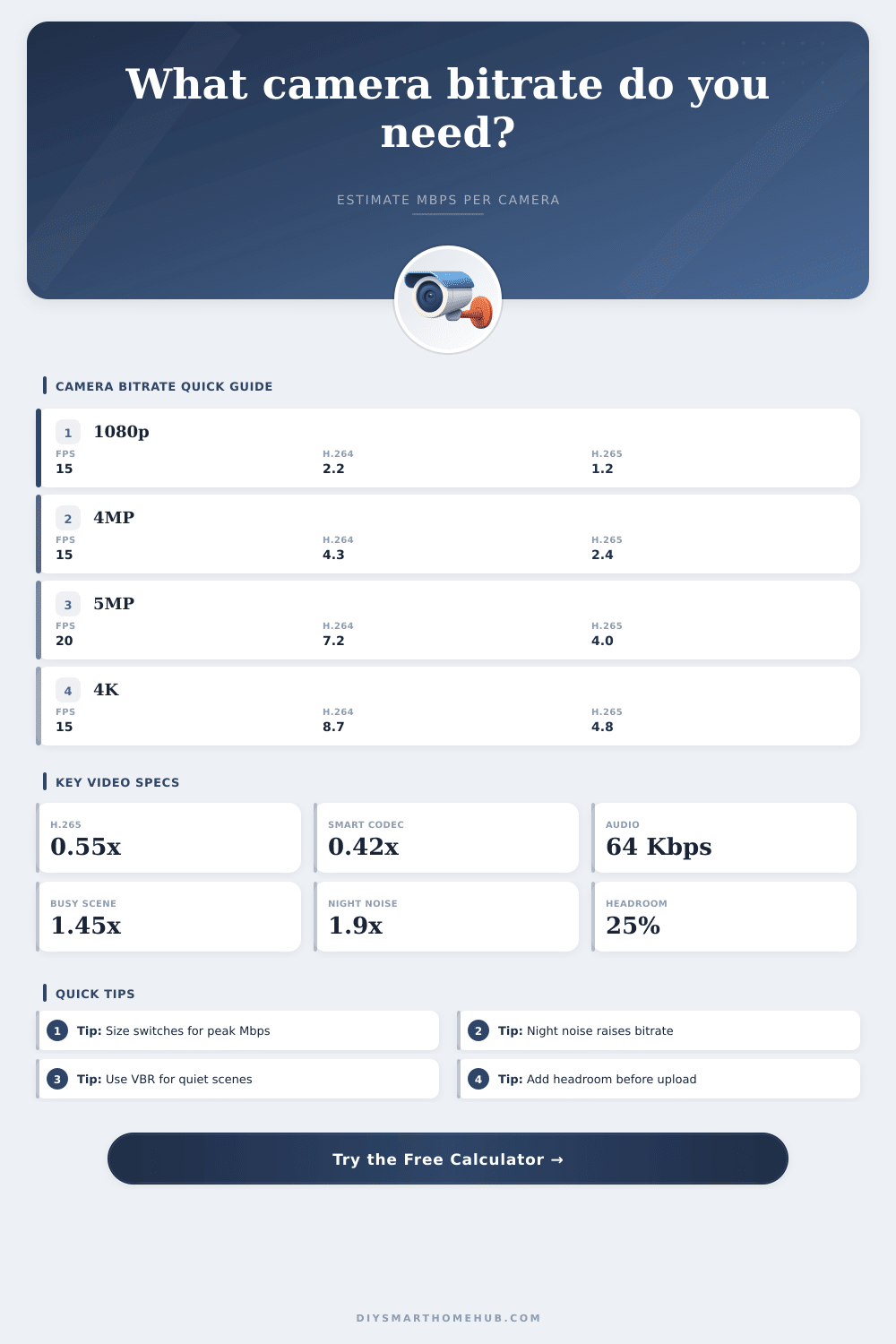
| Resolution | Pixel count | H.264 at 15 fps | H.265 at 15 fps | Typical use |
|---|---|---|---|---|
| 720p / 1MP | 1280 × 720 | 1.0 to 1.5 Mbps | 0.6 to 0.9 Mbps | Porch overview, indoor utility view |
| 1080p / 2MP | 1920 × 1080 | 2.0 to 3.0 Mbps | 1.1 to 1.7 Mbps | General smart home cameras |
| 1440p / 3MP | 2560 × 1440 | 3.5 to 5.0 Mbps | 1.9 to 2.8 Mbps | Doorways, counters, package zones |
| 4MP / 2K+ | 2688 × 1520 | 4.0 to 6.0 Mbps | 2.2 to 3.3 Mbps | Driveways and small lots |
| 5MP | 2592 × 1944 | 5.5 to 8.0 Mbps | 3.0 to 4.4 Mbps | Wide yards and detailed entrances |
| 4K / 8MP | 3840 × 2160 | 8.0 to 12.0 Mbps | 4.4 to 6.6 Mbps | Identification-critical outdoor views |
| Codec / mode | Calculator factor | Peak behavior | Best fit | Planning note |
|---|---|---|---|---|
| H.264 / AVC | 1.00x | Moderate peaks | Older NVRs and broad compatibility | Uses the most bandwidth among modern codecs |
| H.265 / HEVC | 0.55x | Moderate peaks | Most current IP camera systems | Good default for bitrate and storage planning |
| Smart H.265+ | 0.42x | Scene dependent | Mostly static scenes with event motion | Less predictable when rain, trees, or crowds move |
| AV1 security stream | 0.45x | Moderate peaks | Newer cloud or edge devices | Efficient, but not universal on local NVRs |
| MJPEG | 7.50x | Large steady load | Special snapshot or machine-vision use | Frame-by-frame compression creates huge streams |
| Scene type | Multiplier | What changes bitrate | Common camera zone | Compression risk |
|---|---|---|---|---|
| Static indoor hallway | 0.65x | Stable walls, little movement | Hallway, utility room, storage room | Low detail loss at VBR |
| Normal home exterior | 1.00x | People, cars, moderate lighting changes | Door, porch, driveway | Balanced default |
| Busy entrance or counter | 1.45x | Frequent motion and detail changes | Retail door, package desk, lobby | Raise bitrate for face detail |
| Trees, rain, headlights | 1.70x | Many small moving edges | Yard, road-facing camera, open lot | VBR peaks can be sharp |
| Low light / night noise | 1.90x | Sensor noise and IR grain | Garage, alley, side yard | Noise reduction affects clarity |
| PTZ or fast motion | 2.20x | Pan, zoom, tracking, fast subjects | Gate, lot, warehouse PTZ | Use higher peak headroom |
| Device path | Practical bitrate range | Best stream profile | Capacity check | Spec to verify |
|---|---|---|---|---|
| WiFi battery camera | 0.3 to 2 Mbps | Substream or smart VBR | AP airtime matters more than port speed | 2.4 GHz vs 5 GHz support |
| PoE 1080p camera | 1 to 4 Mbps | H.265 balanced at 10 to 20 fps | Many cameras fit a 100 Mbps uplink | Camera max bitrate cap |
| PoE 4MP or 5MP turret | 2 to 8 Mbps | H.265 evidence detail | Use gigabit uplinks for grouped switches | Main stream and substream limits |
| 4K outdoor camera | 5 to 16 Mbps | H.265 or smart codec | Peak load rises in rain and at night | IR noise reduction and max fps |
| PTZ tracking camera | 8 to 25 Mbps | CBR or high-ceiling VBR | Plan for peak while moving | Optical zoom bitrate ceiling |
| NVR switch uplink | 50 to 900 Mbps | Aggregate all camera streams | Keep below sustained port capacity | Backplane, uplink, and recorder ingest |
| Link or path | Usable planning load | Camera examples | When to add headroom | Calculator use |
|---|---|---|---|---|
| 100 Mbps PoE uplink | 60 to 75 Mbps | 20 to 35 light 1080p H.265 streams | Use more margin for CBR or PTZ cameras | Compare to network with headroom |
| Gigabit switch uplink | 600 to 800 Mbps | 80+ mixed home or business streams | Add margin for remote viewing and VMS traffic | Good target for camera aggregation |
| WiFi access point | 25% to 50% of PHY rate | Several low-Mbps cameras per radio | Wireless retries reduce real throughput | Use calculated Mbps as airtime load |
| Internet upload | 50% to 70% of rated upload | Remote live view, cloud recording, offsite NVR | Keep space for normal home traffic | Use remote viewer Mbps result |
| Recorder ingest limit | Model-specific Mbps cap | 80, 160, 256, or 320 Mbps NVR ratings | High-resolution systems hit ingest before ports | Compare to total peak load |
Security camera systems produce a great deal of data that needs to be carry to a network. The resolution of the security camera that is printed on the camera box does not always show the amount of bandwidth that the security camera will use. The resolution of the camera is not the same than the bitrate of the camera.
The bitrate is the measurement of the amount of data that the security camera will output through the network each second. When many security cameras is connected to the same switch or wireless access point, the data load on the network will quickly become very high. Due to the rapid increase in the total load on the network created by many security cameras, many people end up guessing at the correct size for the switch or ending up with more higher costs for data storage than they had calculated.
How to Calculate Security Camera Data and Bandwidth
This data calculator allows the person to enter the settings that they plan to use for their security camera system to project the amount of bandwidth that the security cameras will use and the total amount of data that will be create by those security cameras each day. The resolution of the security cameras will factor into the calculation of the amount of data that will be create by each security camera. Cameras of higher resolution will require more bits to describe each pixel in the frame of the security camera than cameras of lower resolutions.
Cameras with 1080p resolution will have more pixel than cameras with 720p resolution, and cameras with 4K resolution will have more pixels than cameras with 1080p resolution. Cameras with higher resolutions will require higher bitrates. The frame rate that is used for the security cameras will factor into the calculation of the amount of data that each security camera will create.
For security cameras that use fifteen frames per second, the encoder will process fifteen images every second. For security cameras that use thirty frames per second, the encoder will process thirty images every second. Using higher frame rates will increase the amount of data that each security camera creates and place a load on the network.
The codec for the security cameras will factor into the calculation of the amount of data that each security camera will create. For codecs such as H.265, the cameras can use fewer bit to represent each frame of video than cameras that use the H.264 codec. Cameras that use H.265 can transmit the same scene at half the bitrate of the same scene captured using H.264 cameras.
Some security cameras use smart codecs that only transmit data if there is changes in the scene. However, these codecs can become problematic when there is movement in the monitored area that is not from the objects that are being monitored, such as movement caused by the wind or rain. The type of scene that are being monitored will factor into the amount of data that each security camera will create.
Scenes with little movement will require fewer bits than scenes with much movement. For instance, a quiet indoor hallway will require a different bitrate then a scene of a retail area entrance during peak shopping hours. A quiet indoor hallway will use a different bitrate than a scene that focuses on the area that the security camera is viewing that has moving plant in the area.
The type of scenes that are captured at night can require more data because the sensor noise in the security cameras must work harder to capture the scenes. The encoding mode for the security cameras will factor into the amount of data that each security camera creates. For cameras that use a constant bitrate mode, each security camera will always use the same bit rate, regardless of movement in the scene.
However, the bitrate may waste network bandwidth when there is no movement in the scene. For cameras that use a variable bitrate mode, the bitrate will change for each scene that the security camera captures. Variable bitrate modes will have a lower average bitrate.
However, the bitrate may spike to very high bit rates if there is sudden movement in the scene that the security camera is monitoring. For these variable bitrate modes, headroom has to be provided for the network to handle spikes in the bitrate. If there is no headroom for the bitrate to spike to higher values, the network will become saturated with data from the security cameras.
The amount of data that each security camera will create is calculated from the average bitrate of each camera. For security cameras that continuously record the area that they are viewing for 24 hours, the bitrate will determine the total amount of data that is created each day. Knowing how much data that each security camera will produce each day will allow a person to make decisions about their security camera system regarding storage media or cloud storage limits for those cameras.
For instance, if the total data created per day by each security camera exceed the limits of the storage media or cloud storage plan for those security cameras, then the bitrate can be lowered. Data totals can also help a person to decide which security cameras to purchase and how many security cameras will be needed for the area that is to be monitored. In addition to the variables that are accounted for in the data calculator, there are additional variables in the installation of security cameras that are beyond the abilities of the calculator to account for.
For example, wireless security cameras will have to share the bandwidth of the wireless network with other devices in the area. The signal strength from a wireless security camera may also change. Conversely, cameras that use power over Ethernet will have to contend with the bandwidth of the switch backplane and the quality of the Ethernet cable runs.
Additionally, if any individual are remotely viewing the security cameras, the data from those live connections will also use data from the network. These variables are important to consider because they will impact the performance and responsiveness of the security cameras. When planning a security camera system, many people make mistakes.
For example, they may use peak numbers for data for certain variables without providing context for where those numbers will come from. Or, they may not account for the difference between the load on the network during average times versus the load that is placed on the network during sustained periods. For example, if the area that is to be monitored by a security camera receives a great deal of rain, the bitrate for that security camera may spike to very high rates.
Cameras that are grouped together on the same wireless access point may create contention for that access point even if the total number of bits for the cameras is within the theoretical limit for that access point. In addition to the access point of which the cameras are connected, the uplink speed to the security camera video recorder may also need to be checked to ensure that the recorder can ingest all of the data from the cameras. When planning a security camera system, one should use the settings that will be used for the security cameras.
Using a security camera system data calculator will allow the person to determine the data load that the security cameras will create. With that load determined, the person can provide headroom for the data load on the network. For example, if using a variable bitrate mode for the security cameras, the bitrate may spike to very high rates.
Providing headroom for that bitrate will allow for additional flexibility in the data load on the network. Using a lower frame rate for the security cameras will allow for the bitrate to be reduced. Using a smarter codec for the security cameras will also allow for the bitrate to be reduced.
Thus, freeing up some bandwidth for the network. By freeing up bandwidth for the network, the network can add additional security cameras or the user can improve the quality of the existing security cameras. Following this process will ensure that the bitrate of the security cameras is within the limits of the switches to which they are connected and the limits of the local or cloud data storage for those security cameras.
Overall, the goal of the process of planning a security camera system is to ensure that the security system can handle the unpredictable data load from the cameras.