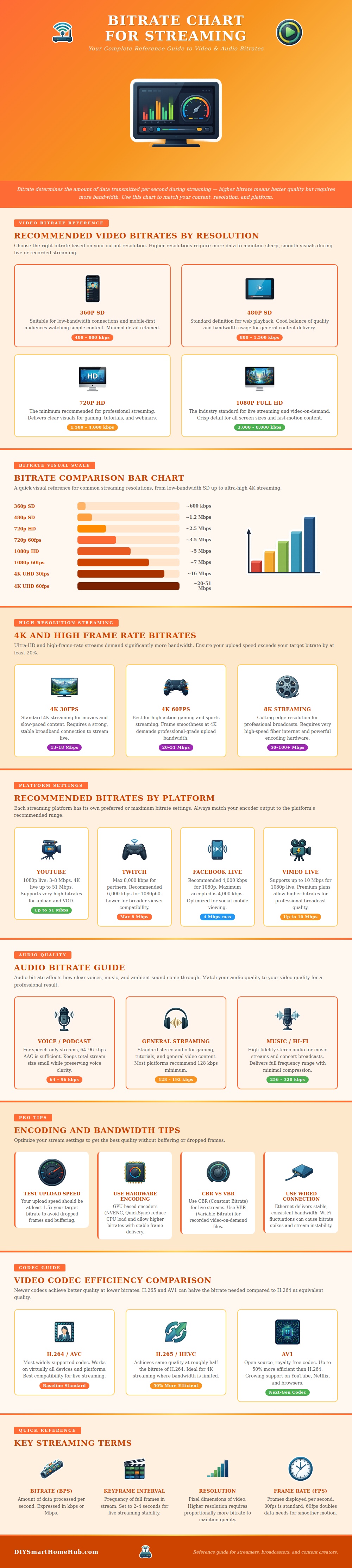
Bitrate refer to an amount of data that the encoder will send every second of the stream. The bitrate will determine the quality of both the visual and audio components of your stream. If you set the bitrate too low for your resolution and frame rate, then the quality of your stream will be soft and blurrily.
However, if you set the bitrate too high for your internet connection, the stream will begin to buffer or fail altogether. In order to find the proper bitrate for your stream, you must understand the relationship between bitrate, resolution, frame rate, and internet connection speed. Resolution refer to the number of pixel in your screens image.
How Bitrate Affects Your Stream
Higher resolution require higher bitrate settings because there are more pixels to encode. Low resolution utilize fewer pixels to create the image on screen, requiring less data to stream that video. High resolution contains more pixels than low resolution settings, therefore requiring a higher bitrate to stream each pixel to the viewers.
Frame rate refer to the number of individual images that play every second on screen. A frame rate of 60 frames per second contains twice as many images as a frame rate of 30 frames per second. For these reason, a stream that use 60 frames per second will require more bitrate than one using 30 frames per second.
Therefore, increasing the frame rate will require an increase to the bitrate settings for your stream, which will require an increase in internet connection speed to support such a bitrate. Each streaming platform have rules regarding the bitrate of data that will be sent to their streaming servers. If your selected bitrate is higher than the limits of the platform for bitrate, the platform will throttle or reject the stream altogether.
Therefore, you must check the rules of each platform to ensure that your bitrate is not above the allowed bitrate. Furthermore, your bitrate settings must remain within the limits of the platform to ensure that your stream will remain stable for all of your viewers. In addition to bitrate, resolution, frame rate, and internet connection speed, audio quality for your stream will also require its own bitrate settings.
If your bitrate for speech is too low, viewers may have trouble understand what is being said on stream. However, music require higher audio bitrate settings to ensure the music is heard clear by the viewers. Your audio bitrate and video bitrate should be set to the same level to ensure that both components of your stream have the same quality.
Poor audio quality will impact the quality of your stream altogether. Your internet connection speed must be higher than the bitrate that you select for your stream settings. If your bitrate is the same as your internet upload speed, your internet connection will not have extra data to account for any fluctuation in internet connection speed.
If your internet connection reaches its limit, the stream will begin to drop frames and buffer. Viewers will experience a broken stream when buffering occurs. To avoid dropped frames and buffering, your bitrate should be lower than your internet upload speed.
Your bitrate can be set to constant bitrate or variable bitrate settings. If you select constant bitrate, your encoder will always send the same amount of data each second. Constant bitrate is generally preferred for live stream settings.
Variable bitrate settings cause the encoder to send more data each second when there is movement within the screen and less data when there is little movement within the screen. Variable bitrate is used for recorded video but is more difficultly to manage for live broadcasts. The codecs will compress your video stream.
Each codec is different from the other and may require different amounts of bitrate to perform its function. Newer codecs are more efficient than older codecs, meaning they will output high resolution video using less data. By utilizing an efficient codec for your live stream, you can lower your bitrate without losing the sharpness of your video.
However, newer codecs may require additional processing power from your computer to perform its function. In order to determine if your bitrate is correct for your live stream, you can always watch your live stream as if you are a viewer of the stream. If the video becomes blurry with a high amount of movement within the screen, your bitrate is too low for the resolution and frame rate of your stream.
If the video begins to buffer for your own stream, your bitrate is too high for the internet connection speed that you have. By using test streams, you can determine the correct bitrate for your live stream prior to begin your broadcast.