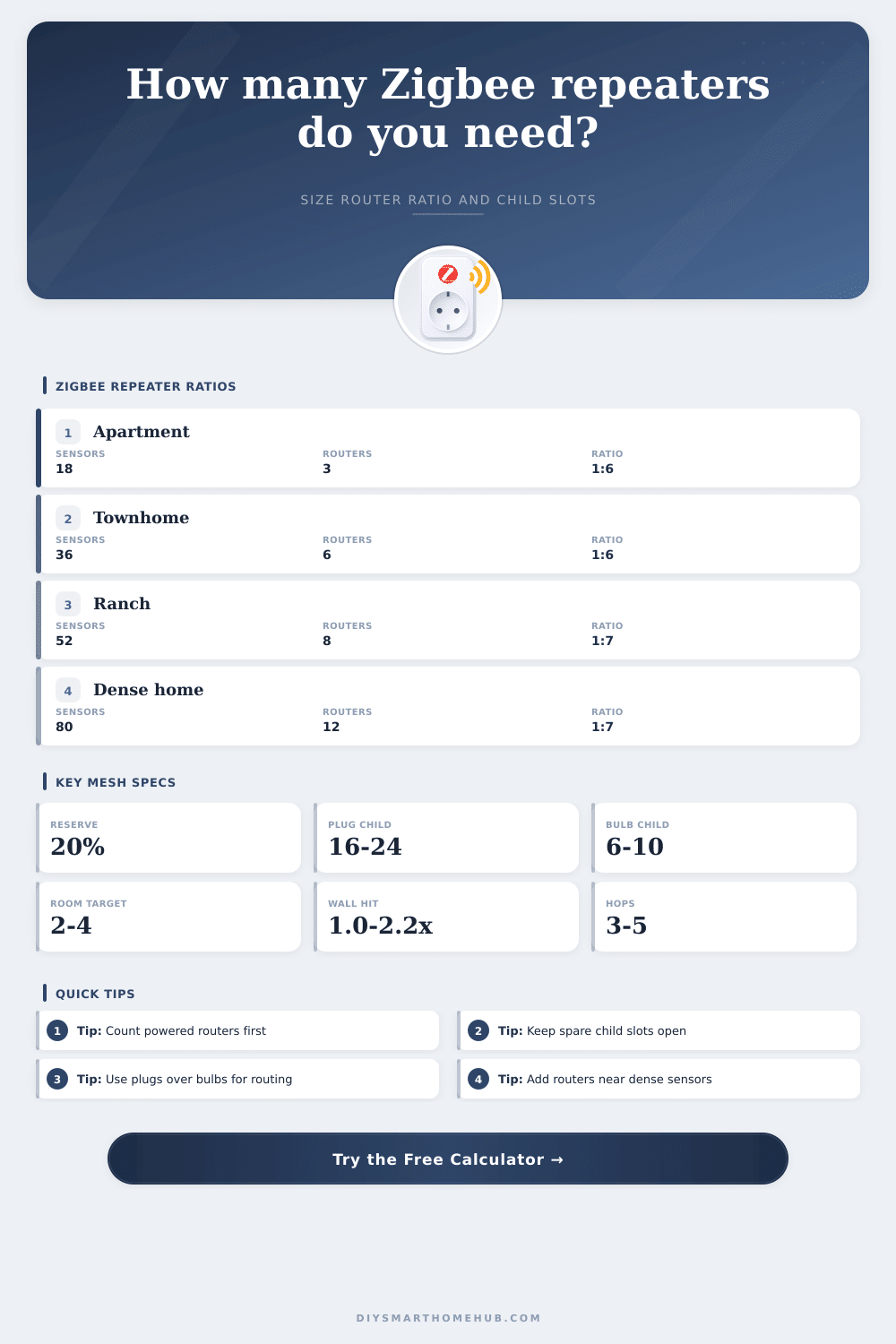
Zigbee Repeater Ratio Calculator
Estimate how many mains-powered Zigbee routers or repeaters a mesh needs by balancing sleepy sensor count, existing router count, wall losses, room density, child capacity, and reserve headroom.
📌Real Zigbee Mesh Presets
Loaded preset: Studio Starter. The calculator compares child capacity, room density, and wall-adjusted coverage before adding mesh reserve repeaters.
⚙Mesh Sizing Inputs
Full Zigbee repeater ratio breakdown
📶Zigbee Repeater Spec Comparison Grid
📊Reference Tables
Router child capacity guide
| Router type | Child slots | Coverage | Best use |
|---|
Wall factor and density targets
| Condition | Factor | Rooms/router | Coverage effect |
|---|---|---|---|
| Open drywall | 1.00x | 4.0 | Full reference area |
| Typical drywall | 1.25x | 3.4 | 80% of reference area |
| Multi-floor | 1.55x | 2.7 | 65% of reference area |
| Brick or ductwork | 1.85x | 2.2 | 54% of reference area |
| Masonry or metal | 2.20x | 1.8 | 45% of reference area |
Common Zigbee mesh sizes
| Project | Area | Sensors | Router target |
|---|---|---|---|
| Small apartment | 500 to 800 sq ft | 10 to 22 | 3 to 4 routers |
| Two-floor townhome | 1,100 to 1,700 sq ft | 24 to 45 | 5 to 8 routers |
| Single-story ranch | 1,600 to 2,400 sq ft | 35 to 65 | 7 to 10 routers |
| Dense security setup | 2,000 to 3,200 sq ft | 60 to 100 | 10 to 16 routers |
| House plus garage | 2,400+ sq ft | 50 to 90 | 12+ routers |
Repeater ratio planning bands
| Ratio | Read | Use case | Reserve check |
|---|---|---|---|
| 1:4 or lower | Very dense | Masonry, locks, many rooms | Usually strong |
| 1:5 to 1:7 | Balanced | Most mixed sensor homes | Good if slots remain |
| 1:8 to 1:10 | Lean | Open plans with strong routers | Watch pairing headroom |
| Above 1:10 | Tight | Few routers, many sleepy devices | Add mains routers |
✅Zigbee Ratio Tips
When you add battery sensors, locks, and motion detector to a house, you are essentially building a mesh network. For the mesh network to feel complete, every device should be online. However, the problem of devices located far from the coordinator dropping offline is a common issues.
This problem does not usually happen because you lack power outlets or smart plugs. The problem occurs because your mesh network does not have enough routing capacity to keep all of your battery devices online through the walls of your house. Zigbee networks uses mains-powered devices to act as repeaters to ensure that all of the mains-powered devices can keep the mesh network alive.
How Many Routers Do You Need for Your Mesh Network
Battery sensors cannot perform this function of act as a repeater. Therefore, every time you add a battery sensor or an leak detector, you are adding more demand on the mains-powered devices. The calculator allow you to balance three specific pressures within your mesh network.
These three specific pressures involve the number of rooms that your mesh network needs to cover, the number of child slot that each of your routers can offer, and the amount of wall loss that your house create. By entering each of these variable into the calculator, the calculator will tell you if you are short on the number of routers that you have, short on the number of child slots, or if you are short on both. Many people begin the calculation of how many routers they will need by counting the number of powered devices that they already have in their home.
However, not all of these devices will route the signal for the mesh network. For example, smart bulb may lose their power if the person that owns the device turns the light switch that controls these bulbs. In contrast, a smart plug will always remain in the powered position.
The device profile option allow for the adjustment of the number of these devices. For example, one high-capacity smart plug may be able to keep twenty-four battery devices online, while a smart bulb in the same location may only be able to keep eight battery devices online. Such a difference is accounted for in the total recommended router count that the calculator provides to the person who use the calculator.
Your house’s construction will have more of an impact on the number of routers that you need than the various types of devices that you have in your home. A house with drywall and open floor plans may allow each router to control several rooms. However, if your house has several brick fireplaces, ductwork areas, or foil-backed insulation, your walls will create a loss of signal for the mesh network.
The wall factor that is included in the calculator allow for this impact on your mesh network to be accounted for. As you increase the number of walls of your house that the calculator determines will impact the signal strength of your router, the calculator will increase the number of routers that it recommends for your home. This is typically the reason that people experience problems with their mesh network signal quality in certain areas of the house.
The room density of your house will impact the requirement for the number of child slot for your routers. A house with many small rooms may need more routers than a house with fewer rooms but with a higher number of sensors. The calculator will determine which factor is limiting for your home.
Adding a router in the wrong spot will solve the problem of coverage for the rooms