Thread Border Router Capacity Calculator
Estimate planning capacity for a Thread smart home by combining border router count, mains-powered mesh routers, sleepy end devices, awake end devices, room spread, hop depth, traffic load, and failover reserve.
📌Real Thread Network Presets
Loaded preset: Apartment Starter. This is a light mesh with one border router and enough powered routers for short hop depth.
⚙Capacity Inputs
📊Current Thread Mesh Snapshot
🗄Thread Role Reference Tables
Thread role planning table
| Role | Planning use | Capacity note | Calculator weight |
|---|---|---|---|
| Border router | IPv6 bridge to LAN and Matter controllers | Use at least 2 for failover-sensitive homes | 55 to 150 load units each |
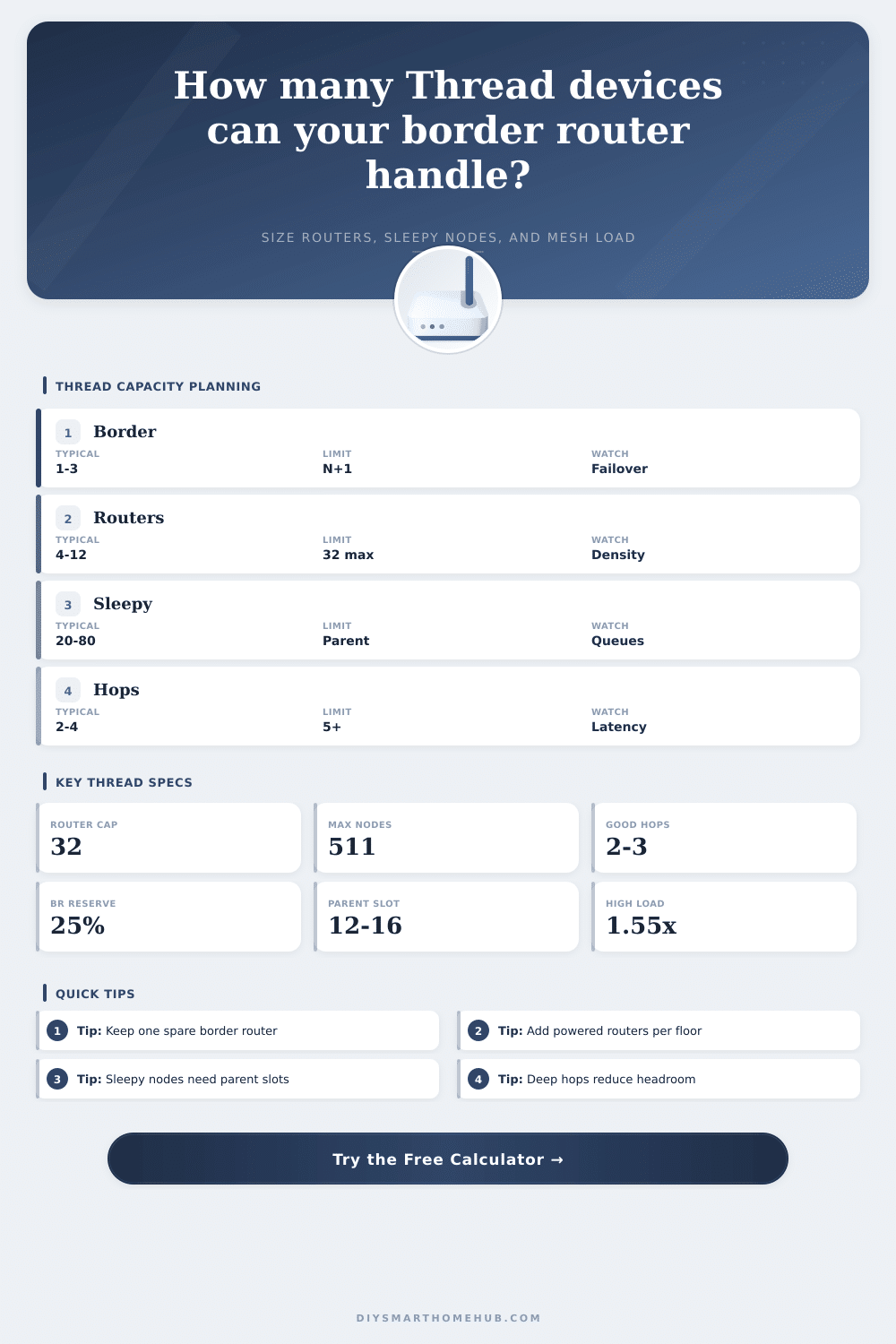
| Thread router | Relays mesh traffic and parents children | Thread networks manage up to 32 active routers | 0.70 load unit, adds slots |
| Sleepy end device | Battery node that polls a parent router | Parent queue pressure matters before radio limit | 0.42 load unit |
| Awake end device | Non-routing endpoint with more live traffic | Higher control traffic than sleepy sensors | 1.00 load unit |
Mesh load multipliers
| Load profile | Multiplier | Typical devices | Risk signal |
|---|---|---|---|
| Quiet sensors and locks | 0.72x | Contact, leak, temp, lock | Parent slots dominate |
| Balanced automation | 1.00x | Mixed Matter home | Normal reserve target |
| Lighting scenes | 1.25x | Bulbs, switches, plugs | Group bursts and retries |
| Frequent telemetry | 1.55x | Energy, climate, occupancy | Queue and radio airtime |
| Automation burst | 1.80x | Scenes plus routines | Short peak congestion |
| Lab testing | 2.20x | Near-limit mixed nodes | Not a comfort zone |
🔌Thread / Router Spec Comparison Grid
| Border router class | Modeled capacity | Sleepy slots per BR | Best fit | Planning watch point |
|---|---|---|---|---|
| Entry hub or speaker BR | 55 load units | 10 | Apartment or room cluster | Keep spare capacity for firmware and Matter controller traffic. |
| WiFi mesh node BR | 85 load units | 14 | Typical smart home | Multiple BRs help only when they stay on the same Thread network. |
| Premium smart home hub BR | 115 load units | 16 | Sensor-heavy homes | Still needs powered Thread routers near edge rooms. |
| PoE or always-on controller BR | 150 load units | 18 | Large or pro-managed installs | Strong uptime, but radio placement still controls hop depth. |
| OpenThread host / RCP BR | 130 load units | 16 | Advanced lab or local server | Host reliability and RCP placement become the main variables. |
🏠Common Thread Project Sizes
| Project size | Typical nodes | Router target | Border router target | Capacity note |
|---|---|---|---|---|
| Single room or studio | 8 to 20 | 2 to 3 | 1, or 2 for failover | Short hops matter more than raw capacity. |
| Apartment | 20 to 45 | 3 to 6 | 1 to 2 | Sleepy sensors usually fit if parent slots are available. |
| Townhouse | 35 to 75 | 6 to 10 | 2 | Place powered routers on each floor. |
| Whole house | 60 to 130 | 9 to 16 | 2 to 3 | Hop depth and sleepy queues become the planning constraints. |
| Large home plus outbuilding | 100 to 220 | 14 to 24 | 3+ | Design around edge paths and N-1 operation. |
💡Thread Capacity Planning Tips
Thread border router capacity planning require a determination of the number of device that the Thread network can support. Each Thread border router is responsible for connect the Thread mesh network to the local area network. The border router translates protocols, keeps the Thread mesh network synchronized with one another, and acts as the path through which data from the mesh network reaches the controller and the internet.
The capacity of the Thread border router will determine how well the entire network is able to function. A Thread networks capacity depend on numerous factors. These factor include the number of devices in the network, the type of devices that is added, and the physical layout of the house that contains the Thread network.
How to Plan Thread Border Router Capacity
Devices that can route the network traffic are referred to as router capable devices. Examples of these devices include smart plugs that are configured as routers and locks that have router capability. These devices will serve as parents to sleepy end devices, such as smart sensor.
If the number of router-capable devices are insufficient for the number of sleepy end devices, then the hop depth for the network will increase. The hop depth is the number of time that the signal must travel from one device to the next in the network. An increase in the hop depth will increase the latency and the amount of airtime that the network uses.
Sleepy end devices are device that keep their radios turned off the majority of the time in order to conserve their battery power. Examples of such devices include contact sensors, leak detectors, temperature node, and smart locks. These devices will awaken for a period of time in order to communicate with its parent device in the network.
Parent devices maintains a message queue for sleepy end devices. However, if there are too many sleepy end device that are attached to one parent device, the message queue will eventualy become filled with messages. Any messages that is not able to be delivered to the sleepy end devices will be lost.
Awake end devices are device that do not route network traffic. However, they are more likely to be reachable than sleepy end devices. Examples of awake end devices that do not route network traffic include smart plugs that are not configured as routers and certain type of locks.
The number of sleepy end devices, awake end devices, and router-capable devices will have an impact based off the distribution of network traffic throughout the Thread mesh network. Another factor that impact the capacity of the network is the physical layout of the house. Houses that contain many room may pose challenges to the data signal of the Thread network.
Many physical barrier may force the signal from the border router to take longer path to reach the devices in certain room of the house. Additionally, if there are device in a room that cannot route the network traffic, then the devices in those rooms will experience an increase in the hop depth. An increased hop depth can create issue for the networks reliability.
The traffic profile of the network is another factor that impacts the capacity of the Thread network. If the user will use the Thread network mainly for quiet sensor, then fewer Thread border router will be required than a network that is to be used for lighting scene throughout the house. A high traffic volume will impact the capacity of the Thread border router and all router-capable device in the network.
Therefore, a plan for the number of Thread border router that will be used will have to provide for extra headroom for device that create high traffic volume. Another important factor to consider is the concept of redundancy. Redundancy within the network will ensure that the network continues to be online during power event and firmware update of the device.
If only a single Thread border router is used in the network, then the entire network will be reliant upon that single device. However, if two Thread border router are used in the network, then one of the two device can provide an alternative path for the network to connect to the local area network in the event that one of the Thread border router goes offline. However, simply adding a second Thread border router will not double the capacity of the network.
There are some common mistake that is made when planning a Thread network. One such mistake is to first add all of the battery-powered sleepy end device to the network. Such addition will potentially overload the parent router of the sleepy end devices.
Another mistake is to think that using one powerful Thread border router is enough for the entire network. However, if there are not enough router-capable device in the network, then the sleepy end devices will not be able to connect to the network. Additionally, people may not be aware that the Thread protocol limit the number of active router to thirty-two.
If an individual adds more than thirty-two router-capable device to the network, then those additional device will have to become end device instead of router-capable device. An individual can use a calculator to determine the capacity of the Thread border router that are to be purchased. In the calculator, the individual can enter the number of Thread border router that will be used, the number of router-capable device in the network, and the number of sleepy end device in the network.
Additionally, the individual can input the number of room in the house and the hop depth that each room should have in relation to the physical layout in the house. After entering these factor, the calculator will display the tradeoffs of this plan. For instance, adding more Thread border router will provide more failover margin in case one of the Thread border router goes offline.
Additionally, adding more router-capable device will reduce the depth that the signal has to hop from device to device. Using such a calculator will allow an individual to visualize the tradeoffs of their plan for their Thread network.