Smart Alarm Entry Delay Calculator
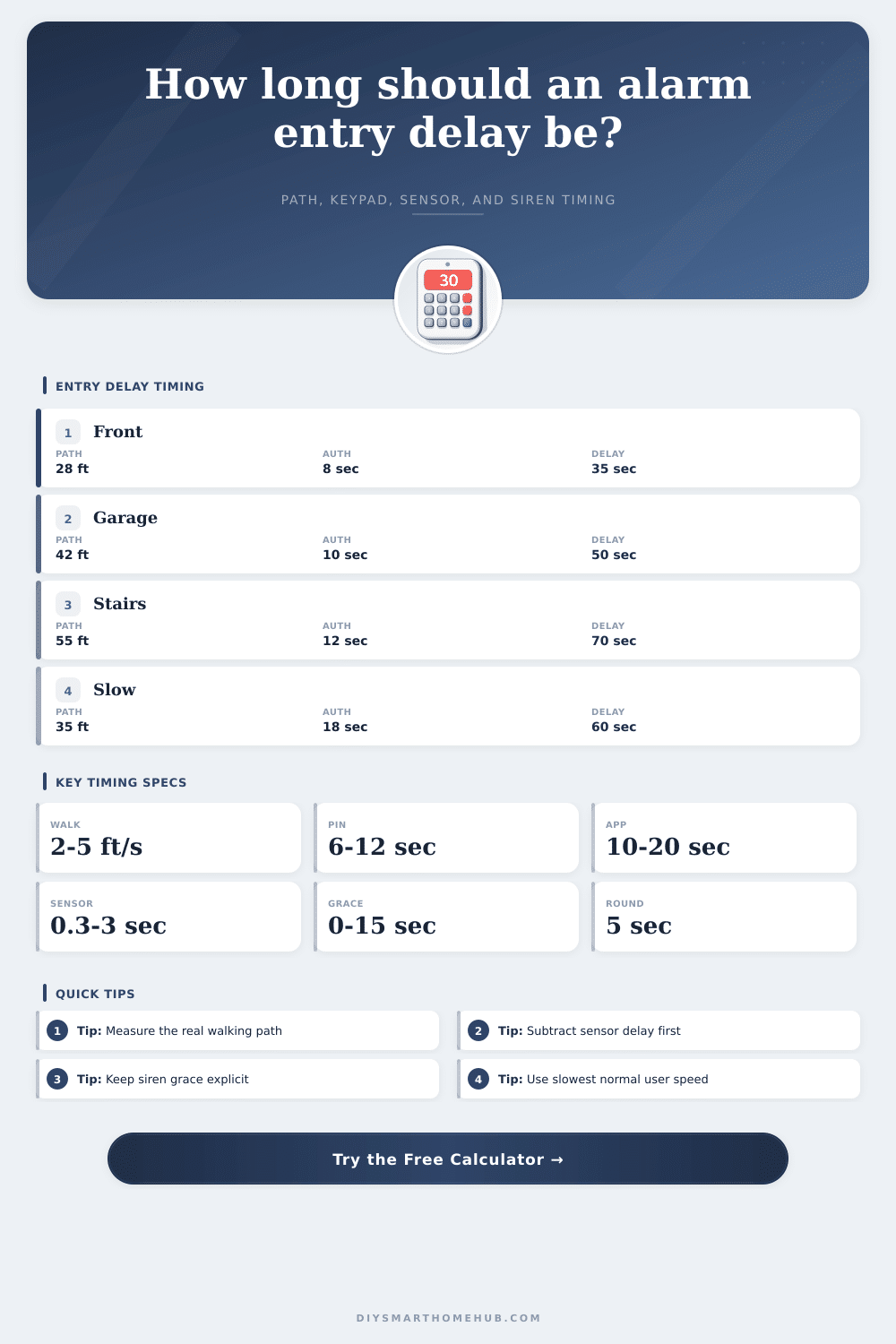
Estimate a practical alarm entry delay from the real door-to-keypad path, walking speed, keypad authentication time, door sensor reporting delay, siren grace, and safety buffer.
📌Real entry presets
Presets load realistic paths and timing for common smart alarm layouts. Change any input after loading a preset.
⚙Entry delay inputs
Timing preview
The recommended panel delay is rounded to the next 5 seconds after subtracting sensor delay and siren grace.
Entry delay result
Full timing breakdown
📊Alarm/keypad spec comparison grid
📑Reference tables
Formula reference
Use these rows to see which timing elements shorten or lengthen the programmed panel countdown.
| Step | Formula | Meaning | Effect on programmed delay |
|---|---|---|---|
| Walk time | Entry path distance / walking speed | Door-to-keypad travel time. | Longer paths or slower speed increase delay. |
| Total disarm time | Walk time + keypad/auth time | Time from opening the door to successful disarm. | Higher auth time increases delay directly. |
| Raw panel need | Total disarm + buffer - door sensor delay - siren grace | Countdown time needed before hidden grace. | Sensor delay and grace subtract from the visible setting. |
| Recommended delay | ceil(raw need / 5) x 5 | Panel-friendly setting rounded upward. | Rounds to typical 5-second alarm increments. |
Alarm and keypad timing comparison
Typical values vary by device, panel state, radio network, and user familiarity. Edit the calculator inputs for your own test walk.
| Profile | Typical auth time | Sensor report delay | Siren grace | Use case |
|---|---|---|---|---|
| Local panel keypad | 6-12 sec | 0.2-1.0 sec | 0-5 sec | Front door or short hall keypad. |
| Wireless keypad | 8-15 sec | 0.5-2.0 sec | 0-10 sec | Garage, mudroom, or side entry. |
| Touchscreen hub | 10-18 sec | 0.5-1.5 sec | 5-15 sec | Central wall console with wake screen. |
| Phone app disarm | 12-25 sec | 0.5-3.0 sec | 5-15 sec | Phone unlock plus app or cloud confirmation. |
| PIN plus RFID tag | 8-16 sec | 0.3-1.5 sec | 0-10 sec | Higher assurance entries with tag confirmation. |
Preset scenario outputs
The table recalculates the preset library using the same path, walking speed, keypad/auth time, door sensor delay, and siren grace formulas.
| Preset | Path and speed | Auth setup | Timing inputs | Modeled result |
|---|
Delay band interpretation
Use the result as a planning estimate, then confirm it with a real test walk while the alarm is in test mode.
| Recommended delay | Typical fit | Watch point | Adjustment cue |
|---|---|---|---|
| 15-30 sec | Short entry with nearby keypad. | Little room for slow users or app disarm. | Add buffer if anyone pauses at the door. |
| 35-50 sec | Common home entry, garage, or hallway route. | Check that the siren grace is real, not assumed. | Retest after moving the keypad or sensor. |
| 55-75 sec | Long path, stairs, or slower household member. | Longer quiet entry window before alarm sound. | Consider a keypad closer to the entry point. |
| 80+ sec | Complex route or app-only disarm. | Very long pre-siren exposure window. | Use another keypad, tag, or entry route. |
💡Timing tips
An entry delay is the amount of time that a smart alarm system wait after detecting that a door has been opened before it will sound its siren. The entry delay that you select for the smart alarm system should be set to a length that is not too short and not too long. If the entry delay is too short, the siren will sound before the person that enter the home has finished entering there security code.
If the entry delay is too long, an intruder that enter the home will have more time to move through the home before the siren sounds to alert the inhabitants of the smart alarm system. The entry delay begin when the door sensor detects that a door or window of the smart home has been opened. After the door is opened, the smart alarm system waits for the person entering the home to reach a keypad of the smart home security system to disarm the smart alarm system.
How to Set and Test Your Home Alarm Entry Delay
The entry delay includes the time it takes for the person to walk to the keypad, wake the keypad, and enter their security code. Additionally, some smart home security systems includes a sensor reporting delay and siren grace period within the entry delay. To calculate the entry delay, one method is to measure the distance between the door and the smart keypad of the smart home security system.
However, the distance between the door and the keypad will likely result in an entry delay that is too short to allow for the inhabitant of the home to properly walk to the keypad. The distance does not include any obstacle that must be avoided when walking to the keypad, such as stairs, furnitures, or the swing of the door. Additionally, the walking speed of the inhabitants of the home may vary; therefore, it is best to use the walking speed of the slowest individual in the home for setting the entry delay.
The time it takes to authenticate with the smart home security system is another factor to consider in calculating the entry delay. For instance, if the keypad of the security system is located nearby one of the doors of the home, the authentication time will be shorter than if the smart keypad is a wireless or touchscreen smart keypad. Additionally, if the user disarms the security system using a phone application, rather than directly at the keypad, the authentication time will be longer.
This time must be included within the calculation of the entry delay. It is also important to account for the sensor reporting delay and siren grace period of the smart home security system. The sensor reporting delay is the length of time between the detection of an open door by the door sensor and the signal being received by the smart security system.
The siren grace period is the length of time between the entry delay ending and the siren beginning to sound. If these period are not accounted for when calculating the entry delay, the entry delay will be incorrect. By subtracting these periods of time in the calculation, the entry delay that you program into the smart security system will equal the actual entry delay of the smart home security system.
It is also important to include a safety buffer in calculating the entry delay. A safety buffer is a period of time that is added to the calculated entry delay to allow time for any small delay in entering the home, such as closing the door, putting down bags, or fumbling with the keypad as the person unlocks and enters the security code. Eight or ten second is usually enough time to include as a safety buffer.
However, if too large of a safety buffer is included, the entry delay will be too long for the smart security system. Additionally, if the entry delay is too long, an intruder will have more time to enter the home. After calculating the entry delay using the calculator that is provided, it is important to test the entry delay.
During the test, the person should walk through the door and disarm the smart security system as they normal enter the home. If the entry delay feels too short, the person should increase the safety buffer or move the keypad. If the entry delay feels too long, you should decrease the safety buffer.
Testing the entry delay will ensure that it provides enough time for the person to exit and disarm the smart security system while still maintaining enough security to protect the homes size from the intruders.