High dynamic range allow a display to manage the dynamic range between the shadows and highlights in an image. High dynamic range allows the depth of a window in the background of a scene to remain visible instead of rendering as brilliant light on the screen. High dynamic range allows the details within a room to remain visible instead of falling into black shadow on the screen.
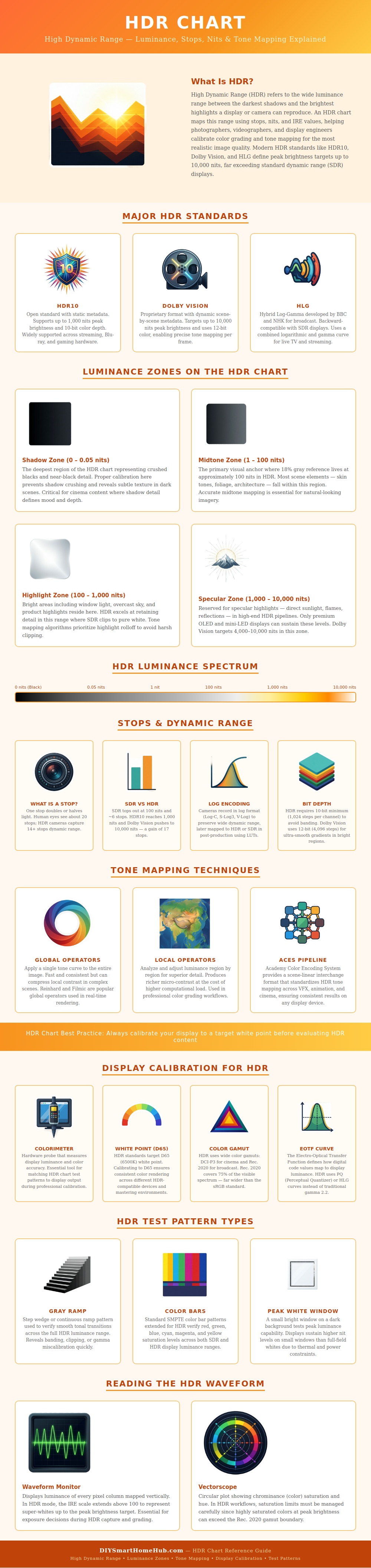
The HDR chart show the different HDR standards so that the viewers can compare the differences between the standards. HDR10 use metadata to even out brightness level and maintains a brightness output of 1000 nits. Dolby Vision incorporate frame-by-frame adjustment in brightness levels and can output much more higher brightness values.
How HDR Works and How to Test a Screen
HLG is used for live broadcast and remains compatible with older screen. Understanding the different HDR standards allows the viewer to understand what brightness value the display can produce. HDR also include the concept of luminance zones.
The lowest luminance zones shows near-black area in an image. The lowest zones are important in maintaining texture in an image even if the screen clips the luminance values. The middle zones include skin tone in an image and represent normal luminance values in an image.
The higher luminance zones show areas in an image with reflective surface like windows and mirrors. The highest luminance zones show direct light source like the sun or flames in an image. The different luminance zones allow the viewer to understand what luminance value should be preserved in an image.
An average human eye sees twenty stops of luminance value. Most camera, however, only capture around fifteen stops of luminance values. The HDR chart display how many stop of luminance values each monitor can display.
HDR log recording is used to even out the luminance values so that the entire range of luminance values is preserved until the editor decide how to even them out. If log recording is not used in filmmaking or video editing, then the shadow or highlight detail will be lost before the editor can have a chance to fix it. Tone mapping is used to make the tone mapping adjustment visible to the editors.
Global tone mapping method apply one tone curve to the whole image. These method are fast to apply but can cause issue in images with many element. Local tone mapping method examine each part of the image separately.
Local tone mapping method protect the detail in each part of the image but use more processing power than global tone mapping methods. Most visual effect companies use the ACES color space to translate the color space between each step of filmmaking and into the display. This avoid the need to translate the color space more than once.
All tone mapping method aim to display the wide range of luminance in the image within the screen’s limited luminance values. Each technology, however, makes different compromise between speed and luminance fidelity. Display calibration is used to make sure that the screen reach the brightness and color value that the display intends to produce.
A colorimeter device read the screen’s brightness and white point. The white point is the color of light that the screen intends to display and is usually set to the D65 standard of 6500 Kelvin. If display calibration is not used, two identical monitor may display the same file with different color and contrast.
The same is true for color gamut. Monitors with a wider color gamut like DCI-P3 or Rec. 2020 can maintain the saturated colors in an image when the screen is bright.
To maintain the saturated color, the display must be capable of displaying those color and calibrated to do so. Test pattern are used to display the image on the screen to ensure that the display work as it should. A gray ramp will show if the tone in an image are smoothly transition or if they are banding.
Color bar will help to even out the saturation of color in an image. A small peak of white on a dark field within the screen will show the brightness of an area of the screen that is bright without the rest of the screen being bright. This brightness value is higher than the brightness of the screen when the entire screen is bright.
Test pattern allow the screen’s brightness to be tested and verified. Waveform monitor are used to display information on the screen in real time. The waveform monitor will show luminance level for each column of the screen’s frame.
In HDR mode, the monitor will also extend the luminance level beyond the old 100 IRE limit. The waveform monitor can help the editor avoid clipping the highlight and shadow in an image before the editing process. The waveform monitor allow the editor to adjust the exposure and lighting of an image before it is recorded.
The vectorscope is used to track the saturation of color in the image. The vectorscope will track the vivid color in an image and limit them from going beyond the color limit of the color gamut that is set for the screen’s brightness. The value of the HDR chart