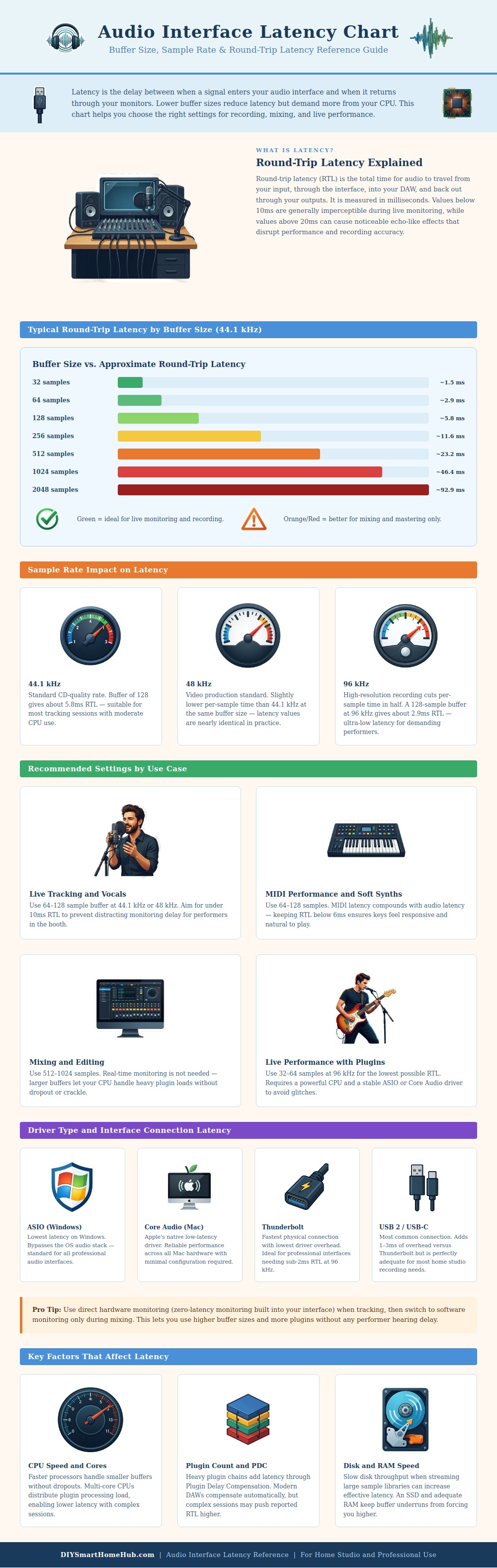
Audio interface latency are the amount of delay that sound takes to travel through a recording system. The latency that an audio interface creates can make recording vocals challenging for the vocalist. Round-trip latency measure the amount of time that it takes for sound to go from a microphone through an audio interface to a computer and then back through headphones or speakers to the vocalist.
If the round-trip latency of an audio interface is under ten millisecond, a person may not notice the delay in the vocal performance. However, if the round-trip latency exceeds twenty milliseconds, the delay becomes noticeable as an echo in the vocals that were recorded. The relationship between buffer size, sample rate, and round-trip latency all play crucial role in the amount of delay that an individual will experience during the recording session.
Why Audio Is Delayed and How to Fix It
Buffer size determine the amount of time that a computer takes to process audio data. A smaller buffer size will make the computer process audio data more frequent. Additionally, using a smaller buffer size will reduce the amount of audio interface latency.
However, processing audio data at a higher frequency require more processing power from the computer. Using a smaller buffer size could result in audio glitches if the computer doesnt have enough processing power. Using a larger buffer size allow the computer more time to process audio data.
Furthermore, using a larger buffer size will allow audio interface performance to remain stable during mixing sessions. Therefore, a high sample rate is beneficial for mixing sessions and a low sample rate is beneficial for vocal recordings. Sample rate is another setting that influences audio interface latency.
Sample rate determines the amount of time that is spent processing each individual sample of audio. Using a high sample rate, such as 96 kilohertz, takes less time to process each individual audio sample than using a low sample rate. Therefore, using a high sample rate will reduce audio interface latency.
However, high sample rates strain the processing power of the computer hardware. For this reason, the majority of musician use sample rates of 48 kilohertz as it is a middle ground for music and video projects and does not strain the computer the same way a high sample rate would. The type of connection between the audio interface to the computer and the type of driver for the audio interface also influence the latency of the audio interface.
Audio interface latency is lower for computers using ASIO driver. ASIO drivers allow audio software to bypass the computer’s operating system. For Mac computers, Core Audio is the best audio driver for achieving low audio interface latency.
Additionally, Thunderbolt connection between audio interfaces and computers have lower overhead than USB connections between the same devices. The difference in latency between Thunderbolt and USB connection is essential for those requiring low latency for live vocal performances. Direct monitoring is a feature on most audio interfaces.
Direct monitoring remove audio interface latency from the recording session. Direct monitoring allows the vocalists input signal from the microphone to be sent directly to the headphones without going through the computer. Because the signal from the microphone does not go through the computer, direct monitoring eliminates audio interface latency.
Using direct monitoring, vocalists can use a high buffer size setting for stability in their recording sessions without hearing any delay in their vocal performance. The performance of a computer also has an influence on the latency of audio interface settings. A computer with high processing power and fast storage can handle a small buffer size.
In contrast, an older computer may struggle with small buffer sizes in there audio projects. The performance of the computer will determine the low point of the buffer size for that machine. For high-end computers, low buffer size can be set for vocal and mixing sessions.
For less costly computers, a larger buffer size will provide stability in vocal and mixing sessions. A person must find the appropriate buffer size and sample rate settings for their specific task using their audio interface. By finding the correct settings for audio interface latency, vocalists and music producer can ensure that their vocals do not develop any latency between the microphone and headphones.
They should of checked these settings first. It is actualy alot of work to get it right, but youll recieve better results if you do.