Smart Lock Access Code Quantity Calculator
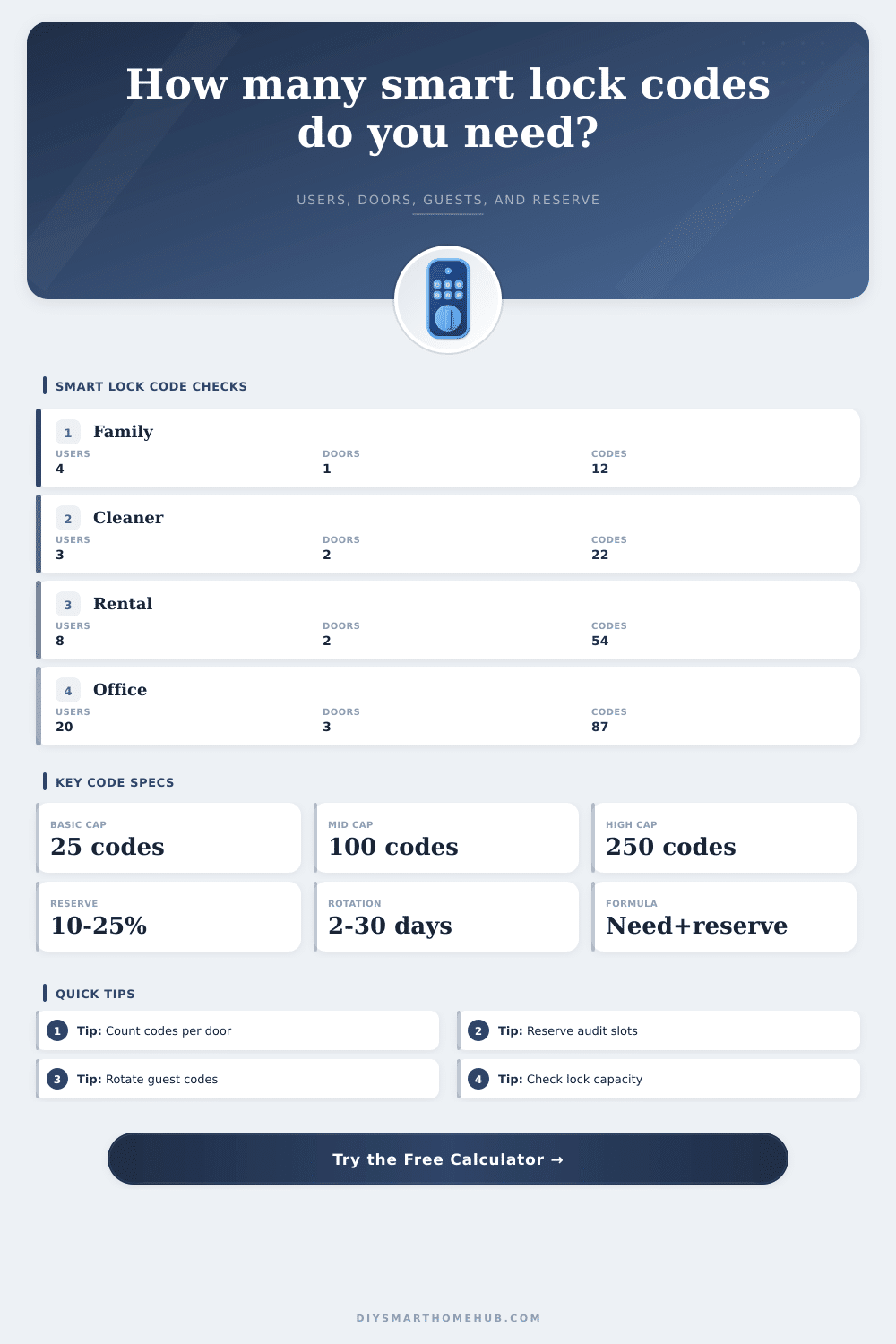
Estimate how many active access codes a smart lock plan needs by combining residents, controlled doors, guest rotation, schedule windows, recurring staff codes, code capacity, and audit reserve.
📌Real smart lock access presets
⚙Users, doors, schedules, and capacity
Capacity load preview
Smart lock code quantity results
Full code quantity breakdown
📊Smart lock spec comparison grid
📑Access code reference tables
These tables show common code-capacity bands, access models, scenario loads, and the exact formula steps used by the calculator.
| Smart lock capacity band | Typical PIN limit | Best fit | Planning warning |
|---|---|---|---|
| Compact keypad | 20 to 30 active codes | Single-family homes with few guests | Short-term rental overlap can fill it quickly |
| Standard smart deadbolt | 50 to 100 active codes | Homes with guests, cleaners, and occasional vendors | Multi-door unique codes may need a higher tier |
| High-capacity residential | 150 to 250 active codes | Rentals, shared homes, and active service schedules | Audit discipline still matters because stale codes accumulate |
| Light commercial keypad | 250 to 500 active codes | Small offices, studios, and managed multi-door entries | Check whether schedules count against the same PIN pool |
| Access model | Standing-code factor | Guest-code behavior | Use when |
|---|---|---|---|
| Same standing codes across doors | 1.00 x users and staff | Guests still count per door and schedule window | Residents use the same PIN at all home entries |
| Zone-based code sets | Ceiling of 60% of door count | Guests are still door-scoped | Some doors share codes while private zones are separated |
| Unique standing codes per door | Door count x users and staff | Guests count per door and schedule window | Each lock is managed separately or uses local-only PIN storage |
| Scenario | Inputs modeled | Active codes | Reserve target | Monthly guest creates |
|---|
| Formula step | Expression used | Why it matters | Result behavior |
|---|---|---|---|
| Standing users | Residents x door scope factor | Shared codes do not multiply the same way per-door codes do | Controls the stable base code count |
| Recurring staff | Staff/vendor codes x door scope factor | Service people often keep access across more than one lock | Adds standing codes that should be audited |
| Temporary guests | Doors x guest groups per door x schedule windows | Guest groups usually need door-specific and time-specific access | Creates the largest swing in rental and vendor plans |
| Guest rotation | Temporary guest codes x 30 / rotation days | Short-lived codes create more monthly admin events | Highlights operational load even if active count fits |
| Audit reserve | Ceiling(active codes x reserve percent) | Keeps room for delayed deletes, emergency codes, and overlap | Shows the true capacity requirement after headroom |
| Per-lock load | Ceiling(required with reserve / doors) | Each keypad has its own stored-code limit | Compares demand against advertised lock capacity |
✅Access code planning tips
When you choose a smart lock, you must consider how many access code that the smart lock can store. Many people assume that the number of codes that the smart lock can store will be the same than the number advertised for that particular smart lock. However, the number of codes that an smart lock can store will be based off the number of codes that is used with the smart lock.
If a property has multiple individuals that need to have access to the smart lock at the same time, such as guests, cleaners, and family member, then the number of codes will have to increase to provide each of these individuals with their own code. Furthermore, if the smart lock can store 100 code, but there are codes that must be rotated for security, the smart lock may only be able to effectively function with 70 code. Thus, the number of codes that is needed will likely be less than the number that are advertised for the smart lock.
How Many Codes Do You Need for a Smart Lock
The number of codes that are required for a smart lock will depend upon the number of individuals that resides in or work at the property. However, the number of codes that are required will also depend upon the scope of the installation of the smart lock system. If the same codes are to be used at each door at the property, then the number of codes that are required will be relatively low.
However, if each door is to have its own set of codes, the number of codes will increase at each door. Furthermore, each smart lock system has its own listing of the codes that it can recognize and store. Each smart lock system does not store the codes that are used by other lock in the property.
Additionally, there may be a decision to make regarding whether there will be one code shared by all family member to the doors at the property, or if there will be separate code for each of the entrances to the individuals’ homes. In addition to the codes that are used by the individuals that resides at or work at the property, there are also other codes that may have to be stored in the smart lock system. For instance, there may be group of guests that are to enter the smart lock system.
However, there may also be other individuals, such as cleaners, dog walker, and delivery person that also have to access the same door as those guest groups. Thus, there will be an increase in the number of codes for those temporary access entries. Furthermore, there may also be an adjustment to the length of time that each code is to be used.
If the codes are to be rotated every three day, for example, there will be more instances in which the code must be created than if the codes were only to be rotated each month. Codes that are used by staff member and emergency access will be different from codes that are used by guests. Staff members and emergency code will be stable code, and some may believe that these types of code are “free” because they do not have to be rotated.
However, each code still takes up space in the smart lock system. Thus, there should be a percentage of the total code that are reserved for these types of code. This percentage of codes isnt wasted space by the smart lock system, but it will prevent the codes from the staff, contractors, and emergency individual from not being able to have access to the property when they are required to do so.
Many people make two different mistake when choosing a smart lock that will store code for a property. One mistake is in the assumption that the codes for guests will be removed immediately when those guests are no longer using the code. However, smart locks often store the codes for guests that is no longer using them.
Thus, a percentage of codes should be reserved for these staff code. Additionally, the other mistake that many people make is the assumption that all of the door to the property are the same. Thus, each of the same code can be stored into each smart lock device.
However, there may be a difference between some of the door to the property and others. Each door may have to be evaluated prior to reaching the limit of the smart lock system. Not all properties will require the same management of code that are stored within a smart lock system.
For instance, a smart lock system that is to be installed at a home that has several guest may require a higher number of temporary code for those guests than a rental home that is to be occupied by only a few individuals at a time. Additionally, an office space that allow contractors to enter the building at times after business hours will have a different set of time window for those contractors than a residential home. Thus, there will have to be calculation made for each type of property.
Running the numbers will allow for each code that is standing codes versus rotating code to be determined. Finally, when choosing a smart lock system, it may be beneficial to purchase a smart lock system of one tier higher than the calculated average number of codes that will be stored in the smart lock at the property. By purchasing a smart lock system of a higher tier, there will be extra headroom for code.
By providing this extra headroom, there will be fewer workaround for the smart lock system to provide for the individuals who require access to the smart lock system. Thus, choosing a higher class of smart lock system will ensure that all individual will be able to have access to the smart lock and the property that is to be secured. You should of checked the capacity before buying any furnitures for the entrance.
It is actualy a lot of work to manage them all.