Projector Throw Distance Calculator
Calculate screen width, projector lens distance, zoom range, brightness, and vertical lens offset from real throw-ratio and screen-size formulas.
Detailed throw breakdown
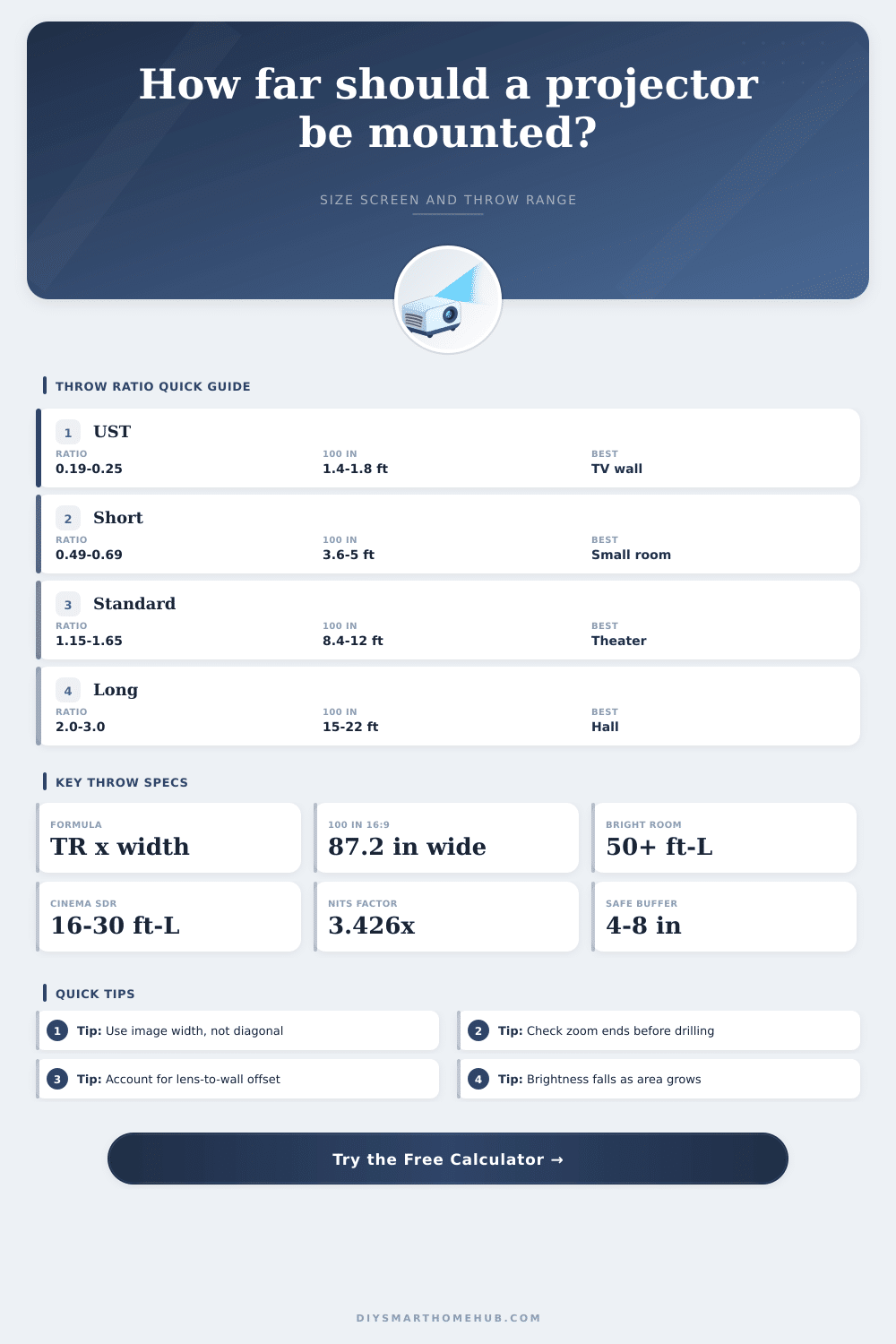
| Projector lens class | Typical throw ratio | Distance for 100 in 16:9 | Best-fit room layout |
|---|---|---|---|
| Ultra short throw laser TV | 0.19 to 0.25:1 | 1.38 to 1.82 ft from screen | Credenza or shelf at the screen wall |
| Short throw portable/home | 0.49 to 0.69:1 | 3.56 to 5.01 ft from screen | Small rooms where seating is close |
| Gaming short throw | 0.69 to 0.83:1 | 5.01 to 6.03 ft from screen | Low-latency setups near the front wall |
| Home theater zoom lens | 1.15 to 1.65:1 | 8.35 to 11.98 ft from screen | Ceiling shelf or rear half of theater |
| Standard conference projector | 1.48 to 1.80:1 | 10.75 to 13.07 ft from screen | Meeting rooms and classrooms |
| Long throw auditorium lens | 2.00 to 3.00:1 | 14.53 to 21.79 ft from screen | Large rooms with a rear projection point |
| Diagonal and aspect | Image width | Image height | Screen area |
|---|---|---|---|
| 92 in 16:9 | 80.2 in / 203.6 cm | 45.1 in / 114.5 cm | 25.1 sq ft / 2.33 sq m |
| 100 in 16:9 | 87.2 in / 221.4 cm | 49.0 in / 124.5 cm | 29.7 sq ft / 2.76 sq m |
| 120 in 16:9 | 104.6 in / 265.7 cm | 58.8 in / 149.4 cm | 42.7 sq ft / 3.97 sq m |
| 135 in 16:9 | 117.7 in / 299.0 cm | 66.2 in / 168.1 cm | 54.1 sq ft / 5.03 sq m |
| 120 in 16:10 | 101.8 in / 258.7 cm | 63.6 in / 161.7 cm | 45.0 sq ft / 4.18 sq m |
| 150 in 2.35:1 | 137.9 in / 350.2 cm | 58.7 in / 149.0 cm | 56.2 sq ft / 5.22 sq m |
| Viewing condition | Suggested brightness | Nits equivalent | Planning note |
|---|---|---|---|
| Dark cinema SDR | 16 to 30 ft-L | 55 to 103 nits | Traditional theater rooms with controlled light |
| Mixed living room | 30 to 50 ft-L | 103 to 171 nits | Useful for dim lamps and lighter wall colors |
| Ambient-light screen | 50 to 80 ft-L | 171 to 274 nits | Helps UST or ALR screens hold contrast |
| Large outdoor screen | 60+ ft-L after dusk | 206+ nits | Needs high lumens because screen area grows fast |
| Room scenario | Screen target | Likely throw class | Typical lens distance |
|---|---|---|---|
| Bedroom portable setup | 70 to 90 in 16:9 | Short throw or standard | 4 to 9 ft depending on lens |
| Apartment media wall | 92 to 110 in 16:9 | UST, short throw, or compact zoom | 1.5 to 10 ft depending on lens |
| Dedicated theater | 120 to 150 in 16:9 | Home theater zoom | 10 to 21 ft depending on screen |
| Conference room | 100 to 135 in 16:10 | Standard conference | 10 to 20 ft depending on screen |
| Multipurpose hall | 150 to 220 in 16:9 | Long throw auditorium | 22 to 48 ft depending on screen |
Ultra short throw
Uses a mirror or steep lens path so a 100 inch image can sit roughly 14 to 22 inches from the screen surface.
Short throw
Works well in small rooms because the projector can sit in front of viewers while still filling a large screen.
Home theater zoom
Offers the most forgiving ceiling-mount range; use the middle of zoom when possible to leave adjustment room.
Long throw lens
Best when the projector must be behind seats or near a rear wall, but it needs a larger room depth.
To install a projector into a room correctly, you must determine the proper mounting distance for the projector. The mounting distance is the distance between the lens of the projector and the screen. If the projector is too far from the screen, the image will not be bright enough.
Additionally, the image will appear distant on the screen. If the projector is too close to the screen, the projector lens will not be able to focus on the screen. If the lens cannot focus on the screen, there may be keystone correction issue, or the screen size may not match the size of the screen you intended the projector to display on.
How to Measure Where to Mount a Projector
To calculate the mounting distance, use the width of the screen instead of the diagonal measurement of the screen. The width of the screen change according to the aspect ratio of the screen. For example, a 120-inch screen with a 16:9 aspect ratio will have a different width than a 120-inch screen with a 2.35:1 aspect ratio.
The width of the screen will change the distance from which you must mount the projector to provide an appropriately sized image on the screen. To calculate the mounting distance, multiply the width of the screen by the projector’s throw ratio. This calculation will allow you to calculate the minimum and maximum distance from which you must mount the projector to the screen.
Many projectors use zoom lenses that offer a range of throw ratios. This feature allow the projector to be mounted in rooms of different depths. By adjusting the zoom lens on the projector, you can change the size of the image on the screen without having to move the projector.
It is best to mount the projector at the middle of the zoom lens range. This will provide you with the most room to make adjustments to the distance between the projector and screen if your calculations are slightly off. If you place the projector at the beginning or end of the zoom lens range, you will not have the ability to make adjustments if your initial measurements is incorrect.
There are different class of projector lenses. Each lens is used in different types of rooms. For example, ultra short throw projectors use special optics to allow the projector to be placed on a cabinet close to the screen.
These projectors are useful in living rooms where there is no room to mount the projector to the ceiling. However, because of their proximity to the screen, they are often exposed to ambient light in the room. Short throw projectors sit a few feet behind the screen and offer flexibility in the placement of seating in small rooms.
Standard zoom projectors are often placed in dedicated home theaters where they can benefit from the natural light falloff on the screen. Another factor to consider when choosing the size of the screen is the brightness of the projector. If you make the screen too large, the projector will emit too much light for such a large screen, and the screen will appear dimmer.
High gain screens will increase the brightness of the screen, but they will reduce the viewing angle of the screen. Additionally, the brightness of the projector will also depend on the ambient light in the room. The darker the room, the less brightness the projector needs.
In addition to brightness and screen size, you must also consider the body of the projector. There must be space for the projector’s cables to bend at the projector and screen. The mount must have space to attach to the projector.
Additionally, the projector needs to be allowed to breathe; therefore, it cannot be flush against the wall. There must be a few inch of space behind the projector for the projectors cables and the projectors ventilation system to have enough space to function correctly. Furthermore, you must also consider the percentage of vertical lens shift and offset of the projector.
This will determine if the projector can be mounted on the ceiling without tilting the projector. This also determines whether the projector will cause the viewers’ sight lines to be blocked. The aspect ratio of the screen will also play a role in the width of the screen and how far the projector must be mounted from the screen.
A wider aspect ratio will create a screen with a greater width with the same screen diagonal size. This larger width of the screen will require a greater mounting distance from the screen. Additionally, if the distance from the screen is greater, the brightness of the screen will decrease.
To avoid this issue, many choose a smaller screen size with a 2.35:1 aspect ratio over a larger screen size with a 16:9 aspect ratio. The seating distance within the room will change according to the aspect ratio of the screen. Planning tools are available to assist with the installation of a projector.
These planning tools will allow you to see how the lens of an ultra short throw projector, a short throw projector, or a standard zoom projector will perform with the same screen size in your room. Using planning tools will help you compare the different lens classes. Additionally, planning tools will show you how a long throw projector will work best in a large room.
Many mistakes occurs when installing a projector. One common mistake is using the wrong measurement for the screen size. Using the diagonal measurement of the screen to calculate how far to mount the projector is a common mistake.
Another mistake is using the zoom lens at the beginning or end of the projectors zoom range. This will leave no room to make adjustments should the room measurements change. These mistakes will result in the projector not functioning correctly in the room.
If you calculate and choose the proper mounting distance for the projector according to the depth of the room, the size of the screen, and the brightness needs of the room, the projector will function correctly in it’s installation. You should of checked the measurements twice.