Smart Motion Sensor Pet Immunity Calculator
Estimate whether a motion sensor setup is likely to ignore a pet by combining pet weight, pet height, mounting height, downward angle, detection zone length, sensitivity, activity, and heat-contrast risk.
📌Real pet immunity presets
📏Pet and sensor inputs
🚨Live sensor profile
Wide-angle PIR
Pet immunity depends on a weight limit plus beam geometry, so the same pet can pass in one room and trigger in another.
Current setup is checked against pet size, sensitivity, and lower-beam clearance at the active detection distance.
Pet Immunity Results
⚙Sensor/spec comparison grid
📚Reference tables
Motion sensor pet immunity comparison
These sensor models are planning profiles, not brand recommendations. The calculator uses their relative limits, fields of view, beam counts, and technology factors in the risk model.
| Sensor profile | Pet limit | Range and view | Best calculator use |
|---|
Pet size and geometry reference
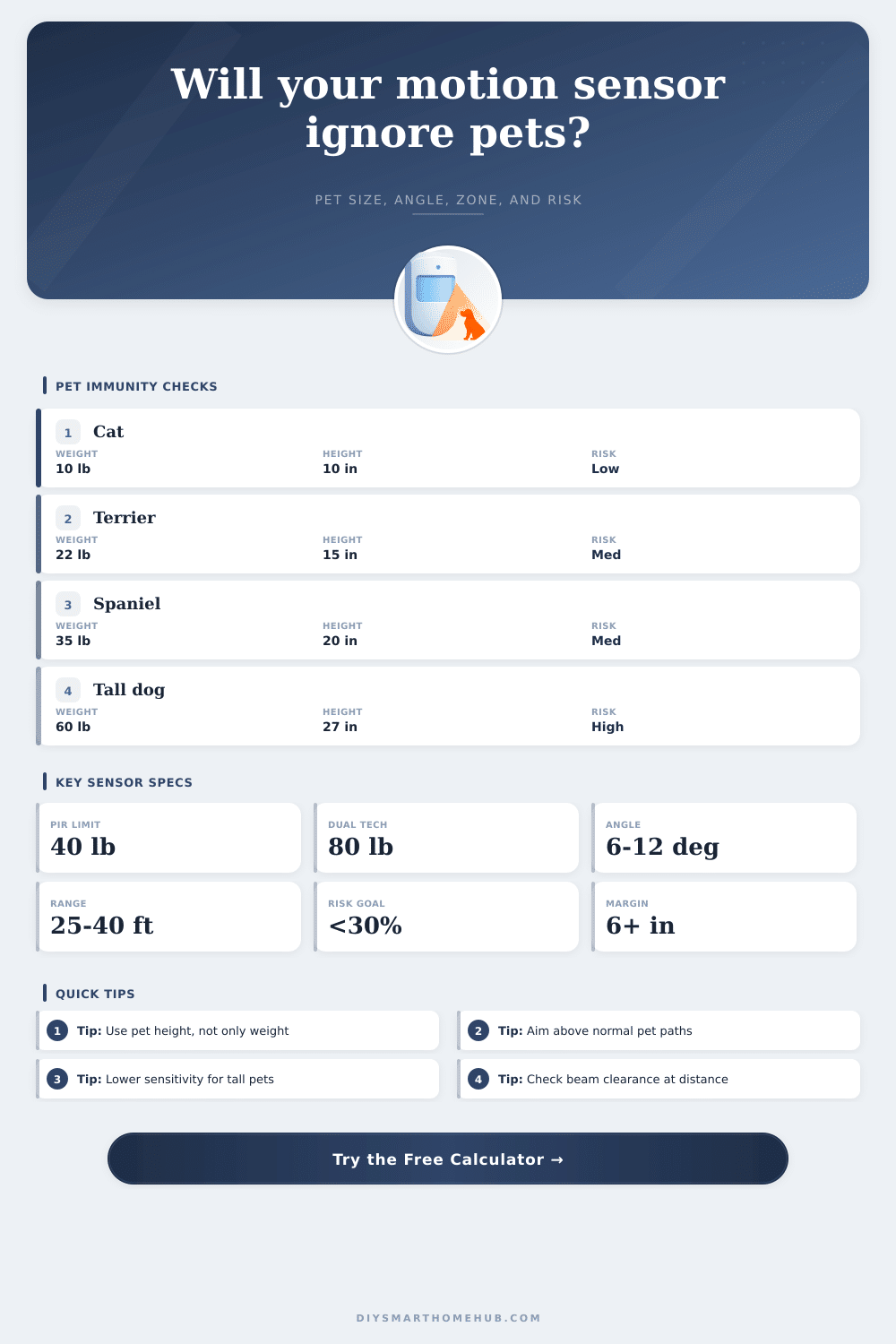
Pet immunity fails most often when the pet is tall enough to cross the lower beam, even when its weight is below the printed immunity rating.
| Pet profile | Typical height | Weight range | Geometry note |
|---|---|---|---|
| Cat or very small dog | 8 to 12 in | 20 to 30 cm | 6 to 15 lb | 3 to 7 kg | Usually low risk unless climbing furniture or crossing stairs. |
| Small terrier or toy breed | 10 to 15 in | 25 to 38 cm | 12 to 25 lb | 5 to 11 kg | Weight may be fine, but beam clearance should still exceed height. |
| Medium dog | 16 to 22 in | 41 to 56 cm | 25 to 45 lb | 11 to 20 kg | Often needs lower sensitivity, better angle, or dual-tech filtering. |
| Tall dog | 23 to 30 in | 58 to 76 cm | 45 to 80 lb | 20 to 36 kg | Commonly above standard pet-immune geometry in normal wall mounts. |
| Large dog | 28 in+ | 71 cm+ | 70 lb+ | 32 kg+ | Usually requires zoning changes or a sensor type that avoids the pet path. |
Sensitivity and false-trigger risk table
The risk formula combines pet size, lower-beam margin, sensor technology, sensitivity, movement behavior, heat contrast, and zone stress.
| Modeled risk | Typical meaning | Likely adjustment | Calculator cue |
|---|---|---|---|
| 0% to 20% | Strong pet immunity margin | Keep the current profile and verify walk paths. | Positive clearance and low sensitivity pressure. |
| 21% to 40% | Usable but watch active pets | Reduce sensitivity or shorten the pet-visible zone slightly. | Pet size is close to one rating limit. |
| 41% to 65% | Borderline false-trigger zone | Improve angle, raise mounting height, or use dual-tech filtering. | Height ratio or weight ratio is near the sensor limit. |
| 66% to 100% | High chance of pet alarms | Move detection away from the pet path or change sensor type. | Beam clearance is negative or sensitivity is too high. |
Preset scenario comparison
These scenarios use the same formulas as the calculator so you can compare how pet height, angle, and sensor technology shift the modeled result.
| Preset | Pet and sensor | Geometry result | Risk result |
|---|
✅Pet immunity calculation tips
When you install an motion sensor that is designed to ignore pets, you have to make sure that the pet cannot cross the motion sensor beam without triggering the motion sensor. Determining if the pet can cross the beam without triggering the motion sensor is difficult. For example, if the pet is a dog that is tall but weighs less than the rated limit of the motion sensor, the dog may still trigger the motion sensor if the lower beam of the motion sensor is at the same height as the dogs shoulder.
Additionally, the pet may be a small cat that jump onto the furnitures in the detection zone of the motion sensor. The geometry of the motion sensor beam is the most importance factor that affects the motion sensor. The wall-mounted motion sensor has a beam that aims slightly downward from where the motion sensor is mounted.
How to Stop Pets from Triggering Motion Sensors
The lower edge of the detection fan of the motion sensor drop in relation to the distance from the motion sensor. For instance, if the motion sensor is placed at an appropriate height with a specified downward angle for the beam, the lower edge of the beam will be at the same height as a dog or a cat when the pet reaches a certain distance from the motion sensor. This distance can be calculate using a calculator that estimates the drop of the beam of the motion sensor at a given distance.
The drop in height of the motion sensor beam can be used to calculate at what distance the lower edge of the motion sensor beam will be at the same height as a pets shoulder. The measurement of the height of a pet and the measurement of the mounting height of the motion sensor allow the person to calculate the angle that the beam of the motion sensor should be aimed. The activity level of the pet can affect the motion sensor.
For example, if the pet move quickly into the detection zone or if the pet jumps over counters or onto furniture, the pet is more likely to trigger the motion sensor even if the beam does not appear to be clear of the pet. Additionally, factors that affect the heat contrast in the motion sensor, such as sunlight, heating vent, and shadows, may cause the motion sensor to trigger the alarm because of the movement of the air or objects that have a different heat contrast than the rest of the area. These factor can be entered into the motion sensor tool to allow the user to adjust the settings of the motion sensor to account for these variable.
The type of technology that is used in the motion sensor will make a difference in its functionality. Motion sensors that use standard passive infrared technology use changes in heat contrast from zone within the motion sensor to detect an intruder. Passive infrared sensors work well if the pet avoid the beam.
Dual-technology motion sensors use microwave technology to confirm motion detected by the passive infrared sensor before it trigger the alarm. The dual-technology motion sensor may cost more money and have a slower response time to movement by an object or an intruder. However, motion sensors of this type will reduce the nuisance of the motion sensor alarms that are created by active pet at home.
The mounting angle of the motion sensor is another adjustment that the person installing the motion sensor can make. For instance, by tilting the motion sensor so that the beam of the motion sensor drops by a few degrees, the beam may be at the same height as a medium-sized dog that weigh less than the limit of the motion sensor. Alternatively, if the motion sensor is mounted at a higher height or the angle of the beam is shallower, the motion sensor beam can be aimed at a higher point in the area, providing extra clearance for the pet.
The beam height at the active distance can be calculate using the motion sensor tool to determine if tilting the motion sensor will solve the problem of the pet triggering the motion sensor. Another factor that affects whether the motion sensor will trigger is the length of the detection zone. For instance, if the detection zone of the motion sensor is longer, the lower edge of the beam of the motion sensor will drop to the same height as a pet at a greater distance from the motion sensor.
In addition, a longer detection zone mean that the pet has more opportunity to move into the detection zone of the motion sensor. Shortening the detection zone will reduce the risk that the pet will trigger the motion sensor. Shortening the detection zone can be performed by masking the lens of the motion sensor or using a motion sensor with a narrower detection zone.
The length of the detection zone can be entered into the motion sensor risk calculator. Many people make mistake in calculating the risk factor for pets triggering the motion sensor. For instance, many people look at the weight limit of the motion sensor and figure out that if the pet weighs less than the specified weight, then it will not trigger the motion sensor.
However, the height of the pet’s body may trigger the motion sensor. Additionally, many people reduce the sensitivity of the motion sensor to compensate for the movement of the pet. However, the motion sensor will become less sensitive to human movement.
Therefore, the person should first ensure that the geometry of the motion sensor’s beam does not pose a threat to the pet crossing the detection zone of the motion sensor. The sensitivity of the motion sensor can only be adjusted if the risk of the pet entering the detection zone remains high. The reference tables can be used to decide the type of motion sensor that will work in the area in which it will be installed.
Lastly, there is a few complication in the actual homes that cannot be accounted for in the mathematical model. For instance, the placement of the furniture in the room will impact where the pet crosses the beam of the motion sensor. The placement of the stairs in the house will have the same impact.
Additionally, the placement of sunlight in the home or new heating source may change the heat contrast in the location where the motion sensor is placed. These variable cannot be calculated by the risk calculator. The risk calculator and variables can provide a good estimate of the risk of the motion sensor being triggered by the pet.
However, walking the path of the pet with the motion sensor in test mode will determine the final word. If both the risk calculator and the physical test of the motion sensor show that the risk of the motion sensor being triggered is low, then the motion sensor will not trigger when it should not.