When building a computer, many computer builders considers the memory speed to be the only important factor to consider when purchasing memories. However, memory speed are not the only important factor to consider. Even if you purchase good memory and install it into your computer’s motherboard, the performance of that memory will depend on the time that the computer system must wait for the memory to provide the data that is requested of it.
This waiting time is referred to as the latency of that memory module, and is one of the critical factor to consider in the function of DDR5 memory. The numbers that are printed on the memory modules do not include the latency of the memory, since those values does not represent the waiting time that the memory will take to respond to the memory controller within the computer. The CAS latency of the memory is one measurement of the latency of the memory, but it is only one of the several measurements of the time required for the memory to retrieve the information that the memory controller requests of it.
How to Get the Best Performance from DDR5 Memory
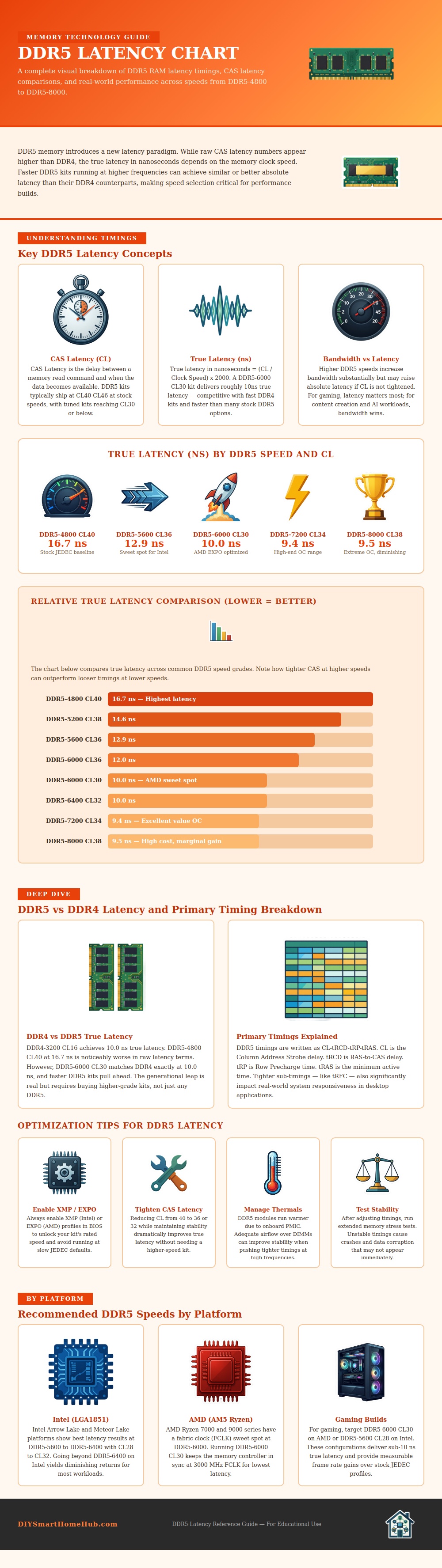
To retrieve the information, the memory controller must open a row in the memory and then access the column that contains the data that is to be retrieved. Each of these steps create a latency for the memory module. DDR5 memory modules have more higher clock speeds than DDR4 modules.
For a given CAS latency value, the DDR5 memory will take less time (in nanoseconds) to complete an operation than the same value of DDR4 memory. For these two reasons, it is possible for a DDR5 memory module to have a higher CAS latency than a DDR4 memory module yet still have better performance from the memory. This is due to the higher clock speeds of the DDR5 memory.
Many memory modules are sold with “loose” timings, which ensures that the memory will be stably on a variety of motherboards. However, memory modules often include a performance profile that you can enable in the BIOS settings of the computer. When enabled, the memory controller will operate the memory at the speed at which the memory manufacturer intended for the memory to run.
If you dont enable this profile in the computer’s BIOS settings, the memory will not be able to reach its full performance potential. The platform upon which you install your DDR5 memory will also impact the type of memory that you should purchase. Intel motherboards tend to exhibit the best performance with memory that operates at a specific memory speed.
AMD motherboards, however, exhibit the best performance with memory that operates at a different speed. AMD’s memory systems requires the memory controller and the fabric clock of the system to operate at the same frequency. Additionally, the longer that you increase the frequency of the DDR5 memory, the smaller the performance gains that you will experience.
While the megahertz value printed on the memory modules is important, it is less important than the relationship between memory frequency and latency. Furthermore, thermal management of the DDR5 memory is important to consider. DDR5 memory includes power management circuitry that is located directly on the memory module.
Because of this, DDR5 memory modules generates more heat than any previous generation of memory modules. If the DDR5 memory reaches too high of a temperature, it may not be able to maintain the settings in its memory controller that require tight timings without introducing errors into the memory system. To avoid this situation, you should ensure that your computer case allow for good airflow around the memory modules.
In any memory system, it is important that you test your memory after you have adjusted any settings for it. Errors in your memory can cause files to become corrupt on your computer system. Additionally, errors in your memory can also make your software crashes while it is in use.
To avoid these issues, you should run a memory stress test after you have set the timings of your DDR5 memory. Overall, to build an effective DDR5 memory system, you should select a speed for the DDR5 memory that is compatible with the platform upon which you are installing the memory. In addition, you should also enable the performance profile in your computer’s BIOS settings.
Finally, you should adjust the latency settings of the memory for additional performance gains that you can experience beyond those offered by increasing the frequency of the memory. Adjusting only the latency settings will provide more performance gains then increasing the frequency of the DDR5 memory.