Smart Hub Device Capacity Calculator
Estimate whether a smart home hub has enough practical capacity for Wi-Fi, Matter-over-IP, Zigbee, Z-Wave, Thread, bridge integrations, automation bursts, polling load, and reserved headroom.
📌Real Smart Hub Capacity Presets
Loaded preset: Apartment Starter. This is a small hub plan with a light device mix and a normal reserve target.
⚙Hub Load Inputs
Full Capacity Breakdown
💡Hub and Protocol Spec Comparison Grid
📋Reference Tables
Protocol Load Weights
| Protocol group | Load weight | Capacity watch | Planning note |
|---|---|---|---|
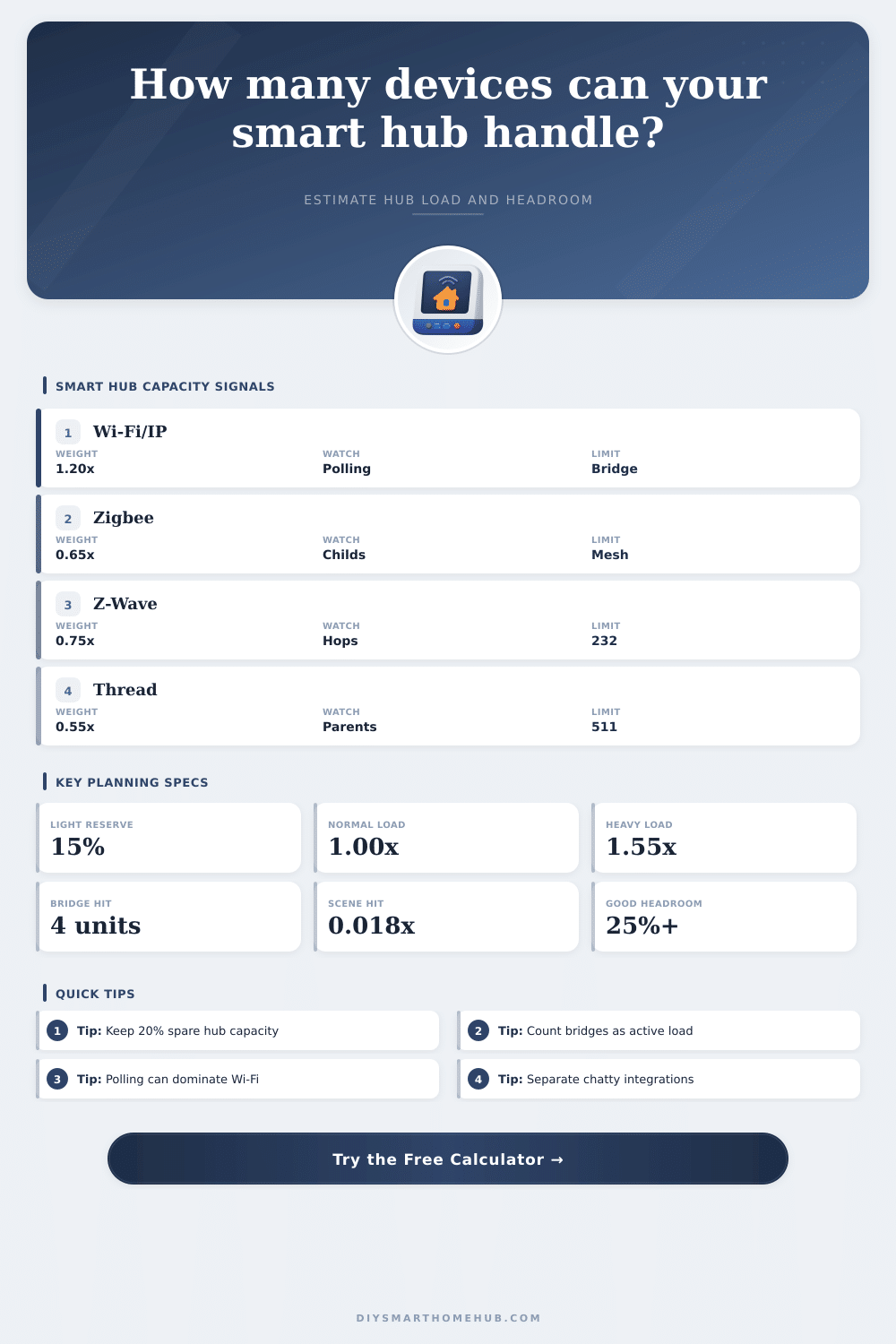
| Wi-Fi, LAN, Matter-over-IP | 1.20 per device | Polling and API calls | Chatty IP integrations often load the hub more than low-power mesh sensors. |
| Zigbee | 0.65 per device | Router and child tables | Many sleepy sensors are usually light unless a bridge polls them constantly. |
| Z-Wave | 0.75 per device | 232-node protocol ceiling | Secure locks and metering devices can raise real event pressure. |
| Thread and Matter fabric | 0.55 per device | Border router and parent slots | Thread devices still add Matter fabric, subscription, and event work. |
| Protocol bridges | 4.00 per bridge | Polling and translation | Each bridge adds state sync, event translation, and reconnect work. |
Polling and Reserve Profiles
| Profile | Load factor | Reserve | Use when |
|---|---|---|---|
| Quiet local control | 0.82x | 15% | Local sensors, few cloud bridges, low polling frequency. |
| Balanced mixed home | 1.00x | 20% | Typical rooms with sensors, lights, a few bridges, and normal automations. |
| Frequent polling | 1.28x | 25% | Energy monitors, climate devices, network polling, and dashboards. |
| Scene burst heavy | 1.42x | 25% | Many group commands, lighting scenes, and simultaneous device changes. |
| Cloud bridge heavy | 1.55x | 30% | Several vendor cloud integrations or bridges with frequent refresh cycles. |
| Lab stress plan | 1.90x | 35% | Near-limit testing, beta integrations, high event logging, and dashboards. |
Hub Class Planning Capacity
| Hub class | Base units | Bridge comfort | Best fit |
|---|---|---|---|
| Entry hub or speaker controller | 75 | 1-2 | Small apartments, light voice control, simple sensors. |
| Mainstream smart home hub | 130 | 2-4 | Most mixed homes with one primary automation hub. |
| Performance hub or mini PC | 220 | 4-7 | Large homes, local dashboards, and more integrations. |
| Dedicated automation controller | 320 | 6-10 | Managed installs with multiple radios and many rules. |
| Home server with local radio stack | 420 | 8-14 | Power-user local control with logging and many protocol stacks. |
Preset Capacity Snapshot
| Preset | Devices | Bridges | Load style |
|---|
🧭Capacity Tips
The same hub can feel healthy at 70% adjusted load and fragile at 95% adjusted load because updates, reconnects, cloud retries, and scene bursts arrive on top of normal device events.
A bridge is not just a passive radio. It translates events, polls device state, handles reconnects, and can create hub work even when the attached devices are quiet.
Smart homes dont usually fails because a person buys to many lights or too many sensors. Instead, the smart home hub usually fails because a person reaches the smart home hub’s limit in terms of how many device the system can manage. The smart home hub manage all the devices within a smart home.
However, the number of devices’ command can overwhelm the smart home hub. A person may experience the smart home system dropping commands that were sent to the devices or may experience the system laggy in responding to commands. However, this is usually not caused by the devices themselves.
Can Your Smart Home Hub Handle All Your Devices?
Instead, the excessive number of devices that the system have to communicate with and the number of translators that exist between the devices and the smart home hub cause it. Many people tends to discover the limited capacity of their smart home after they have added many devices to their smart homes. Such devices could include smart lights, sensors, security panels, smart plugs, and other devices that monitor and control the smart home.
People may begin with a few smart light and a few sensors. However, as time passes, they might add smart security panels, smart thermostats, smart plugs, and other control panels. These devices may seem small in number when added to the smart home.
However, they slowly begin to overwhelm the smart home hub over time. The protocol that a person uses to connect each device to the smart home also play a role in the smart home hub’s capacity. The protocol has more of an impact on the smart home hub than the total number of devices that a person add to the smart home.
Wi-Fi devices usually create the most impact on the smart home hub because the devices from smart homes must constantly communicate with the hub to poll the devices. Low-power mesh devices, such as Zigbee and Thread, has less of an impact on the smart home hub than Wi-Fi devices. However, both of these protocols require a smart home hub to track the devices’ routing tables and the health of the smart home’s network.
Finally, the protocol Z-Wave sit in the middle of these two protocols. However, Z-Wave devices have a ceiling of 200 devices in their network. The tool included with this article will help a person calculate the number of devices that a smart home hub can manage.
A person can enter the devices that they has and the type of protocols that their devices use. The tool will calculate the impact that each type of device will have on the smart home’s hub. Furthermore, the tool will calculate the headroom that the smart home system has for any additional devices.
Another factor to consider is the number of protocol translator or bridges in the smart home. Each bridge has an impact on the smart home’s hub. The bridges translate the signal between the devices and the smart home hub.
Furthermore, bridges must maintain state tables for each device and poll the devices to make sure that they are functioning proper. Each bridge can create four times the impact on the smart home hub of a typical device in the smart home. Therefore, another consideration for a smart home hub is the number of bridges in the smart home network.
If a person has many bridges, the smart home hub may not have the capacity to manage such a network. The tool provided with this article can set the capacity of the smart home hub for determining the number of devices that the hub can manage. The tool allows a person to count the number of bridge in their smart home network.
Another consideration is the automation system of the smart home. Does the smart home have an automation system that trigger many automations? Each automation consumes the processing power of the smart home’s hub.
In the tool, the person can indicate whether their smart home use quiet local control or if their smart home frequently polls devices for data. This will impact the headroom that the smart home will have for the devices. Another part of the tool calculates the reserve capacity of the smart home.
This is a part of device planning that most people tend to ignore. Usually, the device count and the headroom percentage show that the smart home is within normal limits. However, when there is a firmware update or network outage, a person may encounter problem with their devices.
The margin that is left over after the normal operation of the smart home devices is this margin of stability. This margin of stability will indicate the limits of the smart home to absorb unexpected outages or firmware updates. The headroom percentage that is calculated for a person’s smart home is the headroom that remains after the system subtracts the reserve capacity of the smart home.
This is a more accurate measurement of the number of devices in a person’s smart home than the headroom percentage before the reserve devices are subtracted. People also tend to make another common mistake with their smart homes: they treat every device as if it are created and has the same impact on the smart home system as every other device. For example, a person may count fifty sensor in their smart home.
Furthermore, they may also count fifty bulb. However, they may not consider that the smart bulbs may generate more traffic for the smart home system than the sensor. With sensors, the devices might sit idle for long periods of time.
However, they still use up some of the smart home system’s routing slot on the network. Therefore, each protocol get its devices assigned a specific weight by the device planning tool. This is to account for the fact that some devices generate more traffic than others.
Another mistake that most people make is that they do not consider how many protocol translator are in their smart homes. For example, a person may count all of the light in their smart home. They may also count the number of lock in their smart home.
However, they might not account for the cloud services and the smart security panel that control the smart locks in their smart home. These protocol translators do not appear on the device list that a person make when setting up their smart home. However, their impact on the smart home system’s hub is the same as the impact that the physical devices in the smart home have on the system.
A person must ensure that they correctly count the number of protocol translator when using the device planning tool. The type of smart home hub that a person purchase also has an impact on how many devices the smart home can manage. Entry-level smart home controllers can manage fewer devices than performance or dedicated automation controllers.
When a person uses the device planning tool, they can choose the class of smart home hub that they would like to purchase. The tool will adjust the headroom that the smart home can have for the devices based on the type of hub that they select. The most important number that a person should consider when using this device planning tool is the headroom for the next device.
If the headroom that a person calculates allow for one more device to be added to their smart home, their smart home is under control. However, if the headroom percentage is too low for their need, they may have to purchase a smart home hub with more headroom for devices. This will tell a person if their smart home system can manage the devices that they would like to purchase or if they will encounter problems with their devices.
A person should consider the number of device, the number of protocol translator, and the automation system of the smart home when purchasing a smart home hub for their smart home.