Smart Motion Sensor Timeout Calculator
Estimate a reliable motion timeout from occupancy dwell time, motion event rate, sensor retrigger lockout, automation delay, false-off tolerance, wireless message volume, and battery use.
📌Real room and sensor presets
🚶Timeout inputs
Battery Zigbee PIR
Typical sleepy PIR behavior: motion is quick, but retrigger reports are intentionally rate-limited to preserve battery.
Calculated timeout result
📡Sensor and specification comparison grid
📊Reference tables
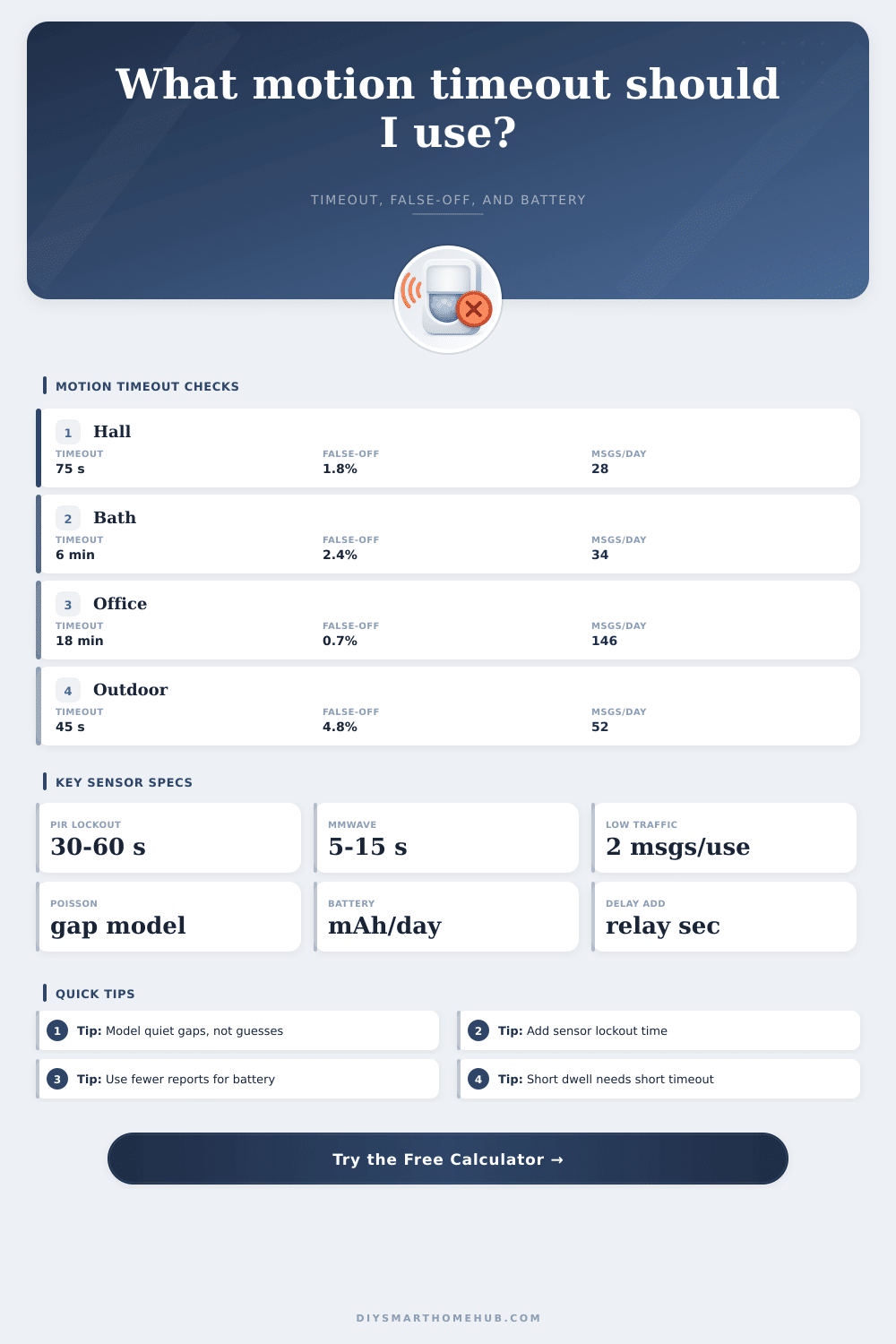
Preset timeout outcomes
Each row is calculated from the same dwell, event-rate, retrigger, and false-off formulas used by the live calculator.
| Preset | Dwell and events | Recommended timeout | False-off and traffic |
|---|
Sensor/spec comparison
Use these representative values when a device manual lists only motion timeout, blind time, or battery class.
| Sensor class | Typical retrigger | Detection character | Timeout implication |
|---|
False-off probability guide
The target false-off value is the chance that one occupied dwell contains a quiet gap longer than the effective timeout.
| Target false-off | Best use | Likely timeout effect | Tradeoff |
|---|---|---|---|
| 0.5% to 1% | Office, bath, elder care path | Longest delay for comfort | More after-vacancy hold |
| 2% to 4% | Kitchen, laundry, living areas | Balanced reliability | Moderate energy and traffic |
| 5% to 8% | Hallway, pantry, stairwell | Short practical delay | Occasional manual retrigger |
| 10% to 15% | Outdoor path or alert-only logic | Very short delay | Comfort is secondary |
Wireless reporting traffic table
Traffic estimates convert occupied episodes and motion events into daily messages before applying per-message battery draw.
| Reporting behavior | Message formula | Battery tendency | Best fit |
|---|
✅Motion timeout calculation tips
When the lights go off in a room in which a person is still present, the problem isnt with the motion sensor but with the motion sensor timeout. The motion sensor timeout is the amount of time between a person’s last movement and the lights turning off. If it is too short, the lights will go off while a person is in the room.
If it is too long, the lights will remain on in an empty room, consuming energy. So, calculating the correct timeout for the motion sensor is essential. Motion sensors are most commonly used in rooms that dont has alot of movement.
How to Choose the Right Motion Sensor Timeout
When a person is in a room, they will stop moving from time to time. When a person stops moving, a motion sensor will not send any signal. These signals must be sent to let the automation system know whether the person has left the room or is simply standing or sitting in the room.
The timeout must be long enough to allow for these period of stillness. So, the length of the timeout is dependent on the length of time a person stays in a room and the numbers of movements that occur when they are in the room. For battery-powered motion sensors, there is one further factor to consider when calculating the timeout.
Battery-powered motion sensors tend to use power-saving method when a person is still in a room. These sensors will suppress the sending of reports for a period of time to save the battery. So, the timeout for the motion sensor should be long enough to allow for the suppression of signals by the sensor, the network delay in the system, and the automation system timeout to turn the lights on or off.
The calculator makes it easy to set these parameters. Outdoor paths will have different setting for motion sensor timeouts than indoor rooms. When a person is on an outdoor path, they will be moving from one spot to the next.
Outdoor paths, however, will have false triggers from the movement of wind or small animal. A long timeout will cause the outdoor path lights to stay on for long periods of time. So, the timeout must be shortened to reduce the amount of running time that the lights will use.
But it cant be shortened to the point where the lights turn off while a person is still on the path. Furthermore, areas where people are likely to be seated or where there will be a lot of movement will require a different motion sensor timeout. For instance, offices often use mmWave sensors to pick up the presence of people that make tiny movement.
These movement rates will allow for a shorter timeout for the motion sensor. But stairwells that have a lot of movement might have a different timeout. As with the conditions of the area and the type of motion sensor, the timeout will have to be different as well.
Most individuals will use one of two settings when setting the motion sensor timeout. They may use the timeout setting of the individual standing next to them, or they may simply choose the longest timeout setting available in the automation system. Unfortunately, these method are largely ineffective.
An individual may use a bathroom for ten minutes, while the pantry in the same structure may only be used for thirty second. Each space will have a different timeout. Thus, not knowing how often individuals will use a space and how often the motion sensor will send signals to the automation system, the timeout for motion sensors is not an accurate setting.
The probability calculation within this tool will calculate the chance that a quiet period between the time that a person last moved and the time that the motion sensor timeout is set to last will be longer than that timeout. The tool treats the detections by the motion sensor as a rate of movement because there will be some movement in a room. If the quiet period, the sensor lockout period, and the automation delay are all shorter than the motion sensor timeout, the chance that the lights will incorrectly turn off will be low.
However, if the motion sensor timeout is shorter than each of those period, the chance of the lights turning off while an individual is in the room will increase. Furthermore, the battery life for battery-powered motion sensors is also connected to the motion sensor timeout. Each time the motion sensor reports the presence of an individual in the room, the motion sensor use some of its battery life.
The rate at which the sensor reports the presence of an individual will impact the life of that battery. For instance, if the motion sensor is configured to report each time an individual moves in the room, the battery will drain at a faster rate than if it only reports when the state of movement change. Thus, the daily message count for the motion sensor will provide an idea of how much energy the motion sensor will use while it is on.
To find the correct timeout for the motion sensor in a room, one must first find a room to evaluate. In that room, one must note the length of time that individuals use the room and the amount of movement that occurs in the room. After finding these variables, they can be entered into the automation system calculator.
One can adjust the target reliability to account for the desired outcome for the motion sensor timeout. If the automation system is set up to minimize the chance of the lights turning off while an individual is present in the room, the target reliability will be set to high. If the automation system is created to save as much energy as possible, the target reliability will be set to low.
By entering these variables, the automation system will output the motion sensor timeout, the chance of the lights turning off while an individual is in the room, the daily message count of the motion sensor, and the impact that the motion sensor will have on the battery life of the motion sensor. The motion sensor timeout is, essentials, a compromise between the needs of providing light for those in the room and saving energy by turning the lights off when no longer needed.