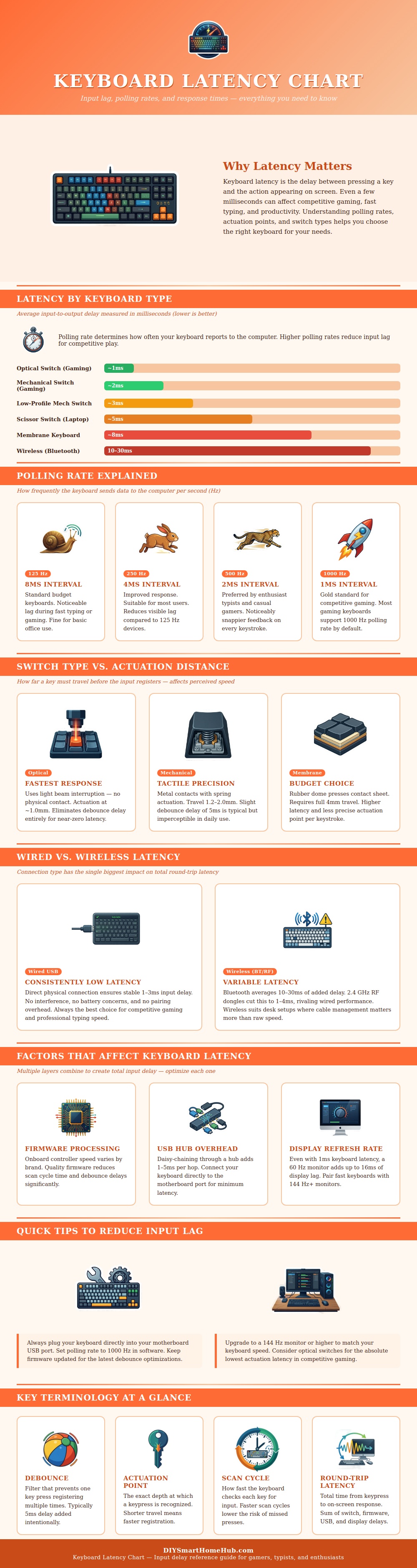
Keyboard latency is a delay between the time a person press a key on a computer keyboard and the time that the computer display the result of that keypress on the monitor screen. Most people does not notice the latency of their keyboard while they are use it to type documents, for example. However, keyboard latency can be noticeable when a person is required to rapidly press the keys on their keyboard, such as when playing a fast paced computer game.
In relation to computer games, a player might notice the latency of their keyboard when their game characters appear to react slow to the players keystrokes. Furthermore, a player might also note the latency of their keyboard when they are required to typing rapidly on the keyboard, such as when typing long documents. Keyboard latency is created as the result of several type of delay in sequence after the moment that a player presses a key on the keyboard.
Keyboard Delay: What Causes It and How to Reduce It
The delay of the keyboard switch is the first type of delay that occur after the player presses a key. After that, the keyboard controller processes the signal that the keyboard switch generates, resulting in the second delay. After that, there is a third delay caused by the connection between the keyboard and the computer, and the fourth delay is caused by the monitor screen requiring a refresh rate to display the result of the keypress on the monitor screen.
Each of these steps within the keyboard introduces a small amount of delay. However, the latency of the keyboard is most noticeable in situations in which each of these steps is performed at high rate, or where the delays of each of these steps is additive in creating the total latency of the keyboard. As such, each of these steps and their potential for introducing a delay can help to explain why a particular keyboard may feel fast on one computer, but may feel slow on another computer.
The technology of the switches that are included in the keyboard can create an effect upon the latency of the keyboard. For instance, if the switch technology use an optical switch, then the use of a light beam to detect when a key is pressed can help to avoid the waiting period that may occur with metal keyboard contacts. In contrast, if the keyboard use membrane switches that employ a rubber dome to detect when a key is pressed, then the longer distance that the key must travel before it is registered can lead to an increase in the latency of that keyboard compared to keyboards with mechanical switches.
In addition to the switches, the type of connection between the keyboard and the computer can also impact the latency. For instance, a wired connection like a USB data connection will not introduce any additional waiting time for the signal to travel between the keyboard and the computer. Wireless connections are more complex than wired connections, however, so more delay occur in the wireless world.
Bluetooth connections are the most common form of wireless connection between a keyboard and a computer, but Bluetooth was designed to minimize power consumption rather than maximize the speed at which devices can communicate, so a wireless keyboard with a Bluetooth connection will typically introduce the most latency between its signals. Some wireless keyboards, however, use a dedicated radio frequency connection between the keyboard and the receiver on the computer, reducing the amount of latency that is introduced by that wireless keyboard. Another factor that can contribute to the latency of a keyboard is its polling rate.
The polling rate is the rate at which the keyboard send a signal to the computer. A low polling rate indicates that the keyboard must wait for longer periods between signal transmission. Thus, the keyboard will have a limit on the rate at which it can be considered to be responsive.
A high polling rate can remove that limit on responsiveness. However, a high polling rate will only be effective in situations in which the computer and the remainder of the system are fast enough to process the signals rapid from the keyboard. In addition to the factors described above, the keyboard controller within the keyboard itself also have an impact upon the keyboard’s latency.
For instance, a keyboard with a cheaper keyboard controller may take longer to read the keys pressed by the player than an expensive keyboard controller. Furthermore, the cheap keyboard controllers may also use debounce filters to recognize which keys were which, which also can contribute to the latency of those keyboards. Updating the keyboard’s firmware may help to reduce any latency caused by the keyboard’s firmware.
Thus, updating the keyboard’s firmware may provide a way for the keyboard’s user to increase the responsiveness of the keyboard without purchasing new keyboard hardware. Another factor that can contribute to the total latency that is experienced by a player is the refresh rate of the monitor screen on which the keyboard’s signals are reflected. Even if the keyboard has very low latency, the keyboard will still have to wait for the monitor to refresh the screen and reflect the signal of the keys on the screen.
Monitors with refresh rate of 60 frames per second will introduce a latency of more than twelve milliseconds, for instance. Thus, any monitor with a higher refresh rate will help to reduce the total amount of keyboard latency that is experienced. However, because the monitor introduces such a delay, increasing the refresh rate of the monitor will have a greater impact upon the latency than improving the keyboard alone.
Depending upon the actions that a player take with their computer, the importance of latency will differ. For instance, if a computer is used for tasks like writing documents and e-mails, the difference in keyboard latency will not be as important as the comfort that is provided by the keyboard. In contrast, for tasks like competitive gaming, however, where precise and rapid responses is required, the differences in latency become more important.
Thus, players who compete in high level gaming tournaments may reduce their keyboard latency by using a wired keyboard connection, increasing the polling rate of their keyboard, and ensuring that their keyboard switches are of type that create short travel distances for the keys. Each of these small improvements to the keyboard will help to reduce the total amount of keyboard latency created by their keyboard.