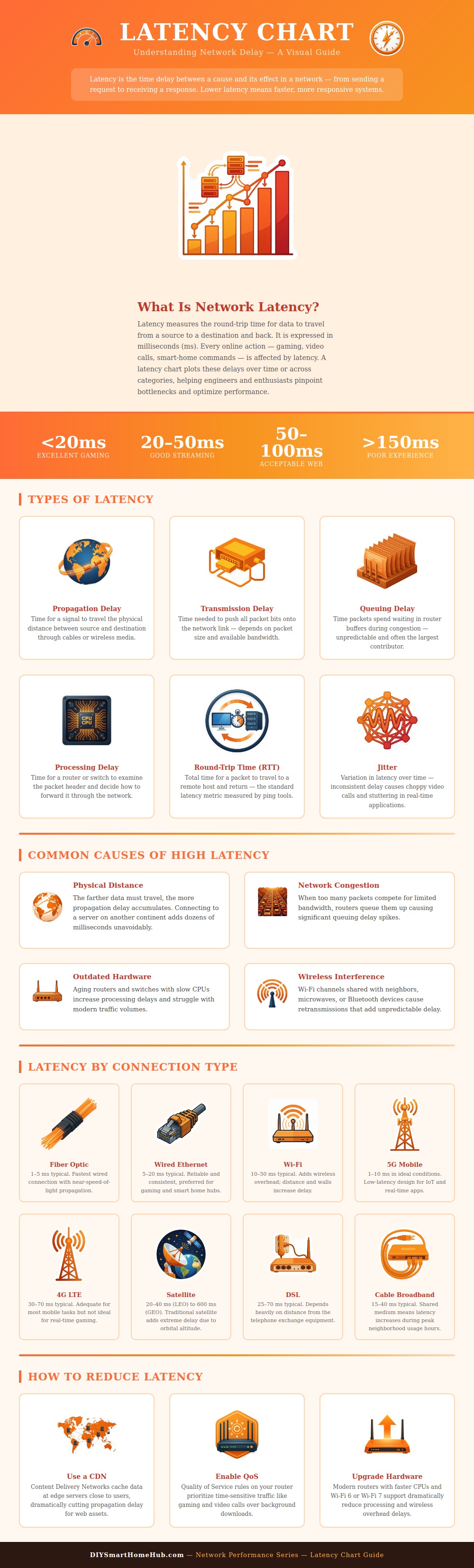
Latency is a time it takes for data to perform a round trip from your device to a remote server and back. Each time you use a smart speaker or participates in a video call, your data have to travel from your device to the server and then back to your device. The length of this round trip are known as latency.
You may experience high latency if the video on a video call freeze or if your smart light takes a long time to respond to a command. Latency is a collection of different type of delay. There are four main types of delay that contributes to the total latency of data traveling from one device to another.
Latency: What It Is, Why It Happens, and How to Fix It
Propagation delay is the time it takes for a signal to travel a certain distance. Transmission delay is the time for a device to push all the data in a data packet into a wire or into the air. Queuing delay is the time for data packets to wait in line behind other data traveling through a router.
Processing delay is the time for a device to read the header of a data packet to determine where to send it. The time taken for data to make a round trip from device to server and back to the device are known as round trip time. Jitter is a value that represents the variation of round trip time.
Each of these type of delay can contribute to the total latency of the data traveling from device to server and and back to device. The largest delay in each of these categories will determine the total latency. One of the main factor that contributes to propagation delay is the distance that the data must travel.
Data travels at a large fraction of the speed of light. Even at the speed of light, it takes time for the signal to cover great distance. If a user is requesting data from a data server that is nearby, there will be a small propagation delay.
However, if the user is data is being requested from a server on the opposite side of the planet, the propagation delay will be large. Data that use fiber connection or 5G connection have low latency because these connections are optimized for the speed at which data travels. Satellite links and DSL connections have high latency because data must travel long distances, such as from the user’s device to a satellite in space.
Congestion and interference are causes of delay that may vary in their presence while data is traveling from device to server. If there are too many devices accessing the same network link at the same time, congestion occurs. When congestion happen, a router holds data packets in memory while that router is waiting for time to recieve another packet so that it can continue down the network.
This waiting time for a router to be available for new data is queuing delay. Another reason that data may experience delay is due to interference. Other signals traveling through the same medium may interrupt data.
For example, a microwave or another device’s Wi-Fi signal could interfere with data traffic. Because of these interruptions, data packets may be sent again, which add to the latency of the data packet. An additional factor that contributes to latency is the age of the hardware devices.
Because older devices have processors that run at a slower speed than newer devices, it take more time for the device to process data packets. Thus, when a router with an outdated processor is receiving a large amount of traffic, there will be long queuing delays while the router’s data queue fills with data packets that take time to process. When a user upgrade to a newer router that includes a faster processor, the device will be able to process each data packet in less time.
Additionally, newer routers are able to handle a greater amount of data traffic than older routers. Thus, upgrading the router will also help to reduce queuing delay. Content delivery networks and Quality of Service settings can help to reduce latency.
A content delivery network will store the same content on remote servers that are closer to the user. Since the distance that the data must travel is less, the propagation delay will be less. Quality of Service settings will ensure that certain types of traffic receive priority over other types of traffic.
For example, you can set up Quality of Service settings to allow video traffic to have priority over file download traffic. While the Quality of Service settings do not prevent distance between the user and the server or congestion on the network, Quality of Service settings can help to guarantee that high-priority data traffic is not delayed. Before making any attempts to fix the latency of your network, you should measure the latency of your network.
Using a command prompt on your computer, you can run a ping test to your device to measure your latency. Compare the results of your ping test to the standard latency ranges for your type of connection. If your latency is high, you may have interference in your wireless network, outdated hardware, or your network may be congested.
By making certain adjustments to your hardware or settings, you may be able to reduce your latency.