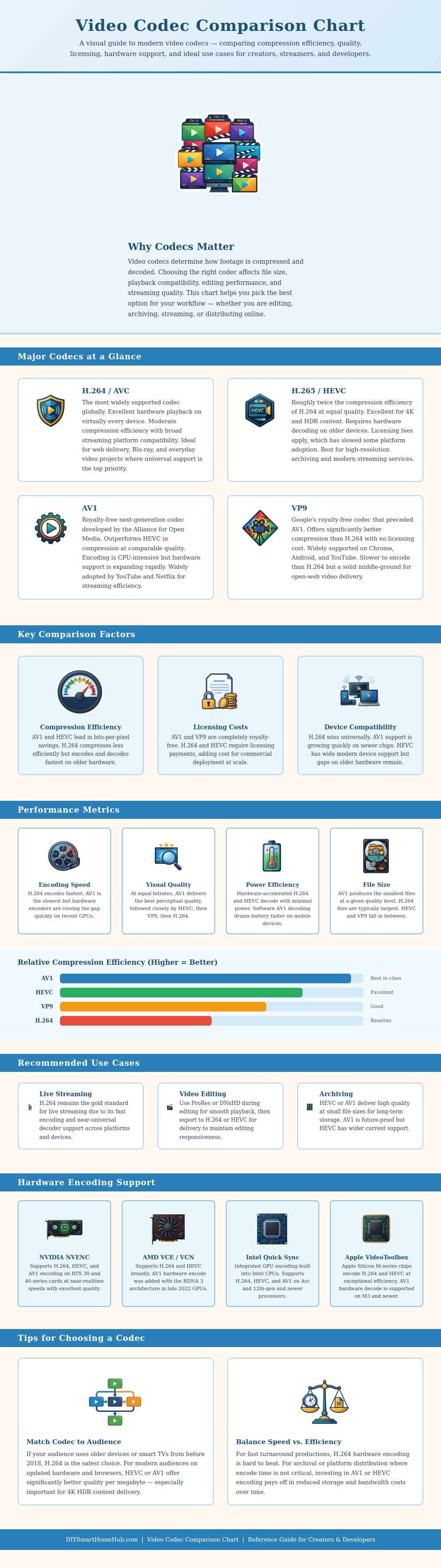
A video codec is used to compress and decompress video files. When choosing a video codec, there is tradeoffs to be made between file size, quality, and compatibility with the device that will play the videos. A video codec can determine the amount of data that a video file will require, as well as the amount of processing power that a device will require in order to play that video.
For example, if you choose a codec that is highly efficient in relation to video compression, your video file will have a small size. However, that same highly efficient video codec may require more processing power to play. Conversely, if you choose a video codec that is not as efficient in relation to video compression, the video file will be relatively larger.
How to Choose a Video Codec
However, that less efficient codec will be easier for devices to play. Device compatibility is one of the main factor to consider when selecting a video codec. The individuals devices that are to view the videos must be able to read the video codec that you selected.
For instance, many older devices can only play certain, well established video codecs. Thus, if you selected a new video codec, you’re videos may not play on those older devices. Therefore, you must consider the device that your audience use.
The devices that your audience use will determine whether or not your chosen video codec is functional. To ensure that all of your audience can view your videos, you should select a video codec that has high compatibility with the devices of your audience. Encoding speed is another factor that you should consider when you are choosing a video codec.
Encoding speed can determine the amount of time that will be required to create your video file. Some video codecs can be encoded at a faster rate than others. For instance, live streaming videos will require a video codec that can be encoded very quick.
Thus, you may have to sacrifice the efficiency of the video codec if you are live streaming videos. However, if you are creating video files that are to be archived, you can use a video codec that takes longer to encode. Video files that are encoded at a faster rate will have larger files, while encoded videos that take longer to create will result in smaller and more high quality video files.
Another factor that can impact the selection of the video codec that will be used is the licensing costs and royalties of the codecs. Some video codecs will require you to pay royalties to the patent holder of those codecs. The costs of licensing those codecs can make platforms cost money to operate, which may deter them from using those codecs.
Other video codecs are royalty-free. Platforms often adopt these codecs more quick than codecs that require licensing costs. Thus, the fact that video codecs are royalty free results in codecs becoming the platforms standard codec more easy than codecs that require licensing costs.
Hardware acceleration can also have an impact on the processing of video codecs. Moddern hardware contains dedicated circuitry for certain video codecs. If your device contains a modern graphics card or processors, your device may be able to use hardware acceleration to process and encode the video codec at a faster rate than if it was using software only.
However, older hardware will not contain the hardware acceleration necessary for the newest video codecs. In choosing a video codec, there are tradeoffs to be made in almost every scenario. For example, if you are creating videos for a group of individuals, you must decide whether you want to use a video codec that is compatible with the most device, has the smallest file sizes, or if you want to focus on another factor altogether.
Thus, you must decide whether you want to use your video codec with high device compatibility, high encoding speeds, high file sizes, or some other prioritized factor. In each scenario, you will not always be able to have all of the feature that you would like with regard to your video codec. You should of considered the costs before starting.