Live Streaming Bandwidth Calculator
Estimate upload Mbps, monthly data transfer, and safety headroom for creator streams, smart camera feeds, live events, and multi-platform simulcasts.
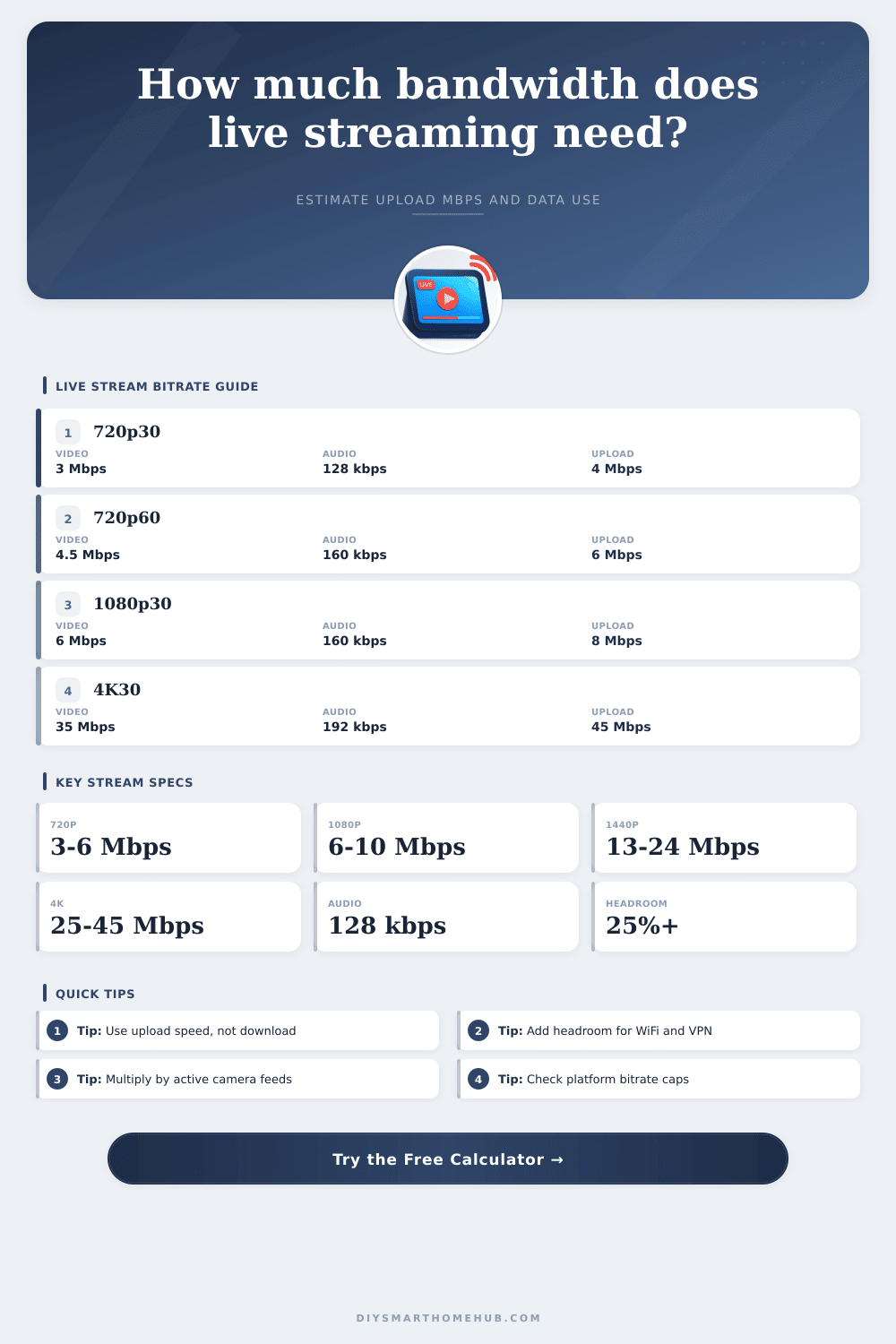
| Profile | Typical Video Bitrate | Common Audio | Recommended Upload For One Feed |
|---|---|---|---|
| 480p30 SD | 1.2 to 2.5 Mbps | 96 to 128 kbps | 2 to 4 Mbps |
| 720p30 HD | 2.5 to 4 Mbps | 128 kbps | 4 to 6 Mbps |
| 720p60 HD motion | 4 to 6 Mbps | 128 to 160 kbps | 6 to 8 Mbps |
| 1080p30 full HD | 4.5 to 6.5 Mbps | 128 to 160 kbps | 8 to 10 Mbps |
| 1080p60 creator | 7.5 to 10 Mbps | 160 kbps | 12 to 15 Mbps |
| 1440p60 high quality | 13 to 24 Mbps | 160 to 192 kbps | 22 to 35 Mbps |
| 4K30 UHD | 25 to 45 Mbps | 192 kbps | 40 to 60 Mbps |
| 4K60 premium | 35 to 68 Mbps | 192 to 320 kbps | 55 to 90 Mbps |
| Use Case | Typical Protocol | Bandwidth Behavior | Best Planning Rule |
|---|---|---|---|
| Creator stream to one platform | RTMP or RTMPS | One constant upstream encode | Plan upload as bitrate x 1.4 |
| Direct multi-platform simulcast | Multiple RTMP outputs | Upload repeats for each destination | Multiply by destination count |
| Cloud restream service | One RTMP uplink | Home upload sends one master stream | Use one destination locally |
| IP camera to recorder or cloud | RTSP, SRT, or RTMP | Each active feed adds upstream load | Multiply by active feeds |
| Remote contribution feed | SRT or WebRTC | May use encryption and retransmits | Add 30% or more headroom |
| Project | Inputs | Practical Upload Target | Typical Monthly Transfer |
|---|---|---|---|
| Weekly 1080p webinar | 1 feed, 1 destination, 24 hours | 8 to 12 Mbps | 70 to 120 GB |
| Gaming creator 1440p60 | 1 feed, 1 destination, 50 hours | 25 to 35 Mbps | 420 to 650 GB |
| Three-platform 1080p simulcast | 1 feed, 3 destinations, 40 hours | 25 to 35 Mbps | 350 to 520 GB |
| Four 720p camera cloud feeds | 4 feeds, 1 destination, 720 hours | 15 to 25 Mbps | 3.5 to 5.5 TB |
Live streaming as an activity require a reliable internet connection. However, live streaming can become unreliable if you dont take into account your bandwidth requirements for live streaming. Many people experience stuttering and dropped frame during there live stream because a live stream require an upload speed that is consistent and sufficient for the bitrate of the live stream.
The upload speed for a live stream is the primary concern for live streaming rather than the download speed. Other device that are connected to your internet connection utilize some of the available upload speed, which is the reason that the upload speed is limited. The calculator included on this page allow you to input the bitrate of your live stream, the number of live feeds that you will be using, and the number of live streaming platform to which you will be broadcasting.
How Much Internet Speed Do You Need to Live Stream
Using these values, the calculator will calculate the amount of bandwidth that you will require for your live stream. Each of the parameter for the live stream calculator has a specific meaning that you need to understand to correctly prepare for your live stream. The encoder pushes the bitrate for the video every second.
This value is one of the main determinant of the amount of bandwidth that will be used during your live stream. Audio data also use some of the available bandwidth, even though the amount of data that is used for audio is less than the amount of data used by video. If you increase the resolution of your live stream or the frame rate of your live stream, then the bitrate will increase because the encoder will require more bits to encode the video at that higher resolution or frame rate.
For example, pushing video data at a resolution of 1080p at 30 frames per minute will require approximately half the bitrate of 1080p at 60 frames per minute because higher frame rates require the pushing of more data to allow for smooth playback of the live stream video. The number of live feeds and the number of live streaming platform will impact the amount of data that is push through your connection. Each additional live feed will increase the amount of data that must be pushed, unless you use a restreaming service that will take one master feed from your machine and push that stream to multiple live streaming platforms.
The safety profile in the live stream bandwidth calculator is implemented to account for the data packet loss that can be caused by WiFi connection or virtual private network (VPN) connection. Your connection will not be able to push the live stream data to the live streaming platforms at the same rate if the data packets are lost, so including a safety profile in your live stream will provide additional headroom for your data to travel. Many people ignore the data that your live stream will use each month.
However, the amount of live streaming data that will be used each month will have an impact upon your internet bill. If your live stream use only one camera to provide live data at 1080p resolution, then the amount of data that is used will be relatively low. However, if you are live streaming from multiple camera and pushing the live stream to multiple live streaming platforms, then the amount of data that is moved will be in the hundreds of gigabyte of data every month.
If you input the encoded rate of your live stream into the live stream calculator, as well as the number of hours that you will stream live each month, and apply an overhead factor, then the live stream calculator will indicate whether or not your internet plan has enough data capacity to support your live streaming activities. Additionally, knowing the amount of data that is used by your live stream can also help you to decide between using a direct upload method for your live stream versus using a cloud restreaming service. If you use a cloud restreaming service, then your live stream will use less data from your machine, but you will have less control over the quality of the live stream that is sent to its live streaming platforms.
Common mistake can be made when planning your live stream and the bandwidth that it will use. For example, many people will test their internet connection during the off-peak hours of the day. However, the internet connection that works during the off-peak hours may not provide enough data to support the live stream during the peak hours.
Many people will count the number of camera that are recording live video, but these cameras that are recording the video locally dont count towards the requirements for live streaming bandwidth. Finally, many people will not account for the bandwidth that is used by the live stream encoder, especially if the live stream encoder is running on the same machine that is live streaming the live stream. These mistake may work when testing the live stream, but the live stream may not work as well during its live stream broadcast.
The reference table that is included on this page can help you to understand the amount of data that each live stream will require to run smooth. For example, a live stream that is set to 720p at 60 frames per minute may require about the same amount of bandwidth as a live stream that is set to 1080p at 30 frames per minute. In this case, many live stream broadcaster will use the 1080p at 30 frames per minute live stream settings to ensure that they will have reliable live streaming.
Additionally, the reference table indicates that live streams that are of 4K resolution will require a different category of internet connection than most home internet plans offer. This headroom for live streaming data will allow for data packet to travel around interference from WiFi networks. The designers designed the safety profiles in the live stream bandwidth calculator for the conditions of a live stream, such as WiFi and VPN connection.
However, they will provide more headroom for live streaming if your live stream is occurring at a public venue with many other WiFi network in operation, rather than a dedicated Ethernet line to your live streaming software. For your live stream, you will have to make compromise in certain aspect of the live stream. For example, you can lower the bitrate of the live stream to save bandwidth.
However, lowering the bitrate may make text that is displayed during the live stream to be more difficult to read. You can use a restreaming service to reduce the amount of bandwidth that your live stream will use. However, this will introduce delay in the live stream.
Finally, you can direct your live stream to multiple destination to allow for multiple viewer of the live stream. However, this will increase the amount of bandwidth that your live stream will use. The live stream calculator will allow you to see the cost of each of these compromise on your live stream.
Once you have determined the amount of bandwidth that your live stream will require, you will have to constantly recheck your calculation. The addition of even one new camera or change in internet plan will impact the requirements for your live stream. The live stream bandwidth calculator will allow you to see these change to your live stream requirements immediately so that you do not experience any dropped frame during your live stream.