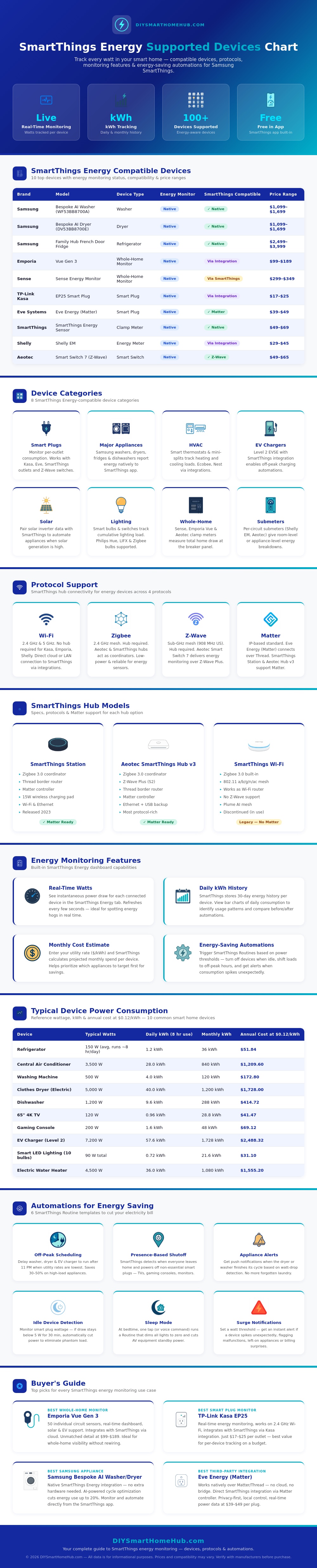
The Things Energy app allows you to monitor the amount of electricity that an appliances in your home is using. Many appliances uses electricity even when they are not being used. The electricity that appliances use when they are not in use is known as standby power or phantom load.
Standby power can lead to increase electricity bills for the homeowners. The Things Energy app allows you to monitor the power that your appliances use because the app monitors the wattage of the devices that is connected to the SmartThings hub. Using the app, you can monitor the amount of electricity used by specific appliance.
Watch How Much Electricity Your Appliances Use
For instance, you could connect an smart outlet to an appliance like a coffee maker. The app will show you when the coffee maker is brewing and how many watt the coffee maker is using while brewing. Additionally, the app will also show you how many watts the coffee maker is using while in standby mode.
Because standby mode for appliances like coffee makers can waste a large percentage of the power that is provided to the appliance, you can use the app to turn the appliance off if it is using to much power while in standby mode. There are different way that the devices in the home can connect to the SmartThings hub. Appliances like Samsung washers and dryer connect directly to the hub.
Other appliances connect to the hub using different wireless communication protocol. For instance, some smart plugs use Wi-Fi to connect to the hub, but many use Zigbee or Z-Wave protocols to connect to the hub. Additionally, Matter-compatible devices can also be used to connect to the hub.
Matter devices are beneficial because they are design to work with appliances of different brands. Additionally, whole-home monitor can also be used to connect to the breaker panel in the home to monitor the power usage of the entire home. The app can use the data to predict the cost of the electricity that the appliances will use.
By entering your electricity rate into the app, the app can calculate the cost that each appliance will place upon your electricity bill. Based off the cost of electricity from each appliance, you can adjust their use in your home to save money. For instance, you can create automation that operate heavy appliances during off-peak hours when the electricity rates are more lower.
When determining which appliances you would like to monitor with the SmartThings Energy app, you may want to prioritize appliances based upon the amount of electricity that they use. Appliances like a central air conditioning unit will use more electricity than appliances like smart light bulb. Therefore, you should monitor large appliances prior to small appliance.
For instance, you can use a panel monitor to monitor the power usage of all appliances in your home, but you can use smart plug to monitor specific appliances that you think may be using alot of electricity. You dont have to pay for a subscription to SmartThings Energy to monitor the electricity that is used by your appliances. The SmartThings Energy dashboard will show you the wattage of your devices, trends in your power usage, and any alert regarding high power readings.
Overall, then, by using the SmartThings Energy app you can gain an understanding of the way in which you are using electricity in your home. By gaining that understanding, you can begin to reduce your electricity bill.