4K Camera Bandwidth Calculator
Estimate 4K security camera bitrate, LAN headroom, daily recording storage, and NVR retention from resolution, frame rate, codec compression, bit depth, GOP, and scene motion.
📌Real 4K camera presets
Presets model common main-stream recording profiles. Use the fields below to match your camera datasheet, NVR stream settings, and expected motion.
⚙Stream inputs
4K camera bandwidth estimate
Adjust the stream settings above to calculate Mbps and storage.
📷Camera / codec spec comparison grid
📊Reference tables
Codec compression factors
| Codec | Ratio | 4K use | Notes |
|---|---|---|---|
| MJPEG | 18:1 | Rare | Huge files |
| H.264 Main | 170:1 | Legacy | Stable playback |
| H.264 High | 210:1 | Mixed NVR | Better AVC |
| H.265 Main | 330:1 | Common 4K | Good balance |
| H.265 Smart | 470:1 | Quiet scenes | Motion varies |
| AV1 | 520:1 | New cameras | Check support |
Typical single-camera 4K ranges
| Scene | FPS | H.265 | H.264 |
|---|---|---|---|
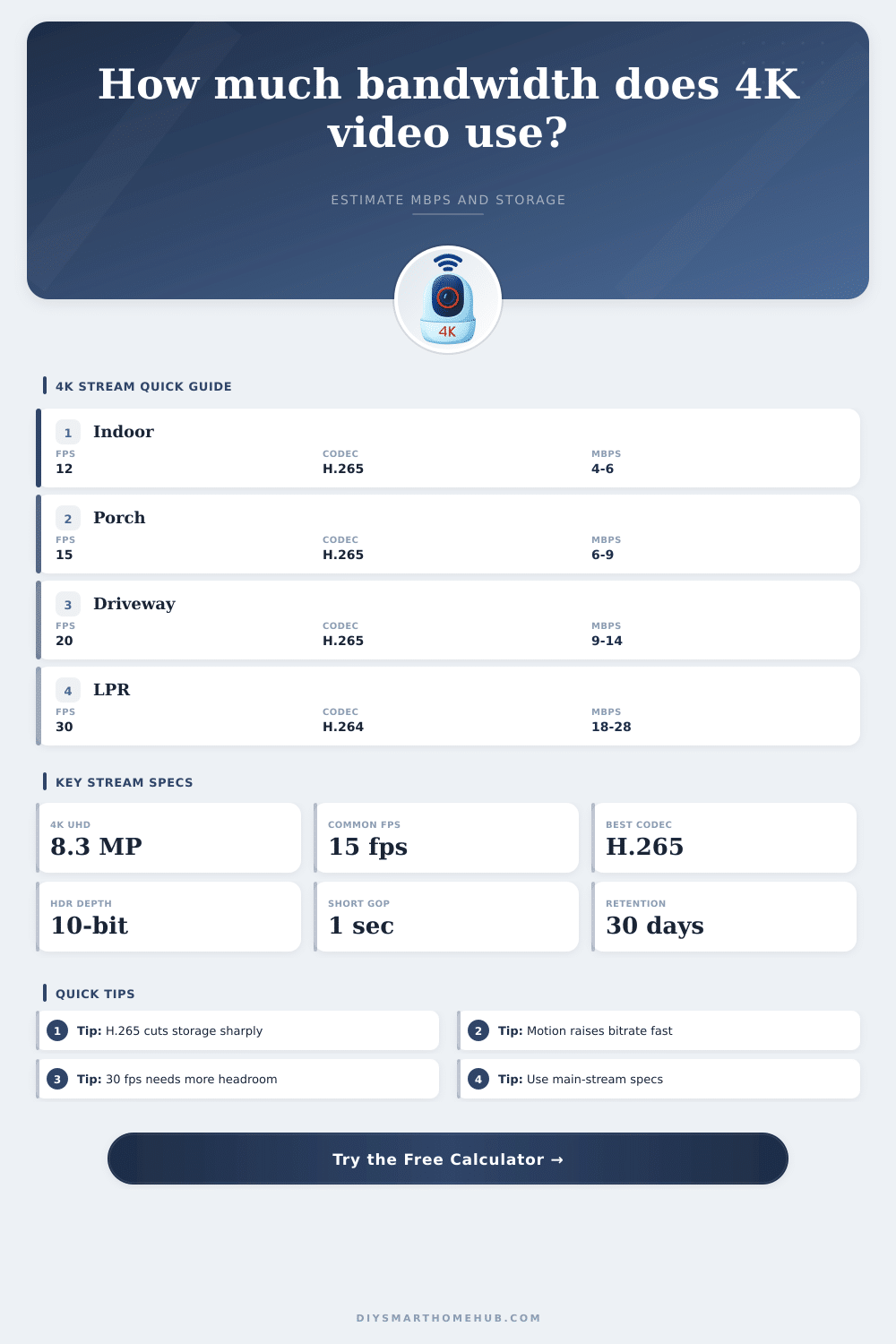
| Quiet indoor | 12 | 3-5 Mbps | 6-9 Mbps |
| Front porch | 15 | 6-9 Mbps | 10-15 Mbps |
| Driveway | 20 | 9-14 Mbps | 15-23 Mbps |
| Street view | 30 | 14-22 Mbps | 22-34 Mbps |
| Rain or trees | 30 | 18-30 Mbps | 28-45 Mbps |
Storage rate formulas
| Item | Formula | Unit | Use |
|---|---|---|---|
| Raw stream | W x H x FPS x bpp | Mbps | Before codec |
| Codec rate | Raw / ratio | Mbps | Base video |
| Scene rate | Base x motion x GOP | Mbps | Final camera |
| Daily GB | Mbps x sec / 8000 | GB/day | Recording |
| Retention | GB/day x days / 1000 | TB | NVR size |
Network planning checks
| Total load | Port | Headroom | Fit |
|---|---|---|---|
| Under 40 Mbps | 100M | Good | Small PoE |
| 40-80 Mbps | 100M | Tight | Limit bursts |
| 80-300 Mbps | 1G | Good | Home NVR |
| 300-700 Mbps | 1G | Tight | Use VLANs |
| 700+ Mbps | 2.5G+ | Better | Large sites |
💡Planning tips
Many cameras advertise 4K but record a lower substream for remote viewing. Size storage from the main stream that the NVR actually records.
Rain, headlights, trees, and short GOP settings can push variable bitrate above the calm-scene average, so keep switch and NVR links below sustained saturation.
When you set up a 4K security camera, the video stream will not use a file size because the video stream will travel as a continuous flow of data. This continuous flow of data must carry to your network and your storage device every second of every day. If the continuous flow of data from your security camera dont match with the capacity of your network and storage devices, your security camera will drop frames or reaches the storage limit for your security system.
The resolution will be the first variable to consider for determining the amount of data that your 4K security camera will output. Each frame of 4K resolution will contain four times the amount of detail then a 1080p security camera. Because the amount of detail from 4K security cameras is so high, this resolution is helpful for reading license plates and spotting small movement from a distance.
How to Plan Data and Storage for 4K Security Cameras
However, the resolution also increases the amount of raw data that must be processed from your security camera. The second variable to consider is the frame rate. More frames per second will increase the amount of data that the security camera output before any compression.
For instance, 15 frames per second may be sufficient for an outdoor security camera, but 30 frames per second may be necessary for license plate recognition. The third variable that you should consider is the compression of the raw data from the security camera. Using the H.265 encoding for your security cameras will produce a more efficient reduction in the amount of raw data that is sent from the security camera compared to using the H.264 encoding.
However, H.265 will require more processing power from the security camera and the security camera recorder. Older security camera systems may use the H.264 encoding because of the compatibility of this encoding with other devices. Smart codecs will compress the data to reduce the size of the files but will also create spikes in the amount of data that is to be processed and sent.
The behavior of the scene that is being monitored will also impact the amount of data that is to be processed. A quiet area will produce less data than an area that is frequently visited by individuals or vehicles. The Group of Pictures, or GOP, will also impact the amount of data that is to be processed.
A GOP will dictate how often the security camera will send a full reference frame of the scene being monitored. Using short GOP intervals will allow for better seeking within the recorded security camera footage but will require more raw data to be processed by the security camera system. Security camera systems come with a calculator that will allow you to enter each of the variables for your security cameras.
This security camera calculator will show you the bitrate of each security camera, the total amount of data that will be sent to your network, the amount of storage that will be required daily, and the total amount of data that will be required for your desired amount of retention of the security camera footage. These four variables will allow you to determine whether your network and security camera recorder can handle the amount of data that 4K security cameras will output. If the values from these variables show that your network and security camera system will become overloaded with data, you would of been required to make adjustments to the resolution, frame rates, and codec before activating your security camera system.
Another variable to consider is the headroom that your network will have. The actual throughput of your network may not be the same as the amount of data that is rated for your network. For instance, your network might be rated at one gigabit per second, but the actual throughput can be less due to network overhead or other devices connected to the network.
While a single security camera may use only a few megabits per second, eight security cameras will use more data and could begin to overwhelm your network. Storage planning will follow the same logic as network planning. The amount of data that your network will require is based off the bitrate of your security camera footage, the number of security cameras, and the length of time that you would like to record the security cameras.
The amount of daily gigabytes that your security system will use will multiply the bitrate of your security camera by the number of hours and the number of security cameras that you have. The retention of these security cameras will translate the daily gigabytes to the total amount of terabytes that will be required for your security camera system. For instance, if you require a thirty-day storage period for your security cameras, they may require more data than you budgeted for.
Furthermore, additional storage will be required for the reserve percentage of your security systems file system. This reserve percentage will add to the storage requirement for your security camera to avoid the storage drive being filled with recorded security camera footage. Many individuals make mistakes when setting up their security cameras.
Some individuals may base the data rate for their security system on the specifications provided by the manufacturer for the cameras. Instead, they should base the bitrate on the requirements of the security cameras. For example, some individuals may base their storage on the bitrate of their security cameras but may not account for the fact that lowering the frame rate will not halve the amount of storage that is required.
Furthermore, these individuals may choose to use smart codecs for all of their security cameras; however, they may encounter problems with the storage if there is alot of motion in the security camera feeds from rain, sunlight, or headlights from passing vehicles. Using a security camera data calculator will help individuals to test the storage and data rate of all of the settings for their security cameras. By adjusting only one variable in the security camera system, individuals can observe the impact that the adjustment will have on the bitrate and the amount of storage that is required for that security camera system.
In addition to the four main variables for setting up a security camera system, there are additional variables that you can consider. The bit depth and chroma sampling for security cameras will impact the amount of data that is sent from the cameras. Using bit depths of ten bits instead of eight bits will allow security cameras to carry more information about the color of the objects in their surveillance feeds.
Higher bit depths will result in improved image quality but will also increase the amount of raw data that is to be processed by the security camera. However, the raw data will only increase in a modest amount. However, if many security cameras of High Dynamic Range (HDR) is active within the same network, the increase in raw data will become noticeable.
The goal in establishing a 4K security camera system is for the security cameras to match the amount of data that is to be sent from the cameras to the monitoring requirements for those security cameras. For instance, if a security camera is established in an area where license plate recognition is important, that security system will require a higher frame rate and a short GOP interval to allow for the recognition of license plates. In contrast, a security camera that is used to provide an overview of the back yard may have a lower frame rate and longer GOP intervals.
The calculator for the security camera will allow you to make these decisions visible to you. By adjusting the settings of the security cameras to match the capacity of the network and storage devices, the surveillance system will remain reliable.