🔋 SimpliSafe Camera Battery Life Calculator
Estimate how long your SimpliSafe camera battery will last based on your usage patterns
| Activity | Approx. mAh / Event | Events Before Dead (6000 mAh) | Daily Impact (10 events) |
|---|---|---|---|
| Motion Clip (1080p, 30s) | ~8–12 mAh | ~500–750 clips | ~100 mAh/day |
| Motion Clip (720p, 30s) | ~5–8 mAh | ~750–1200 clips | ~65 mAh/day |
| Live View (1080p, per min) | ~15–20 mAh | ~300–400 mins | ~75 mAh/5 min |
| Night Vision (per hour) | ~25–40 mAh | ~150–240 hrs | ~200 mAh/8 hrs |
| Standby (per day) | ~10–20 mAh | ~300–600 days | ~15 mAh/day |
| Two-Way Audio (per min) | ~20–30 mAh | ~200–300 mins | varies |
| Weak Wi-Fi Overhead | +20–40% drain | significant impact | +30% daily use |
| Camera Model | Low Use (5 events/day) | Medium Use (15 events/day) | High Use (40+ events/day) |
|---|---|---|---|
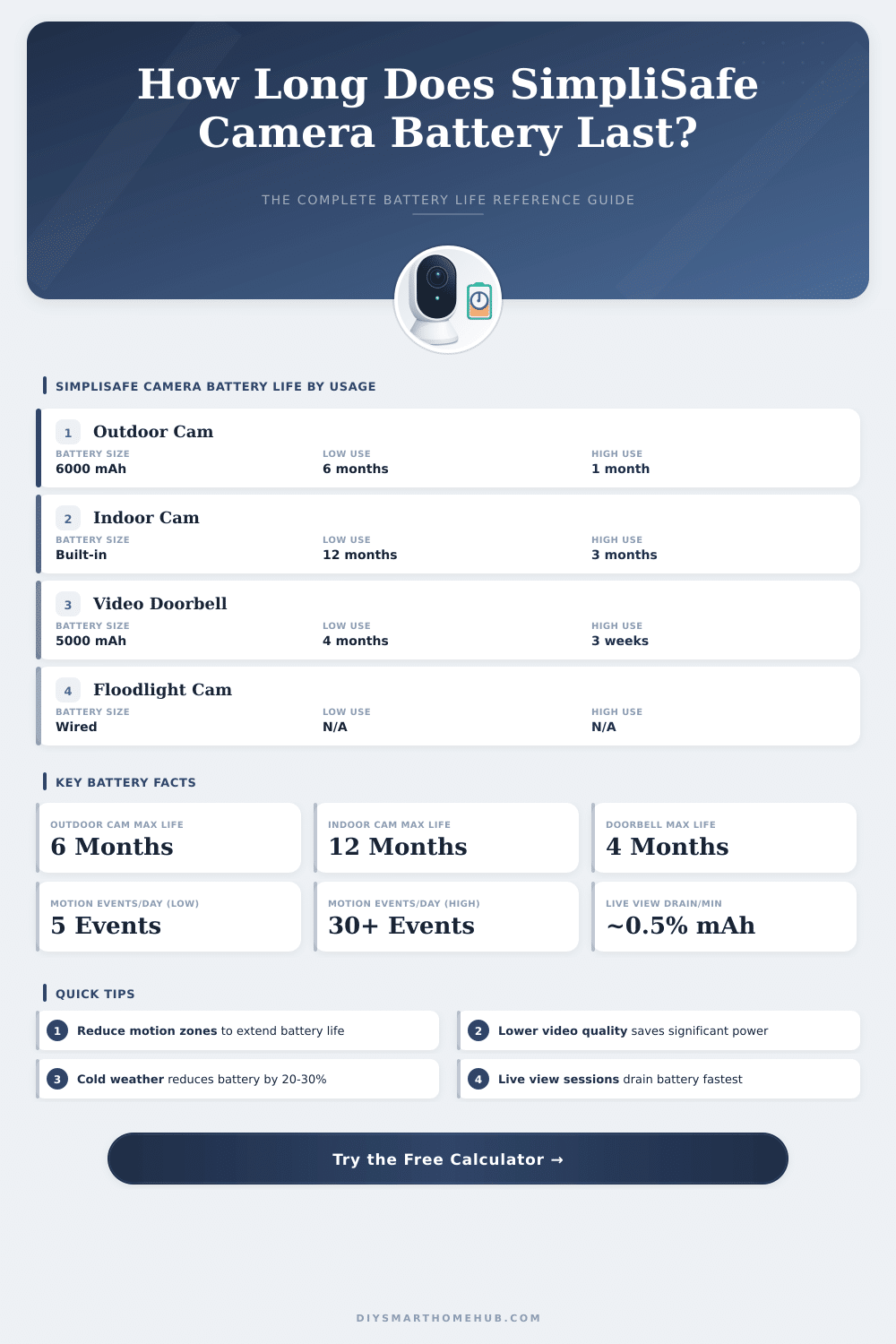
| Outdoor Wireless Cam | 4–6 months | 2–3 months | 3–5 weeks |
| Indoor Wireless Cam | 9–12 months | 5–7 months | 2–3 months |
| Video Doorbell Pro | 3–4 months | 6–8 weeks | 2–3 weeks |
| Outdoor Wired Cam | No battery (wired) | No battery (wired) | No battery (wired) |
| Temperature Range | Battery Life Impact | Estimated Reduction | Tips |
|---|---|---|---|
| Above 60°F (15°C) | Optimal performance | 0% | Ideal operating range |
| 32–60°F (0–15°C) | Slight reduction | 10–15% | Minimal impact |
| 14–32°F (-10–0°C) | Noticeable reduction | 20–30% | Charge more frequently |
| Below 14°F (-10°C) | Significant reduction | 30–50% | Consider wired option |
The SimpliSafe outdoor camera runs on a rechargeable Battery… The kind of thing that seems practical, until you stand on a sliding ladder and wonder how many times you really will have to swap it. The life of the Battery ranges between 3 and 6 months per charge, but this amount changes a lot based on your settings, the place where you installed it and the amount of movement that it picks up.
Cameras that watch busy doorways or front porches drain much more quickly because motion alerts and extra video use energy more quickly than one would think.
How to Charge, Replace, and Save the SimpliSafe Camera Battery
Charging the Battery requires a USB power brick with at least 5V and 1.5A. Nothing fancy, but you must use the right model, otherwise you will get only a partial charge that will leave you upset. A full charge takes up to 6 hours with the cable in the box.
Here is the spot: SimpliSafe also sells a back-up Battery for purchase. It is black and available at stores like Lowe’s, and resets in around 7 hours. Having one of those makes sure that your camera runs withuot breaks, very handy, if you worry about missing an important moment.
Swapping the Battery is really easy. Slide it into the port with the tab straight out, then turn the cover back until it clicks. When you did the change, though, do not wonder if warnings about low Battery or network issues stay in the app for a bit of time (sometimes up to 21 hours).
It bothers, sure, but that is just how the system works.
Here is something important too note: even when connected to power, this Simplisafe Camera does not act as a usual wired security camera. It still stays in sleep and wakes up only because of movement, instead of working all day. That differs from systems that always stay active.
If your camera is in a place with many folks, you maybe will have to change the Battery more often than the specs promise. Going up the ladder monthly for that soon becomes boring, especially after promises about months of use.
Making the Battery last longer is possible, if you set some things. Turning on the options “Only Folks” and “Active Zones” in the app cuts extra alerts… Fewer alerts mean less energy use.
SimpliSafe also offers a solar panel with a cable kit, if you want to keep the Battery charged without hassle. The solar panel needs around 3 hours of good sunshine daily to keep the charge, although everything depends on how much sun reaches the place of your camera.
Firmware updates fixed some problems with the Battery over time. Earlier updates fixed cases, where the outdoor camera wrongly showed itself offline and cut the constant alerts about low Battery. When problems with the Battery come up, checking the version of the firmware in theapp is worth doing first.