🤖 Roomba Battery Life Calculator
Estimate runtime per charge, total cleaning cycles, and yearly battery performance for your Roomba model
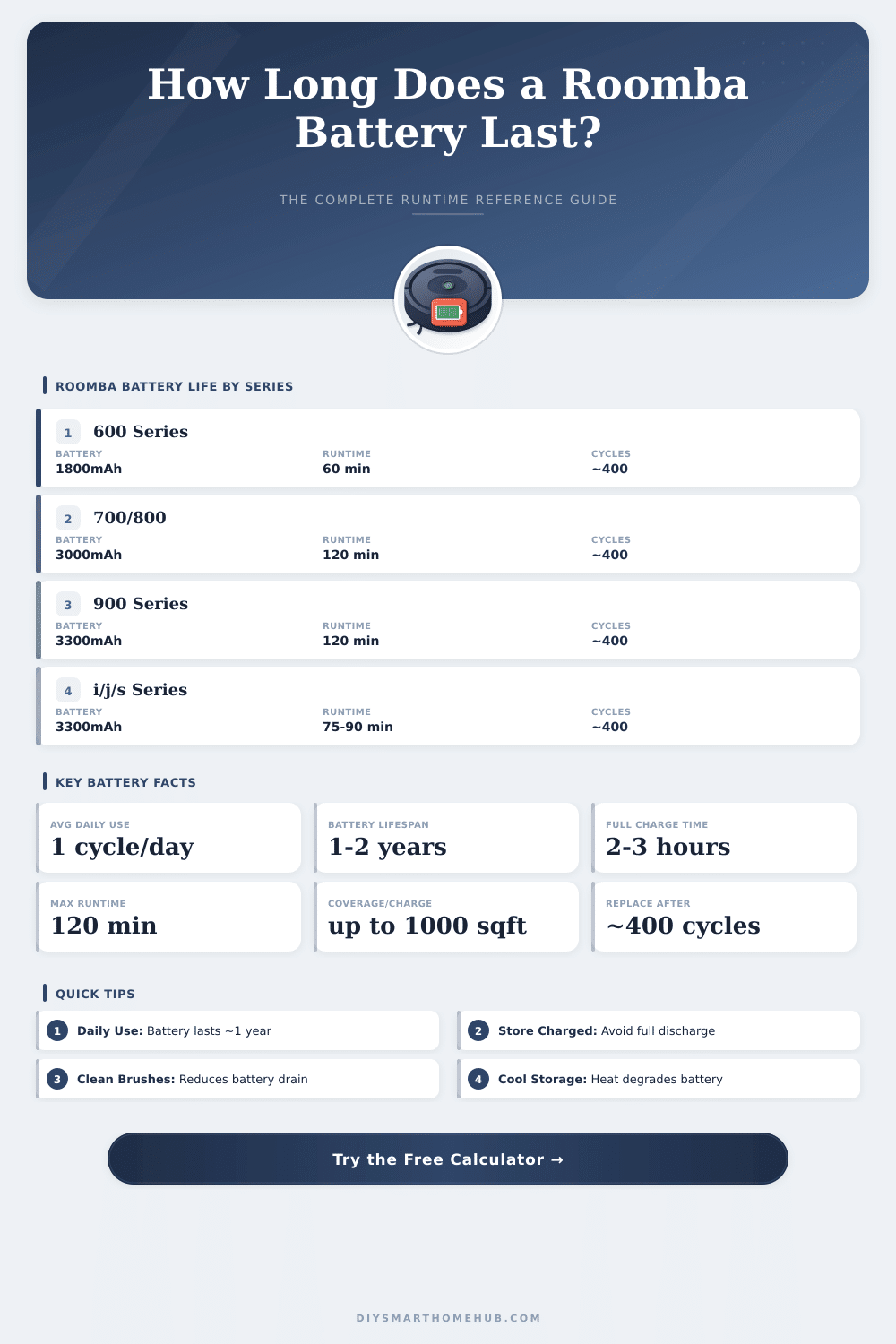
| Series | Battery Capacity | Runtime | Charge Time | Max Cycles | Coverage / Charge |
|---|---|---|---|---|---|
| 600 Series | 1800 mAh | 60 min | 2 hrs | ~400 | Up to 600 sq ft |
| 700 Series | 3000 mAh | 90 min | 2-3 hrs | ~400 | Up to 800 sq ft |
| 800 Series | 3000 mAh | 120 min | 2-3 hrs | ~400 | Up to 1000 sq ft |
| 900 Series | 3300 mAh | 120 min | 2-3 hrs | ~400 | Up to 1000 sq ft |
| i Series | 3300 mAh | 75 min | 3 hrs | ~400 | Up to 750 sq ft |
| j Series | 3300 mAh | 75 min | 3 hrs | ~400 | Up to 750 sq ft |
| s Series | 3300 mAh | 120 min | 3 hrs | ~400 | Up to 2000 sq ft |
| Combo Series | 3300 mAh | 110 min | 3 hrs | ~400 | Up to 1500 sq ft |
| Age (Months) | Approx. Cycles Used (Daily) | Capacity Remaining | Runtime Remaining | Status |
|---|---|---|---|---|
| 0–3 | 0–90 | 100% | Full rated runtime | ✅ Excellent |
| 3–6 | 90–180 | 95–100% | Near full runtime | ✅ Excellent |
| 6–12 | 180–365 | 85–95% | Minor reduction | 🟢 Good |
| 12–18 | 365–548 | 70–85% | Noticeable reduction | 🟡 Fair |
| 18–24 | 548–730 | 50–70% | Significant reduction | 🟠 Poor |
| 24+ | 730+ | Below 50% | Replace recommended | 🔴 Replace |
| Floor Type | Runtime Impact | Coverage Impact | Notes |
|---|---|---|---|
| Hard Floor (Wood/Tile) | Baseline (0%) | Baseline | Most efficient surface |
| Low-Pile Carpet | −5 to −10% | −5 to −10% | Minimal extra drain |
| Medium-Pile Carpet | −10 to −20% | −10 to −20% | Moderate suction needed |
| High-Pile Carpet | −20 to −35% | −25 to −35% | Maximum motor effort |
| Mixed Surfaces | −10 to −15% | −10 to −15% | Averaged across surfaces |
The Battery for Roomba is genuinely important because without good ones the device simply sits still. Its models mostly require 2 to 3 hours to fully charge. After full charge they can work on difficult surfaces for up to two hours.
In some versions the duration of the Battery reaches even 120 minutes, what is enough for a typical robotic vacuum.
All About Roomba Batteries
Roomba depends on special batteries, that are done to match certain energy demand. One can not use average rechargeable AA-batteries in that device. Every series requires its own types.
There are lithium ion replacements, that work with the e-, i- and j-series, even so not with the j9+. Besides that, another lithium ion Battery of 1800 mAh works for the 960 and for several models from the 600 and 800 series, like the 614, 640, 670, 675, 680, 690, 805, 850, 860, 890 and 895.
The iRobot XLife Extended Duration Battery offers double more cleaning cycles than the prior Advanced Mighty System. Like this it practically doubles the use period before refill becomes needed. It fits with the Roomba 500 and 700 series, the Scooba 450 and the Craete 2.
Also third-party batteries enjoy popularity. For the 500, 600, 700, 800 and 900 series there are improved replacements with 3300 mAh capacity. Some users even manage to install versions up to 6800 mAh.
One person put a 3400 mAh Battery in his i7. Another changed the Battery of his J7+ by means of a bigger capacity, what well improved the cleaning time. NiMH stays a good type for batteries, and it is safer to build than lithium. 14.4V 3500 mAh NiMH full Battery meant four Roomba works very well.
Even so not every third-party Battery works. Some Roombas refuse certain brands. For instance, one 6000 mAh big Battery of a particular maker was entirely refused by the device.
Some of those third-party batteries fail already after only five months.
The problems with charging appear quite commonly. One common issue is Charging Error 1, that happens when the Battery gets too low so that the Roomba can not recognize it. Charging Error 19 means that the dock can not charge or that the current is outside normal range.
Sometimes the fault sits on the charging station itself, not on the Battery. Bad contacts or springs on the dock can cause such problems. Usually white, green or orange light shows that charging happens.
Blinking light means that it yet is not fully charged. If no light shines, maybe it absolutely does not charge.
Roombas never genuinely turn off, because the WiFi stays active, what drains the Battery after some hours on the charging base. Putting them in Battery saving mode helps. Long time in saving mode without use can harm the Battery.
The original Battery usually lasts around four years before change becomes needed. Somefolks even build batteries using separate cells like 18650 lithium ions or 21700 cells.