Power Bank Real Capacity Calculator
Estimate real USB output from rated mAh, 3.7 V cell energy, boost efficiency, cable losses, device charging losses, measured output Wh, and capacity retention.
Calculation breakdown
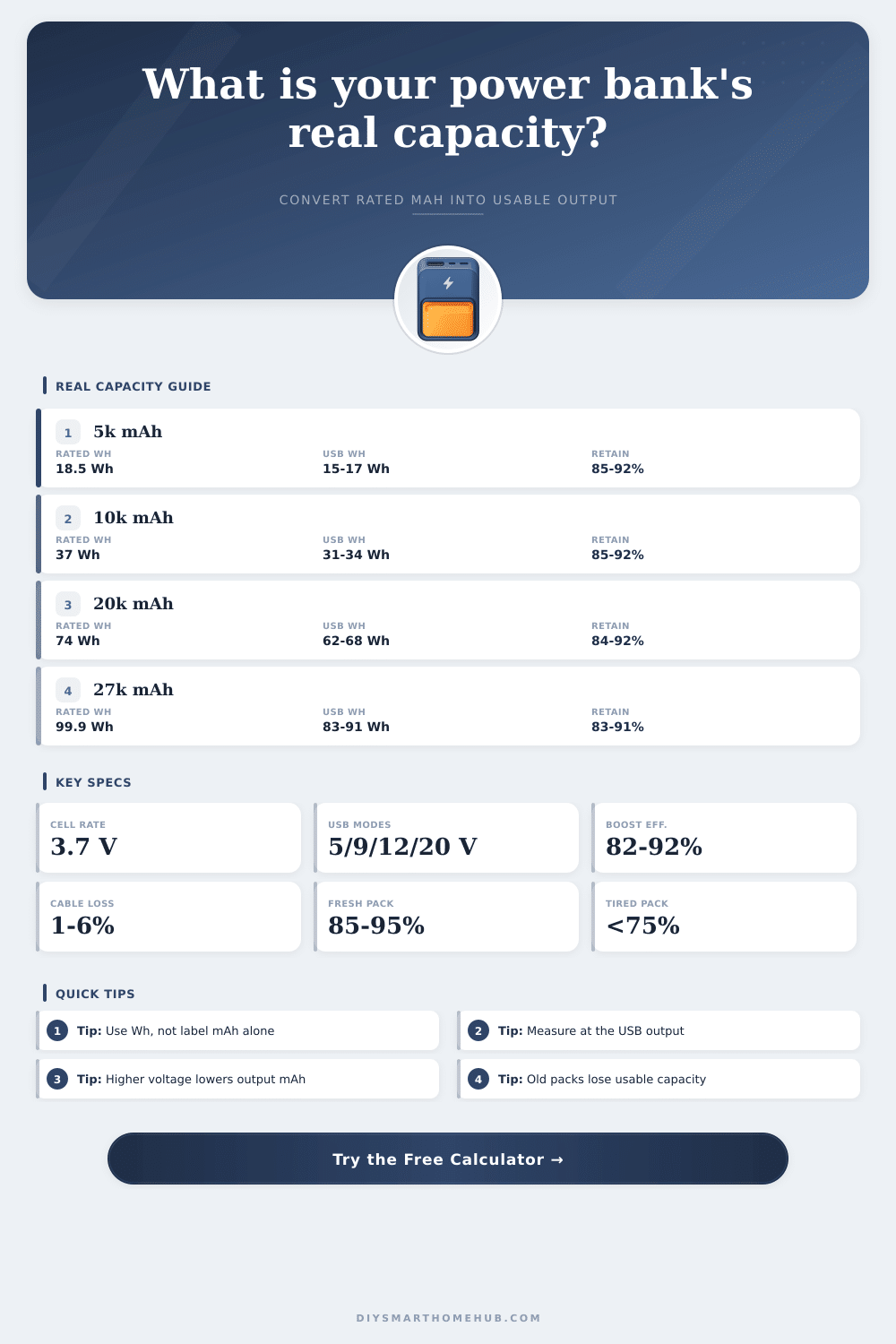
| Rated label capacity | Rated Wh at 3.7 V | Expected USB Wh at 88% | 5 V output mAh before device loss |
|---|---|---|---|
| 5,000 mAh | 18.5 Wh | 16.3 Wh | About 3,260 mAh |
| 10,000 mAh | 37.0 Wh | 32.6 Wh | About 6,510 mAh |
| 20,000 mAh | 74.0 Wh | 65.1 Wh | About 13,020 mAh |
| 26,800 mAh | 99.2 Wh | 87.3 Wh | About 17,460 mAh |
| 40,000 mAh | 148.0 Wh | 130.2 Wh | About 26,050 mAh |
| USB output mode | Voltage | mAh from 32 Wh output | Typical use |
|---|---|---|---|
| Basic USB | 5 V | 6,400 mAh | Phones, earbuds, small controllers |
| Fast charge low PD | 9 V | 3,556 mAh | Phones and compact tablets |
| USB-C PD mid | 12 V | 2,667 mAh | Routers, hubs, and tablet loads |
| USB-C PD laptop | 20 V | 1,600 mAh | Laptops and higher-wattage devices |
| Measured retention | What it usually means | Calculation clue | Result interpretation |
|---|---|---|---|
| 90% to 100% | Excellent or optimistic loss assumptions | Measured Wh close to expected USB Wh | Pack is performing very well. |
| 80% to 89% | Normal used-pack behavior | Some aging or test load losses visible | Still practical for daily use. |
| 70% to 79% | Noticeable aging or high-load sag | Measured Wh well below label-based estimate | Expect fewer full charges. |
| Under 70% | Weak cells, cold test, or poor conversion | USB meter result far below expected output | Retest with another cable and load. |
| Preset | Rated capacity | Measured output | Typical result |
|---|---|---|---|
| 5,000 mAh pocket test | 18.5 Wh | 15.8 Wh | Healthy small bank, about one phone charge. |
| 10,000 mAh slim test | 37.0 Wh | 31.5 Wh | Normal daily bank with modest losses. |
| Aged 10,000 mAh test | 37.0 Wh | 24.8 Wh | Reduced retention, fewer real charges. |
| 20,000 mAh phone bank | 74.0 Wh | 63.0 Wh | Strong multi-phone travel capacity. |
| 26,800 mAh flight pack | 99.2 Wh | 84.5 Wh | Near common flight limit, laptop capable. |
Label mAh is tied to the internal 3.7 V cells. USB output mAh at 5 V, 9 V, or 20 V is a different number, so Wh is the cleaner comparison.
A USB meter result in Wh lets the calculator estimate retention. If the result is low, retest with a steady load and a short rated cable.
The reason I have a power bank in my bag is because of the sticker: “Ten thousand milliamp hours.” That’s how much it’ll charge my phone, right? No. Ten thousand milliamp hours measure from the cells within the power bank which are sitting at 3.7 volts each. Your phone need five volts (or more) coming out the other end. What happened to the rest of your capacity? It’s hiding in this voltage gap.
If you care about knowing what percentage charged your power bank really hold; and when it will be useful for topping up, you’d better know about this gap. That’s where this page come in: it bridges that gap for you. It takes the rated capacity and converts it into watt hours, the only honest measure of battery comparisons. Then it removes all losses that inevitably occur. These happen when you boost voltage, run current down a cable, and deal with heat inside your laptop or phone.
Why Your Power Bank Has Less Power Than It Says
Plugging in the details of your particular set-up means the calculator above will do all the math for you, no guesswork on conversions and coefficients required. All you have to know is how efficient your cable actualy is, plus what voltage mode your device likes.
But there’s no such thing as a free boost. To do it, the built-in circuitry has to takes the three point seven volts from your cells and convert it into five volts or more. And the conversion generates heat, it burns energy. Eight to fifteen percent are typical loss on decent power banks, and that’s just from stepping up the voltage. That’s where people go wrong. They see “ten thousand milliamp hours” and assume they’ll get “ten thousand milliamp hours” out of USB port. It doesn’t work like that; it can’t. The physics won’t allow it. As you increase voltage, you reduce current compared to what went in, while maintaining roughly the same watt hours.
Surprisingly, quality of the cable also make quite a difference in your ultimate result. Because a long skinny or worn-out cable is similar to having a small pipe, it heats up from resistance while limiting flow. You can account for the cable loss in the calculator. Good gear typically has about one to six percent, but cheap accessories can reach extremely high levels.
Next time you’re out trying to squeeze a couple more percentage from your power bank and find yourself disappointed, grab a replacement cable first instead of blaming battery. It’s such a little thing, but it really does make a big difference when you’re talking about a few percentage points of power.
There’s also a quiet tax in terms of charging device efficiency. When you plug your phone into any charger, it doesn’t take all the watts that are fed into its port. Part of it turns into heat when charging quickly. Part of it is changed into something else to match voltage used by its own battery. And this depends on temperature and age… An old phone with a worn-down battery could end up holding onto fewer charges than a brand-new one, given the exact same charge source. That chart on the page illustrates this, explaining how retention rate decrease with age.
And with age comes loss of real capacity. The lithium ions in the battery wear out with time and hundreds of charge/discharge cycles, and that old power bank won’t hold as much total energy as it did when new. You can expect to get from a healthy pack about eighty to ninety percent of what manufacturer said it has. A tired one may only manage seventy-five percent or even less. Measure how much you’re putting out, and if it’s way lower then expected, then the battery cells themselves is wearing out (not the converter).
So really, milliamp hours will never paint the truest picture. Watt hours will always be better. It removes the voltage tricks from the equation and reveals pure workable energy. And that’s what happens when you begin to think in real-world watt hour terms instead of chasing label numbers: your expectations become grounded in reality. There are no more surprises in your pockets. The box promises power, but physics delivers the truth.