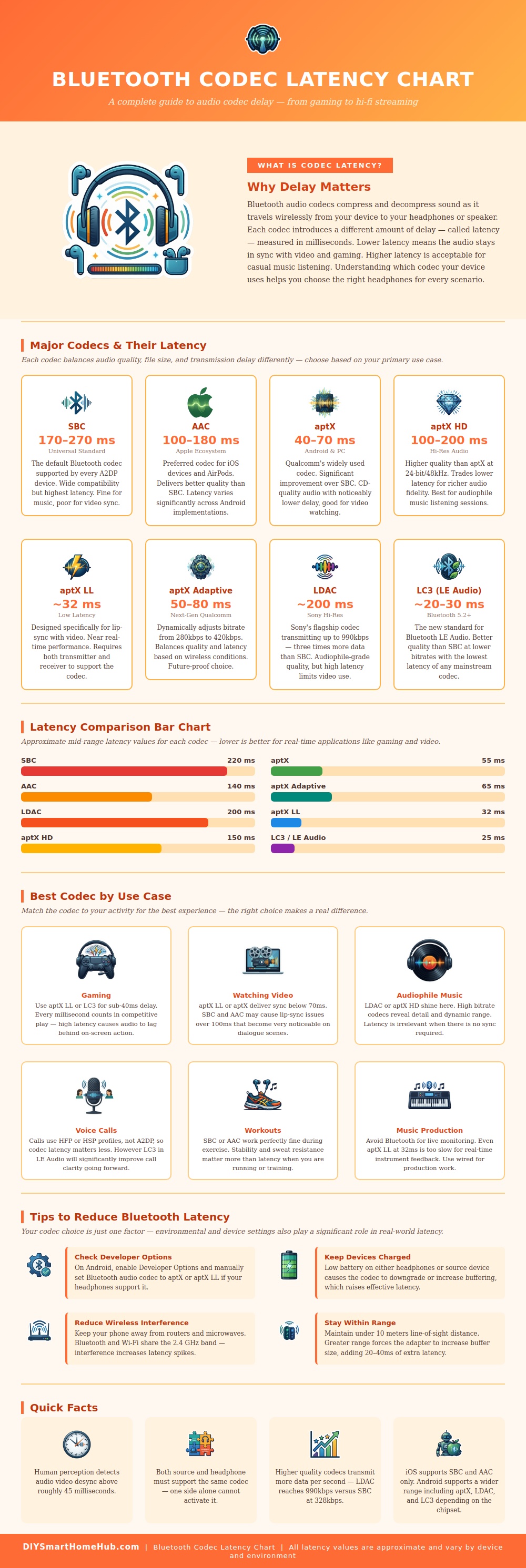
Bluetooth audio delay occur due to an inherent properties of Bluetooth technology. To transmit sound from one device to another, Bluetooth technology must compress the sound data and sends that compressed data to the Bluetooth receiver. This process of compressing and sending the audio data introduce a small amount of delay to that audio data.
This delay between the visual actions on a screen and the sounds heard through headphones can be noticeable. For example, a person may notice that the character’s lips is moving on the screen before there voice is heard through the headphones. In addition, a person may also experience audio delay when play video games.
Why Bluetooth Sound Is Late and How to Fix It
In this case, the person may notice that the sound of footsteps happens after the character’s movement of footsteps on the screen. The Bluetooth technology use different codec to manage the balance between audio quality and speed. Some Bluetooth codecs are created to deliver high quality audio but at the cost of introducing audio delay.
In contrast, other Bluetooth codecs minimize audio delay but provide less audio quality. These two main feature ensure that audio delay will differ depending on the Bluetooth codec used by a device. Depending on the activity a person is performing with the Bluetooth device, that Bluetooth device may automatically use a certain Bluetooth codec.
For example, if a person is listening to the music while walking, the audio delay may not be noticeable. In this case, Bluetooth devices will allow the user to set the Bluetooth codec to one that provides high quality audio so that the music is detailed and clearly. However, if a person is playing a video game or watching a movie with the Bluetooth device, the audio delay will be more noticeable.
In these cases, the Bluetooth device should use a Bluetooth codec that minimizes the audio delay between the screens and the sounds play through the headphones. The phone and the headphones that are being used determine the Bluetooth codec that a device use automatically. Most Bluetooth devices will default to the standard Bluetooth codec that will allow them to connect to the most device.
This default Bluetooth codec is not always the one with the fastest data transfer speed. However, some Bluetooth devices and headphones allow a person to manually change the Bluetooth codec used by the device. This change in Bluetooth codec may fix the problem of audio delay.
However, audio delay will only be reduced if both devices supports the new Bluetooth codec and if they agree to its use. In addition to the factors mentioned above that may cause audio delay, other environmental factors can contribute to audio delay. For example, if a person is in a very crowded area, there may be many wireless signal.
These wireless signals can interfere with the Bluetooth signal between the devices. The Bluetooth headphones may have to buffer the audio data to maintain the Bluetooth connection with the phone, contributing to audio delay. In addition to this, if a phone or headphone has a low battery, it may buffer the audio data to save power.
This buffering introduce audio delay between the visual and audio data. Lastly, if a person is located away from the phone or laptop, the wireless signal will be weaker. The Bluetooth system will have to work more hard to maintain the connection with the Bluetooth headphones.
This effort will lead to audio delay between the devices. In response to the problems related to audio delay, newer versions of the Bluetooth standard were create with the goal of reducing audio delay and improving the efficiency of Bluetooth technology. As more Bluetooth headphones and phones are introduced with these new Bluetooth standards, there will be a decrease in audio delay for all Bluetooth device users.
If audio delay is a problem for a person, there are steps that they can take to fix the issue. For instance, they can purchase Bluetooth headphones with low delay Bluetooth codec or they can adjust the Bluetooth codecs on the devices that they are using.