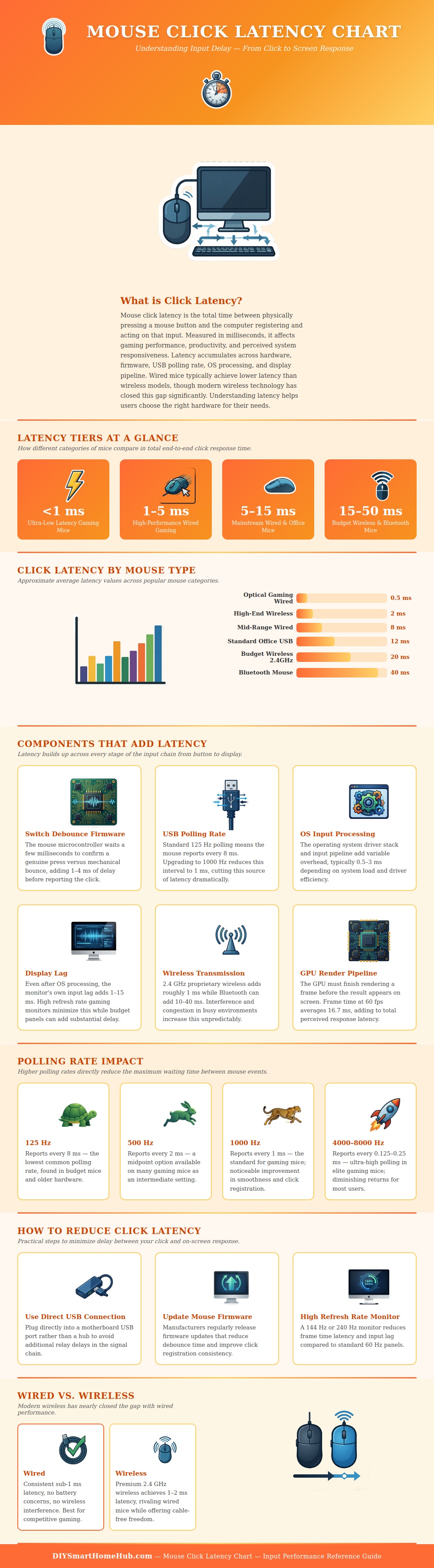
When you click an mouse button, the mechanical action of clicking the mouse button must travel through several different stage before the action of clicking the mouse is reflected on the screen. The delay between clicking the mouse button and seeing that click reflected on the screen is referred to as the latency of the mouse. While many users may feel as if there is a latency between the click and the screen reflection of the click, there are actualy several different factor that contribute to that delay.
These factors includes the latency caused by the switch debounce of the mouse button, the polling rate of the mouse, the operating system latency, wireless latency, and display lag. Each of these factors contribute to the total latency that the user experience with the mouse, and understanding each of these factors allow the user to decide if changing the hardware that they use will lead to a reduction in the latency of that mouse. Wireless mice tends to have a more higher perceived latency than mice that are connected directly to the computer through a USB port.
Why Your Mouse Click Feels Slow
However, this isnt always true of wireless mice, as the latency between wireless and wired mice has become very small. In many cases, wireless mice that are high end models will have the same latency as wired mice; users will not notice any difference between the latency of wireless and wired mice. However, latency can be a determining factor in the world of fast paced, competitive gaming.
For the majority of users, though, the convenience of a wireless mouse is a more important factor than the very small amount of latency that may be introduced by using wireless technology. Another factor that will influence the latency of the mouse is the polling rate of that mouse. Polling rate is the frequency at which the mouse send information to the computer.
If the polling rate of the mouse is low, the mouse will take longer to relay information to the computer of the clicking of a button; thus, the latency will be increased. If the polling rate is high, though, the mouse will send information to the computer more frequent; thus, latency will be decreased. Gaming mice, for example, often allow users to adjust the polling rate, allowing those users to view the difference that can be made by changing the polling rate from a low to a high rate.
Another factor that will impact the latency of the mouse is the monitor that the user select for their computer. Latency can be introduced by the monitor if the refresh rate of the monitor is too low. Refresh rates that are high will cause the monitor to process the images that are created on the monitor very quickly.
High refresh rates will make the mouse feel more responsive. If, though, the user selects an older monitor with high levels of input lag, that monitor will introduce latency with each mouse click, regardless of the speed of the mouse. There are a few changes that can be made to the computer and the mouse without having to purchase new hardware.
For example, the user can plug the mouse directly into a USB port on the computer’s motherboard instead of plugging it into a USB hub. Plugging the mouse directly into the motherboard will eliminate latency caused by the USB hub. Additionally, updating the firmware of the mouse may reduce the latency caused by switch debounce time.
Finally, using a monitor with a high refresh rate will likewise reduce the latency of the mouse. High refresh rates will allow the computer to display each frame of the screen more quickly. The type of wireless connection that a wireless mouse uses will also impact the latency of the mouse.
Budget wireless mice often have higher latency than more expensive wireless mice because higher-end mice utilize higher-quality radio hardware that allow for faster transmission of signals from the mouse to the computer. Bluetooth wireless mice have higher latency than 2.4 GHz wireless mice because the Bluetooth protocol isnt design to transmit data at low-latency rates. Finally, users must decide whether or not the latency of the mouse is a problem for the type of work that they do with that mouse.
For most office work, latency isnt a problem. For competitive gaming, though, latency can be a problem. Thus, users should of purchase computer and mouse hardware that will best allow them to perform the type of work that they do with the mouse.