Security Camera Storage Calculator
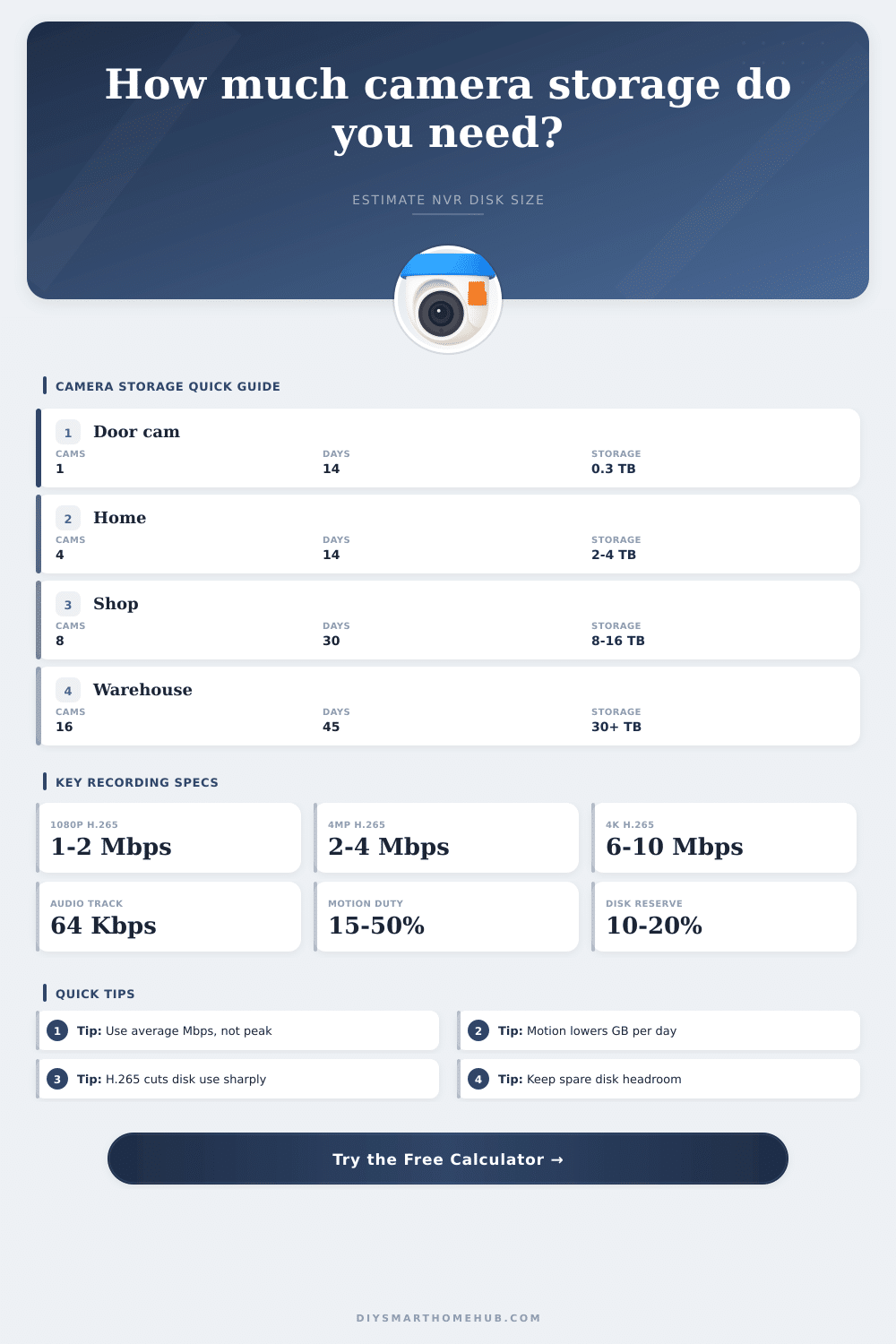
Estimate how many terabytes your NVR, NAS, DVR, or edge recorder needs from camera count, resolution, codec, frame rate, recording duty cycle, retention, and reserve headroom.
| Resolution | Pixels / MP | Typical H.264 at 15 fps | Typical H.265 at 15 fps | Best fit |
|---|---|---|---|---|
| 720p | 1280 × 720 / 1MP | 1.2 Mbps | 0.7 Mbps | Entry doors, package views |
| 1080p | 1920 × 1080 / 2MP | 2.5 Mbps | 1.4 Mbps | General home monitoring |
| 1440p | 2560 × 1440 / 3MP | 4.0 Mbps | 2.2 Mbps | Porches, counters, hallways |
| 4MP | 2688 × 1520 / 4MP | 5.0 Mbps | 2.8 Mbps | Driveways and small business |
| 5MP | 2592 × 1944 / 5MP | 6.0 Mbps | 3.3 Mbps | Wider outdoor scenes |
| 4K | 3840 × 2160 / 8MP | 12.0 Mbps | 6.6 Mbps | Identification-critical zones |
| Storage type | Typical camera count | Storage behavior | Strength | Watch point |
|---|---|---|---|---|
| NVR with surveillance HDD | 4 to 64 cameras | Continuous circular recording | Best all-around retention pool | Use usable RAID capacity, not raw slots |
| DVR for analog HD | 4 to 32 cameras | Encoded by recorder channels | Simple migration from coax cameras | Codec options may be limited |
| NAS running camera software | 2 to 80 cameras | Shared volume with quotas | Flexible RAID and expansion | Leave CPU and network headroom |
| MicroSD edge recording | 1 camera per card | Local overwrite loop | Useful failover recording | High write endurance matters |
| VMS server array | 32+ cameras | Policy-based archives | Scales for multi-site systems | Plan both ingest Mbps and disk IOPS |
| Setting | Calculator factor | Typical use | Storage impact | Formula note |
|---|---|---|---|---|
| H.264 | 1.00x | Older cameras and DVRs | Baseline | Most compatible stream |
| H.265 / HEVC | 0.55x | Most modern IP cameras | About 45% lower than H.264 | Best default for NVR sizing |
| Smart H.265+ | 0.45x | Static scenes with motion detection | Lower average writes | Assumes mostly stable background |
| MJPEG | 6.00x | Specialty snapshot workflows | Very high storage use | Frame-by-frame compression |
| Audio track | +0.064 Mbps | Door, counter, or intercom areas | Small but constant addition | 64 Kbps audio allowance |
| Scenario | Assumed streams | Recording profile | Approx. GB per day | Common retention target |
|---|---|---|---|---|
| Single 1080p door camera | 1 × H.265, 15 fps | Typical motion, 35% | 5 to 8 GB | 7 to 14 days |
| Four-camera home NVR | 4 × 1080p H.265, 15 fps | Continuous | 55 to 75 GB | 14 to 30 days |
| Small shop 4MP system | 8 × 4MP H.265, 20 fps | Continuous | 250 to 420 GB | 30 days |
| Warehouse interior | 16 × 4MP H.265, 15 fps | Continuous | 450 to 750 GB | 30 to 60 days |
| Outdoor 4K identification | 2 × 4K H.265, 15 fps | Busy motion, 50% | 70 to 110 GB | 21 to 45 days |
| Usable storage pool | At 50 GB/day | At 150 GB/day | At 500 GB/day | Best-fit system size |
|---|---|---|---|---|
| 1 TB usable | 20 days | 6.7 days | 2 days | 1 to 2 light cameras |
| 4 TB usable | 80 days | 26.7 days | 8 days | Small home systems |
| 8 TB usable | 160 days | 53.3 days | 16 days | Homes and small offices |
| 16 TB usable | 320 days | 106.7 days | 32 days | 8 to 16 camera NVRs |
| 32 TB usable | 640 days | 213.3 days | 64 days | Large NVR or NAS arrays |
Security camera storage are an essential component of a security system. The security camera storage must be planned out in such a way that security cameras’ footage will be available when it is needed. Many person install security cameras and recorders without considering the storage requirements for those cameras.
Eventualy, the storage for those security cameras will run out before the amount of security footage that is desired to be store. The storage calculator require several different inputs to calculate the amount of storage that the security cameras will use. One of the primary inputs are the security camera resolution.
How to Plan Storage for Security Cameras
A 1080p resolution will produce more data then a 720p resolution. Additionally, a 4K resolution will contain even more data than a 1080p resolution. Another of the main data inputs is the frame rate.
A frame rate of 15 frame per second will produce less data than thirty frames per second. The third main input is the codec that are used for the security cameras. A codec with H.265 compression will produce half the data of a codec with H.264 compression.
The fourth input is for the data that the audio from the security cameras will produce. Finally, the duty cycle of the surveillance cameras is another of the main storage calculator inputs. The duty cycle is the percentage of the day that the security cameras is continuously recording.
Security cameras can be set to continuously record, or to only record when there is motion in the security camera’s view. If the cameras are only recording in instances in which there is motion, there will be less storage requirement for those cameras. The last inputs are the number of days that the security footage need to be stored, the number of cameras, and the reserve percentage for storage.
The storage for security cameras will never show the full data capacity of the hard drive due to the data that is used for the filesystem. Additionally, there can be spikes in the data use from the security cameras, so there must be extra storage for those instances as well. When entering the storage calculator, it is important to ensure that the various input are correct according to the use of the security cameras.
If the surveillance cameras are only used to detect the presence of individuals, using a lower resolution and motion-only recording can lessen the storage requirements. However, if the security cameras must capture the features of individuals or license plate of incoming vehicles, then higher rates of data will have to be used for these surveillance cameras to ensure that details are visible. Additionally, the surveillance camera’s storage will depend upon the location of the surveillance camera.
Cameras that view areas with a lot of activity will require more storage than those that view less active areas. There are a few physical factor that can impact the surveillance security cameras. The bandwidth of the network between the security cameras and the recording device may not be able to handle the data that the surveillance cameras are producing.
Additionally, the recording device may struggle with writing so much data at once from the surveillance cameras of high resolution. Finally, hard drives will eventually fail over time. Therefore, you should of plan for the surveillance system to have every three or four years worth of hard drives replaced.
There are a few mistakes that many people makes when calculating the storage needs of their security cameras. Using the maximum bitrate of the surveillance cameras instead of the average bitrate will result in an oversize security camera storage system that will cost too much money. Additionally, if the reserve percentage is not included in the storage requirements, the surveillance system may delete some of the security footage before the amount of day that is desired to be stored.
To avoid these problems, create a buffer of ten or fifteen percent. Additionally, providing the storage system with extra headroom will make it much easier to add more security cameras in the future if needed. Environmental factor will impact the reliability of the security camera storage.
Hard drives that are stored in hot locations, such as attics, will fail more often than hard drives that are stored in cooler locations. Additionally, hard drives that are exposed to power fluctuations may experience corrupted recordings of the security cameras. These factors will not impact the storage calculation but will impact the length of time that the surveillance camera storage remain reliable.
The purpose of planning the storage for the security cameras is to ensure that the security system will keep the security footage that is needed for surveillance without requiring people to constantly monitor the surveillance cameras. If the factors are set up in the storage system and the reserve percentage account for the instances of increased data use, the security camera storage system will be reliable. Additionally, if the storage system is properly plan, it will work on the first day that it is established and will continue to work on day four hundred.