Patch Cable Length Calculator
Estimate the finished Ethernet patch cord length to order for smart home racks, panels, wall plates, desks, shelves, and grouped network drops.
| Stock size | Metric size | Best smart home use | Planning note |
|---|---|---|---|
| 0.5 to 1 ft | 0.15 to 0.30 m | Adjacent patch panel and switch ports | Only works when ports align cleanly with little dressing. |
| 1.5 to 3 ft | 0.46 to 0.91 m | Same-row rack patching and small media panels | Often enough for short loops through a horizontal manager. |
| 5 to 7 ft | 1.52 to 2.13 m | Vertical rack jumps, shelves, hubs, and small cabinets | Useful when ports are separated by several rack units. |
| 10 to 15 ft | 3.05 to 4.57 m | Desk wall plates, media consoles, and gateway shelves | Leaves movement slack without an oversized coil. |
| 20 to 30 ft | 6.10 to 9.14 m | Garage panels, room jumpers, temporary AP tests | Check the total channel length when permanent cabling is long. |
| 50 ft and longer | 15.24 m and longer | Long temporary links and rack-to-rack paths | Use only when the full Ethernet channel still stays within rating. |
| Cable type | Typical frequency | Common Ethernet use | Nominal bend rule |
|---|---|---|---|
| Cat5e UTP patch | 100 MHz | 1 Gb links for hubs, TVs, bridges, and light PoE devices | About 4x cable outside diameter |
| Cat6 UTP patch | 250 MHz | 1 Gb links, short 10 Gb patching, APs, and smart panels | About 4x cable outside diameter |
| Slim Cat6 patch | 250 MHz | Dense patch panels where airflow and port access matter | Confirm the maker rating for dense bundles |
| Cat6A UTP patch | 500 MHz | 10 Gb-capable switches, NAS uplinks, and high-rate APs | About 4x cable outside diameter |
| Cat6A shielded patch | 500 MHz | Noisy panels, shielded jacks, and higher-performance uplinks | Avoid sharp bends that deform the shield |
| Cat8 shielded patch | 2000 MHz | Short high-speed equipment-room patching | Use broad routing and match shielded hardware |
| Routing method | Base path used | Added allowance | When it fits best |
|---|---|---|---|
| Direct face-to-face | Diagonal distance | 3% plus 0.1 ft | Short, visible patches between nearby ports. |
| Horizontal plus vertical managers | Horizontal + vertical | 10% plus 0.5 ft | Clean rack dressing through front organizers. |
| Side-managed rack path | Horizontal + vertical | 14% plus 1.0 ft | Patch cords routed around a side manager or door edge. |
| Overhead tray or shelf path | Horizontal + vertical | 12% plus 1.5 ft | Gateway shelves, ceiling trays, and cabinet tops. |
| Desk grommet or wall plate | Horizontal + vertical | 18% plus 2.0 ft | Moveable desks, TV consoles, and office plates. |
| Rack-to-rack dressed jumper | Horizontal + vertical | 15% plus 3.0 ft | Adjacent equipment racks with cable tray turns. |
| Project | Typical geometry | Likely stock length | Secondary planning check |
|---|---|---|---|
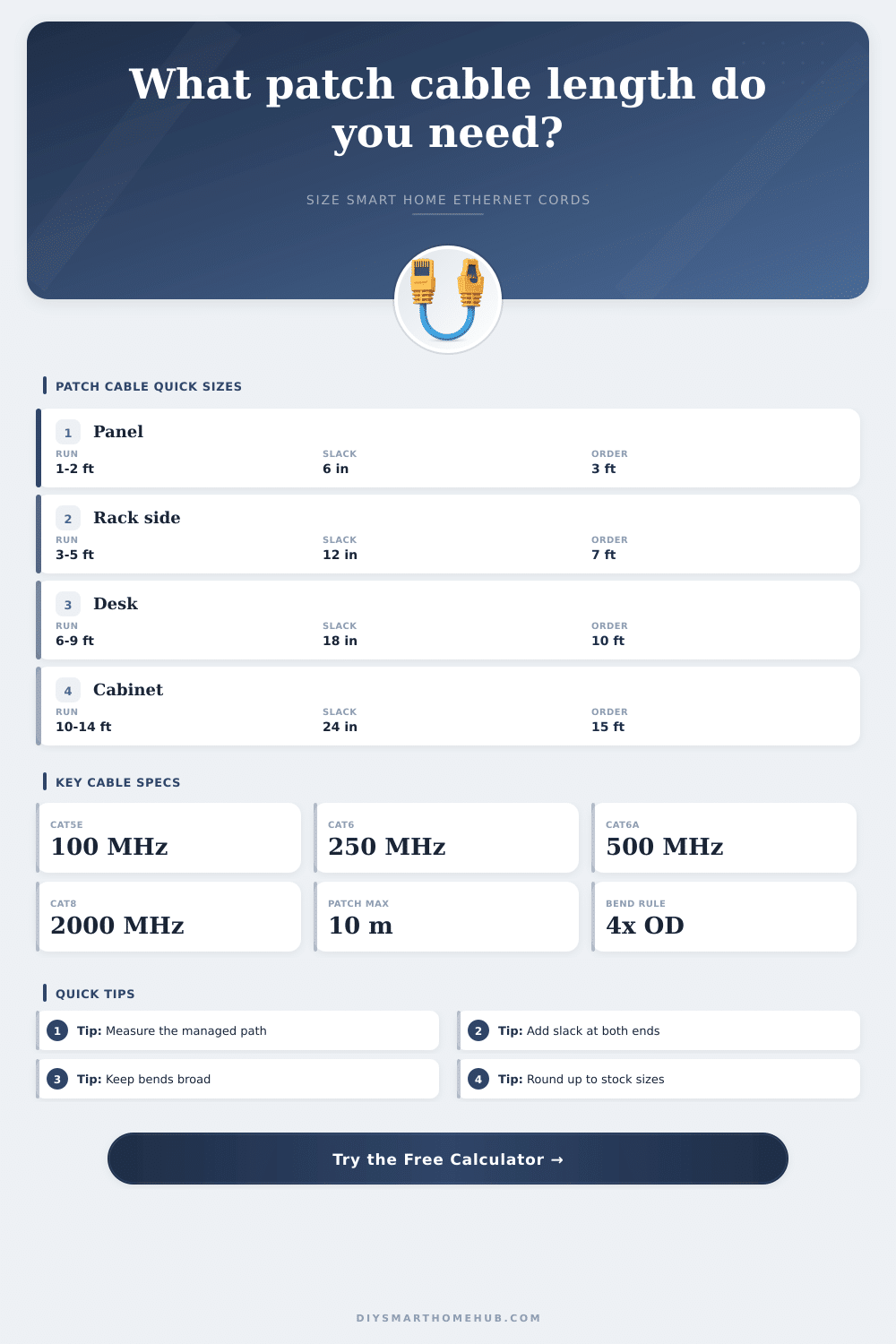
| Patch panel to switch row | 2 ft horizontal, 0.5 ft vertical | 3 ft | Great for tidy panels when ports line up. |
| 8U rack side manager | 3 ft horizontal, 3.5 ft vertical | 7 to 10 ft | Measure through the manager, not across the rack face. |
| Media cabinet shelf | 4 ft horizontal, 2 ft vertical | 7 ft | Include loop slack for sliding a shelf or gateway. |
| Desk to nearby wall plate | 7 ft horizontal, 2 ft vertical | 10 to 15 ft | Movement slack matters more than a perfectly tight path. |
| Garage automation panel | 10 ft horizontal, 3 ft vertical | 15 to 20 ft | Plan for cabinet doors, relays, bridges, and service access. |
When you are choosing patch cables for your smart home, you must consider the path that the patch cable will take. Patch cables doesnt necessarily travel in a straight line from one device to the next. Instead, the patch cables have to follow certain routes along the walls and the furnitures in your home.
If the patch cable selected is too short for the path from one device to the next, then the patch cable may end up pulling tight against a corner, or the device may strain the connection between those two devices. On the other hand, if there is enough length in the patch cable, a service loop can be created that allow for the device to be moved for any reason. Thus, before purchasing patch cables, you must determine how long the path will be between each of the device.
How to measure and choose the right patch cable length for your smart home
The two primary measurements of a patch cable are the horizontal offset and the vertical rise of the patch cable. The horizontal offset measurements is the distance from left to right between the two devices, and the vertical rise is the distance from device to device that is up and down in relation to the devices. These two measurements determine the straight line distance between the devices, but the patch cables does not necessarily travel in a straight line.
Instead, the patch cables may travel through cable managers or along lacing bars that is attached to the devices. If the patch cables enter a side manager or an overhead tray, the patch cable will require more length than if it merely enter a rack. Thus, you must account for the routing method of the patch cable when purchasing the patch cables.
Another important measurement is the slack in the patch cable. Slack is the length of the patch cable that is provided beyond the length between the devices. For example, a service loop that is incorporated into the patch cable allow for the patch cable to be labeled, it allows for a device to be moved for reasons like improved airflow, and it allows for the patch cable to be re-terminated.
Thus, if there is not enough slack in the patch cable, there will not be enough length to move the devices in the smart home. Slack should be included on both ends of the patch cable. Another factor to consider is the category of the patch cable and how it will behave within the rack.
Patch cables with thicker jackets will take up more space within the cable manager. Additionally, if there are too many thick patch cables within the rack, the cables may obstruct the airflow within the rack. Shielded patch cables are stiffer than unshielded patch cables.
Thus, cables with shielded wire will have a larger bend radius than those with unshielded wires. Lastly, slim patch cables will take up less space within the cable manager than other types of patch cables. However, the manufacturer of the slim patch cables may have different specifications for the bend radius of those cables.
Thus, you must consider each of these different factors when entering information into the cable length calculator that will determine the length of the patch cable. Patch cables are made in a variety of lengths by their manufacturers. If you calculate the length that is required for your smart home devices, it is important to round that length up to the nearest stock length of patch cable.
The stock lengths may require adding a few foot to the calculated length or several inches to allow for slack within the cable. This extra length is not wasted length because if it is incorporated into a broad loop rather than a tight coil of cable, the bend radius of the cable will be within the specifications required for the devices. A tight coil may create a stress point along the patch cable.
Another important rule for patch cables is the 100-meter rule for Ethernet channels. The permanent link from a device to the network in the wall will be 90 meters in length, meaning that the patch cables must total to be around 10 meters in length. If any one patch cable is too long in length, it will use up most of that 10-meter limit.
Thus, it is important to ensure that the calculated length is within the 100-meter limit. Many people make mistake when measuring the length of the patch cables for a smart home. For example, people may only measure the straight diagonal distance between the devices.
They may also only add slack to one end of the patch cable. Finally, people may order the patch cables to be of the exact length that is calculated. If the length between the devices is only measured for the diagonal, the patch cable may be too short.
Additionally, if slack is only added to one end of the patch cable, there will not be slack for the other end of the patch cable to allow for movement of the device. Finally, if the length of the patch cable is ordered to be of the exact length that is calculated, there may not be enough length within the patch cable to allow for movement of the devices. Reference tables can be used to determine the stock lengths of patch cables that is recommended for common tasks within a smart home.
For example, 3-foot patch cables may be used to connect two devices that is beside each other. Additionally, 7-foot patch cables may be used to move the patch cable vertically within the rack. A length of 10-foot or 15-foot patch cables may be ordered to allow for devices to move between a desk and a wall plate.
These tables are a starting point for smart homes, but will not be absolute rules for the length of the patch cables. A variety of other details within the smart home will impact the length of the patch cables. For instance, the patch cables within a media cabinet that is to be opened frequently will require more slack than patch cables for a media cabinet that is not going to be opened as often.
Additionally, if a PoE camera is mounted to the ceiling, there may need to be extra length to allow for the camera to be lowered for cleaning. Additionally, if there are going to be many patch cables within the rack, you can purchase slim patch cables to allow for even the tightest spaces within the panel to be used for the cables. Thus, walking the devices in your smart home will help you to have an idea of how the cables will need to be managed in the future.
The best way to calculate the length of the patch cables you will need for the smart home is to measure the dressed route of the patch cables. In other words, walk the path that you want the patch cables to take, and use a tape measure to determine the length. Make sure to note each turn that the patch cable must make and each cable manager that will be used.
Additionally, be sure to add in each measurement of the slack that will be required at each end of the patch cable. Finally, use a length calculator for patch cables to convert each of these measurements into a length of patch cable that will be available in stock and long enough to connect each device in the smart home.