Raspberry Pi Power Consumption Calculator
Estimate board draw, 5V current, daily energy, monthly kWh, battery runtime, and power supply headroom for always-on smart home projects.
Use 24 for always-on home automation.
Zigbee sticks, radios, cameras, displays, and USB sensors.
Add DC watts for GPIO HATs, fans, screens, or relay boards.
Typical USB-C adapters and DC converters land near 85% to 92%.
A 20000 mAh 3.7V power bank is about 74 Wh before conversion loss.
Estimated Power Profile
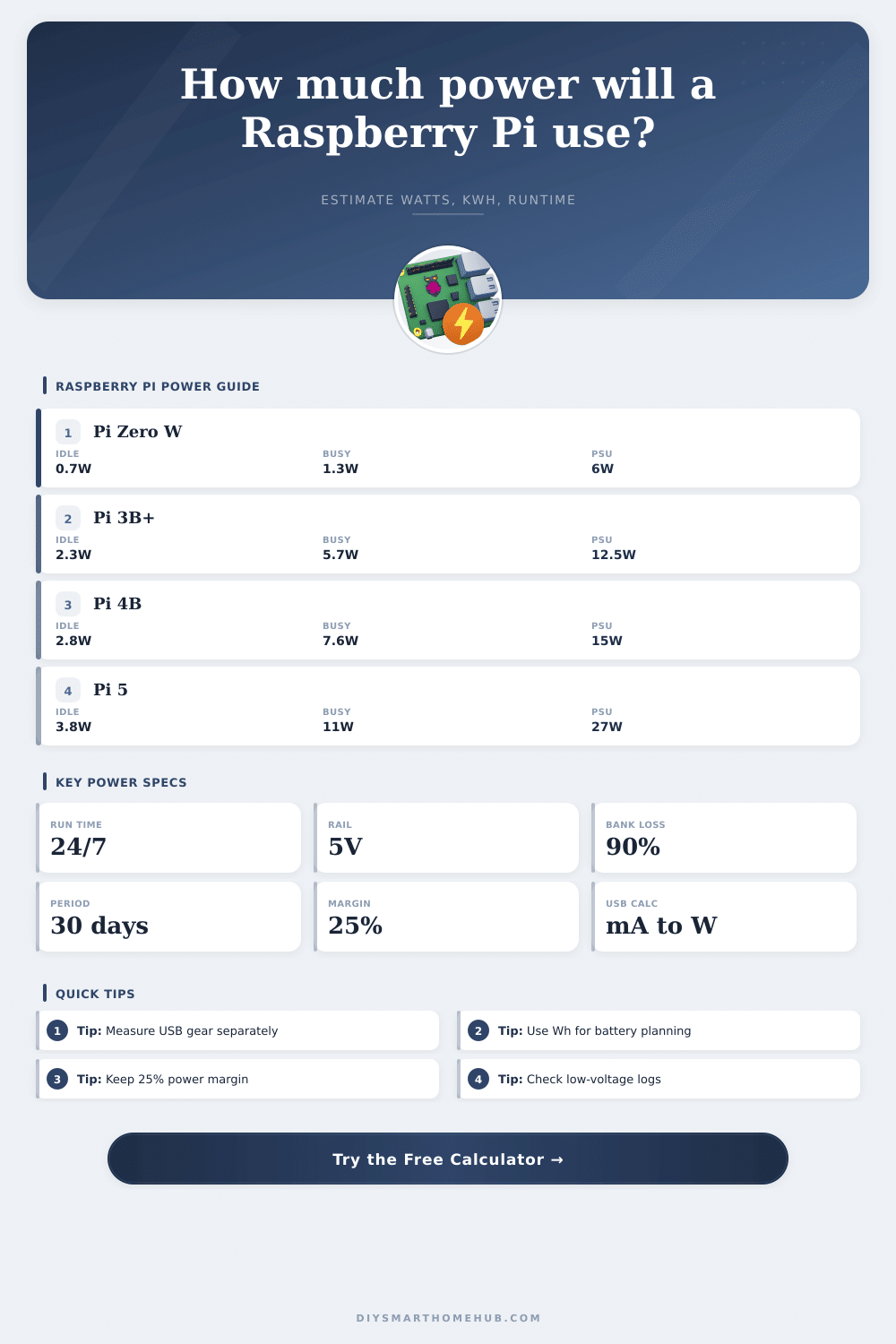
| Board | Idle Estimate | Busy Estimate | Connector | Planning Note |
|---|---|---|---|---|
| Raspberry Pi Zero W | 0.6 W | 1.3 W | Micro USB | Best for simple radio bridges and sensor nodes. |
| Raspberry Pi Zero 2 W | 0.8 W | 2.2 W | Micro USB | More CPU headroom while staying very low power. |
| Raspberry Pi 3 Model B+ | 2.3 W | 5.7 W | Micro USB | Plan 5.1V 2.5A when USB peripherals are attached. |
| Raspberry Pi 4 Model B | 2.8 W | 7.6 W | USB-C | Use 5.1V 3A for SSD or radio-heavy builds. |
| Raspberry Pi 400 | 2.9 W | 7.0 W | USB-C | Similar power class to Pi 4 in dashboard use. |
| Compute Module 4 | 1.8 W | 6.5 W | Carrier board | Add carrier, radios, relays, and storage separately. |
| Raspberry Pi 5 | 3.8 W | 11.0 W | USB-C PD | 5V 5A supply gives the larger downstream USB allowance. |
| Accessory | Typical Draw | 5V Current | When To Add It |
|---|---|---|---|
| Zigbee or Z-Wave USB stick | 0.3 W to 0.8 W | 60 mA to 160 mA | Always-on radio coordinators. |
| 2.5 inch USB SSD | 1.0 W to 2.5 W | 200 mA to 500 mA | Home Assistant database or logs. |
| Pi 5 NVMe HAT and SSD | 1.3 W to 3.0 W | 260 mA to 600 mA | Fast storage on Pi 5 automation servers. |
| Official camera module | 0.5 W to 1.2 W | 100 mA to 240 mA | Camera monitoring and snapshots. |
| Small 5V fan | 0.4 W to 1.0 W | 80 mA to 200 mA | Enclosures with sustained CPU load. |
| 7 inch touch display | 2.0 W to 4.0 W | 400 mA to 800 mA | Wall dashboards and control panels. |
| Project | Likely Board | Typical DC Draw | 24 Hour Energy | Power Planning Focus |
|---|---|---|---|---|
| BLE room bridge | Pi Zero W | 1 W to 2 W | 24 Wh to 48 Wh | Very small supply, clean WiFi placement. |
| MQTT sensor gateway | Zero 2 W | 2 W to 3 W | 48 Wh to 72 Wh | Battery UPS sizing and radio stability. |
| Automation controller | Pi 3B+ or Pi 4 | 4 W to 8 W | 96 Wh to 192 Wh | USB radios and storage headroom. |
| Camera monitor | Pi 4 or Pi 5 | 8 W to 15 W | 192 Wh to 360 Wh | Thermal margin and PSU current. |
| Wall dashboard | Pi 400 or Pi 5 | 7 W to 13 W | 168 Wh to 312 Wh | Display load and adapter efficiency. |
| Power Path | Useful Output | Best Match | Important Limit |
|---|---|---|---|
| 5.1V 2.5A micro USB | About 12.5 W | Pi 3B+ and older boards | Cable voltage drop matters at higher current. |
| 5.1V 3A USB-C | About 15 W | Pi 4, Pi 400, light Pi 5 use | Pi 5 reduces USB allowance on standard 3A supplies. |
| 5V 5A USB-C PD | About 25 W to 27 W | Pi 5 with storage or USB devices | Requires proper PD negotiation for full Pi 5 budget. |
| 37 Wh power bank | About 33 Wh usable | Short UPS for low-power boards | Runtime halves when draw doubles. |
| 74 Wh power bank | About 67 Wh usable | Pi 4 automation backup | Check that 5V output current meets the load. |
| 99 Wh power bank | About 89 Wh usable | Travel-safe high capacity backup | High-load Pi 5 setups still need 5V current headroom. |
The Raspberry Pi boards is often used in smart home projects. However, the Raspberry Pi boards can run for many years without being notice. Because of this, a person may overlook the power draw of the Raspberry Pi board.
This overlooked power draw may result in a high electricity bill or the failure of a battery backup system that power the Raspberry Pi board. While Raspberry Pi boards are energy efficiently, it is important to consider the power draw of all device that are attached to the Raspberry Pi board. A person must consider the processor and the memory of the Raspberry Pi board.
Raspberry Pi Power Use and Battery Life
However, these two components dont tell the whole story of the power draw of the Raspberry Pi board. The power draw of the Raspberry Pi board change based on the workload that the Raspberry Pi board requires for automation projects. Some periods of automation projects may show a light load of work.
However, during other periods, the automation project may require higher power draw of the Raspberry Pi board. It is important to consider the amount of current that each attached device will draw so that the Raspberry Pi board and the attached devices all have access to the same 5V rail that the Raspberry Pi board provide. Devices like radios, storage devices, and display screen all have an impact on the total wattage of the Raspberry Pi board and any device attached to it.
The efficiency of the power supply create a number in the power calculations that represents the energy that is lost between the Raspberry Pi board’s power adapter and the 5V power rail. No power supply is 100% efficient. Some energy from the power adapter is converted to heat before it can reach the Raspberry Pi board.
The lower the efficiency of the power supply, the more power watts that will be required from the power adapter to provide the same amount of power to the Raspberry Pi board. These inefficiencies in the power supply impact the total amount of energy that is available each day. Additionally, it also has an impact on the length of time that the battery backup will be able to provide power to the Raspberry Pi board.
The batteries that back up the Raspberry Pi boards is typically rated in watt-hours. However, when these batteries are discharge, the battery bank will lose some of those watt-hours as it converts the stored energy to 5 volt that the Raspberry Pi board uses. For instance, a battery bank that is rated at 74 watt-hour will not be able to deliver 74 watt-hours to the Raspberry Pi board.
The type of storage device that are used will also impact the power consumption of the Raspberry Pi. The power consumption of microSD cards is among the lowest. However, devices like hard drives or NVMe drives will use more power then microSD cards.
Additionally, devices like display screens or camera modules will use power from the Raspberry Pi even when the Raspberry Pi is not executing any program. Because of the way that display and camera modules use power from the Raspberry Pi, the total amount of power that is used each day will increase at a faster rate than if the Raspberry Pi was not performing these function. Power tables exist to give a start to projects to provide an idea of the power draw of these devices without having to refer to the datasheets of each device.
By understanding how much power the Raspberry Pi and its devices will draw under steady-state conditions, one can calculate the length of time that the batteries will run the Raspberry Pi board before they are deplete. To calculate the battery runtime, the watt-hours that the battery bank can provide divided by the total DC load will provide the length of time that the Raspberry Pi board and its devices will run. However, it should be noted that batteries may lose some of their capacity over time as they age.
Additionally, if the batteries are stored at higher temperature than recommended for those brands of batteries, they will also lose their capacity to hold as much energy as they were initially created to hold. If the system that is to be created is supposed to last through a full day without any access to mains power, a margin for error should of been incorporated into the calculations for the length of time that the battery backup will run. The size of the power supply is calculated in the same fashion as the length of time that the battery backup will run.
The power supply will have to provide enough current to supply the Raspberry Pi board and all of the device that are attached to it. A safety margin for the power supply is provided in most projects. This safety margin ensure that the power supply will be able to handle voltage drops in the power cables that supply the Raspberry Pi with power.
Additionally, a safety margin protect the power supply from current spikes that occur when the Raspberry Pi board accesses its data on the storage devices or when the Raspberry Pi board transmits data from its radios. If the power supply is set to be too small for the Raspberry Pi board and its devices, even a small change in the workload of the Raspberry Pi may cause the voltage to drop to levels that will cause the Raspberry Pi to either throttle or automatically reboot. Power tables can be used to compare the different model of Raspberry Pi boards quickly.
Raspberry Pi Zero W models will draw the least amount of power from the Raspberry Pi, which is important to consider for projects that are to run on batteries. However, Raspberry Pi 4 and 5 models have more power available to support additional storage devices and camera modules. However, they also have a higher baseline power draw.
These tables also provide information about the type of connectors and the power rating of common power supplies that are available for each model of Raspberry Pi. One of the most common mistake that people make is the idea that the power draw of the USB ports is an optional part of the power calculations. However, if the project includes radios or storage devices, they will be a significant part of the total power draw of the Raspberry Pi.
If these devices are ignore, the total power draw will be too low to supply the power to these devices. Another common mistake is to forget that the efficiency percentage refer to the total DC load of the Raspberry Pi and its devices. A small change to the efficiency will impact the total amount of power in watts that come from the power adapter to the Raspberry Pi.
Additionally, these changes will accumulate over time. Ultimately, the goal of calculating the power draw of a Raspberry Pi and its devices is to determine the actual cost of operating the Raspberry Pi and whether or not the power path can handle the system. With the correct inputs, the calculations will generate results that provide information about whether or not an upgrade to the power supply, Raspberry Pi model, or battery backup is needed prior to purchasing and mounting the Raspberry Pi and its devices.