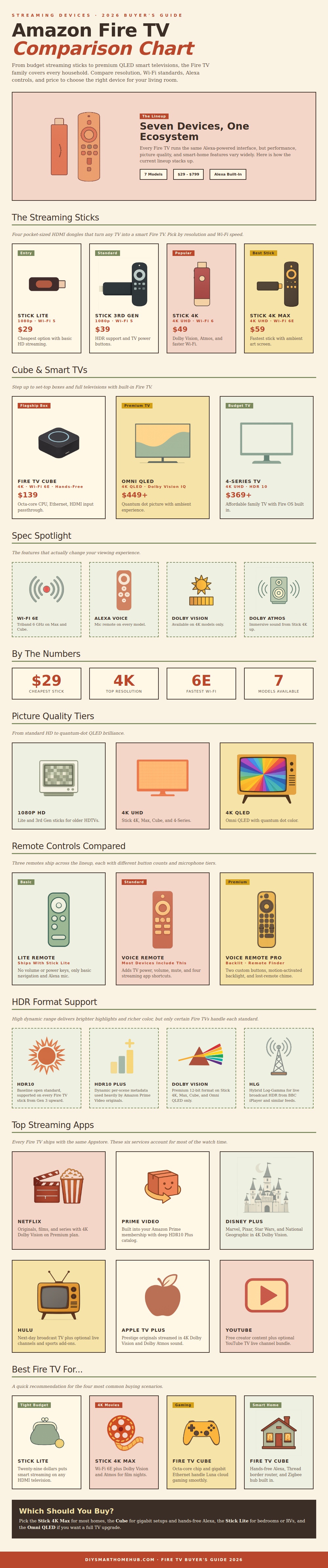
Fire TV device come in several different formats. The formats include HDMI sticks, set-top boxes, and built-in televisions to Fire TV devices. To determine which Fire TV device to purchase, you must consider the type of television that you has and the speed of the internet connection in your home.
If you own an older television, purchasing an HDMI stick will allow you connect the HDMI stick to the television and gain streaming capability. HDMI sticks come in several different categories based off the resolution and processing speed of the HDMI stick. Basic HDMI sticks will allow your television to stream content in high-definition resolution.
How to pick the right Fire TV
However, because the processing speeds of these basic HDMI sticks are slower than premium HDMI sticks, you may encounter lag while streaming on a basic HDMI stick. If you own a television with 4K resolutions, you should purchase a 4K HDMI stick to allow for higher resolution streaming different than that provided by a high-definition HDMI stick. Additionally, the higher-end 4K HDMI sticks often include support for advanced brightness formats to allow for better detail of the dark scenes within your televisions content.
Fire TV set-top boxes, such as the Fire TV Cube, offer more processing power to your television than HDMI sticks. The Fire TV Cube offers more processing power to your televisions content than that of an HDMI stick. Additionally, the Fire TV Cube can connect to your home internet connection through a wired connection to the router to provide more stability to your signal than a wireless internet connection would provide.
Furthermore, if you have many smart device in your home, such as smart lights or smart doorbells, the Fire TV Cube can act as a hub for those smart devices. The speed of your home internet connection is another important aspect to consider when purchasing a Fire TV device. Many homes is of large size and contain many wireless devices connected to the home Wi-Fi network.
Additionally, many households experience lag when streaming content to their televisions while many devices are connected to the same Wi-Fi network. Newer Fire TV devices use newer Wi-Fi networking standard that reduce lag when streaming content and allow for more devices to be connected to the Wi-Fi network. If the speed of the internet connection in your home is slow, it is unlikely that purchasing a high-end Fire TV device will allow for an improvement in the streaming of content compared to purchasing a low-end Fire TV device.
The remote controls for Fire TV devices may range in functionality and features. The standard remote controls for Fire TV devices will allow you to navigate through the content on your Fire TV device and control the settings for your television. However, standard remote controls will not feature any special functionality for your television.
Premium remote controls for Fire TV devices may feature backlit buttons to improve visibility in the dark and feature a find-my-remote feature that will make a sound if you cant locate the remote control. Fire TV devices range in their picture and sound quality. Some Fire TV devices use quantum dot technology to produce colors on the televisions screen.
Quantum dot technology produces more vibrant colors on the screen than other television technology. Many Fire TV devices also utilize high dynamic range to adjust the brightness of the screen. There are two main type of high dynamic range formats.
The first includes adjusting the brightness of the entire screen. The premium Fire TV devices feature a high dynamic range that adjusts the brightness of each scene that is played on the television screen. Additionally, the premium Fire TV devices enhance the sound quality as they support immersive and directional audio.
All Fire TV devices have the same application. Whether you use the Fire TV stick, the Fire TV Cube, or a television with built-in Fire TV functionality, you have access to the same applications. The same number of subscription and Alexa settings are available on each type of Fire TV device.
To purchase the correct Fire TV device, you must consider your budget and the type of television that you have. If you have a limited budget, you can purchase a basic HDMI stick to stream content for others in your home who may use an older televisions. However, if you would like to enjoy the best picture quality in your main living area, you should of purchase a 4K Fire TV device or a Fire TV Cube.
Before purchasing a Fire TV device, test the speed of your home Wi-Fi connection to ensure that the Fire TV device will perform as you would like in your home. Furthermore, ensure that the HDMI stick is plugged into the appropriate HDMI port on your television to avoid heat from the televisions screen damaging the HDMI stick. Finally, if you would like your television to feature art when not in use, enable the ambient mode on your television.