🔋 Ring Battery Charging Time Calculator
Estimate exactly how long your Ring device battery will take to charge based on your current level, device, and charger type.
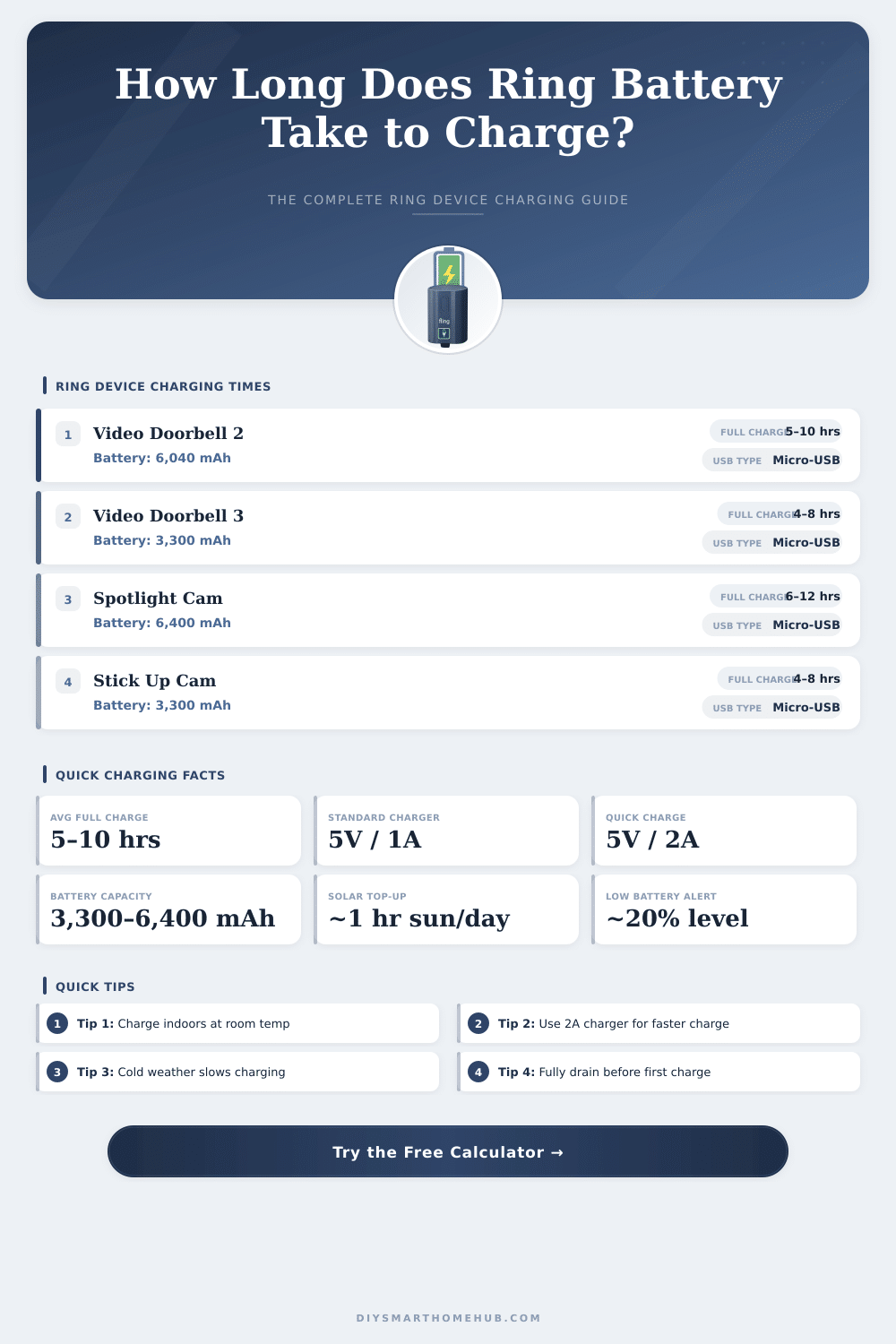
| Ring Device | Battery (mAh) | Standard USB (1A) | Quick Charge (2A) |
|---|---|---|---|
| Video Doorbell 2 | 6,040 mAh | 8–12 hrs | 4–7 hrs |
| Video Doorbell 3 | 3,300 mAh | 5–8 hrs | 2.5–4.5 hrs |
| Video Doorbell 4 | 3,300 mAh | 5–8 hrs | 2.5–4.5 hrs |
| Peephole Cam | 3,300 mAh | 5–8 hrs | 2.5–4.5 hrs |
| Spotlight Cam Battery | 6,400 mAh | 8–13 hrs | 4–7 hrs |
| Stick Up Cam Battery | 3,300 mAh | 5–8 hrs | 2.5–4.5 hrs |
| Charger Type | Output | Effective mA to Battery | Best Use Case |
|---|---|---|---|
| Standard USB Wall (5V/1A) | 5W | ~800–900 mA | Overnight charging |
| Quick Charge USB (5V/2A) | 10W | ~1,500–1,700 mA | Daytime top-up |
| Ring Solar Panel | 2W (peak) | ~40–60 mA avg | Trickle maintenance |
| Hardwired / Trickle | Variable | ~100–300 mA | Slow maintenance charge |
| PC USB Port | 2.5W | ~400–500 mA | Emergency only |
| Current Level | % Remaining to Charge | Doorbell 2 / Spotlight | Doorbell 3/4 / Stick Up |
|---|---|---|---|
| 0% (dead) | 100% | ~10–12 hrs | ~5–8 hrs |
| 10% left | 90% | ~9–11 hrs | ~4.5–7 hrs |
| 25% left | 75% | ~7–9 hrs | ~3.5–6 hrs |
| 50% left | 50% | ~5–6 hrs | ~2.5–4 hrs |
| 75% left | 25% | ~2–3 hrs | ~1–2 hrs |
| 90% left | 10% | ~1–1.5 hrs | ~0.5–1 hr |
Ring Battery doorbells can be reset using the USB cable that goes in the back. Just bind it to any USB power source to start the charging. It looks easy even so it is worth noting some details about that mode.
A full charge lasts around 5 to 10 hours. The time ranges based on if the USB cable is plugged into a wall outlet or in a USB port of a computer or other device. Ring batteries have high capacity and low flow of charge, because of that the process is this long.
How to Charge and Care for Your Ring Doorbell Battery
Lithium batteries, that you can not remove, need 4 to 12 hours to reach full charge.
During the charging, the Battery shows two colored lights, steady red and blinking. Both shine together when it loads. After a full charge only one green light stays.
When the whole ring around the button of the doorbell becomes blue, the process ended.
Some doorbells have a removable Battery. To pull it out, press the metal release tab, release and slide it out. Then bind the cable to the charging port of the Battery.
Because other doorbells lack a removable Battery, the whole device must be stripped so that the micro-USB cable can plug directly into it.
There is a double charging station, that works too reset up to two Ring batteries at the same time. It is useful, because it allows you to swap batteries during use, which escapes breaks in recording. Such stations plug into a normal outlet and charge almost twice more quickly than simply using a micro-USB cable.
A package with fast charger and two batteries costs $89.99, while separate purchase would be more expensive.
Setting up a Ring doorbell with Battery to an existing wired system only gives steady power. The internal charger limits the flow to a small amount, even from a solar panel or transformer. Cool weather shrinks it even more.
For wiring to an existing bell, you need a transformer of 8 to 24 VAC.
The Ring app warns with a message, when the Battery needs recharging. Some users notice that their Battery empties more quickly than one hopes. Much activity and common moves use more energy.
Lowering the sensitivity of the motion detector can help the Battery last more long. A solar charger is another option for keeping the level up. One sample with a solar panel kept the Battery at 80 to 90 percent during most of thetime.
Fresh lithium batteries maybe start a bit slow, but they should improve over time.