Home Backup Essential Loads Calculator
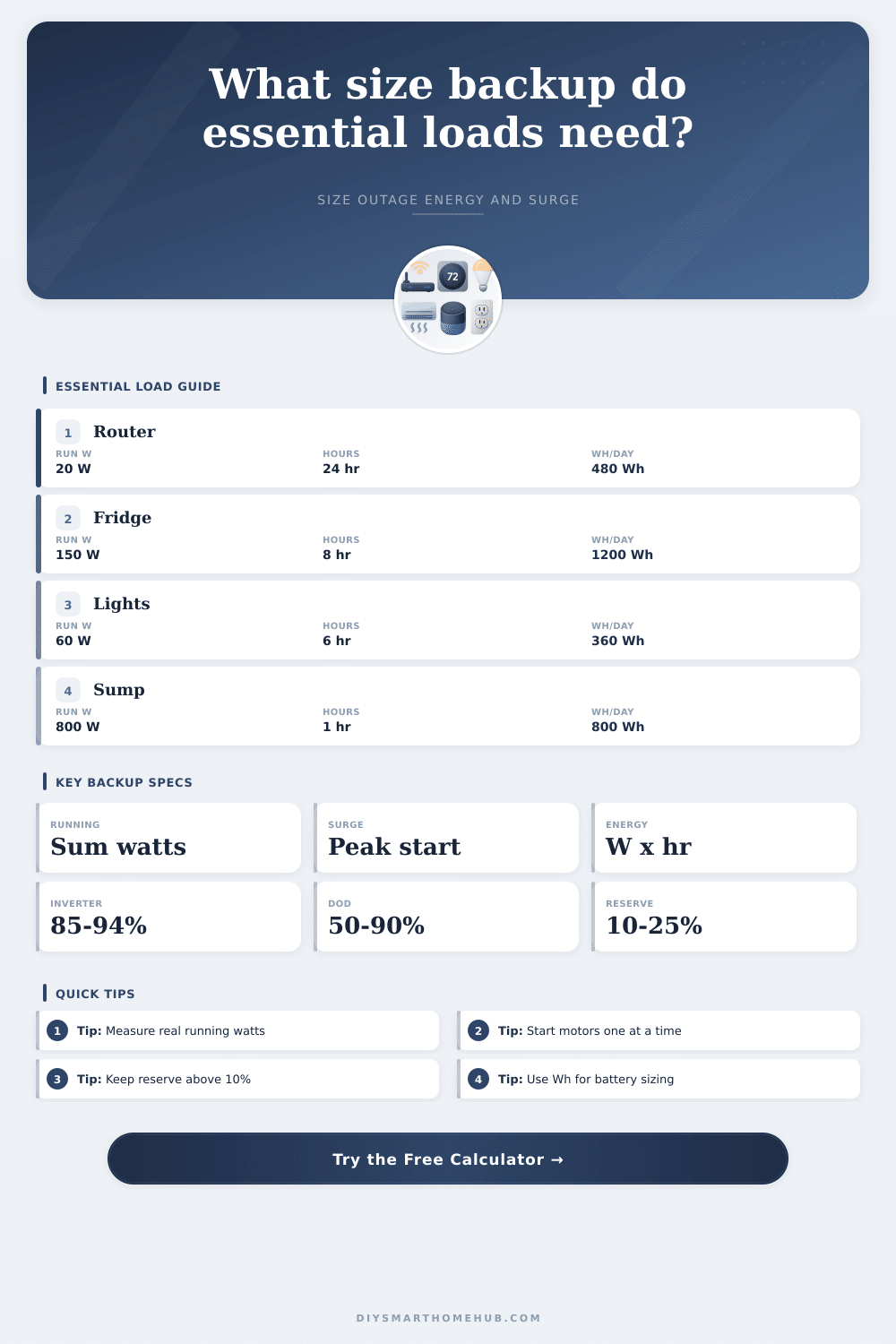
Size a battery, inverter, or backup power station from essential running watts, startup surge, daily watt-hours, outage hours, inverter efficiency, depth of discharge, and reserve margin.
⚡Essential Load Presets
🔌Backup Planning Inputs
💡Essential Loads
Home backup load estimate
Calculation breakdown
📊Backup Spec Grid
🧮Backup Comparison Grid
Lean Backup
0.5-1.5 kWhRouter, modem, hub, phone charging, and a few low-watt lights for communication-first outages.
Food Protection
2-4 kWhNetwork plus refrigerator or freezer loads, with surge rating sized for compressor starts.
Storm Core
4-8 kWhFood, network, lights, fans, medical device allowance, and intermittent sump pump activity.
Extended Core
8+ kWhLonger outage planning where daily Wh, reserve, and controlled appliance scheduling matter most.
📋Essential Load Reference Tables
| Load type | Typical running watts | Startup surge | Backup note |
|---|---|---|---|
| Router, modem, hub | 15-60 W | Usually none | Often the best value load to keep powered continuously. |
| Refrigerator | 100-250 W | 2-5x running | Use average daily hours rather than assuming 24 hours of compressor run time. |
| Chest freezer | 80-200 W | 2-5x running | Lower duty cycle if unopened; higher in hot garage conditions. |
| Sump pump | 600-1200 W | 2-4x running | Short runtime but high surge; size inverter surge carefully. |
| LED lighting circuit | 20-150 W | Small | Reduce fixture count to lower nightly Wh demand. |
| Schedule assumption | Hours per day | Formula effect | Best used for |
|---|---|---|---|
| Continuous critical load | 24 hr | W x 24 for daily Wh | Network, alarm panel, medical monitoring, smart hub. |
| Refrigeration duty cycle | 6-12 hr | W x compressor run hours | Fridges and freezers that cycle on and off. |
| Evening lighting | 3-8 hr | W x selected use hours | LED lights, task lamps, and stair lighting. |
| Intermittent pump | 0.25-3 hr | W x pump run hours | Sump pump, condensate pump, or well pump cycles. |
| Work session | 4-10 hr | W x device-on hours | Laptop, monitor, VoIP phone, and network gear. |
| Battery profile | Planning DoD | Inverter factor | Reserve guidance |
|---|---|---|---|
| LiFePO4 home bank | 80-90% | 90-94% | 10-20% reserve for longer battery life and load error. |
| Portable power station | 85-90% | 85-90% | 15-25% reserve because AC standby draw can be meaningful. |
| AGM lead acid | 50% | 85-90% | 20-30% reserve for voltage sag and aging. |
| Direct DC network backup | 80-90% | 95-100% | 10-15% reserve when voltage conversion is efficient. |
| Preset scenario | Typical running load | Surge priority | Planning focus |
|---|---|---|---|
| Network only | 20-60 W | Low | Longest runtime from small batteries or DC UPS units. |
| Fridge plus network | 150-300 W | Medium | Compressor surge and daily Wh both matter. |
| Medical priority | 80-250 W | Low to medium | Reserve margin and measured device watts are important. |
| Sump pump ready | 700-1400 W | High | Inverter surge rating may be the limiting factor. |
| Whole-home core | 500-1200 W | High | Stagger large starts and manage duty-cycle loads. |
🔧Backup Sizing Tips
When the lights go out, you’ve got to do some math. Your initial response is often panic, but your next response should of being math. Instead, most people makes costly errors with backup power by buying based off anxiety, not arithmetic. They’ll get an overpriced portable station, or they’ll grab a huge generator that dies after four hours because they forgot about its compressor’s startup surge. Or they’ll skimp on capacity and run out of food while the storm’s still raging.
Usually, the line between sitting in the dark versus staying connected is one of two specific numbers: immediate startup surge and continuous running watts. Get them confused and you’re going to either blow up an inverter fuse or trip a breaker really fast. Surge watts are the ones to turn something on and running watts are the ones to keep it running long term. Your fridge doesn’t require 20 watts to hum along for hours on end, but it does want three or five times what it uses when it’s humming to make sure it gets started. Failing to account for this power delivery curve is a common trap. It catches people who size their system based off how much energy each device use per day rather than the power delivery curve.
How to Calculate Your Backup Power Needs
Once you enter your own loads into the calculator above it’ll crunch the numbers for you, but knowing why you put the numbers in there prevents expensive mistakes down the road. Know how many devices is plugged into the same outlet? Do any of them tend to be turned on at the same time? Pro tip: staggered starts save dough.
A battery’s “energy” are measured in watt-hours (not just amps and volts). The reason this is important is a battery with a rating of ten thousand watts lasts only minutes, until it runs out of juice. Homeowners tend to view outages in terms of time: a few hours during a storm; maybe a day or two if there’s a grid failure. To know how much energy you’ll need, calculate how many watts your critical load draw each hour and then multiply by the number of hours you think the power might be out. Now factor in real-world losses.
Inverters loses some energy in the form of heat as they convert stored DC battery energy back to usable AC current to power the lights and appliances in your house. Also, lithium batteries has a depth of discharge limit, you don’t want to drain ’em down all the way if you expect them to keep going. Leaving a 20 percent reserve helps cover any unexpected load increases, like if the weather gets too cold and your batteries aren’t performing at peak efficiency.
It’s clearly laid out in the reference table on the page that shows what kind of loads are common for various scenarios. A simple network backup might only need enough power to keep Wi-Fi and phone charging going, whereas something like a medical priority situation require lots of reserve capacity and reliability. But it all boils down to honestly assessing how you’re actualy using the power. Will instant ramen suffice if there’s an outage or do you need the microwave on? If you cut what isn’t necessary, the battery size requirement shrinks a lot. This goes from a six-thousand-dollar project to a two-thousand-dollar project and that is how you save money.
Treat your backup system like an investment portfolio; in this case, an energy portfolio. Diversify. Maintain enough cash to fund emergencies while avoiding bankruptcy. Guessing based off nameplate ratings is inferior to measuring true device consumption using a plug meter. The latter lists max possible draw (not avg. Usage). Even if a smart hub says it’s a 50 watt appliance, that’s rare; know the facts so you can purchase precisely what you need.
But how do you prepare? How do you get there? It’s all about confidence, not clutter. You don’t have to run your whole house. You just need enough to keep the food cold, the data flowing, and the lights on. Learn the math of daily energy requirements, learn the rhythm of surge spikes vs. Running watts, and that fear will go away. Yeah, the lights will go out again, only this time you’ll be prepared for it.