Home Automation Server RAM Sizing Calculator
Estimate practical memory for a home automation server by combining the operating system, automation platform, add-ons, entities, recorder database pressure, virtualization overhead, and safety reserve.
Memory calculation breakdown
| Platform profile | Base platform RAM | Typical OS RAM | Best use |
|---|---|---|---|
| Home Assistant OS | 0.9 GB | 0.8 GB | Appliance-style hub with supervised add-ons |
| Home Assistant Container | 0.7 GB | 0.6 GB | Docker host with separately managed services |
| openHAB | 1.2 GB | 0.8 GB | Java-based automation with bindings and rules |
| Node-RED first hub | 0.5 GB | 0.5 GB | Flow-based control with MQTT and light dashboards |
| Mixed automation stack | 1.8 GB | 1.2 GB | Multiple controllers, bridges, databases, and dashboards |
| Service type | Typical RAM | High-load trigger | Calculator treatment |
|---|---|---|---|
| MQTT, Zigbee, Thread bridge | 0.15 to 0.35 GB | Many retained messages or device maps | Standard add-on bucket |
| Node-RED, dashboards, backup | 0.25 to 0.60 GB | Large flows or many browser clients | Standard add-on plus dashboard users |
| MariaDB or PostgreSQL local | 0.70 to 1.50 GB | Long retention and fast state changes | Recorder cache bucket |
| NVR, image analysis, voice | 1.00 to 2.50 GB | Cameras, inference, speech pipelines | Heavy add-on bucket |
| Home profile | Entity count | State rate | Recorder RAM cue |
|---|---|---|---|
| Small smart hub | 150 to 400 | 20 to 80 per min | 0.25 to 0.50 GB cache |
| Normal connected home | 500 to 1200 | 80 to 250 per min | 0.50 to 1.20 GB cache |
| Power monitoring home | 1200 to 2500 | 250 to 650 per min | 1.20 to 2.50 GB cache |
| Lab or camera-heavy home | 2500 to 5000+ | 650+ per min | 2.50 GB or more cache |
| Deployment | Overhead range | What it covers | RAM allocation note |
|---|---|---|---|
| Bare metal appliance | 0% to 8% | OS services and hardware reserve | Lowest overhead, but still keep reserve |
| Docker or Podman | 5% to 15% | Container runtime and service spread | Good for add-on-heavy hosts |
| LXC container | 5% to 12% | Container boundary and host sharing | Set a firm memory limit plus swap policy |
| Virtual machine | 12% to 25% | Guest OS, hypervisor, ballooning margin | Allocate host RAM above guest recommendation |
| NAS hosted app | 15% to 30% | NAS services, filesystem cache, app runtime | Leave room for storage services |
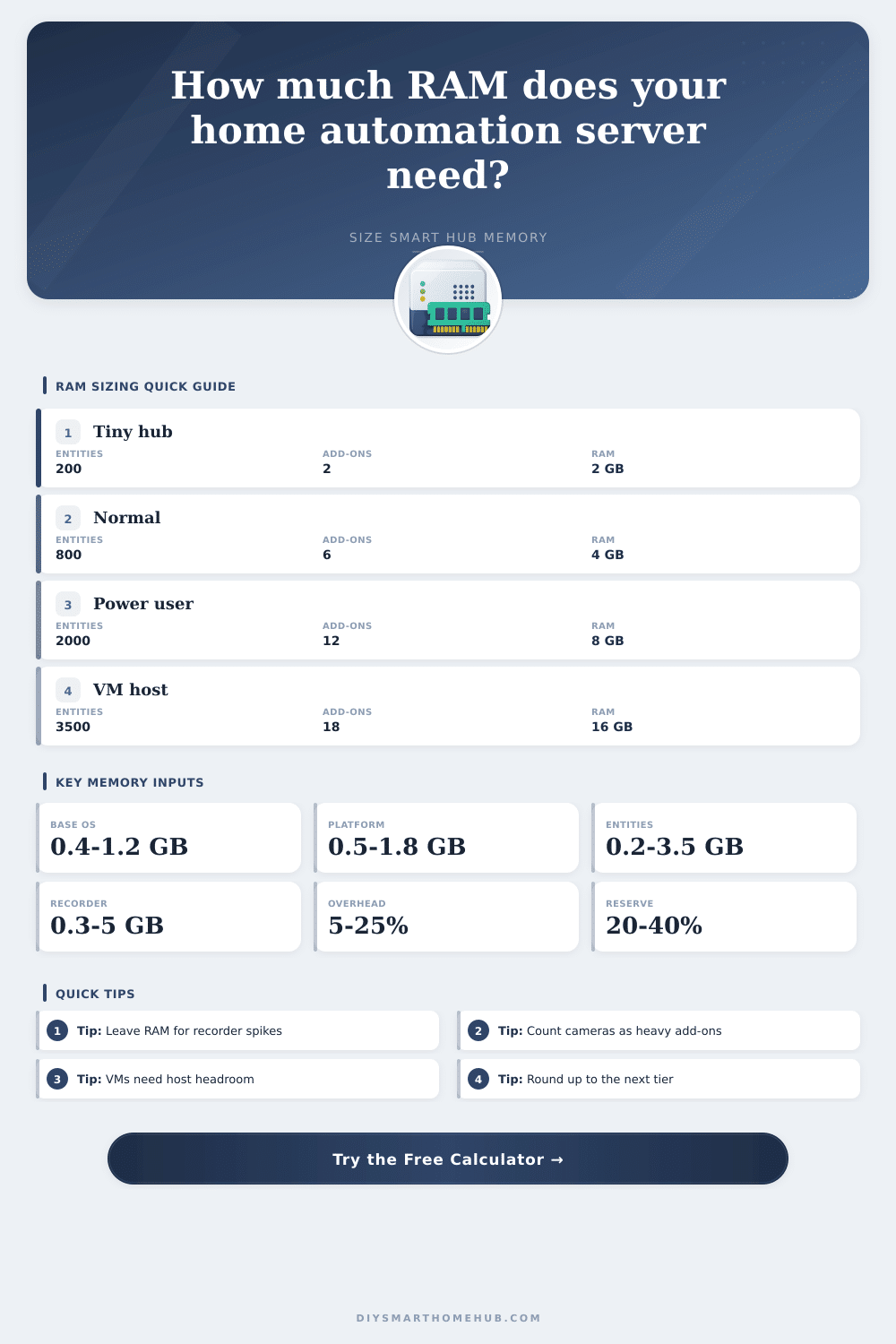
2 GB tier
Works for a very small appliance build with few entities, minimal history, and no heavy add-ons. It leaves little room for growth.
4 GB tier
Fits many starter homes with MQTT, one radio bridge, short recorder retention, and light dashboards.
8 GB tier
Comfortable for most homes with several add-ons, local recorder use, tablets, and a growing entity count.
16 GB tier
Better for VMs, camera services, long history, local databases, and lab-style stacks sharing the same server.
Sizing the memory on your home automation server is a particular kind of challenge. Unlike most installations where sizing comes up at boot time, this one often shows itself months later. Your smart lights starts blinking in panic. They are rebooting due to a software update when your power goes out, which triggers a backup. Sizing RAM is less about raw hardware specs and more about predicting future chaos.
This is a brain you’re installing into your house. You want to make sure there’s space for it to think, without short-circuiting. Plug in your add-on list and your entity count into the calculator, and it do the math. It saves you from having to guess if that four gigabyte stick will hold all those additional camera streams.
How Much RAM Do You Need for Your Smart Home?
The first thing most folks think about is their automation platform and their operating system. These are the weight sitting still in your bag. The core application is comfortabley idling around half a gigabyte to a gigabyte (in a Docker container or running in Home Assistant OS). Not so bad there, right? Until you consider what’s stacked on top of it.
There is an entity for each light, each switch, each sensor, and each binary detector. You need memory to track each entity’s state, history, and attributes. Add in a couple hundred power meters feeding back every ten seconds, add in another fifty lights, and your entity count will balloon quick. All that data sits in active memory before getting written to disk. High-frequency sensors like power meters use up RAM much faster than a simple doorbell sensor that only changes state once an hour.
Next, there’s the recorder database, the quiet assassin of under-provisioned servers. With ten days of history per motion event and per temperature spike, it adds up fast. When you load up a dashboard on your tablet or phone, the database engine use some cache memory to handle your query. If you don’t dedicate sufficient RAM to that cache, the server begin to swap to disk, leading to lag, what seems to be a frozen system. You’ll see this lag during peak evening usage when everyone is checking their dashboards (or just after a backup job completes). It’s the part that most people overlook. They’ll count the number of devices, but not account for how much history each device will generate.
Add-ons get heavy Zigbee coordinators and MQTT bridges tend to be fairly lightweight. However, things shifts drastically if you’re running something that requires far more memory and CPU. This includes voice assistant services (Whisper or Piper) or compute-heavy, memory-intensive stuff like machine learning containers and a local NVR to manage security cameras. In this case, you can’t assume the maximum memory use during your automation logic’s sleep time, but rather the worst-case scenario when they’re both up and running.
Virtualization will complicate things further by consuming its own share of memory, above and beyond what the guest VM perceives itself to have. I recommend playing it safe with a 20 percent overhead margin to ensure host has enough breathing room in case the guest wants a few extra bytes for itself.
On one hand, nobody likes going to bed knowing they maxed out their system’s memory capabilities (so go ahead and spend a little extra if it’ll make you feel better). On the other hand, you don’t want to undershoot on memory either: you’ll quickly find yourself in an endless loop of tweaking settings, testing for bottlenecks, etc., which isn’t what this automation thing is all about! You really want to hit that sweet spot between sufficient memory to accommodate expansion while not wasting money by buying more than you’ll ever use. A twenty-five to forty percent reserve is reasonable. It accounts for future upgrades, firmware changes, and the occasional spike (or adding that cool new smart whatever it was you found on sale last week).
So, what is all this memory business really about? It’s about resilience. It is the resilience of having a system that will be there for you when you need it, whether running backups overnight or waking up to that pesky alarm clock. Memory helps you move beyond guessing at the interaction between virtualization layers, databases, and entities. The tiered view of memory usage on the page gives you a visual way to think about where your system falls on the home automation build spectrum. Start from where you are today. Put a bit of a cushion in there just to be safe. Then, develop something that can stand strong as you work yourself to the limit. That peace of mind is priceless; far more valuable then a few gigs you may miss.