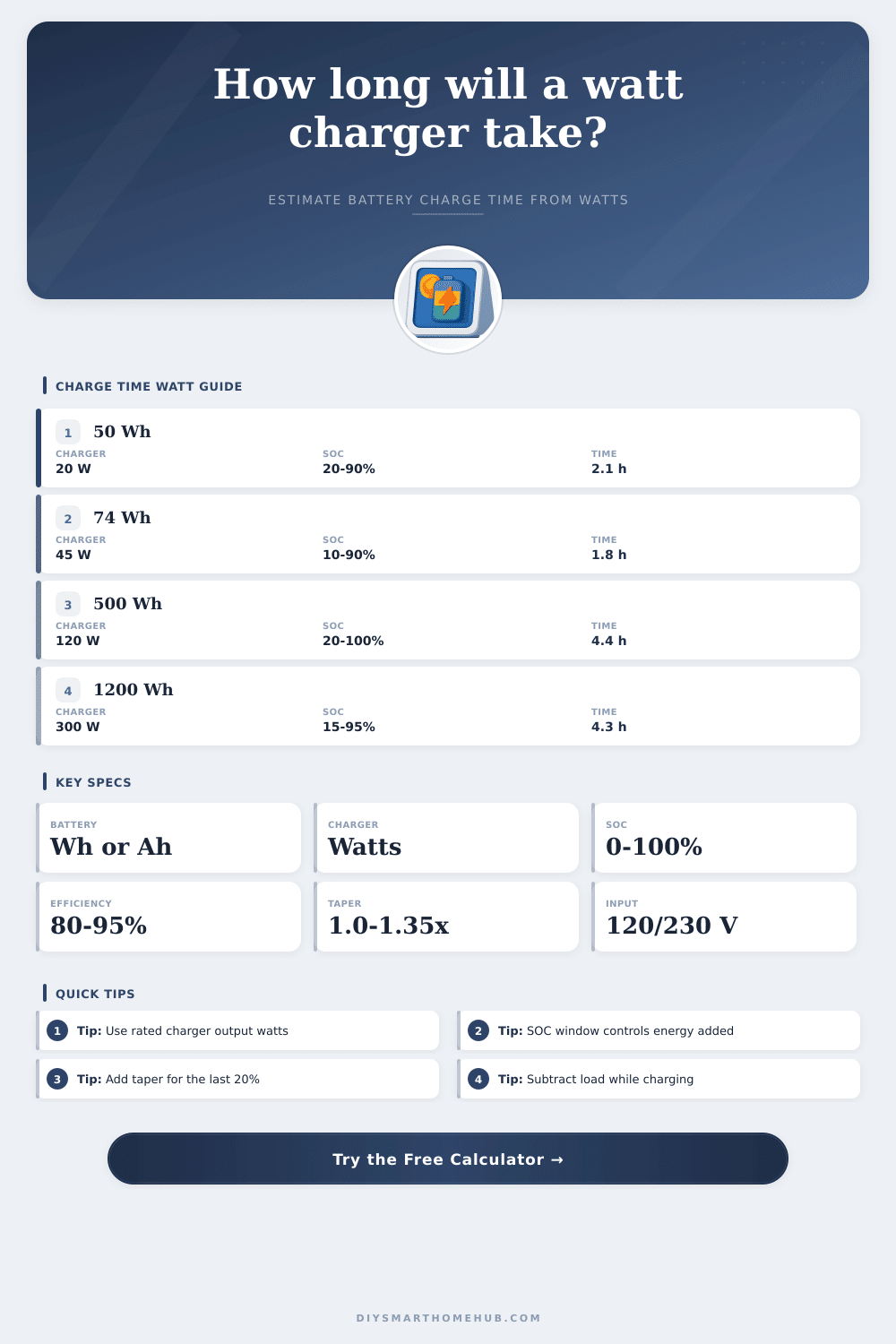
Charge Time Calculator Watts
Estimate battery charge time from capacity, charger output watts, charge efficiency, taper factor, starting SOC, target SOC, and input current.
▣ Charger and Load Presets
⚙ Battery and Charger Inputs
Calculation Breakdown
▦ Charger Spec Grid
☰ Reference Tables
| Charger type | Typical watts | Best use |
|---|---|---|
| USB-A phone charger | 5 to 12 W | Small phones, sensors, low power packs |
| USB-C fast charger | 18 to 45 W | Phones, tablets, small power banks |
| USB-C laptop PD | 60 to 140 W | Laptops and larger battery packs |
| E-bike brick charger | 100 to 250 W | 36 V to 52 V mobility packs |
| Power station AC charger | 120 to 1000 W | Portable energy storage systems |
| Battery example | Nominal Wh | 80% window |
|---|---|---|
| Phone battery | 12 to 20 Wh | 10 to 16 Wh |
| Tablet battery | 25 to 45 Wh | 20 to 36 Wh |
| Laptop battery | 45 to 100 Wh | 36 to 80 Wh |
| Tool pack | 72 to 180 Wh | 58 to 144 Wh |
| Portable power station | 256 to 2048 Wh | 205 to 1638 Wh |
| Battery behavior | Efficiency | Taper factor |
|---|---|---|
| Supercapacitor or linear DC charge | 90% to 98% | 1.00 to 1.08 |
| LiFePO4 pack | 88% to 96% | 1.05 to 1.18 |
| Lithium-ion pack | 85% to 94% | 1.10 to 1.30 |
| Lead-acid battery | 75% to 88% | 1.20 to 1.55 |
| NiMH pack | 65% to 80% | 1.10 to 1.35 |
| AC input | 100 W output | 300 W output |
|---|---|---|
| 120 V, PF 0.95, 90% eff. | 0.97 A | 2.92 A |
| 120 V, PF 0.80, 85% eff. | 1.23 A | 3.68 A |
| 230 V, PF 0.95, 90% eff. | 0.51 A | 1.53 A |
| 230 V, PF 0.80, 85% eff. | 0.64 A | 1.92 A |
ℹ Charge Time Tips
You feel that familiar sinking sensation when your laptop drops to ten percent and you have to get two hours of work out of it. It is a 21st-century panic attack. It is wrapped up in plastic. We look at the number. We make an educated guess as to how long it will take, and then we almost always guess wrong.
Here’s the thing: Charging isn’t like filling up your gas tank. You can’t simply add energy until needle moves upward in a nice straight line. Batteries has personalities. When they’re full, they fight against taking any more in. If you push them too hard, they’ll get hot. Knowing why your device isn’t charging as fast as the box claims it will requires understanding that Watts alone don’t tell the whole story. They’re only part of the equation.
How to Calculate Charge Time Correctly
How long does the actual journey take? That’s just a metaphor to explain that actual charge time depend on things like efficiency losses, voltage conversions, and how much of the battery is already full. To that end, if you plug your charger specs and battery capacity into the calculator up top, it’ll do all the work for you and save you from having to guess at voltage conversions and efficiency losses.
But first: What are these inputs? How does it translate into something meaningful about your hardware? On the consumer electronics package, battery capacity is typically printed in either amp-hours (Ah) or milliamp-hours (mAh). Those are big-looking numbers, so people like them. The truth is that it is watt-hours. Whether you store a hundred watt-hours in a lead-acid block or a lithium cell, they’re still a hundred watt-hours. Converting to watt-hours gets rid of the confusion around all those different nominal voltages, they vary wildly between a phone battery and an e-bike pack. Knowing the voltage makes a difference, because it lets you compare apples-to-apples when you’re trying to get a sense for how much energy you have. If you don’t convert to watt-hours but keep it as amp-hours, you won’t even be close with your time estimate.
And then we have the charger output. Folks look at the word fast charging and imagine something that goes up linearly. It doesn’t work like that. For most lithium systems, the charger charge at a constant current until about eighty percent. After that point, it switches over to constant voltage mode (the taper phase). In the taper phase, the charger dramatically slows down to prevent any damage or overheating of cells. To account for this taper phase, the tool has an input called the taper factor. Ignore that and you will believe that your battery reaches one hundred percent in four hours. What really happens? Six. And as always, that last bit of juice is the expensive bite of the meal.
The second quiet robber of time is efficiency. Not all of those watts traveling through the wire from your wall outlet make their way into the battery. Some will be lost in converting alternating current flowing from your house into direct current for use by your device, while some will become heat in your charging cord. Newer USB-C chargers tend to be pretty efficient, reaching over 90% efficiency. Old school brick adapters or basic power packs can fall as low as 80% or even less. That means a big difference for you over the life of many charge. Remember it’s not just this charge but the cumulative wear and tear on your equipment as well as how much money (and energy) you’re throwing away unneccessarily.
These variables are also reflected in the reference tables that come with the tool, so you can find out what’s normal for a given type of charger or how varying battery chemistry, such as standard lithium-ion vs. LiFePO4 will impact charging behavior. If you’re dealing with an old lead-acid battery found in something like a golf cart or older UPS system, it’ll be less efficient all around (with heavy taper phase) and slower, by design. By contrast, supercapacitors don’t hold much energy but they do charge practically instantly. Understanding where your device sits on this spectrum lets you set appropriate expectations ahead of time without having ever pushed the button yet.
But don’t forget to deduct whatever load you’re applying during the charge process. A power station powering a fridge won’t be sending those watts to the battery. Gross watts aren’t as important than net watts. This is all very simple subtraction, but it makes all the difference. After getting an idea of how long it’ll take, keep in mind there’s some friction in real life. Lithium cells move ions slower when they’re cold, so charges will take longer. Heat trips your batteries’ safety cutoff and throttles down power to avoid thermal runaway. Charging your phone can also slow down to save its battery life across years of use.
It’s not about getting it right. It’s about putting away the guesswork and making plans. When you know that one watt lasts so long, whether that means an hour on your laptop during a flight or a year on your cabin’s solar system, you’re in control. You’re doing the math of the machine, rather than fighting against some percentage bar. And that final twenty percent may go on for eternity, but at least you’ll understand why.