Access Point Distance Calculator
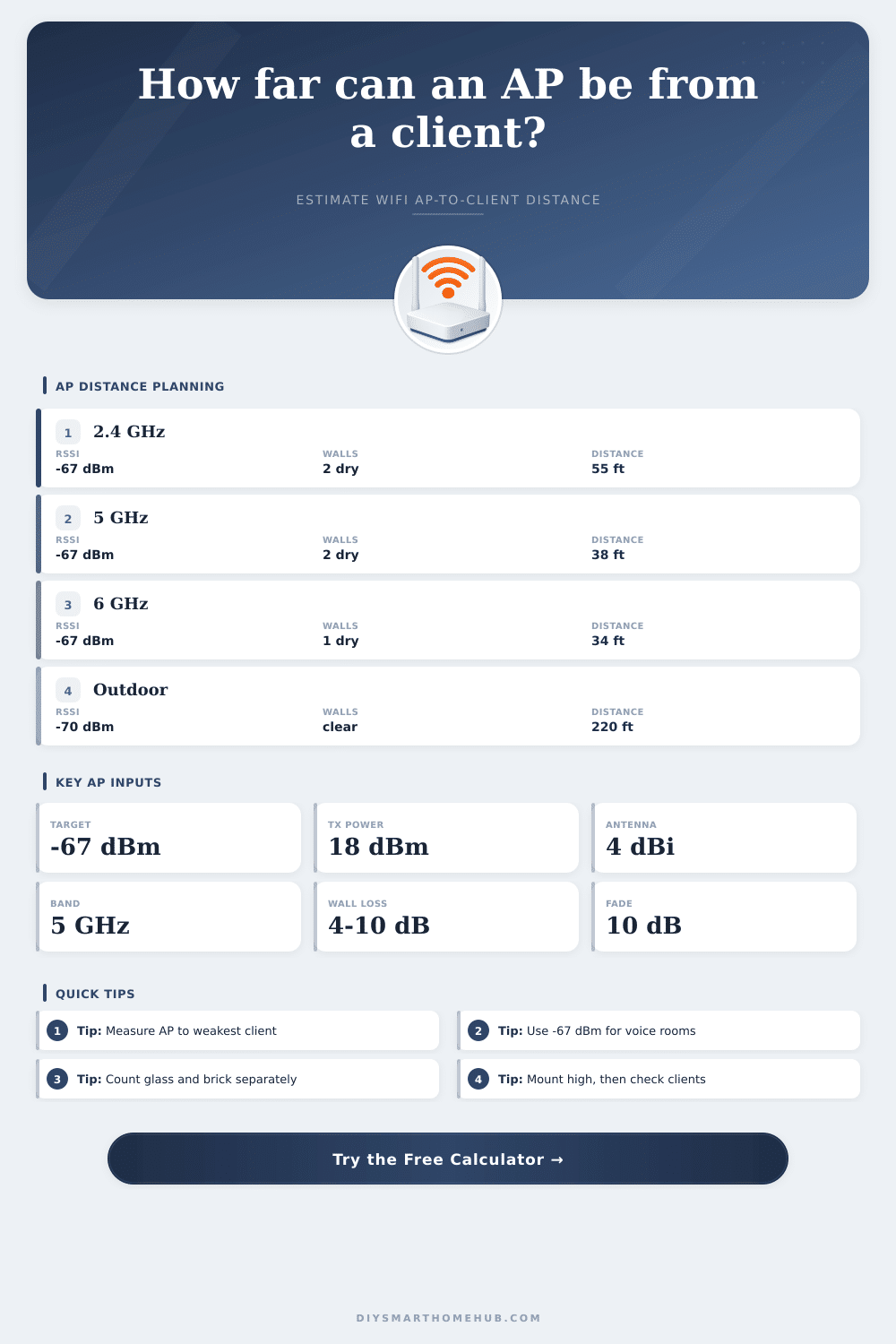
Estimate the maximum AP-to-client distance from target RSSI, transmit power, antenna gain, frequency, free-space path loss, wall attenuation, fade margin, and mounting height.
📍AP placement presets
📶Radio and path inputs
Calculation breakdown
📊AP mounting and spec grid
🎯Target RSSI table
| Use case | Target RSSI | Why it matters | Distance planning cue |
|---|---|---|---|
| Voice or roaming | -67 dBm | Stable calls need stronger edge signal. | Use strict fade margin. |
| Video calls / laptop | -65 to -67 dBm | Higher modulation needs cleaner signal. | Shorter cells are normal. |
| Phone / tablet browsing | -70 dBm | Balanced throughput and coverage. | Works for most rooms. |
| IoT sensor | -72 to -75 dBm | Low data rate devices can tolerate weaker RSSI. | Check battery device uplink. |
🚧Wall attenuation table
| Obstacle | Base loss | 5 GHz factor | 6 GHz factor |
|---|---|---|---|
| Drywall / hollow wall | 3 to 5 dB | 1.25x | 1.45x |
| Interior glass | 2 to 6 dB | 1.20x | 1.35x |
| Brick or block | 8 to 15 dB | 1.30x | 1.55x |
| Concrete, tile, stone | 12 to 25 dB | 1.35x | 1.60x |
| Metal appliance path | 18 to 35 dB | 1.40x | 1.70x |
📡Frequency and FSPL reference
| Band | Center frequency | FSPL at 30 ft | Planning note |
|---|---|---|---|
| 2.4 GHz | 2400 MHz | 59.3 dB | Best wall tolerance, lower capacity. |
| 5 GHz low | 5180 MHz | 66.0 dB | Common indoor capacity band. |
| 5 GHz high | 5800 MHz | 67.0 dB | Slightly higher path loss. |
| 6 GHz | 6100 MHz | 67.4 dB | Great capacity, shorter cells. |
🏠Placement distance examples
| Placement | Typical target | Walls | Expected cue |
|---|---|---|---|
| Ceiling AP to same room | -67 dBm | 0 to 1 | Usually height-limited, not budget-limited. |
| Hallway AP to bedroom | -70 dBm | 1 to 2 | Door and wall angle matter. |
| Garage AP to workbench | -70 dBm | 1 metal path | Model appliance loss separately. |
| Patio client | -70 dBm | glass or exterior | Use planned distance and wall loss together. |
💡Distance planning tips
Some rooms (like bathroom) have bad cell service. Why? Because physics limits radio waves‘ ability to pass through walls. Using a calculator, you can see why your signal dies in certain areas, it takes the guesswork out of it. For products, higher frequencies tend to be better. But those higher frequencies, like six gigahertz, fade rapidly as they encounter anything in their path. A single interior door absorbs more of that high-frequency energy then a brick wall swallows from the two-point-four gigahertz band.
When you select your frequency, the tool will adjust your input for wall loss accordingly. And the math is clear: Speed comes at the expense of range.
How To Get Better Wi-Fi In Your House
The radiation pattern shows that antennas do not merely emit power. They have a radiation pattern, which is often at an angle for ceiling mounted antennas. For example, it may be stronger if aimed a little to one side than if aimed straight down, so your device right below would recieve less signal strength than one a little off center. Because of geometry, adding vertical distance adds to overall path length. This diminishes your power budget before the radio even has to deal with horizontal distance. The calculator determines actual slant range based off client position and ceiling height. It doesn’t care about misleading floor plan measurements. This slight geometric penalty grows quickly as distance increases.
Different homes have different construction materials. Some let signals pass mostly unchanged, like drywall. Others eat up a lot more energy, such as glass and brick. Metal objects and concrete block almost completely stop it, depending on frequency. As you count the walls between your access point and client devices, those fuzzy ideas of coverage become cold math. You’re calculating how many times the signal will need to battle its way to your speaker or laptop.
The network philosophy is defined by strength of signal in your targets. For the edge of coverage, voice calls and video conferencing require a stronger signal. Otherwise they produce audible glitches and frozen frames because of packet loss. Sensitive applications like this benefit from stability; set a -67 decibel target to ensure that. Weaker readings (-70) are often tolerable for casual browsing. Adjusting the target also adjusts the maximum distance it can covers.
How far out will you go? Do you want broad but shaky coverage, or tighter and more reliable cells? That determines the number of units required, and where to position them.
Life isn’t neat or predictable. Furniture moves around, people move across signal paths. Some big appliances turns on and off at random intervals, creating varying amounts of interference. Adding a 10db buffer ensures your connection stays solid as conditions change. Without it, your network will drop-out each time dishwasher runs. You should of expected the worst-case scenario avoids frustrating intermittent network drops.
Having all these inputs aligned provides a plan that fits the way your house is set up. No more running after invisible signals. Now you’re creating a network according to real-world constraints you can measure. The end result? A home with connectivity wherever you go, comfortabley in every room.