Soundbar Width Match to TV Calculator
Compare TV screen width, soundbar width ratio, media stand clearance, cabinet opening fit, center-channel alignment, height clearance, and seating-distance visual balance.
Calculation breakdown
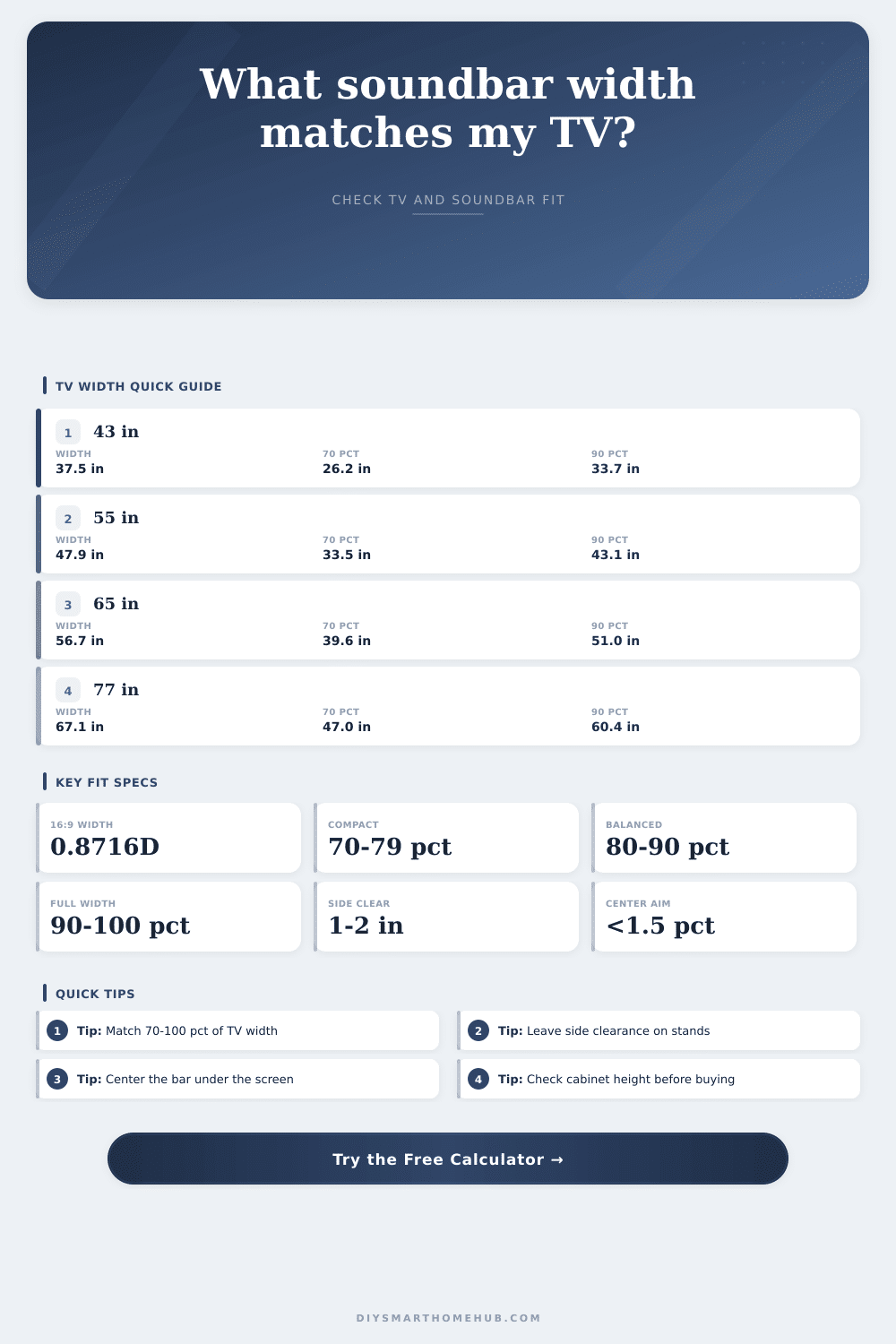
| TV diagonal | Approx screen width | 70% compact bar | 90% balanced/full bar |
|---|---|---|---|
| 43 in / 109 cm | 37.5 in / 95.2 cm | 26.2 in / 66.6 cm | 33.7 in / 85.7 cm |
| 50 in / 127 cm | 43.6 in / 110.7 cm | 30.5 in / 77.5 cm | 39.2 in / 99.6 cm |
| 55 in / 140 cm | 47.9 in / 121.8 cm | 33.5 in / 85.3 cm | 43.1 in / 109.6 cm |
| 65 in / 165 cm | 56.7 in / 143.9 cm | 39.6 in / 100.7 cm | 51.0 in / 129.5 cm |
| 75 in / 191 cm | 65.4 in / 166.0 cm | 45.8 in / 116.2 cm | 58.8 in / 149.4 cm |
| 85 in / 216 cm | 74.1 in / 188.2 cm | 51.9 in / 131.7 cm | 66.7 in / 169.4 cm |
| Soundbar ratio | Visual reading | Best fit use | Calculator status |
|---|---|---|---|
| Below 60% | Noticeably short | Small bedrooms, small shelves, limited openings | Too narrow for most main TVs |
| 60% to 69% | Compact | Secondary rooms or furniture-limited layouts | Below target unless compact is selected |
| 70% to 79% | Clean compact match | Minimal consoles, smaller bars, narrow shelves | Inside compact profile |
| 80% to 90% | Balanced width match | Most living rooms and media consoles | Inside balanced profile |
| 90% to 100% | Full visual match | Large screens, wall mounts, wide furniture | Inside full-width profile |
| Above 100% | Wider than screen | Only if stand and sight lines still work | Flush limit or oversize warning |
| Placement type | Allowance formula | Typical clearance | Fit check |
|---|---|---|---|
| Open media stand | stand width - bar width | 1 to 2 in each side | Positive side clearance avoids edge crowding. |
| Cabinet cubby | opening width - 2 x clearance | 1.5 to 3 in total | Bar must be no wider than allowed width. |
| Below TV panel | TV-bottom gap - top clearance | 0.5 to 1 in above bar | Bar should not block screen or IR window. |
| Wall shelf | shelf width - bar width | 1 in each side | Check usable flat shelf, not nominal size. |
| Recessed opening | opening height - clearance | Extra air around vents | Height margin matters as much as width. |
| Object width at 9 ft | Apparent angle | Approx TV equivalent | Use in calculator |
|---|---|---|---|
| 32 in / 81 cm | 16.9° | 37 in TV width x 86% | Small rooms and compact bars. |
| 40 in / 102 cm | 21.0° | 48 in TV width x 83% | Common 55 in TV pairing. |
| 48 in / 122 cm | 25.1° | 57 in TV width x 85% | Common 65 in TV pairing. |
| 55 in / 140 cm | 28.6° | 65 in TV width x 84% | Large living-room bars. |
| 65 in / 165 cm | 33.5° | 74 in TV width x 88% | Large screens and theater walls. |
There you are, standing in living room with a box containing a soundbar in your hands and staring at a TV hanging on the wall. Suddenly, entertainment geometry gets real.
On one hand, you want it to appear that the sound is emerging from screen itself. But on the other hand, you don’t want it to look as if you just threw something together. How much space lie between them isn’t merely aesthetic, it’s also acoustic. If sound source is too far to either side of what you see on-screen, your brain must do some extra work to combine sight and sound. This results in a subtle disconnect in your viewing experience.
How to Choose the Right Size Soundbar for Your TV
When you know how big your bar should be you just plug it into the calculator above and it does math for you. You won’t have to guess if it will look okay on your 65-inch TV. Because let’s face it most folks go for largest bar their wallet will allow thinking larger = better. But a bar that are wider than your TV creates visual clutter that pulls focus off of the content on screen. That becomes a visual distraction pulling focus off of contents on the screen.
Understanding what you’re measuring is really the key. And that’s where most folks gets confused. You aren’t measuring same thing as the box the TV comes in, which is much wider than the width of the actuall screen. You aren’t measuring the width of the thick plastic bezel. You’re measuring the width of the active screen.
With a standard 16:9 screen, the width is much narrower then the diagonal measurement suggests. Sixty five inches isn’t six feet across. It’s more like fifty seven or so. That’s an important difference when you want to be in the sweet spot.
For example, you want the soundbar to be roughly 70-90% the width of your screen. Why? That gives you a nice balance. The video stays main focus because it is the reason you are watching. At the same time, audio isn’t so small that it feels unimportant; you still want it to have some impact.
Below 70%, it starts looking like an afterthought. It is a slim strip of plastic fading away into the furnitures. Above 90%, you start risking the bar being larger than the screen itself, which can look awkward if not part of some ultra-wide setup (but we aren’t talking about that here).
The table of references at the bottom of the page makes it all clear for popular TV sizes: it will tell you directly what these percentages correspond to in actual inches.
And finally, what about the furniture? That’s when reality meets your dreams of your new media console. Maybe you’ve found the right width, but that doesn’t mean it fits inside the cabinet opening. Measure the usable width of the shelf, ignoring any raised lips or decorative edges. Then add an inch or two on either side for clearance. Why the clearance? Because that isn’t just easy-to-install space. It’s also the spot where air can move freely around the bar, keeping its insides from overheating throughout a marathon movie session.
And if your bar exceed the cabinet opening vertically, it’ll protrude. Not only does this look like a visual distraction but it becomes a tripping hazard as well. Measure the height first.
Finally, you must align the acoustic center of the soundbar with the center of the TV screen as much as possible. Any misalignment, no matter how slight, will throw off the stereo image so that one side (typically left) sounds overly prominent and the other (right) overly recessed. Your TV might be mounted off-center from the wall, or you could have an asymmetrical stand; you’ll want to play around with spacers or risers to achieve proper alignment. It is a small detail but it is worth doing.
The seating distance also comes into play here. Depending on where you sit on the couch, the perceived length/width of the TV/bar will vary. Something that appears proportionate at a 3-foot distance may appear tiny at a 10-foot distance behind it. To help you judge this visual balance, the calculator takes into account your viewing distance. Will the ratio hold up from your primary seat?
But don’t fret over exact measurements. A couple of tenths of an inch either way won’t hurt the look. It’s about balance. Ideally, the TV and soundbar should be comfortabley companions: two items that complement each other rather than one that feels as though it is squatting on the furniture.
Trust the math, double-check the clearances, and measure twice. Once width equals screen size and once everything lines up, technology takes a backseat. Now all you’re left to do is concentrate on the story itself.