VLAN Subnet Size for IoT Calculator
Plan an IPv4 subnet for smart-home devices, cameras, hubs, and future growth with DHCP and static address ranges sized from usable host math.
Camera, NVR, and doorbell addresses are counted as predictable by default.
Controllers, bridges, and gateways usually deserve reservations or fixed IPs.
Most lighting can use DHCP, with a few key controls reserved.
Growth reserve catches seasonal devices, replacements, and new rooms.
| Prefix | Total addresses | Usable hosts | IoT fit range | Planning note |
|---|---|---|---|---|
| /30 | 4 | 2 | 1-2 devices | Too small for almost every IoT VLAN; better for transit links. |
| /29 | 8 | 6 | 3-5 devices | Useful for a tiny lab segment, not a room of smart devices. |
| /28 | 16 | 14 | 7-11 devices | Small appliance or camera-only VLAN with little growth room. |
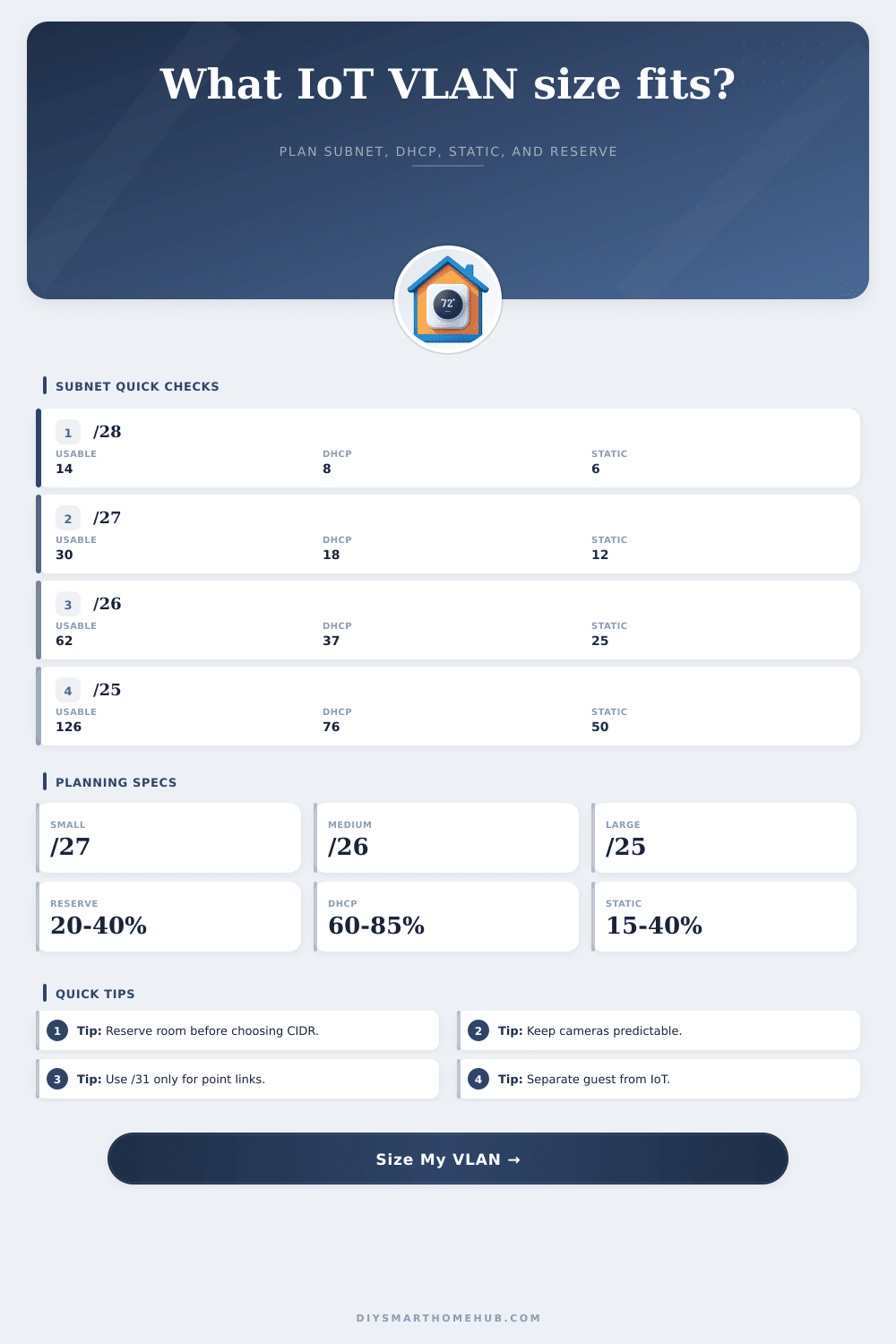
| /27 | 32 | 30 | 15-24 devices | Good for a starter IoT VLAN when reserve is modest. |
| /26 | 64 | 62 | 31-50 devices | Common smart-home size when lights, sensors, and hubs are combined. |
| /25 | 128 | 126 | 63-100 devices | Fits larger homes, camera-heavy designs, and healthy growth reserve. |
| /24 | 256 | 254 | 127-203 devices | Convenient and familiar, but larger than many home IoT VLANs need. |
| /23 | 512 | 510 | 255-408 devices | Use only when a very large property or lab truly needs it. |
| Category | Typical count | Address style | Static weight | Subnet impact |
|---|---|---|---|---|
| Cameras and doorbells | 2-24 | Static or reservation | High | Predictable addresses simplify NVR and firewall rules. |
| Sensors, locks, and buttons | 8-80 | Mostly DHCP | Low | Large count, but usually easy to keep in the pool. |
| Bulbs, switches, and dimmers | 10-90 | Mostly DHCP | Low-medium | Can be the largest address consumer in Wi-Fi lighting homes. |
| Displays, speakers, and TVs | 3-30 | DHCP | Low | Usually simple DHCP clients, but may need firewall groups. |
| Appliances and thermostats | 4-35 | DHCP or reserved | Medium | Reserve critical HVAC or energy devices if automations depend on IP. |
| Hubs, bridges, and gateways | 2-18 | Static or reservation | High | Controllers and bridges are small in count but important to reserve. |
| Policy | DHCP share | Static share | Best for | Watch item |
|---|---|---|---|---|
| DHCP heavy | 80-90% | 10-20% | Bulbs, sensors, speakers, and simple appliances | Keep a small reserved block for gateways and cameras. |
| Balanced | 60-75% | 25-40% | Most home IoT VLANs with a few cameras and hubs | Confirm DHCP minimum still covers roaming or replacement clients. |
| Static heavy | 40-60% | 40-60% | Camera-heavy or automation-critical networks | Document reservations so the pool is not fragmented. |
| Camera fixed | 50-70% | 30-50% | NVR, doorbell, and surveillance VLANs | Keep camera growth from consuming the whole static range. |
| Scenario | Device count | Reserve | Suggested subnet | Reasonable split |
|---|---|---|---|---|
| Starter IoT room | 12-20 | 25% | /27 | 20 DHCP, 10 static |
| Apartment smart home | 25-45 | 30% | /26 | 40 DHCP, 22 static |
| Camera-heavy home | 40-70 | 35% | /25 | 76 DHCP, 50 static |
| Whole-house buildout | 70-120 | 35% | /24 | 170 DHCP, 84 static |
| Large property | 130-240 | 40% | /23 | 340 DHCP, 170 static |
30 usable hosts. Good when device count is known and future growth is small.
62 usable hosts. Often enough for apartments and moderate homes.
126 usable hosts. A strong fit for cameras, hubs, and whole-home lighting.
254 usable hosts. Simple to remember and roomy, but may be more than needed.
You buy a smart lock for your front door, only to realize your router has run out of addresses on the main network. What’s wrong? This is because houses are full of connected appliances that just join without asking. It isn’t that they’re connected; it’s that you’ve ran out of addresses. To solve this, you want to create a separate VLAN for all those gadgets, but how do you size the subnet?
Guessing leads you down road of either wasting hundreds of IP addresses by going with a slash twenty-four (out of habit) or choosing a tiny block which fail as soon as you bring home a second camera. How to choose: That’s the question, right? How much for now versus how much for later? Don’t over-engineer it.
How to Choose the Right Subnet Size for Your Home Network
Some of these things is static. Examples are security cameras and NVRs. To set up firewall rules, you have to know exact location of those endpoints. And then there are other device that don’t really care what IP they have. Just get me to the cloud, bulbs and sensors say. Plug in your numbers (device count) and let the calculator do work for you. Don’t waste time calculating yourself how many host are really usable. Let it figure out network overhead for you.
Then separate the dynamic pool from the static requirements. See if you can squeeze by with a slash twenty-seven. Or if you has to go down to a slash twenty-six. It all changes when growth reserves are enabled. What was a home with thirty smart devices now have forty-five. Next year? Who knows? One day someone adds a new thermostat. Another person puts lights in their kitchen’s ceiling. You’ll find yourself reconfiguring subnets again in six months if you only size your VLAN for today. In IP space, adding a twenty-five percent buffer doesn’t cost much. Not remembering it are expensive.
Before the tool picks its prefix length, it applies that percentage. The final recommendation leaves some breathing room. That way, the doorbell won’t be rejected by DHCP server due to a full pool. For some things (like critical infrastructure), it has to be predictable. Hubs and cameras tip the scale towards reserved static heavy in favor of that. And it’s not even a preference, but rather a need. The camera will always have the same address so the video analytics server can find it. It won’t work if the IP change on each reboot. Automation scripts fail. Controllers stay put thanks to policy profiles. Bulbs take whatever they get.
Order from Chaos. There’s an art to picking the proper prefix length. Find the smallest block that feels comfortabley. Say you choose slash twenty-eight. You get fourteen host bits of address space. Maybe that’s enough for a few switches in a single room? But what about future growth? What happens to that headroom if you plan on growing? It is immediately gone. Jump to slash twenty-five and you has double the number of addresses. It is not twice the complexity. See the chart? That’s the reference table, which makes it easy to see what jumps in available space at every level of CIDR notation. So you go from thirty hosts to sixty-two hosts. And then you go from there to one hundred twenty-six.
Don’t get me wrong: don’t think bigger is better. Sure, a slash twenty-four is great…until it’s time to fire off those firewall rules for two-hundred IoT devices. Instead, put them in subnets (aka VLANs). That’ll help performance and security. Segregate speakers from cameras. Limit the broadcast traffic. Contain any breach. This disciplined way of thinking is what the calculator will force on you. It will make you count up each category of device. Turn that abstract network drawing into some concrete numbers. These numbers tells you how you should configure your switches. You’re going to build out a network that increases as you do, not against you.
Done properly? You won’t even see the proper subnetting. Ignore it and it’s painfully obvius. The goal is an ever-smater network that doesn’t need a network audit every time you add a new smart plug. How many devices do you have? Count them. What might you buy in the future? Add some buffer for those. Leave the rest up to the math. That is how you keep a home network stable and improving.