Desk Height Ergonomic Calculator
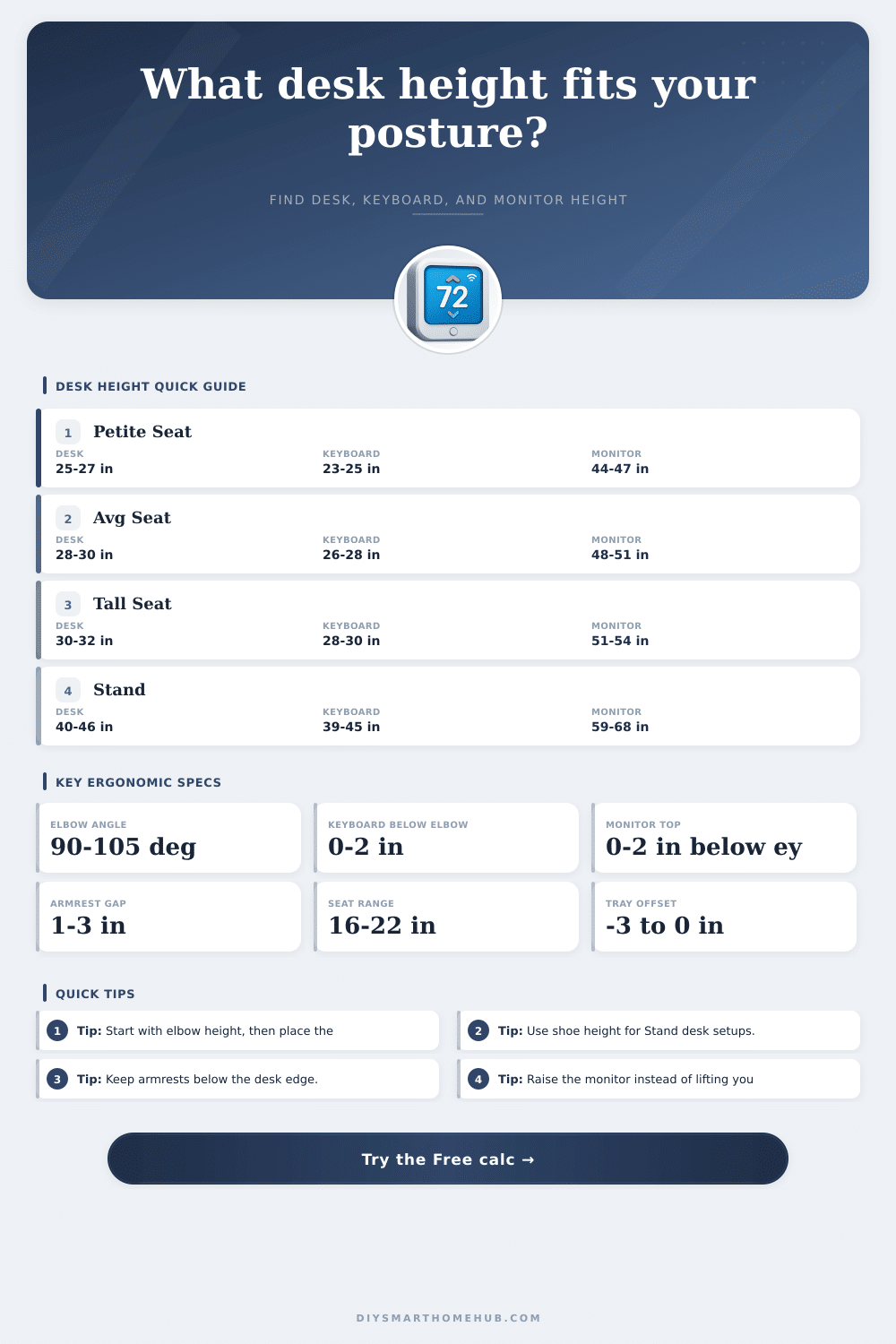
Estimate an ergonomic desk surface, keyboard tray height, monitor top height, elbow clearance, and armrest clearance from your body height, chair setup, shoes, tray offset, and posture mode.
1 Presets
2 Measurements
Result Breakdown
3 Ergonomic Spec Grid
4 Formula Table
| Output | Formula Used | Why It Matters |
|---|---|---|
| Seated elbow height | Seat height + estimated seated elbow rise | Creates the main typing reference without forcing shoulders upward. |
| Standing elbow height | User height x mode elbow factor + shoe height | Accounts for shoe soles and standing posture. |
| Keyboard height | Elbow height - forearm angle drop + mode adjustment | Keeps wrists close to straight while letting the forearm slope slightly downward. |
| Desk height | Keyboard height - keyboard tray offset | A tray below the desktop lets the desk surface be higher than the keys. |
| Monitor top height | Eye height - mode eye drop | Places the top of the screen near eye line so the neck stays neutral. |
5 Posture Range Table
| Mode | Desk Range Logic | Monitor Logic | Best For |
|---|---|---|---|
| Seated focus typing | Keyboard near elbow, desk adjusted by tray offset | Top about 1 in below eye line | Writing, coding, spreadsheets, and long typing blocks. |
| Seated relaxed | Keyboard slightly lower than focus mode | Top about 1.5 in below eye line | Reading, calls, mixed laptop and monitor work. |
| Standing neutral | Standing elbow height plus shoes | Top about 1 in below standing eye line | Adjustable standing desks and standing workstations. |
| Sit-stand compromise | Blends seated and standing references | Uses the midpoint between seated and standing eye lines | Shared risers or quick-change converters. |
| Gaming with arm support | Allows a lower keyboard and stronger armrest check | Top about 2 in below eye line | Mouse-heavy setups and chairs with fixed arms. |
6 Preset Guide
| Preset | Typical Height | Chair or Standing Reference | Included Setup Detail |
|---|---|---|---|
| Petite seated | 5 ft 2 in | 16.5 in seat | Low tray, compact monitor. |
| Average seated | 5 ft 8 in | 18.5 in seat | Standard office chair and tray. |
| Tall seated | 6 ft 2 in | 20.5 in seat | Higher chair, taller monitor stand. |
| Laptop riser | 5 ft 9 in | 18.5 in seat | External keyboard, raised screen. |
| Standing desk | 5 ft 9 in | 0.8 in shoes | Standing neutral with monitor lift. |
| Gaming setup | 5 ft 10 in | 19 in seat | Arm support and lower keyboard target. |
7 Adjustment Tips
You have probably felt it in your lower back before you even notice it in your neck. As you stare at the screen, it’s a mild stiffness then by mid-day it’s a thudding pain with everything else pivoting around center of that desk height.
Standard desks is thirty inches high, so most folks just get a standard desk because who wants one that looks unusual? But there’s no allowance made for how thick your chair cushion are or what shape your elbows make. So you’re either hunching over, or, even worse, shrugging your shoulders, and neither position is good for an eight-hour workday.
How To Find The Right Desk Height For You
But there’s no need for you to guess at coefficients. After entering your seating info and height, the calculator do the math for you. But before trusting the numbers, it helps to know what you’re measuring.
It doesn’t matter whether your desk is near the ceiling or the floor; instead, key reference point is your elbow. When you type hard, say, doing work, your forearms should be roughly parallel to the floor. In more relaxed modes like browsing, your elbows can dips slightly downwards.
Why? Because we don’t want our wrists bending upwards (and thereby compressing the carpal tunnel) nor do we want our shoulders straining by having a keyboard surface that’s too low. Keyboard height differ from desk surface height. Your keyboard may sit on a two-inch-deep keyboard tray, so your typing plane is now two inches lower then what’s called a “standard” desk, which is typically thirty inches from the floor.
To factor in that variance, the tool let you specify how far below the desk surface you’re sitting, keeping your wrists in a neutral position even when you have a taller desk for monitors. It also factors in how high you stand because standing up alters your body’s alignment. Thick-soled work boots can increases your elbow height by almost an inch. This shifts the ideal monitor position and disrupts balance if the desk isn’t adjusted to match.
The common mistake: Most people fix this last. Check your screen height first! To avoid forward head posture (which puts pressure on your neck), your monitor’s top edge should of be at or just below eye level. You can adjust the height of your screen if your neck hurts from a low screen but your arms are positioned comfortabley.
Don’t lower your desk to accommodate both. Doing that would compromise your eye ergonomics for your arm ergonomics. Separate these two by using a riser or book. Also consider the height of the armrest since many is fixed and must slide beneath the desk so you don’t have to move away from your keyboard. Typically, one to three inches will be enough (i.e., enough room for armrests to slide underneath but no more).
If there isn’t this space, then you’ll have to lean in to type, bending your back at an unnatral angle. As the table below demonstrates, even with the same chair model, a small person may require a different height compared to a six-foot-two person. Because ergonomic comfort is a range, one that adjusts for how thick your shoes are or how far you compress your office chair, it’s a moving target, not a fixed number.
How do you feel when you first arrive versus an hour later? Do you slouch at lunchtime? Aim to eliminate uncomfortable pressure points, not freeze yourself into one position. Use your elbows as your anchor point, allow everything else to sort itself out and listen to your body; new furnitures defaults rarely know better. Your spine will thank you.