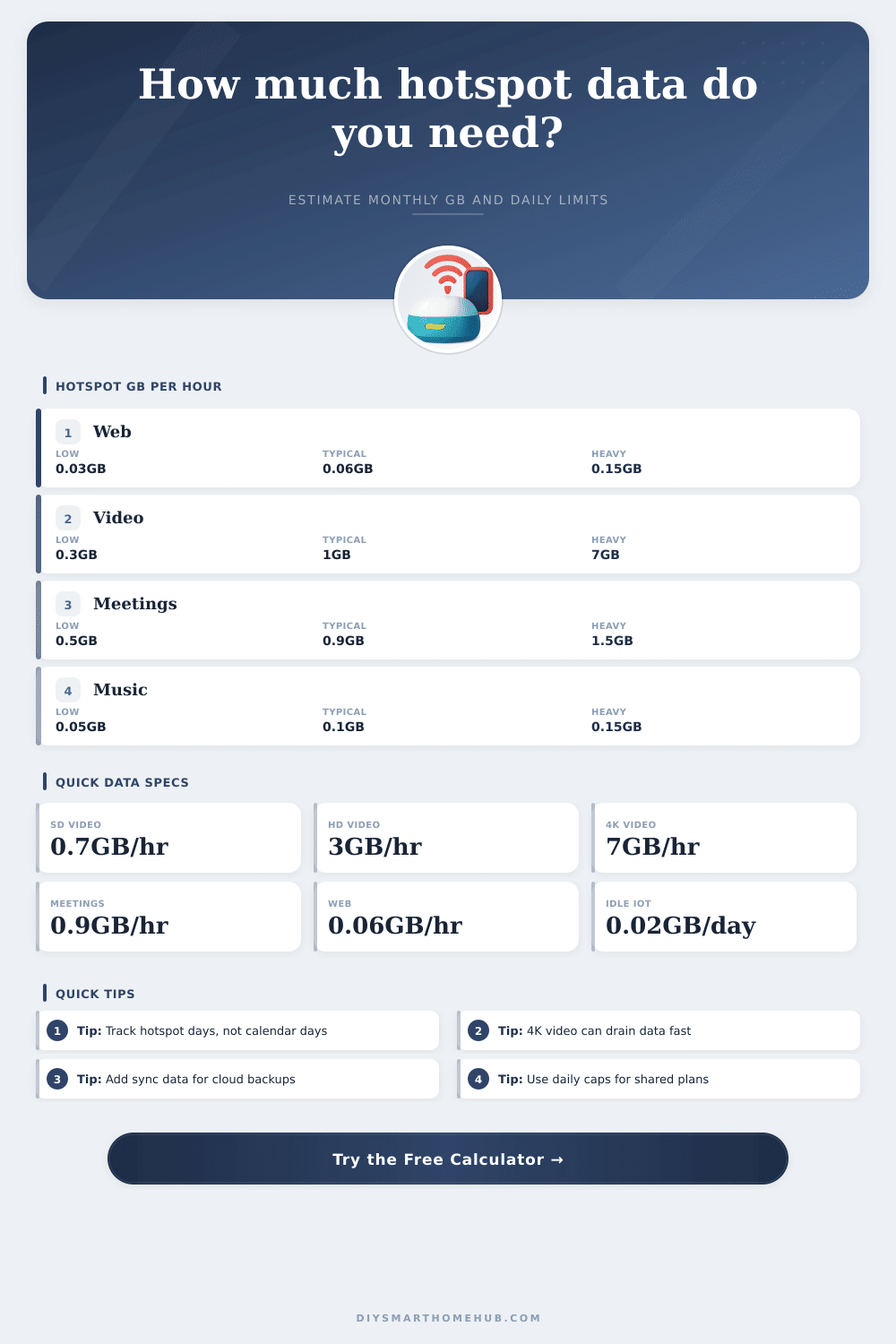
Hotspot Data Usage Calculator
Estimate hotspot data for a billing cycle using realistic activity rates for web work, video streaming, meetings, background sync, and connected smart devices.
Rates are planning estimates. Some apps change bitrate automatically when hotspot signal, screen size, or account settings change.
📊 Hotspot Data Estimate
| Activity | Planning Rate | 10 GB Covers | Best Use |
|---|---|---|---|
| Web, email, documents | 0.03 to 0.15 GB/hr | About 167 hr at 0.06 GB/hr | Light work and admin tasks |
| Music or podcasts | 0.05 to 0.15 GB/hr | About 100 hr at 0.10 GB/hr | Audio-first travel days |
| Online gaming play | 0.04 to 0.30 GB/hr | About 50 hr at 0.20 GB/hr | Gameplay without downloads |
| HD video meetings | 0.5 to 1.5 GB/hr | About 11 hr at 0.90 GB/hr | Remote work and classes |
| Security camera viewing | 0.3 to 1.5 GB/hr | About 20 hr at 0.50 GB/hr | Short live checks, not 24/7 upload |
| Video Quality | GB Per Hour | 30 GB Covers | Planning Note |
|---|---|---|---|
| Data saver 240p to 360p | 0.3 GB/hr | 100 hours | Useful for small screens and lectures |
| SD 480p | 0.7 GB/hr | 43 hours | Balanced for phones and tablets |
| HD 720p | 1.0 GB/hr | 30 hours | Good default for shared hotspots |
| Full HD 1080p | 3.0 GB/hr | 10 hours | Large screens use data quickly |
| 4K UHD | 7.0 GB/hr | 4.3 hours | Use sparingly on capped plans |
| Common Plan Size | Safe Daily Use Over 30 Days | HD 720p Hours | 1080p Hours |
|---|---|---|---|
| 10 GB | 0.33 GB/day | 10 hours | 3.3 hours |
| 30 GB | 1.0 GB/day | 30 hours | 10 hours |
| 50 GB | 1.67 GB/day | 50 hours | 16.7 hours |
| 100 GB | 3.33 GB/day | 100 hours | 33.3 hours |
| 300 GB | 10.0 GB/day | 300 hours | 100 hours |
| Scenario | Typical Inputs | Daily Estimate | Monthly Pattern |
|---|---|---|---|
| Email workday | 5 hr web, 0.5 hr calls | About 0.95 GB | 15 to 20 GB if used often |
| Remote work calls | 4 hr web, 3 hr meetings | About 4.0 GB | 80 GB over 20 active days |
| Family travel | Multiple devices, HD video | About 14.6 GB | Short trips can still be heavy |
| Smart home backup | IoT idle plus brief checks | About 1.0 GB | Small unless cameras upload nonstop |
A mobile hotspot allow many device to use the data from a data plan. A mobile hotspot allows laptops, tablets, and other smart devices to use the internet using the data from the cellular plan. Many people dont understand how quick data is consumed from a mobile hotspot.
Video calls, streaming media, and other data that is transmitted in the background of smart devices consumes data at a very quick rate from a mobile hotspot. The number of active day that a person uses their mobile hotspot is important to calculate the total amount of data that is used. The number of active days that a person use their mobile hotspot is not the same than the total number of days in the plan.
How Video Quality and Active Days Use Up Hotspot Data
For example, a person may use their mobile hotspot for eight travel days in a thirty day month. The higher the number of active days, the more lower the amount of data that the devices use each day. Therefore, the calculator will ask for the number of active days because the number of active days will increase the data that the devices connect to the mobile hotspot use each day.
Video quality will have a major impact on how much data a mobile hotspot use. By lowering the quality of the videos that are watched on a mobile device, the amount of data that is used will decrease. When changing the quality of the video from high definition to standard definition, the amount of data that is used will decrease.
The same is true for video calls; high definition use more data than standard definition video calls. Video calls use a significant amount of data while on call. Therefore, the quality of the video on video calls will direct impact the amount of data used by the mobile hotspot.
Data from other smart devices that is connected to a mobile hotspot also uses data from the mobile hotspot. The person with the hotspot uses this data even when they isnt actively using the devices. Devices can use data for security camera, cloud applications, and system update.
The devices constantly use this data. Therefore, the data that other smart devices use while on a mobile hotspot also direct impacts the amount of data that is available for other device. The number of devices that is connected to a mobile hotspot also uses data.
When more devices are connected to a mobile hotspot, more data is used. For example, connecting four device will use more data than one device. This is due to automatic syncs and notifications from other device.
The more devices connected to a mobile hotspot, the more data the devices will use. Video quality setting will use a significant amount of data by a mobile hotspot; 4K videos use a significant amount of data. By choosing a specific quality for videos on a mobile hotspot, you can accurately project the data that is used.
Video quality has the most significant impact on the amount of data that is used on a mobile hotspot. Video calls use more data than browsing the web. One hour of video calls use more data than several hour of browsing the web and working on document.
With many back-to-back video calls, a person on their data plan can quick used up data. The reference table will show how many hour of video of specific quality can be viewed with a certain amount of data. These table will show how many hour of standard video can be viewed in a specific amount of data.
These reference table will also show what size of data plans a person can purchase, and how many hour of video can be viewed with that certain amount of data. For shared plan, where several people will use a mobile hotspot, daily data limit must be set for each person using the mobile hotspot. The data calculator will find a safe daily amount of data so that the group can set a limit for each member of the group.
This ensure that the group does not use up all of the data available for the group. A mistake that a person may make with a mobile hotspot is ignoring the number of active days with the data allowance. For example, a person may have a fifty-gigabyte data plan.
Using the mobile hotspot for eight day at a high quality for video will use up all of the data in a few day. However, if the person use the mobile hotspot for fewer day at a lower quality for video, the same amount of data will last the person for a full month. The most important factor in managing a mobile hotspot with a data plan are the number of active days and the quality of the video that is watched.
A data calculator may not be able to account for the quality of the signal of a mobile hotspot. However, it can calculate the variable that a person can control. By adjusting the quality of the video that is watched and the number of device using the mobile hotspot, a person can create a margin of safety for the mobile hotspot connection plan.
This will ensure that the mobile hotspot will not become a costly connection due to exceeding the data plan limit.