Backup Storage for Smart Home Config Calculator
Estimate storage for smart home configuration backups by combining compressed full backup copies, incremental change data, week or month retention, offsite replicas, and growth reserve.
Backup storage calculation breakdown
| Formula step | Calculation | What it represents | Planning note |
|---|---|---|---|
| Compressed full size | Full size x compression percent | Stored size of one full smart home config backup | Apply before counting full copies |
| Full copies | Retention days / full interval | Number of full backup restore anchors kept | Rounded up and compared with minimum full copies |
| Incremental count | Retention days / incremental interval | Changed-data restore points inside retention | Full backup days are excluded from incrementals |
| Incremental storage | Incrementals x full size x change rate | Total changed data between full copies | Change rate is applied to compressed full size |
| Copy multiplier | Local set + offsite copy sets | Replicated backup retention across locations | One offsite set doubles the storage requirement |
| Final storage | Backup set x copies x reserve | Practical capacity target | Reserve absorbs growth and failed backup retries |
| Smart home backup profile | Typical full size | Daily change cue | Compression behavior |
|---|---|---|---|
| Config files only | 0.5 to 2 GB | 1% to 3% per day | Usually compresses strongly because YAML, JSON, and logs are text-heavy |
| Config plus recorder database | 2 to 8 GB | 3% to 7% per day | Database files compress moderately and change steadily |
| Dashboards and media assets | 4 to 15 GB | 2% to 6% per day | Images and audio clips may already be compressed |
| Container stack export | 5 to 25 GB | 4% to 10% per day | Mixed app data and databases create uneven incrementals |
| VM or full appliance image | 15 GB and higher | 5% to 12% per day | Snapshots often include more unchanged blocks than config exports |
| Retention pattern | Full backup rhythm | Incremental rhythm | Best planning use |
|---|---|---|---|
| Short rollback window | Weekly full | Daily incremental | Small hubs where recent config mistakes are the main concern |
| Monthly archive | Monthly full | Daily or 2-day incremental | Stable automations with low daily change rate |
| Fast restore chain | Weekly full | Every 6 to 12 hours | Busy hubs with frequent automation edits and add-on updates |
| Appliance image strategy | Biweekly full | Daily incremental | VMs or mini PCs where full images are larger but restore steps are simpler |
| Long compliance archive | Monthly or quarterly full | Weekly incremental | Low-change exported configs where older restore points matter |
| Scenario | Full size | Retention | Typical storage target |
|---|---|---|---|
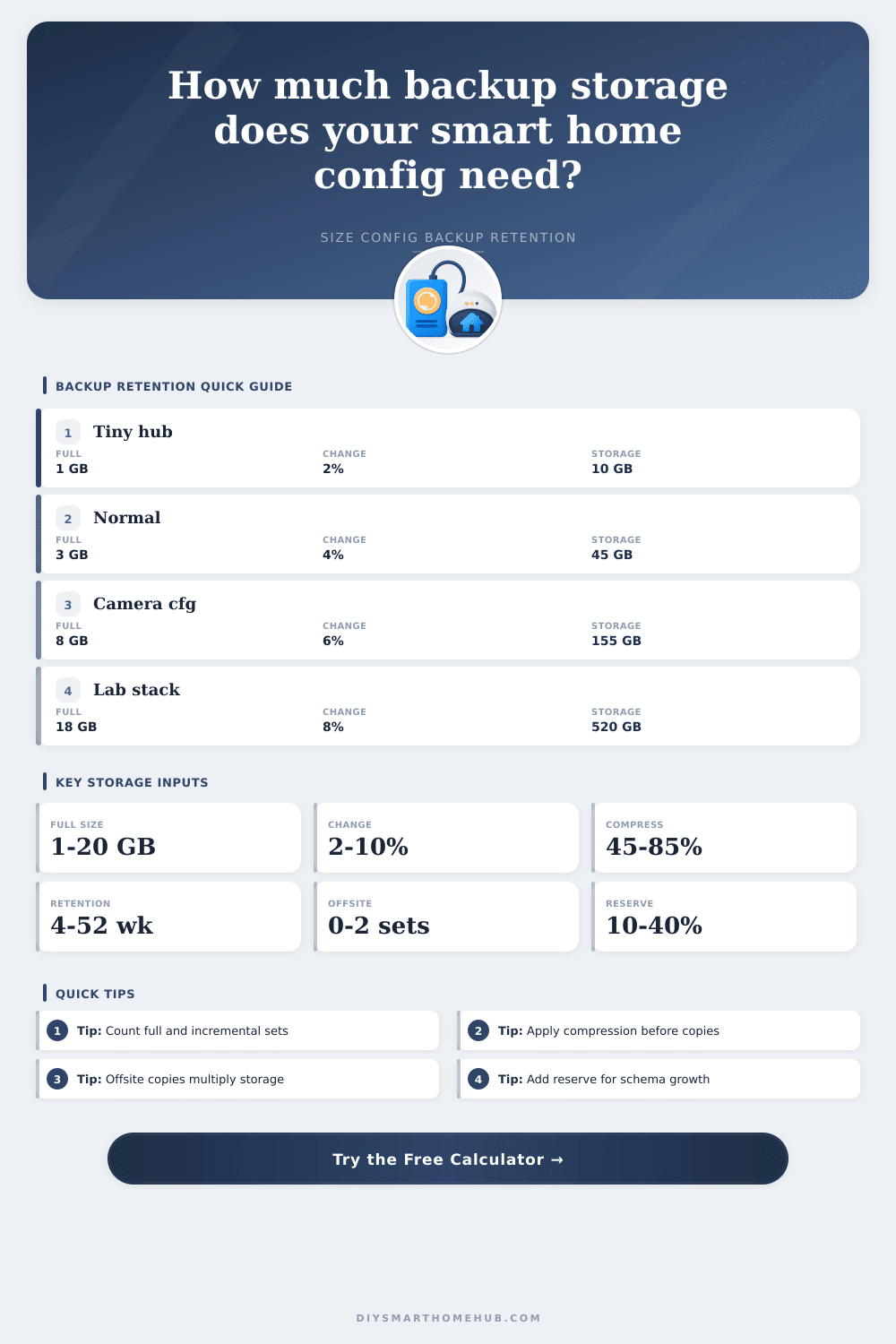
| Tiny hub config export | 1 GB | 8 weeks | About 10 to 20 GB with one offsite set |
| Normal home automation server | 3 to 5 GB | 12 weeks | About 40 to 90 GB with one offsite set |
| Dashboard and asset-heavy hub | 8 to 12 GB | 6 months | About 180 to 360 GB with offsite copy |
| Recorder database-heavy server | 10 to 18 GB | 6 months | About 300 to 650 GB depending change rate |
| Lab stack or VM image archive | 18 GB and higher | 12 months | Often 1 TB or more after offsite copies |
Config export
Smallest storage footprint and easiest to move offsite. It works best when databases, media folders, and add-on volumes are either excluded or exported separately.
Application backup
Includes add-on data, dashboards, helper stores, and recorder history. It needs more storage, but it usually gives a more complete smart home restore point.
Image backup
Captures the appliance, VM, or host volume. It is larger and more sensitive to change rate, so retention and offsite multipliers matter more.
After spending weeks setting up smart devices, automating workflows, and fine-tuning dashboards, it all seems put together. Then something get updated, breaking everything. Now you know configuration files are not just data; they’re the secret sauce of your carefully crafted organization. And losing them mean losing comfort of everyday.
Lots of people think that “backing up” is a single-click affair. They forget that it need to store incremental changes across multiple offsite locations over the course of several month. Enter the calculator: give it your backup profile and retention preferences, then let it do the math on compression rates and storage multipliers for you. You’ll never guess again, and you wouldn’t of had to.
How Much Backup Space Do You Need?
First: how big does it get? File size varies depending off the length of operation. At install, the system may be around a gig. But then all those add-on pack add data, fast. Is this a full image of the application? Or is it just the configuration? Config is text and will compress well. Databases contains historical sensor information which do not compress well. If you keep months of recorder history in your backup set, your storage needs grows linearly with time. The tool prompts for the rate of change per day to help calculate data growth. A relatively static hub may only have 2% change each day. An integration test lab may hit 10% or more. Over time, that add up to a lot.
Hardware limitations also clash with retention windows. Hard drives has physical limits, and you might wish to retain backups for a year or more. That’s where incremental backups comes in. Rather than re-copying everything each week, you back up only changes since the last snapshot. That saves a lot of space. But it complicate things. Each incremental file rely on the previous full backup. Corrupt that anchor file and the whole thing’s broken. Your 20 restore points is all based off a single vulnerable file from six months ago. And now you have zero effective backups. Understanding how full and incremental cycles combine will help determine your retention period, here’s the reference table showing the impact of different intervals on overall storage needs.
Physical risk involve offsite requirements. Backups prevent software bugs and accidental deletions. But what about floods? Hard drives can fail. What about theft? You want copies away from your house. Small config files are easy to store on cloud services. Large database images becomes costly there. Larger archives can be stored on external drive that is rotated between two sites. Each copy increase your cumulative storage cost. A single local copy and single offsite copy doubles your total storage. The calculator automaticly factors this copy multiplier into the result. All you have to do is determine how many redundant copies you’re willing to pay for. Redundancy is cheaper than rebuilding your smart home.
Add a reserve buffer, too. Over time, systems expands. The network adds new devices. Databases change their structure. Backups tend to get bigger over time. By reserving twenty percent of your space as headroom, you won’t have to cull backups once you run out of room. You’ll have margin for larger-than-anticipated monthly updates and job failures. It’s easier to plan for growth then react to it after-the-fact.
Managing smart homes is as much about preservation as it is about automation. Having elaborate lighting scenes doesn’t do much good if you can’t get your settings back when something go wrong. Having the right size backups gives you a way to return to normalcy. That makes it more than a stressful chore. A smart home should allow you to not worry about scrambling for answers when things goes wrong. Just restore and carry on.