Firmware Update Download Size Calculator
Estimate how much data a smart home firmware rollout will download after device count, full packages, delta packages, protocol overhead, retries, bandwidth, and data cap reserve.
⚙Update presets
📦Firmware rollout inputs
🔎Formula checks
📊Firmware download results
Run the calculator to see package mix, overhead, retry margin, bandwidth time, and data cap impact.
🔧Firmware planning specs
| Update item | Calculator formula | Typical range | What changes it |
|---|---|---|---|
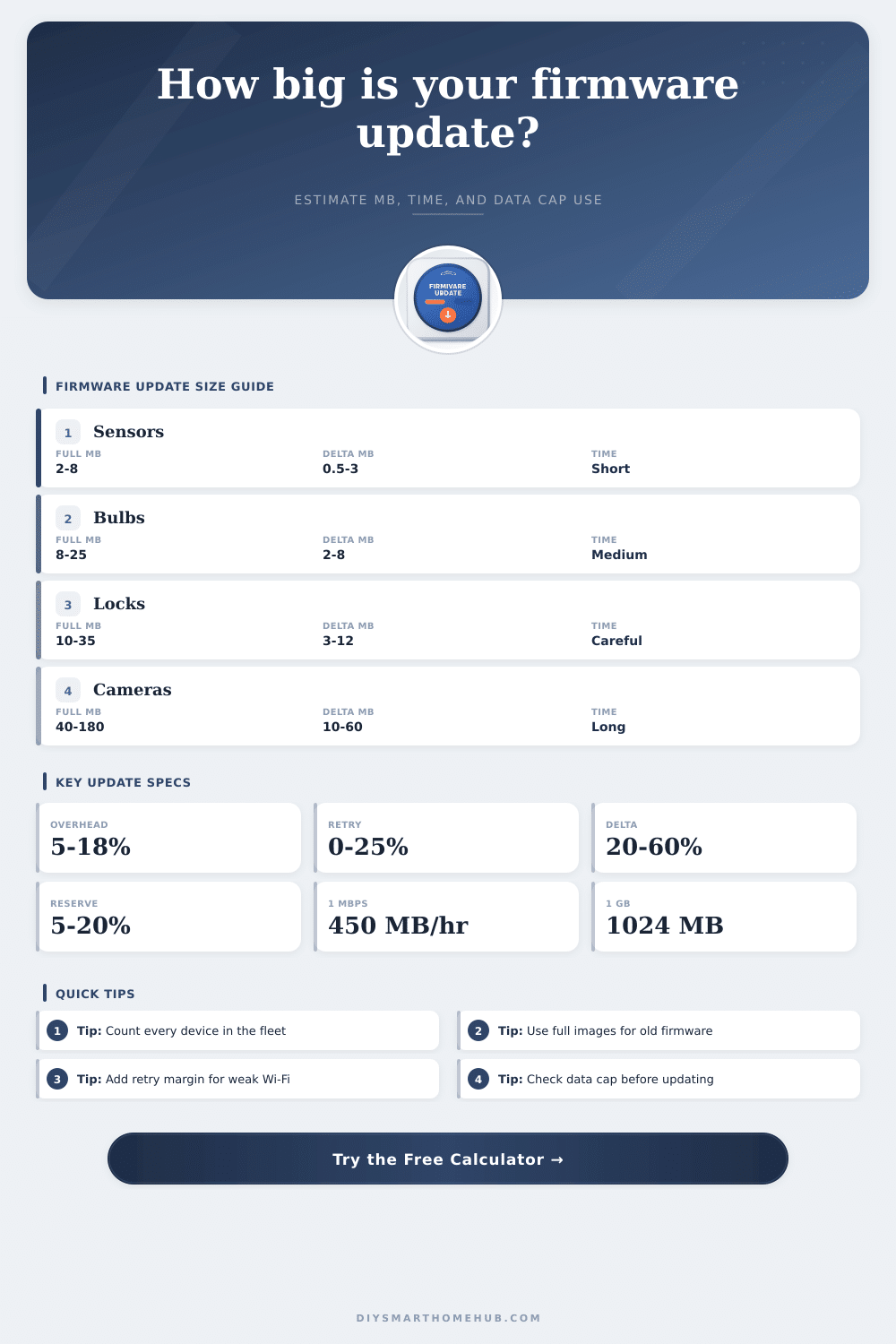
| Full package devices | Device count x (100 - delta eligible %) x full MB | 2 MB to 180 MB each | Device class, memory layout, signed image format |
| Delta package devices | Device count x delta eligible % x delta MB | 20% to 60% of full image | Old firmware version, compression, binary diff method |
| Protocol overhead | Base download x (1 + overhead %) | 5% to 18% | TLS, MQTT/HTTPS headers, encryption, metadata |
| Retry margin | After-overhead download x (1 + retry %) | 0% to 25% | RSSI, mesh hops, congestion, sleeping devices |
| Download time | Total internet MB x 8 / usable Mbps | Minutes to hours | Bandwidth, throughput efficiency, throttling |
| Data cap impact | Total internet GB / monthly cap GB | Small to severe | Cap size, current usage, reserve target |
| Device class | Common full image | Common delta | Rollout note |
|---|---|---|---|
| Contact, leak, and motion sensors | 2 to 8 MB | 0.5 to 3 MB | Battery devices may update slowly and retry more often |
| Smart bulbs, plugs, and relays | 8 to 25 MB | 2 to 8 MB | Large fleets can exceed the size of one camera update |
| Locks, keypads, and alarm accessories | 10 to 35 MB | 3 to 12 MB | Use staged waves when reliability matters more than speed |
| Thermostats and displays | 25 to 120 MB | 8 to 45 MB | UI assets can make packages larger than simple sensor firmware |
| Indoor and outdoor cameras | 40 to 180 MB | 10 to 60 MB | Video features, AI models, and recovery partitions add size |
| Hub, bridge, or border router | 40 to 250 MB | 15 to 90 MB | One hub download can seed many LAN-side device updates |
| Delivery model | Internet data impact | Device/LAN impact | Best use |
|---|---|---|---|
| Direct cloud-to-device | Each device downloads its own package | Same as internet traffic | Simple Wi-Fi devices and cloud-managed updates |
| Hub cached by group | One package per model or update group | Devices still receive their own LAN payloads | Zigbee, Z-Wave, Thread, or bridge-managed fleets |
| Hub cached plus multicast | One package per group | Reduced LAN airtime for repeated payloads | Large same-model fleets on local control networks |
| Manual local upload | Usually one package from admin workstation | Depends on controller distribution method | Labs, offline sites, and restricted networks |
| Scenario | Device count | Package mix | Planning concern |
|---|---|---|---|
| Small sensor patch | 10 to 30 | Mostly delta | Retry margin matters more than package size |
| Whole-home bulb rollout | 20 to 80 | Mostly delta, some full | Concurrent waves prevent Wi-Fi congestion |
| Camera firmware month | 4 to 16 | Often full packages | Data cap and update window can become limiting |
| Hub-cached mesh update | 30 to 150 | Few update groups | Internet use can be low while LAN traffic remains high |
| LTE backup site | 5 to 40 | Mixed packages | Cap reserve should be checked before rollout |
I tap “update” in my smart home app, and suddenly every device in the house freeze for thirty minutes. I pushed four hundred megabytes of firmware over a connection that’s too slow, so now the Wi-Fi has dropped and the cameras are offline. If you’ve got a lot of connected devices like this, you know the frustration. Usually it’s not because someone wrote bad code, but because they didn’t plan their bandwidth well.
They don’t understand the cost of delivering updates. How much data they’re going to consume when they press that button. And so the cameras go offline, and your security system isn’t there when you need it. With that in mind, plug your connection types and number of devices into the calculator above. It do all the math for you (and spares you complicated conversions and coefficients).
Why Firmware Updates Fail and How to Fix Them
A firmware update isn’t just a simple transfer of files over the air. There’s an entire series of processes, from error-correction mechanisms to protocol headers to encryption, that each add overhead and expand raw package size. For example, that 32-megabyte image could balloon to 40 with the addition of overhead. And that increase is significant when it scales to a fleet of dozens of devices simultaneousy receiving an update. What was intended as a brief update quickly become a multi-hour networking process.
When it comes to delta updates, they’re a breath of fresh air. Instead of shipping the whole operating system, they ship just the changes from one version of software to another. This make them much smaller downloads; frequently reducing payload by half or even more. But not all devices benefit from this optimization. Devices that are older and may have skipped a few releases need full images because there’s nothing to compare against. And if some of your fleet has already had multiple updates while others haven’t, you can’t expect them all to get the smaller patch. Plan for worst case, which means legacy devices drag down the average and make rollouts less efficient.
Bandwidth consumption also has a lot to do with delivery architecture. Each camera, bulb and sensor individually grab its own copy of update directly from the cloud. With models that cache at the hub, the system work totally differently: One master package is downloaded by the central hub which then pushes it to all attached devices locally. That shifts the load to your local network and dramatically cuts down external data usage. It’s not only convenient but necessary if you’re on a metered LTE connection. Otherwise, it comes down to what your data caps and infrastructure can handles.
This also applies to time management. Too many updates pushed at once will flood the router and result in timeouts. It’s better to stage things out in waves so there’s time for validation checks and less congestion on router. Those pauses are factored into the tool to help you calculate how long everything should of take, including the required breaks between groupings. Failing to account for those periods can lead to failed downloads and brick risks. That’s especially risky on battery-driven gear that goes to sleep frequently to save juice.
And you know what happens when you forget about Wi-Fi? There’s bound to be some interference somewhere, which means you need a margin for retries baked in your math. And then there’s data caps. If not monitored, those big camera updates will burn up a good chunk of your monthly allotment. Check how much data you have left before rolling them out so you don’t run out and cause overages or throttling. A little bit of admin work will save your wallet and your network performance.
Delivering firmware isn’t as much about the code as it is planning how to get it from A to B. It’s a race against hardware limits, congestion and latency, you’re shoving bytes across real-world constraints. Get ’em right in advance, and what could be a difficult ordeal becomes just another piece of routine maintenance. Keeping your home smart but not breaking your connection.