QoS Bandwidth Priority Calculator
Plan router QoS settings from measured upload and download speed, bufferbloat headroom, class reserves, latency-sensitive queues, and device priority weights for smart homes, gaming, video calls, and busy Wi-Fi.
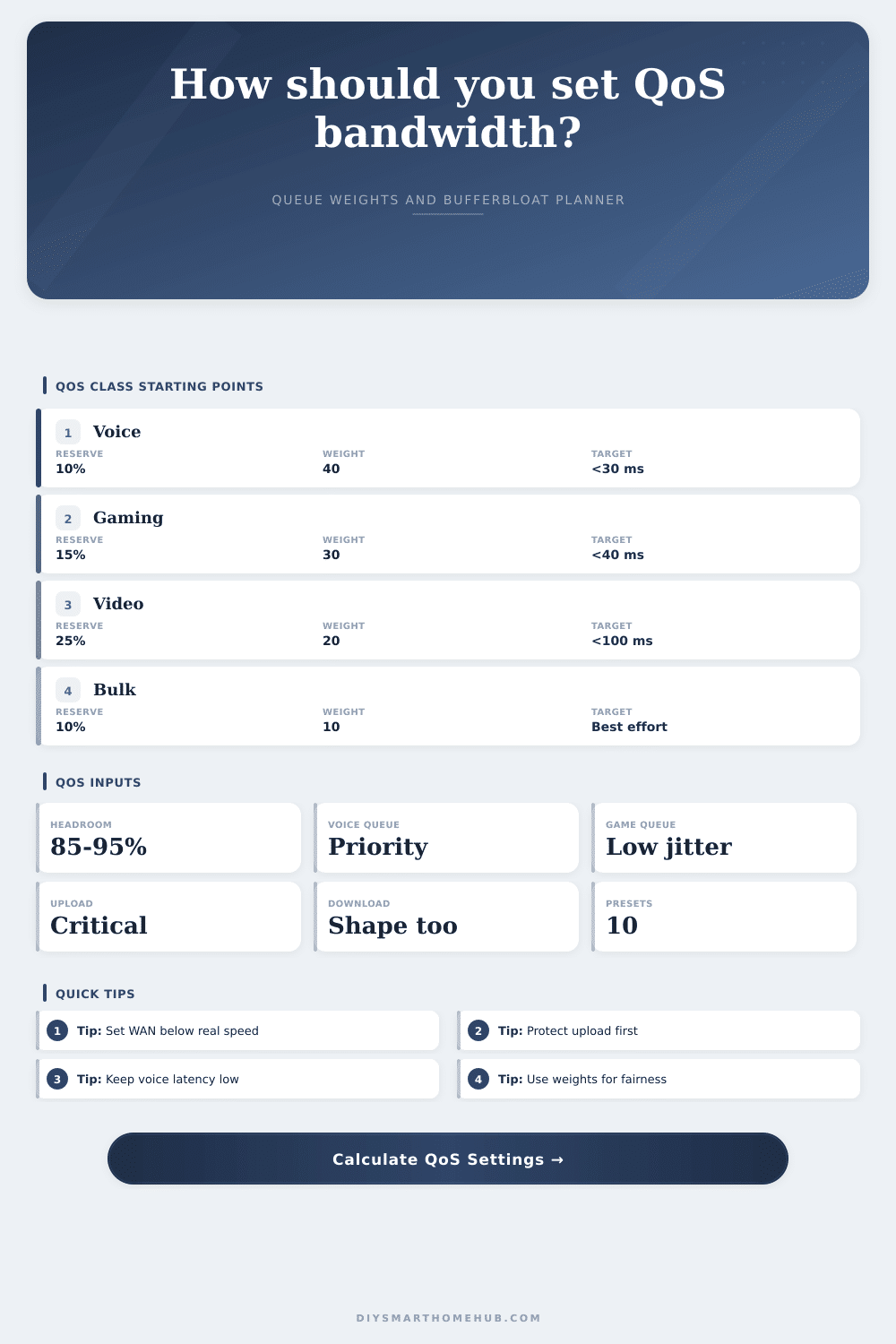
Set router WAN bandwidth below real line rate so queues form in the router, not the modem.
Latency-sensitive queues should be small, reserved, and served before bulk traffic.
High, normal, and low priority devices share leftover bandwidth by weighted fairness.
Flow queueing reduces one upload, camera, or download from filling the entire buffer.
Reserved bandwidth per class
| Class | Reserve formula | Download | Upload | Status |
|---|
Device priority weight split
| Priority | Devices | Weight | Per-device share | Queue note |
|---|
Wi-Fi QoS comparison
| Wi-Fi | QoS tools | Latency fit | Best use |
|---|---|---|---|
| Wi-Fi 5 | WMM queues | Fair | Light homes, careful channel use |
| Wi-Fi 6 | OFDMA, WMM | Good | Busy smart homes and calls |
| Wi-Fi 6E | Clean 6 GHz, WMM | Very good | Low-interference work and gaming |
| Wi-Fi 7 | MLO, 6 GHz, WMM | Excellent | High-throughput low-latency clients |
Router QoS comparison
| Router mode | Strength | Weak point | Use when |
|---|---|---|---|
| SQM CAKE | Best bufferbloat control | Needs CPU | Latency matters most |
| FQ-CoDel | Good fair queueing | Manual shaping | OpenWrt or prosumer router |
| Adaptive QoS | Easy app classes | Opaque rules | Mainstream home router |
| Manual HTB | Exact reserves | Needs tuning | You know each class demand |
| Priority list | Simple device order | No real shaping | Small networks only |
Preset comparison
| Preset | Line speed | Headroom | Priority reserve | Main risk |
|---|
Latency class guide
| Traffic | Latency target | Reserve range | Queue treatment |
|---|---|---|---|
| VoIP and video calls | Under 30 ms added delay | 5% to 15% | Priority queue, small burst |
| Gaming and remote desktop | Under 40 ms added delay | 10% to 20% | Low-latency class, high weight |
| Streaming and cameras | Under 100 ms added delay | 20% to 45% | Assured class, medium weight |
| Downloads and backups | Best effort | 5% to 20% | Scavenger class, capped bursts |
You’re presenting, and this is the important part where something has to be said. But then your video call glitches. Oh wait, no, it freezes mid-frame. And then you look down at your phone: full bars; great Wi-Fi. Except for it isn’t. What’s going on?
Here’s what: bandwidth isn’t simply a measure of raw throughput. It’s a question of priority. A fast internet don’t make your online gaming smoother so much as ensuring that your router prioritizes the packets that matter.
How to Fix Your Internet with QoS
Home networks generally has equal right of way on everything. Your voice data gets no special treatment; neither does that huge backup upload to a cloud. That results in bufferbloat. Because the router doesn’t know what type of data needs immediate attention (latency sensitive) vs. Bulk transfer, packets begins piling up in its memory.
What fixes this? Quality of Service is known as QoS. Think of it as a traffic cop for data streams on your network. Once you enter your measured line speeds and desired class reserves, the calculator above will do the math for you. It will translate these network ideas into real settings you can use.
How do you start? You start by adjusting your line rate, of course. You may feel like adjusting your QoS limits to match the amount of bandwidth that your ISP claims to provide. Don’t. Your connection in the real world isn’t a constant. When it dips, your modem will still queue up packets. That leads to lag if you’re shaping to 100 percent of your line speed.
Shape instead to 85 to 95 percent of what you’ve measured. The queue will remain short. This forces your router to make its own local decisions instead of relying on the equipment provided by your ISP to bottleneck your traffic. This headroom decrease jitter.
Now we get into reservations. Certain types of traffic require low latency. Gaming traffic do. Voice traffic does. But they don’t require huge amounts of bandwidth. They just want it now. That’s where the tool comes in. You can set aside a reserve for those kinds of classes.
Say you reserve 12 percent for voice. Even if your backup is saturating your upload, your call is still going to be crystal clear. What the exact percentage should be isn’t as important than understanding the idea. You’re buying insurance.
This is how gaming traffic works too. It isn’t necessarily throughput-sensitive so much as it’s sensitive to jitter. If you have a small dedicated lane for game packets, they won’t get hung up behind someone downloading a movie.
This leaves us with device weighting. Once reserved classes has their day in the sun, what’s left goes to other devices. But not all your devices are created equal. Smart fridges don’t deserve as much bandwidth as your work laptop. That leftover capacity needs to be divided up fairly, which is why the calculator uses a ratio like 4 to 2 to 1. This way nobody gets to hog the connection but everyone else can still use it.
And this is where many people go wrong. They obsess over speed tests without paying attention to fairness. If you think your network is slow, chances are the wrong things is getting priority. It also helps that routers vary in their capabilities. For example, not every piece of hardware have the ability to do QoS equally well.
Hardware using FQ-CoDel or SQM-style algorithms to actively control queue size is best suited for bufferbloat control. While basic priority lists help, they’re more blunt tools that don’t account for complex traffic mixes. If you’ve got a bunch of gaming consoles, smart home gear, work gear, cameras etc., it’s worth spending a little extra on managing your router better. It will let you know how good your hardware is at the job.
And last, test under load. That means QoS tuning wouldn’t of do any good if all you do is run a speed test alone. Simulate real world use. Stream while gaming. Backup while streaming. Does your latency spike? Use what you learned there to tweak the weights and reserves.
The numbers in the calculator are simply a starting point. Real world use will make those numbers more accuratly over time. And remember, perfection doesn’t happen on a chart. Perfection is when everything works so smoothly you don’t even notice the tech behind it.
When that video call sounds crystal-clear, even though you’re doing a backup in the background… then you’ve got it. And the traffic cop is working.