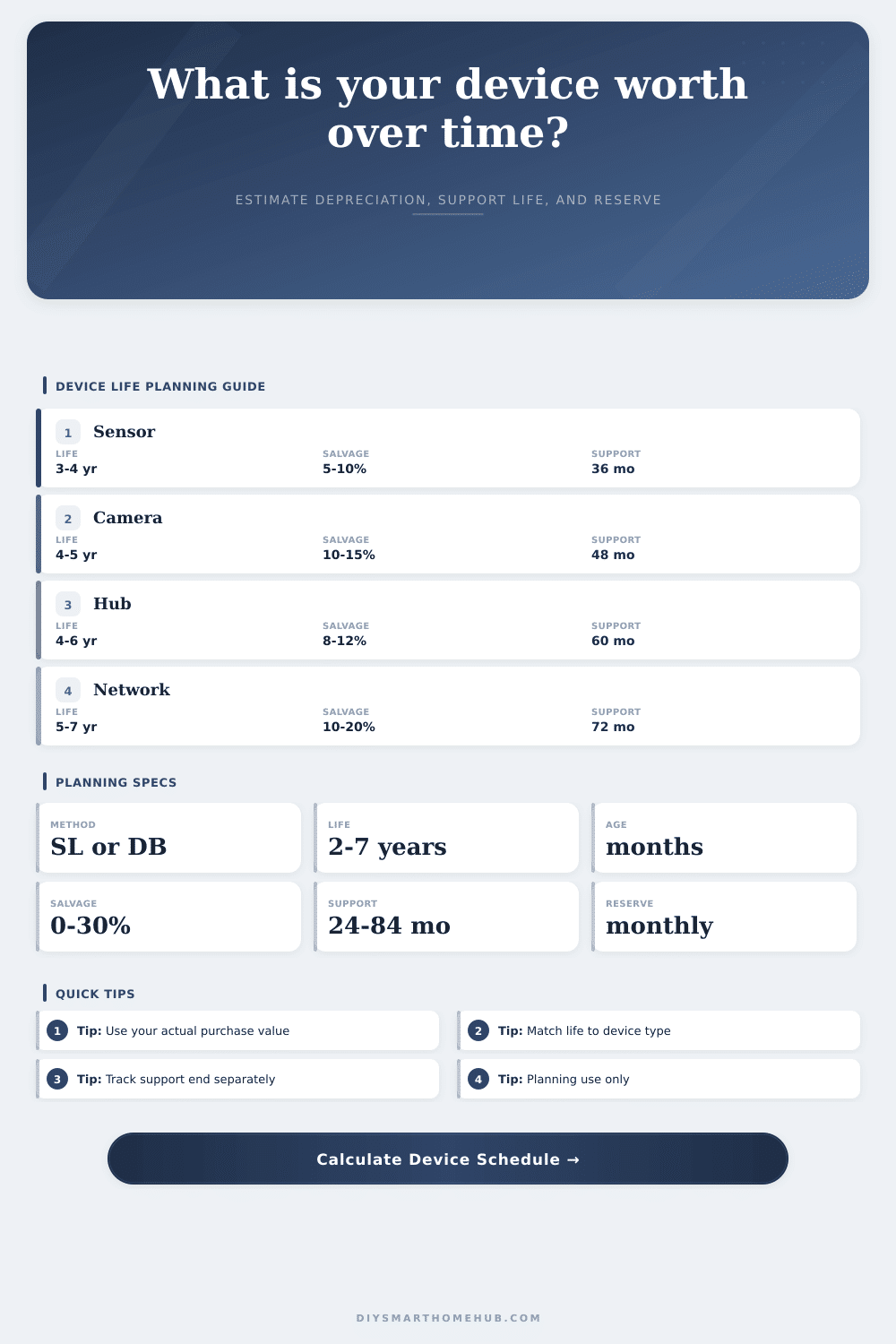
Device Depreciation Schedule Calculator
Estimate a smart-home device's planning book value from user-entered purchase value, depreciation method, useful life, salvage percent, age, support horizon, and replacement reserve.
| Year | Start value | Depreciation | End value |
|---|---|---|---|
| 1 | $0 | $0 | $0 |
| Method | Book now | Deprec now | Monthly ref |
|---|---|---|---|
| Straight-line | $0 | $0 | $0 |
| Device type | Life | Salvage | Support |
|---|---|---|---|
| Sensors | 3.5 yr | 8% | 36 mo |
| Trigger | What it means | Reserve action | Planning note |
|---|---|---|---|
| Useful-life end | Wear estimate | Fund by life end | Stable devices |
| Support end | Updates stop | Fund earlier | Cloud devices |
| Salvage floor | Residual value | Keep floor intact | Resale or reuse |
| Reserve target | Refresh cash goal | Monthly set-aside | Household planning |
The smart home system you paid for three years ago isn’t really worth what you paid for it. And actualy, the hardware itself is costing you more than it’s worth, costing you money without providing value in the form of either convenience or security. The device resides on your shelf, sucking up cash. That’s why knowing about depreciation is so important. It forces you to look beyond acquisition costs and understand cost of owning something.
For example, “device depreciation schedule calculator” determines how long it will take you to buy new hardware (support horizon). It also determine how long you’ll use it (useful life), what its worth today (planning book value), and what the monthly cost of replacing it will be (replacement reserve). The latter is your financial runway in dollars per month.
Why You Need a Device Depreciation Calculator
When we talk about electronics most of us are buying them as if they were a car: you buy something, use it and then you toss it out in favor of a newer version once it breaks. With smart home devices, things don’t quite work that way. In fact, more often than not, they rarely break mechanically. Instead, they die digitly.
That is to say you could have a perfectly working camera with a functioning sensor and lens. However, if the encryption protocol is no longer supported or the cloud server shuts down, your camera becomes a doorstop. That’s why this distinction is important, we can see mechanical wear and tear, but digital decay? It’s invisible until it’s too late. And that’s where the calculator comes into play. By splitting up support life and physical life, it lets you begin to model this invisable digital decay.
Next: Determine what type of depreciation best reflects your situation. (There’s a straight-line vs. If the hardware is simple, like a basic thermostat with no display or a simple door sensor. It uses straight-line depreciation. This is because it will work more or less forever, even though the battery will eventualy die and the plastic will turn yellow.
But if it’s something complicated that’s obsolete as soon as you buy it, a camera, a display or some sort of hub thingy; then its value declines at a faster pace, so you’d use a declining balance method. You can switch back and forth between the two using our calculator and observe how fast you’ll eat through your reserve in the long run, depending on whether you’re aggressive up-front or not.
The other key input is the salvage value, that is to say, the price at which you expect to get rid of it once it’s time for replacement. This value is surprisingly low in the case of most consumer devices (because they’re considered too risky to resell). You could buy a two-hundred-dollar smart lock but only get fifteen bucks back for it on the secondhand market. The calculator enforces a realistic salvage floor on you so that you don’t overestimate what you’ll recover, and your book value will never fall below zero as long as the salvage floor remains realistic. It keeps the model honest.
Finally, there’s the variable of the support horizon; the timeframe for which the manufacturer will provide security patches and firmware updates. When this time frame expires, the device turns into a liability. The calculator looks at this date to tell you when you need to completely fill up your replacement reserve fund. If the support runs out before you’ve got that cash in hand, then you’re going to end up spending on something unplanned when you’re least prepared. This is the worst time.
This one goes against intuition: why would you build a monthly reserve fund if you’ve already made the purchase? The answer is that you’re not saving for what you just purchased, you’re saving for what you will need to replace in the future. Save a little bit of money each month (as a percent of the cost) so when the device has expired, you’ll have the cash on hand to refresh as soon as needed. That smooths out the financial impact of updating your smart home setup and turns an expensive, lumpy expenditure into something more affordable and predictable.
When I use it, it points out expected lifespan of each item, which can serve as a sanity check through the reference tables that come with the tool (for example: hubs need to be replaced more often than simple switches; sensors last longer than cameras). It will also give you an idea of what’s normal, so if your thermostat has been up and running for seven years, maybe you’re blessed… but it’s probably out of the support window anyway. Plug all those dates into the tool, and you’ll get a solid plan to work backward from.
Control isn’t a negative; it’s planning for when you need to replace your devices. Knowing precisely how much value you’re getting out of your gear helps you make better upgrade decisions. It also removes emotional reactions to failure, letting you take charge of your assets instead. That tricky mathematical equation is all baked into the calculator above, leaving you free to remove guesswork from your bottom line and dive deeper into strategy.
At the end of the day, if your smart home has no maintenance, then your smart home isn’t all that smart. Your smart home is only as smart as how well you maintain it. Failing to monitor the life cycle of your devices will cause budget shocks and holes in your security. When you understand when things stop getting supported, and when they start depreciating, you become an active manager rather than a passive owner, keeping both finances and security intact. You don’t need to cling to outdated tech; instead you smoothly swap out for something new at the proper moment, and it won’t cost you a dime, while still keeping your home safe.