Home Assistant Addon RAM Sizing Calculator
Estimate Home Assistant memory headroom from the install profile, add-on workload, devices, entities, recorder retention, database cache, container reserve, and common RAM size rounding.
Preset scenarios9 editable Home Assistant RAM profiles
RAM sizing inputs8 inputs, all recalculated live
Formula breakdown
Current sizing markersLive values from the selected inputs
5-column comparison gridInstall profile behavior
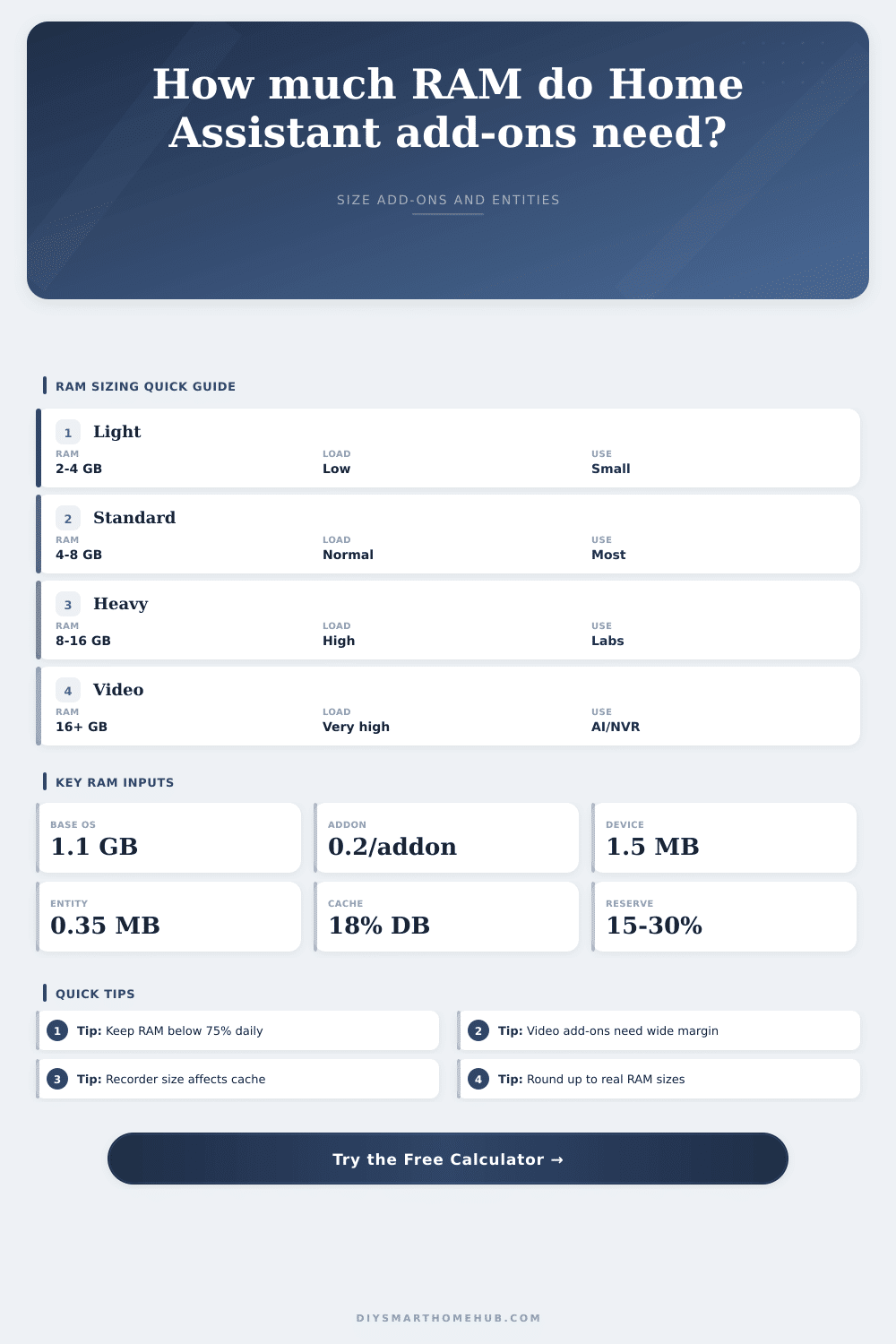
Add-on workload referenceFormula inputs used by the calculator
| Workload mix | Fixed RAM | Per add-on RAM | Typical services | Calculator meaning |
|---|---|---|---|---|
| Light helpers | 0.15 GB | 0.10 GB each | File editor, terminal, small helpers | Small background utilities with limited memory spikes. |
| Standard add-ons | 0.25 GB | 0.20 GB each | Broker, dashboards, backup, DNS helpers | General add-on stack for most home dashboards and automations. |
| Media and voice | 0.45 GB | 0.35 GB each | Voice pipeline, media services, dashboards | More live buffers, more resident processes, and higher restart spikes. |
| Database-heavy | 0.55 GB | 0.30 GB each | History tools, time-series helpers, energy data | Add-on RAM is moderate, but recorder cache is usually larger. |
| Video or AI | 0.85 GB | 0.70 GB each | NVR, image analysis, object processing | Large bursts and native libraries require wider RAM reserve. |
Database and entity tablesRecorder cache and entity overhead
| Event intensity | Modeled database growth | Live cache base | Best use | When to raise it |
|---|---|---|---|---|
| Quiet | 35 MB per day | 0.15 GB | Filtered recorder and lower sensor rate | Raise if many diagnostic entities are kept. |
| Normal | 75 MB per day | 0.25 GB | Typical room sensors, climate, switches, and helpers | Raise when energy sensors update frequently. |
| Busy | 160 MB per day | 0.45 GB | Energy monitoring, dashboards, and many integrations | Raise for high-frequency sensors or long graphs. |
| Heavy | 360 MB per day | 0.75 GB | Camera events, dense history, and fast-changing entities | Raise for image, video, or event-heavy stacks. |
| Planning band | Devices | Entities | Overhead model | Common RAM result |
|---|---|---|---|---|
| Small hub | 25 to 60 | 250 to 700 | Devices x 1.5 MB plus entities x 0.35 MB | Often 2 to 4 GB before large add-ons. |
| Normal home | 80 to 180 | 800 to 1,800 | Registry and state memory become visible | Often 4 to 8 GB depending on add-ons. |
| Large home | 220 to 450 | 2,000 to 5,000 | Entity state plus integration workers adds margin | Often 8 to 16 GB with active history. |
| Lab or video stack | 300 plus | 4,000 plus | Entity overhead is secondary to add-on spikes | Usually 16 GB plus for heavy workloads. |
Common project sizesUse these rows as a sanity check
| Scenario | Add-ons | Devices | Entities | Retention | Likely RAM tier |
|---|---|---|---|---|---|
| Light sensor hub | 4 | 45 | 420 | 7 days | 4 GB |
Home Assistant is a frozen dashboard that won’t load. You’ve been here before: It starts off with some fancy new voice assistant integration and then ends up with a frozen dashboard that won’t load. Welcome to the Home Assistant trap.
On paper, the actual software is remarkably lightweight; however, the ecosystem around it has a nasty habit of slowly eating memory until your one-board computer start swapping data out to disk. This is when performance cratering happen. Remember, a smart home hub isn’t really about raw processing power, but rather sizing RAM to account for the total overhead of having dozens of service running at the same time.
How to Stop Home Assistant From Freezing
After plugging in your mix of add-ons and entity count into the calculator above, it do all the math for you… Saving you from guessing on conversions and factors. What does it all mean? Memory consumption is not linear with complexity. Everyone underestimates the price of integrations, as each camera, sensor, or bulb have its own cost.
Each device uses a small, set amount of space in the system registry. Each individually may be a fraction of a MB, but collectively they represents a substantial baseline even if no automations is running at all. This is the static memory, which is separate from the dynamic memory used by active add-ons such as database recorders or MQTT brokers. Knowing this will help you understand why your apparently simple hub seem sluggish, whereas another complex hub seems to run smoothly. It could of simply be due to the fact that RAM headroom was enough for both static entities and dynamic services respectively.
The silent memory hog is database retention. The recorder integration works like most systems by saving history for later graphing. But making those queries require some working memory. You have a hundred temperature sensors and five years of history. That makes the database file grow big on disk but even worse, it eats up RAM quick as the cache has to be kept active to serve up that data.
To account for this, the tool let you set how long things should be kept and what level of events you want to see. More frequent updates mean bigger buffers is required. It happens when you stall out the system while trying to get history, right when you need to do it most. Ouch. That’s exactly what can ruin a home automation experience. Be conservative about historical data unless you realy need it.
And that’s where things get interesting, because these workloads aren’t anywhere near as straightforward than sensor tracking. These involve large chunks of connected memory for frame buffering, along with neural network inference processing. While a regular home automation stack could likely be served by a measly four gigabytes of memory, slap an image recognition pipeline or local NVR integration into the mix and said buffer will vanish faster than you can say “buffering.” The calculator takes that into account, breaking down heavy media processing from light helper tasks. Memory spikes aren’t just possible, they’re virtually certain when something changes in the room (scene change, motion event, etc.), so reserve margins needs to be wider here.
The choice of install profile matters more than many people think. A fully fledged OS appliance requires more base memory when running Home Assistant in a container. However, it does not provide as many management utilities built into the system to make it easy to deploy add-ons. A virtual machine guest has the hypervisor overhead to contend with. The reference table on the page shows how base costs can change based off whether you choose raw efficiency or convenience for running your Home Assistant instance.
At the end of the day, all this RAM stuff isn’t really about recording what you’ve got now, but rather predicting how much you’ll need in the future: Smart home technology grows over time. You purchase one device here, another there, and every new purchase compounds the memory strain on your hub. By leaving a bit of wiggle room when planning, you can ensure your hub stays quick and snappy while continuing to grow without ever pushing it near its limits. This allows you to remain far under capacity most days and always stay far away from swap space.
When you start thinking about headroom versus marginal gains and stop chasing more, everything starts to feel much more stable. Instead of continually dealing with crashes, you are finally able to livig with your automations.