Audio Sync Delay Calculator
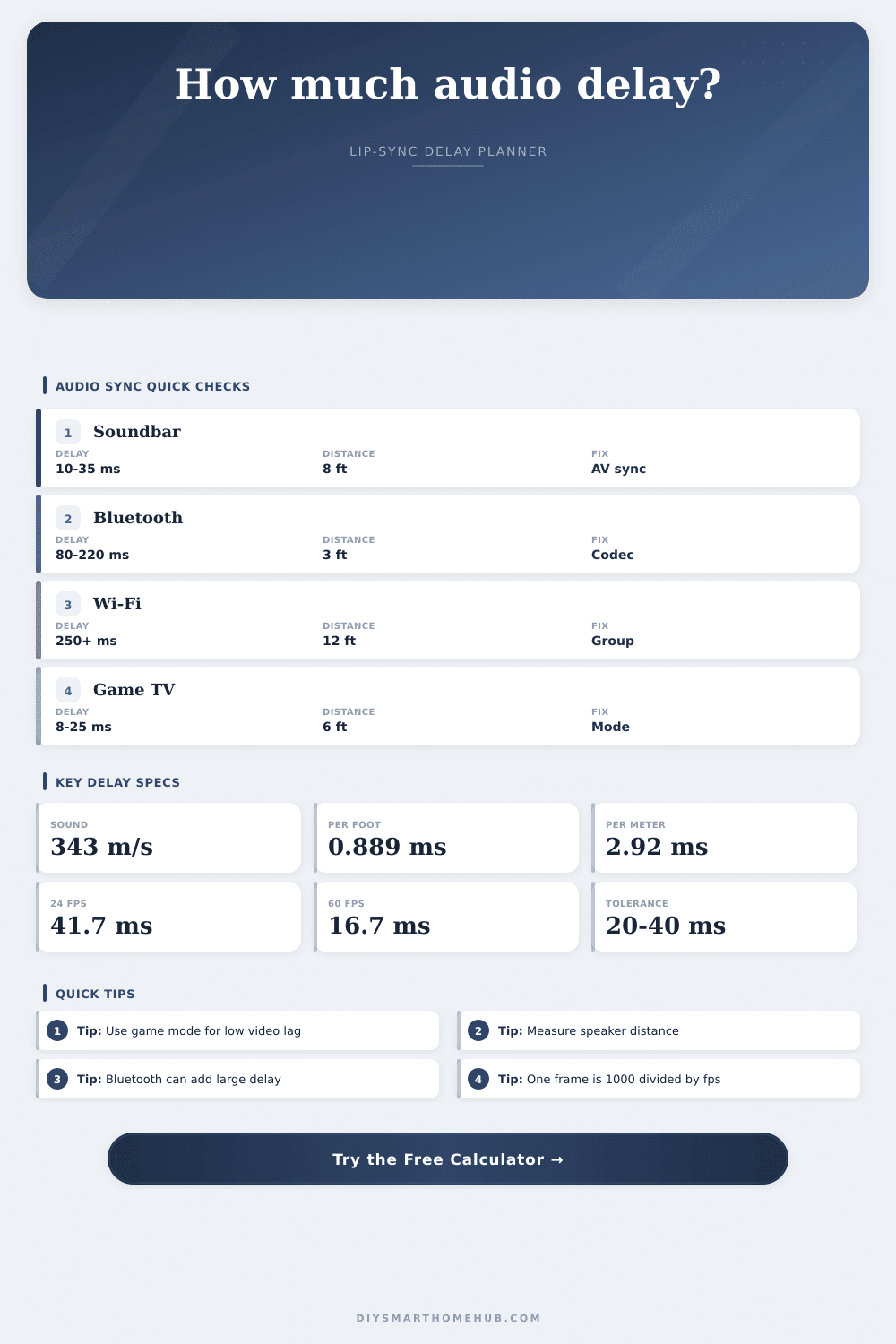
Estimate lip-sync compensation from sound travel time, speaker distance offsets, Bluetooth or Wi-Fi latency, TV video processing, frame-rate delay, and the current audio delay setting.
Video, audio, wireless, and distance timing
Live constants and offsets
Formula breakdown
| Reference item | Formula or basis | Typical value | Calculator use | Sync implication |
|---|---|---|---|---|
| Speed of sound at 20°C | 331.3 + 0.606 × 20 | 343.4 m/s | Sound travel time | About 2.91 ms per meter. |
| Milliseconds per foot | 0.3048 m × 1000 / 343.4 | 0.889 ms/ft | Speaker distance offset | 10 ft adds about 8.9 ms travel. |
| Milliseconds per meter | 1000 / 343.4 | 2.91 ms/m | Metric distance offset | 3 m adds about 8.7 ms travel. |
| 24 fps frame delay | 1000 / 24 | 41.7 ms | Frame buffer estimate | One frame can exceed tight lip-sync tolerance. |
| 60 fps frame delay | 1000 / 60 | 16.7 ms | Game and broadcast paths | Small frame queues still matter. |
| Audio or video path | Common delay range | Main source of delay | Best calculator field | Planning note |
|---|---|---|---|---|
| TV game mode video | 8 to 25 ms | Minimal image processing | Video processing | Often leaves little video delay available for slow wireless audio. |
| TV movie processing | 60 to 160 ms | Scaling, smoothing, interpolation | Video processing | Can make audio seem early unless audio delay is added. |
| HDMI ARC or optical | 10 to 40 ms | TV audio output and decode | Transport delay | Usually adjustable with TV or soundbar AV sync. |
| Bluetooth SBC or AAC | 120 to 220 ms | Codec and buffer latency | Transport delay | Often makes audio late on low-lag video modes. |
| Low-latency Bluetooth | 30 to 60 ms | Smaller codec buffer | Transport delay | Can fit games better when both devices support it. |
| Wi-Fi speaker group | 250 to 1000+ ms | Network and group buffer | Transport delay | Best for whole-home audio, not tight video sync. |
| Speaker comparison | Reference distance | Speaker distance | Offset at 20°C | Practical use |
|---|---|---|---|---|
| Soundbar at TV wall | 8 ft | 8 ft | 0.0 ms | No distance trim difference from the reference speaker. |
| Closer surround | 10 ft | 6 ft | -3.6 ms | Closer speaker arrives early; AVR distance trim normally delays it. |
| Far front speaker | 8 ft | 12 ft | 3.6 ms | Farther speaker arrives late compared with the reference. |
| Projector back row | 10 ft | 18 ft | 7.1 ms | Speaker travel adds small but measurable acoustic delay. |
| Subwoofer near seat | 12 ft | 4 ft | -7.1 ms | Distance trim and phase controls may both matter. |
A character is talking and you see her lips moving out-of-sync with audio, which comes a fraction later. That’s a glitch that kills immersion. It tell you there’s something not right about your signal chain somewhere.
It could be video processing lag. Wireless buffering. Or it could simple be how sound travels through space. Everyone assumes something is wrong with their soundbar or TV. But in most cases it’s not. It’s almost always some sort of timing mis-match between two independent paths.
How to Fix Lip-Sync Issues
Audio and video is processed differently. They pass through different circuits, they come out at different locations in space. If the timelines differ by as little as 20-40 milliseconds your brain stops believing. What you’re seeing isn’t a real person talking anymore, but just a video of someone talking with an unrelated sound track playing over it.
To address it though, you first need to know where it’s hiding. Most often it’s video processing. Moddern TVs perform a lot of stuff behind the scenes. They upscales resolution, fill in frames, and smooth motion. It all takes time. That’s why game mode exists: to strip away those visual enhancements so that latency stays low.
Watch a movie with a Bluetooth headset on in standard picture mode? The audio will rush ahead while video gets delayed significantly. Use the calculator above to visualize that gap by entering in your display unit’s exact processing delay. You can find those specs online via testing resources or in your TV’s technical manual. An estimate will at least give you a baseline as to how much time the video is losing en route to screen.
Other latency sources, and there are quite a few for audio… May not be apparent at all. Massive amounts of buffering occur over wireless connections. Bluetooth codecs like SBC or AAC can imposes anywhere from 100-200 ms of delay alone by compressing and then buffering data to avoid any dropouts. Lower-latency codecs such as aptX LL reduce this figure, but it’s still noticeable. Worse yet, Wi-Fi speakers will typically buffer several seconds of audio in order to keep playback smooth over a network.
In other words, trying to play something on your TV while streaming sound to a smart speaker group over Wi-Fi probably won’t get you perfect lip-sync without some major intervention. These transport delays are accounted for by the tool so you can find out whether your wireless system is fundamentally incompatible with tight sync requirements.
It’s not just the electronics that have an impact. There is also physical environment. In room-temperature air, sound travels approximately 343 meters every second. That doesn’t sound too bad, until you realize how much time it takes over long distances. When your surround speakers is positioned behind you and your soundbar sits atop the TV stand, sound coming from the rear channels arrives after sound coming from center channel.
The receiver accounts for this with distance settings expressed in either feet or milliseconds. Getting those settings wrong ruins the sense of where the speaker are located. To help you ensure that your electronic delays match your acoustic offsets, the calculator has a place for you to enter distances between speakers. It will even convert temperature, warmer air conducts sound faster than cooler air. That changes the number of milliseconds per foot ever so slightly. A tiny variable, yes, but home theater fans strives for precision.
Human tolerance for sync error is very narrow. According to studies, most people pick up on an offset greater then 30 or 40 milliseconds. This is less than half a second of delay. With rapid cuts and especially in high motion scenes, your eyes becomes very sensitive to the synchronization. When audio arrives too soon, it feels like the video is dragging behind; when the audio arrives too late, it feels like the video is rushing ahead. Neither sensation are pleasant.
The aim isn’t perfect synchronicity, but rather getting things within this invisible window. You can bridge that gap by adjusting your TV’s lip-sync setting. This accounts for distance between you and your source, the audio transport lag, and the time required by your video processor. Maybe you’ll adjust the delay in ten-millisecond increments, and suddenly you’ve got that natural synchronicity between the actor’s lips and voice. You should of adjusted it sooner.
This isn’t about patching faulty machinery. This is about training two separate sets of technology to keep up with one another. And when it works, the technical gear vanishes entirely. All that remains is the story.