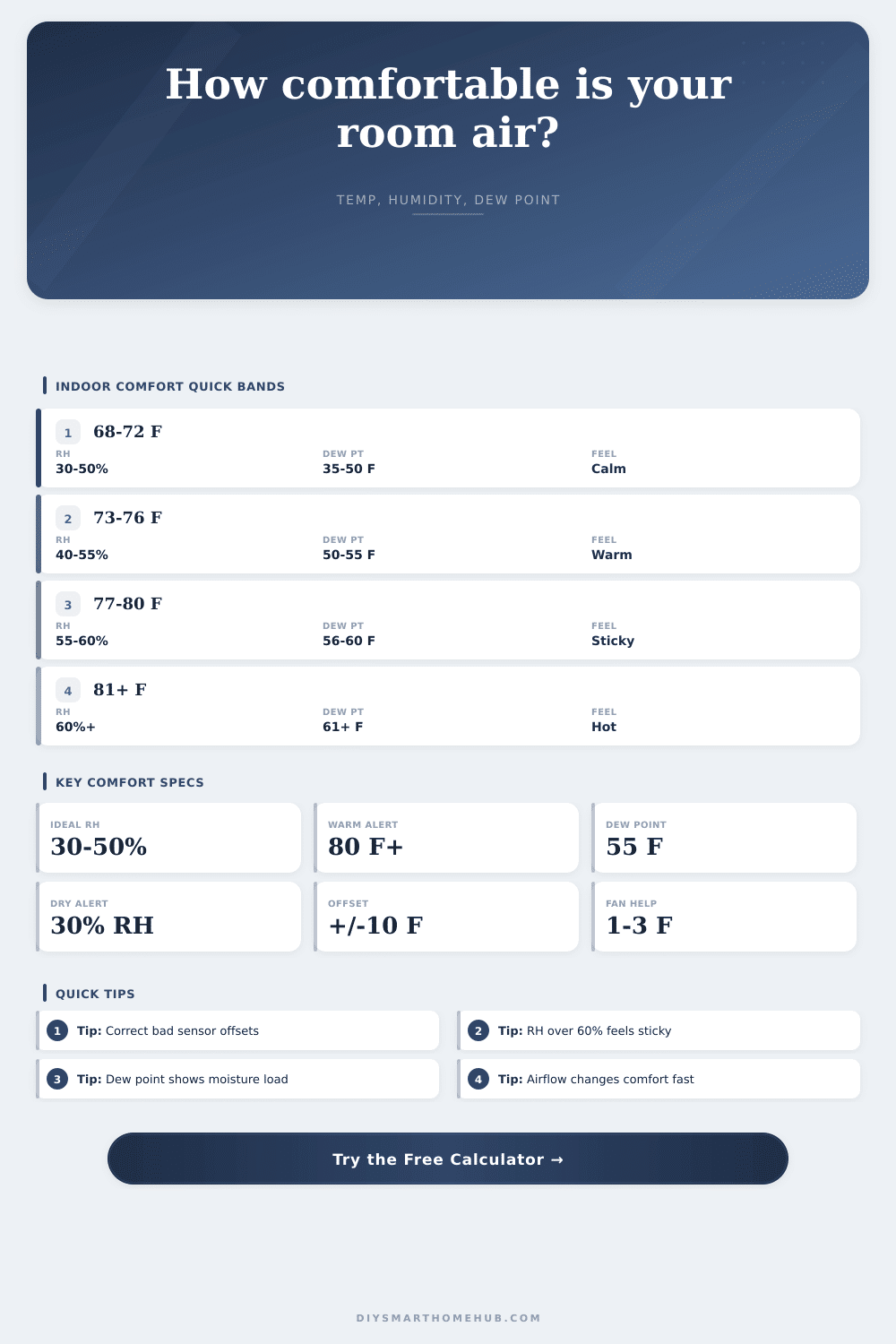
Comfort Index From Temp and Humidity Calculator
Score indoor comfort from corrected temperature, relative humidity, dew point, NWS-style apparent temperature, airflow, room use, and HVAC sensor offsets.
Detailed comfort breakdown
| Indoor RH | Comfort read | Common sensor clue | Automation cue |
|---|---|---|---|
| Below 25% | Very dry | Static, dry throat, shrinking wood | Pause dehumidify and consider humidity add |
| 25% to 29% | Dry edge | Comfort may improve with slight moisture | Watch trend before changing setpoint |
| 30% to 50% | Best general band | Balanced comfort and lower mold risk | Hold HVAC comfort profile |
| 51% to 60% | Humid edge | Room can feel warmer than thermostat shows | Prefer dry mode, AC runtime, or ventilation |
| Above 60% | Too humid | Sticky surfaces or condensation risk | Trigger dehumidification priority |
| Room use | Typical comfort temp | Good RH target | Dew point guide |
|---|---|---|---|
| Living space | 70°F to 76°F | 35% to 55% | 45°F to 57°F feels balanced |
| Bedroom sleep | 65°F to 72°F | 35% to 50% | 40°F to 55°F often feels calm |
| Nursery | 68°F to 72°F | 40% to 50% | 45°F to 55°F keeps air moderate |
| Home office | 68°F to 75°F | 35% to 55% | 45°F to 58°F supports focus |
| Basement | 65°F to 74°F | 30% to 50% | Below 55°F helps control damp feel |
| Garage or workshop | 60°F to 80°F | 30% to 60% | Below 60°F reduces heavy moisture feel |
| Observed offset | Calculator entry | Likely meaning | Smart-home action |
|---|---|---|---|
| Sensor reads 2°F high | -2°F | Display is warmer than room | Correct before changing schedules |
| Sensor reads 2°F low | +2°F | Display is cooler than room | Check drafts and exterior walls |
| RH reads 5% high | -5% RH | Moisture reading is overstated | Compare against a trusted hygrometer |
| RH reads 5% low | +5% RH | Moisture reading is understated | Recheck after sensor acclimates |
| Offset over 5°F | Large correction | Placement may be the real problem | Audit sunlight, electronics, and supply air |
| Scenario | Corrected temp | Corrected RH | Dew point | Comfort score | Best automation cue |
|---|---|---|---|---|---|
| Balanced living room | 72°F | 45% | 50°F | 92 to 100 | Hold current comfort mode |
| Humid basement | 70°F | 68% | 59°F | 55 to 72 | Run dehumidify priority |
| Dry winter lounge | 69°F | 24% | 30°F | 60 to 78 | Limit over-drying cycles |
| Sunny office | 78°F | 52% | 59°F | 65 to 82 | Add fan before lower setpoint |
| Post-shower bath | 76°F | 78% | 69°F | 35 to 58 | Vent until RH trend falls |
| Garage work zone | 82°F | 46% | 59°F | 50 to 72 | Use airflow and heat alert |
Heat index gate
The NWS heat index equation is applied for hot rooms at or above 80°F. In normal indoor ranges, the calculator uses air temperature as the apparent baseline.
Dew point signal
Dew point is estimated with the Magnus approximation. It often explains sticky comfort better than RH alone because it reflects actual moisture load.
Sensor offsets
Offsets correct known display drift before scoring. Large offsets should also prompt a placement check near windows, appliances, vents, or exterior walls.
Turn on the thermostat to seventy-two degrees and step into a swamp: Why? Because we know half of what makes inside comfort comfortable is temperature. The other half is something called water vapor in the air, which means you can have normal numbers showing up on the face of your regular old thermometer, yet still feel like your skin is sticking to itself.
It doesn’t require knowing any conversions or coefficients. Just plug it in and the calculator will take care of the rest. But there’s another thing called relative humidity, which refer to how saturated with water the air is based off the existing temperature. If the relative humidity is fifty percent, for example, then the air has as much water in it as it could possibly have given the current temperature. Because warm air can contain more water than cold air, this value can change drastically depending on the temperature. For instance, an air mass that’s measured at thirty percent humidity in the wintertime may rise to sixty percent in summertime (though actual quantity of water present hasn’t changed).
How to Make Your Home Feel Comfortable
And that’s why dew point is such an important figure: it measures absolute moisture content independent of heat, and if your dew point exceed fifty-five degrees Fahrenheit, regardless of what the thermostat shows, chances are you’re not comfortable.
Sensors are nice, and smart home sensors are nicer. But they’re not always placed correctly. If you see that one wall mounted sensor by your outside door is reading 2 degrees warmer than the one on the opposite side of room, or if one is reporting high humidity just because it’s in a sunny corner, account for those offset readings first. Then judge your HVAC system. Fix the sensor placement issues, and your air conditioner or dehumidifier won’t work unnecessarily hard trying to cool down based off wrong readings. It will turn confusing data into information you can use.
Thermal comfort also has a lot to do with airflow. Even if the room is not physically cooler, a light breeze across your body help cool you down, because it speeds up the rate at which sweat evaporates. That’s why fans work in a warm but still room; the tool takes into account air flow rates and adjusts the felt heat to match. Moving air strips humidity from your body, while still air trap it there. That simple physical trick makes all the difference when you are dealing with a hot afternoon.
Comfort preferences vary by room. For example, most people sleep best when it’s cool (sixty-five to seventy degrees fahrenheit) and not too damp. The deeper the stage of sleep, the more crucial this is; a bedroom should thus be slightly drier and cooler. Offices benefit from steady conditions, you don’t want your brain distracted by temperature changes while trying to concentrate. Bathrooms and kitchens present another wildcard, they need to breathe because of shower vapor/steam and cooking smells, but they also require ventilation strategies. Running one static profile for the whole house tend to result in someone always complaining.
That math works mostly for extreme outdoor conditions, which is why weather services use the heat index. It is also true indoors where we don’t really get into those extremes. However, if you are feeling weighed down by moderate temperatures, it is usually because of high humidity. This is the kind of humidity that prevents your sweat from evaporating as effective, which is how our bodies lose metabolic heat. So when the air can’t hold any more moisture it just stops working, making you overheat quicker. It all goes back to the biology of it.
Understanding that constraint can help explain why you might feel worse on a humid seventy-five degree day rather than an 85-degree day with low humidity in certain situations. The other issue with moisture is specific to winter: cold outside air carry far less water than warm air; if you bring cold outside air indoors and then crank up the heat, the relative humidity plunges. This leads to sinus irritation, cracked wood floors and dry skin (which gets static electricity). Humidity levels need to stay at least thirty percent inside in winter; meaning either a tighter envelope, or actively humidifying your house. That means knowing when to add moisture back to the mix, versus pulling it out. Refer to the table on this page for clarity.
Managing your home’s climate doesn’t require a degree in meteorology. You just need some intuition and accurate information. First fix your sensors. Then observe the trend in dew point over weeks, not minutes. Before you adjust temperature, adjust airflow: Those few things can make a living space feel naturaly comfortable without wasting energy on overactive systems. Air should feel neutral and light. That’s when you know you’ve got it right.