Data Cap Usage Projection Calculator
Project monthly internet data usage from current-cycle pace, streaming, video calls, cloud cameras, smart home backups, downloads, and baseline device traffic.
Run the calculator to project cap usage.
Projection breakdown
| Activity | Typical planning rate | Monthly example | Formula used |
|---|---|---|---|
| SD streaming | About 1 GB/hour | 2 hours/day = 60 GB | GB/hour x hours x days |
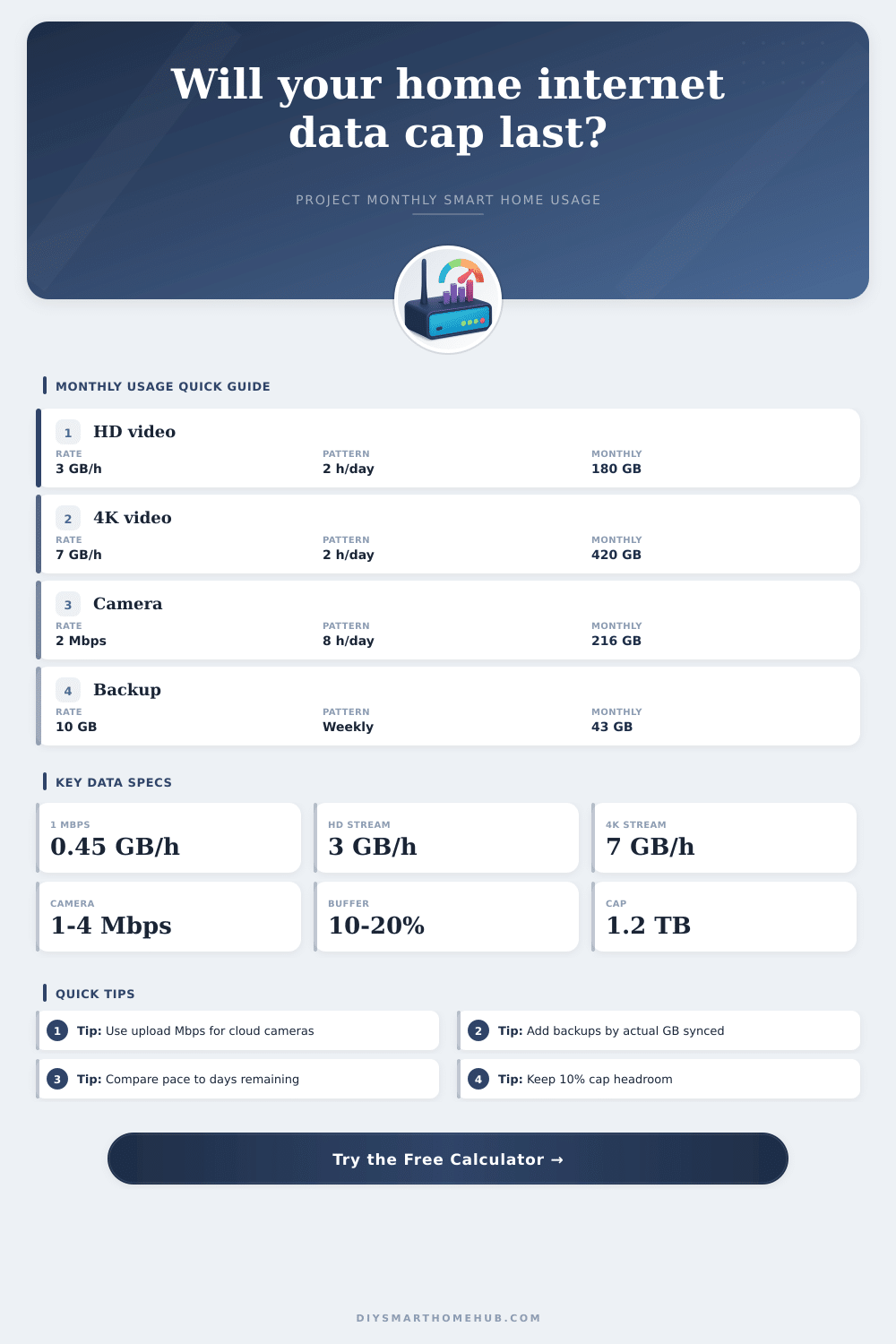
| HD streaming | About 3 GB/hour | 2 hours/day = 180 GB | GB/hour x hours x days |
| 4K streaming | About 7 GB/hour | 2 hours/day = 420 GB | GB/hour x hours x days |
| HD video calls | 1 to 2.5 GB/hour | 10 hours/week = 64 GB | GB/hour x weekly hours x weeks |
| Cloud camera upload | 1 to 4 Mbps per camera | 2 Mbps x 8 hours/day = 216 GB | Mbps x seconds / 8 / 1000 |
| Daily cloud backup | User-entered GB/day | 5 GB/day = 150 GB | GB/day x cycle days |
| Camera profile | Bitrate | 8 hours/day per camera | 24 hours/day per camera |
|---|---|---|---|
| Low motion clip quality | 0.8 Mbps | 8.6 GB/month | 25.9 GB/month |
| Typical 1080p cloud upload | 1.5 Mbps | 16.2 GB/month | 48.6 GB/month |
| High quality 1080p | 2.5 Mbps | 27.0 GB/month | 81.0 GB/month |
| 2K or high-motion camera | 4 Mbps | 43.2 GB/month | 129.6 GB/month |
| 4K camera stream | 8 Mbps | 86.4 GB/month | 259.2 GB/month |
| Scenario | Main drivers | Typical monthly use | Cap planning note |
|---|---|---|---|
| Light smart apartment | HD streaming, calls, small backups | 250 to 500 GB | Usually comfortable under a 1 TB cap. |
| Family streaming home | Multiple HD screens and updates | 600 to 1000 GB | Watch 4K and game downloads near cycle end. |
| Cloud camera home | Continuous or motion-triggered uploads | 800 to 1600 GB | Camera duty cycle dominates the projection. |
| Backup-heavy month | Photo sync and full image backup | 700 to 1800 GB | One-time syncs can exceed normal pace. |
| Remote work plus media | Video calls, cloud files, HD/4K streaming | 500 to 1200 GB | Use current-cycle pace plus planned remaining use. |
Current pace
Uses data already consumed divided by days elapsed, then extends that rate across the full billing cycle. It is best when your habits are steady.
Activity plan
Uses the individual streaming, camera, backup, update, call, and smart home inputs. It is best when a new camera or backup job changes normal use.
Blended view
Combines used data so far with planned remaining usage. It avoids overreacting to early-cycle spikes while still counting future one-time transfers.
So why does it matter? If you get an “unlimited” plan from most internet providers, the reality is they imposes a cap on your data usage. You may only realize this when your speeds slow as the billing cycle end and you’re left to buffer through a key video call.
You don’t need to track every download; you just need to know which activities uses the most data. Plug in your camera specs and streaming habits into calculator above, and let it do the math for you, there’s no guessing if you’ll reach that elusive wall or not.
How to Manage Your Data Usage
The first thing everyone thinks of when it comes to streaming video is how much you’re watching. However, second factor tends to be overlooked (namely), the quality. While standard definition isn’t going to kill you, today’s 4K content will eat up roughly seven gigabytes for each hour of footage. Add in multiple stream per house (say, if two family member are each binging their own show), and those totals adds up fast. You don’t have to remember every minute watched. Just an idea of how much you watch daily and at what resolution. A chart on the site breaks it all down nicely, explaining that moving from high def to ultra-high def can double or triple monthly bill. Small change, huge difference.
You might not know, but all those cloud security cameras is uploading 24/7, and they sure do add up. An hour of video captured at just two megabits per second adds up to 216 gigabytes a month. And most folks has multiple lenses. Add that all together and see how much data your cameras consumes on your internet plan. Did you get a smart doorbell lately? See if you can change the bitrate settings. Reducing image resolution or limiting motion detection areas can eliminate dozens of gigabytes a month while still keeping things safe. Sometimes adjusting these options are less effort than upgrading your internet plan.
Spikes happen when big downloads or backups changes the average. If you get hit with a big update for a new game, or try to do a full system image transfer, that could mean fifty gigabytes dumped on your connection in the afternoon. That can make everything else seem like it’s running tight by comparison. Instead of just looking backward, look forward: Plan for what you know will be one-off transfers so you don’t end up surprised with overage bills.
You can actualy add a safety buffer into the equation here. This is a smart move because so few ISPs offers any kind of partial credit if you are only slightly over your limit.
Another issue is video conferencing. While it’s fine for pre-recorded streams to adjust bitrates for lower bandwidth, live video calls needs to send a constant stream to be useful. High-def conference calls burn through more data in an hour than you’d use in an hour while casually browsing with a phone’s limited connection. Plan for this different than entertainment usage, don’t combine them. The data usage is too different.
Depending where you are in life, pick the best type of projection for you. Keep going at same rate and stretch it out. That’s good enough. Switched jobs to work from home? Got a new camera? The past numbers doesn’t really apply. Make the prediction based off what you plan to do instead. When there’s a bit of background noise (e.g. Smart home devices) and a few unusual peaks, combine them. Leave yourself some breathing room (at minimum, 10% more).
Gaming consoles auto-download drivers in the background when you’re asleep, and operating systems silently shove patches down your throat during the dead of night. Those sneaky little hogs adds up quicklly. Reserve that space so small bumps won’t send you over the edge… Whether into throttled speeds or extra fees on your bill. Better safe than sorry.
There’s never been a more important time to understand your data, and yet, data isn’t always so free. Data plans is created to help deal with network traffic, and while they may be made for profit, they also provide an opportunity for us to take control over this equation by knowing how much data we use. By being able to know who uses what in your house, you can make changes proactively (changing quality settings, changing scheduling). This shifts from guesswork to management; what was once a stressful situation becomes part of your routines. Basically, keep the meter full without it running dry.