Internet Plan Sizing by Household Calculator
Estimate the right household internet plan from concurrent activities, work calls, cloud cameras, backup upload, overhead, upload-to-download balance, and Wi-Fi efficiency.
Run the calculator to size the household plan.
| Activity | Download used | Upload used | Calculator role |
|---|---|---|---|
| 4K UHD stream | 25 Mbps each | 1 Mbps each | Entertainment load, reduced by concurrency factor |
| 1080p HD stream | 8 Mbps each | 0.5 Mbps each | Entertainment load, reduced by concurrency factor |
| Online gaming | 3 Mbps each | 1 Mbps each | Light Mbps but sensitive to overhead and Wi-Fi quality |
| Heavy browsing or downloads | 15 Mbps each | 1 Mbps each | Bursty household activity before overhead |
| HD video call | 4 Mbps each | 4 Mbps each | Work/call load counted directly at peak |
| Cloud camera | 0.5 Mbps each | 2 to 8 Mbps each | Upload load scaled by cloud recording duty |
| Planning factor | Typical range | Why it matters | Good sizing rule |
|---|---|---|---|
| Upload split | 10% to 50% | Cable plans can have much lower upload than download | Use 35%+ when cameras and calls overlap |
| Wi-Fi efficiency | 50% to 90% | Plan speed is measured at the gateway, not every device | Divide usable need by Wi-Fi efficiency |
| Overhead | 15% to 50% | Retries, protocol overhead, updates, and burst traffic add margin | Use 35% for busy smart homes |
| Camera duty | 35% to 100% | Motion clips and continuous cloud recording stress upload differently | Use 85% or 100% for security-heavy homes |
| Concurrent users | 60% to 100% | Not every stream or download is active at the same second | Use 90% for evenings or shared homes |
| Household | Peak pattern | Upload risk | Plan class to compare |
|---|---|---|---|
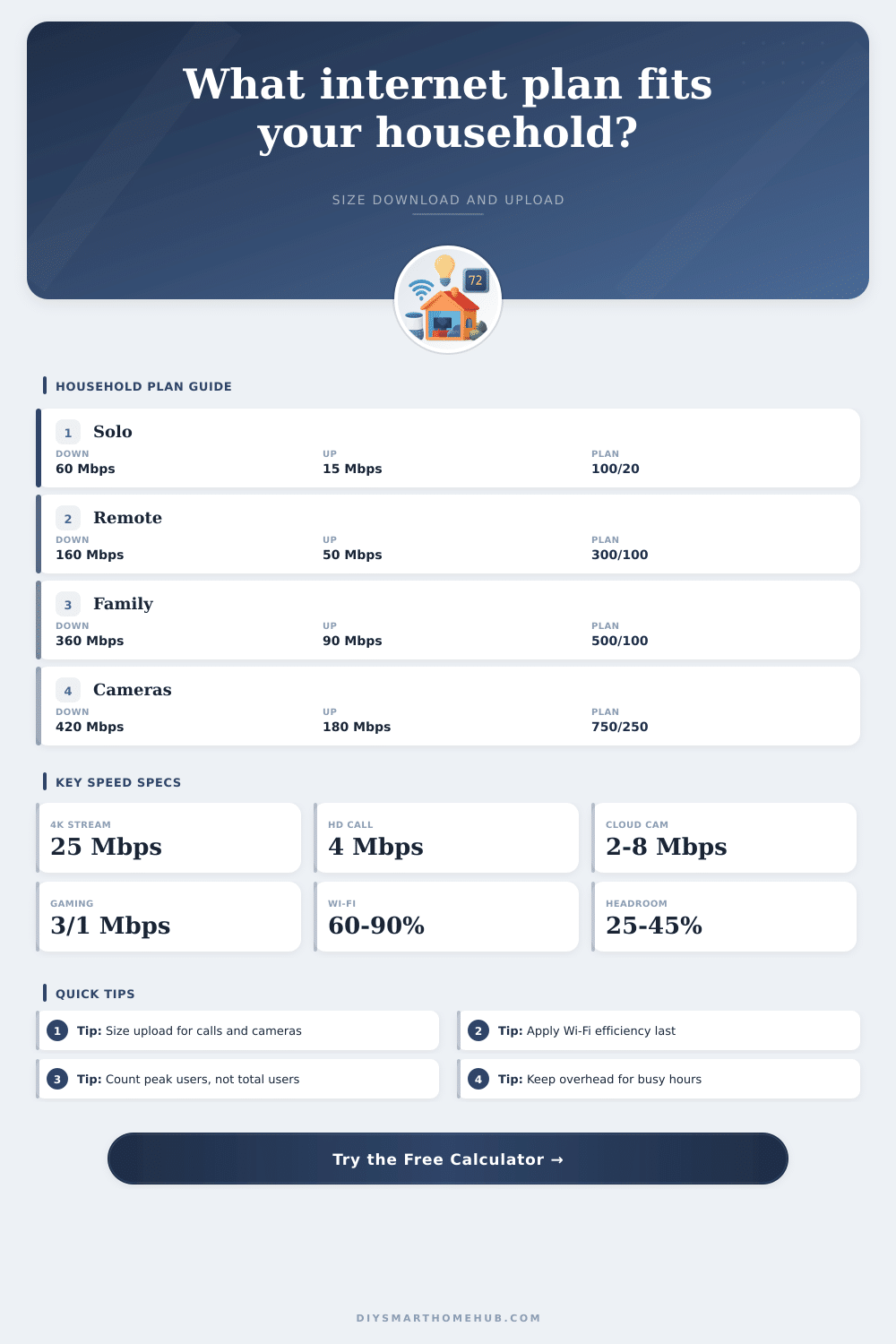
| Solo apartment | One 4K stream, light calls, few devices | Low unless backups run during calls | 100 to 300 Mbps down, 20+ Mbps up |
| Remote-work couple | Two HD calls plus streaming | Moderate because calls are two-way | 300 to 500 Mbps down, 50+ Mbps up |
| Family 4K evening | Multiple 4K streams and gaming | Moderate unless cloud cameras overlap | 500 to 1000 Mbps down, 100+ Mbps up |
| Camera-heavy home | Cloud cameras plus normal use | High because upload is continuous | 500+ Mbps down, 200+ Mbps up |
| Creator studio | Large file sync, calls, and media work | Very high, symmetry helps | Gigabit class with strong upload |
How many people share your home? Odds are you can answer that question, but do you realy know what Mbps means in terms of your everyday life? The speed listed on your bill isn’t necessarily reflective of your experience with buffering videos. It’s easy to assume there’s a direct link between those digits and the quality of your online experience, but the truth is: there’s a disconnect between numbers and everyday usage.
Because providers tend to market download speeds, that’s where most users puts all their attention. Why wouldn’t you? After all, it takes more data to watch a movie then send an email, right? But our homes has evolved. Today, we rely on our internet connection for everything from video chatting to streaming TV shows. All these task require both uploading and downloading.
How to Pick the Right Internet Plan
Without addressing the upload side of things, your service could appear sufficient during a test run, but once you start using video conferencing or cloud cameras, you’ll notice lag. While you’re able to stream 4K movies without a hitch, your Zoom meeting appears as a slideshow. The upstream pipe are congested.
After you input those details. The specifics of your house (the calculator do the rest of the math). There’s no need for you to guess at factors like protocol overhead or Wi-Fi loss. And it makes you consider concurrency, allowing you to understand whether your entire family are on the network simultaneously. That hardly ever actualy happens (five people don’t really hit the network at exactly the same second). But when you’re all eating dinner, you come pretty close. Someone might be watching TV, someone else is playing games and someone else is backing up photos.
Usage is often staggered. The tool adds a peak simultaneous use factor to account for it. It ensures you don’t buy too much bandwidth for a stress scenario that never occurs … but also don’t buy too little for busy times.
The quiet killer of good service is Wi-Fi efficiency. Even if your router promises to hit one gigabit, that doesn’t mean you’re getting anything close to it; not with all those microwaves, floors and drywall between you and your router. You’re lucky to keep eighty percent of whatever speed your hardware’s capable of by the time the signal hits a laptop or smart speaker. That loss is included based off a built-in buffer in your target plan size: The calculator takes your desired performance at the device end and converts it into what you need at the modem end.
Watch out for security cameras. Storing constant 24/7 video feeds in the cloud is different than storing clips triggered by motion. Each camera are an always-on, never-ending drain on your data. Constant 1080p uploads. Say, with four cameras recording, burns up your upload allotment nonstop. It is not a sporadic download, like when you get a game patch, but a consistent stream that eats into the available pool. Heavy-duty camera rigs might mean that you focus on the upload split when choosing plans if you’re doing video conferencing from home and want rock-solid calls.
To that point, here’s a reference table showing the relationship between household composition and its associated data requirements. While a small one-person apartment is quite a bit different than a large smart house filled with several dozen connected devices, the former might do fine on a minimalist plan with minimal overhead. The latter requires a strong symmetric connection capable of carrying the background chatter of IoT updates and check-ins.
The trick to sizing an internet plan is not to nail down some magic number, but rather to set realistic expectations of performance under peak loads. Don’t buy the fastest pipe in town. Buy a pipe large enough so that when everyone’s on it, it doesn’t choke. You should of known your own upload obligation/download hunger, and stop paying for speed you don’t use so you can invest in reliability where you actualy need it instead. Use it to invest where you really want it to be reliable instead. Aim for a seamless evening flow rather than maximum theoretical throughput.