Mesh Node Count By Square Footage Calculator
Estimate the number of Wi-Fi mesh nodes from home square footage, floor count, wall derating, 5 GHz spacing, overlap, client load, and wireless backhaul hop capacity.
Mesh node profile reference
| Profile | Nominal coverage | 5 GHz spacing | Use case |
|---|---|---|---|
| Wi-Fi 5 dual-band | 1,400 sq ft / 130 sq m | 30-35 ft / 9-11 m | Small homes and light client loads. |
| Wi-Fi 6 dual-band | 1,800 sq ft / 167 sq m | 32-38 ft / 10-12 m | Normal smart homes with moderate throughput. |
| Wi-Fi 6 tri-band | 2,200 sq ft / 204 sq m | 35-40 ft / 11-12 m | Wireless backhaul with better spare airtime. |
| Wi-Fi 6E tri-band | 2,000 sq ft / 186 sq m | 30-36 ft / 9-11 m | Shorter high-band links and dense rooms. |
| Wi-Fi 7 tri/quad-band | 2,500 sq ft / 232 sq m | 36-42 ft / 11-13 m | High throughput, MLO-capable newer nodes. |
Derate and overlap guide
| Condition | Coverage multiplier | Spacing cue | Calculator effect |
|---|---|---|---|
| Light drywall | 0.85 | Upper 30s ft | Small coverage derate. |
| Typical rooms | 0.74 | Mid 30s ft | Default planning basis. |
| Dense appliances | 0.60 | Low 30s ft | More nodes for weak rooms. |
| Masonry or metal | 0.46 | Near 30 ft | Coverage can halve quickly. |
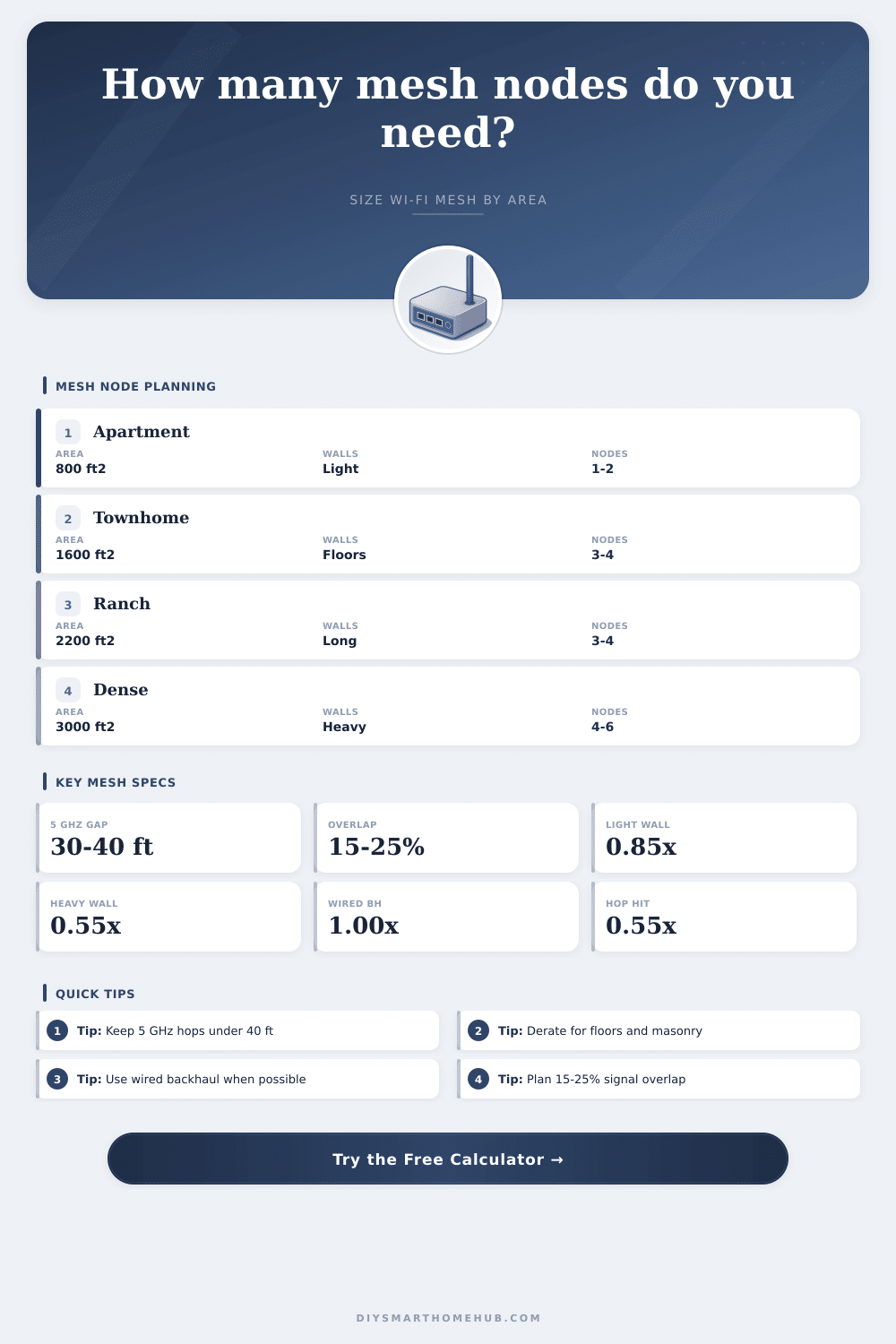
| 15-25% overlap | 0.85 to 0.75 unique area | Better roaming | Reduces unique sq ft per node. |
Backhaul and hop capacity reference
| Backhaul mode | Capacity factor | Hop behavior | Planning note |
|---|---|---|---|
| Wired Ethernet | 1.00x | No wireless hop tax | Best for heavy streaming, cameras, and work calls. |
| Mixed wired/wireless | 0.75x | Only wireless leaves are taxed | Good when one satellite can be wired. |
| Dedicated tri-band | 0.65x | Second hop roughly 0.55x | Useful for homes without Ethernet. |
| Shared dual-band | 0.45x | Second hop roughly 0.50x | Keep chains short and spacing conservative. |
Common project sizes
| Project | Area | Usual nodes | Main driver |
|---|---|---|---|
| Studio or apartment | 500-900 sq ft | 1-2 | Devices or concrete walls. |
| Townhome | 1,400-2,000 sq ft | 3-4 | One node per floor plus stairwell spacing. |
| Single-story ranch | 1,800-2,600 sq ft | 3-4 | Long 5 GHz span across bedrooms. |
| Large smart home | 2,800-4,000 sq ft | 4-6 | Backhaul, walls, and client load. |
| Garage or detached zone | 300-800 sq ft | 1 extra | Exterior wall and distance break. |
That’s why you got a mesh Wi-Fi system, it advertised seamless coverage of every room in your house, right? You unpacked the packaging, placed the satellites exacty where the marketing brochure suggested and waited for magic to happen. Next thing you know, you’re attempting to make a video call from that distant bedroom or stream a movie in basement. Video freezes, connection stutters. Even with a bunch of node running around your house, your high-speed internet is still slow.
Physics is the issue; not necessarily the hardware. Wireless signals inherently gets worse over distance. They also get worse if they encounter things like appliances, floors, or walls. Mesh networking, to most consumers’ minds, is simply “square feet.” How much coverage do you have? How much paint do I need to buy to cover this wall? Well, Wi-Fi isn’t paint. It’s radio waves bouncing off stuff, absorbing into things, interfering with other radio waves. If you place your nodes based off only square footage without considering how the signal travels through your specific layout, you will end up with slow or dead parts of the network. These areas might be technicaly connected, but they will be practically unusable.
Why Your Mesh Wi-Fi Is Still Slow
After plugging in the specifics of your floor plan into the calculator above, this is what it looks like. The calculator does all math for you. You won’t have to guess how much your walls weakens the signal. The base is obviously your square footage, but that’s only the beginning. What matters most is what’s in between you and the backhaul: The walls. Even a slender drywall partition could weakens the signal somewhat. And then there are those heavy-duty walls made out of brick; the kind that bear a load, or those floors chock-full of reinforced concrete joists. These act as shields, cutting your effective range in half or even more. That’s why two houses of the same size can require vastly different numbers of nodes. The calculator use your chosen building materials to reduce theoretical coverage of your space to a more realistic number.
Now, let’s talk about placement… And why where you put those nodes matters just as much as how many you have. A 5 GHz signal has a limit, so don’t try to get away with pushing them out too far and saving a few bucks. For example, in an open living room situation, you could easily hit thirty or forty feet from a node. But throw in a bathroom, a staircase, an island in the kitchen and that signal plummets. To help plan for this, you ask the tool for the greatest distance between two points and then tell it how far apart you want the nodes to be spaced. Ideally, there should be some overlap because otherwise, when people leave the coverage area of one node, they won’t handoff to another until the signal is totally gone. And that lag is what create dropped calls.
The thing that catches most folks out is what I call backhaul. Mesh systems needs those nodes to communicate with one another to get data back to primary gateway. That’s done either wirelessly (backhaul) or via ethernet cables (hardwired). With wireless backhaul, every time there’s a hop it uses up bandwidth and airtime. Tri-band systems use one radio for this purpose so the rest are available for your devices. Dual-band systems shares the burden. Everything your phone sends as data is also being sent across the radio that connects the node to the gateway. The number of wireless hops it has figures into the calculator. A satellite that’s two or three nodes removed from main router might feel like a great signal locally but its throughput will be pathetic because of all the backhaul involved. Wiring at least one of the middle nodes resolve that bottleneck completely.
But that comes back to client density as well. Twenty devices per house is different than eighty. Your node’s radio chips must contend with smart home sensors, game consoles, and streaming sticks. More airtime is required if you’re dealing with lots of active clients; particularly during those peak times. That’s where your typical usage pattern comes into play (along with your device count). You want to keep the conversation going, and having too many people wanting to say something at the same time means you’ll need additional capacity.
All told, making sure your mesh network has the right number of nodes isn’t so much about covering area as avoiding signal interference. You should of wanted a bunch of solid short hops, not a couple of pathetic long shots. So take the inputs from the real-world layout of your house, not the fantasy layout depicted on the product page. And when the numbers tell you to add another node to cut down on hops or cross a thick wall, believe them. The point of having a well-built mesh network is that it’s seamless, not only at the couch in the middle of the living room but up against all of the walls in your entire house.