Smart Lock Battery Life Calculator
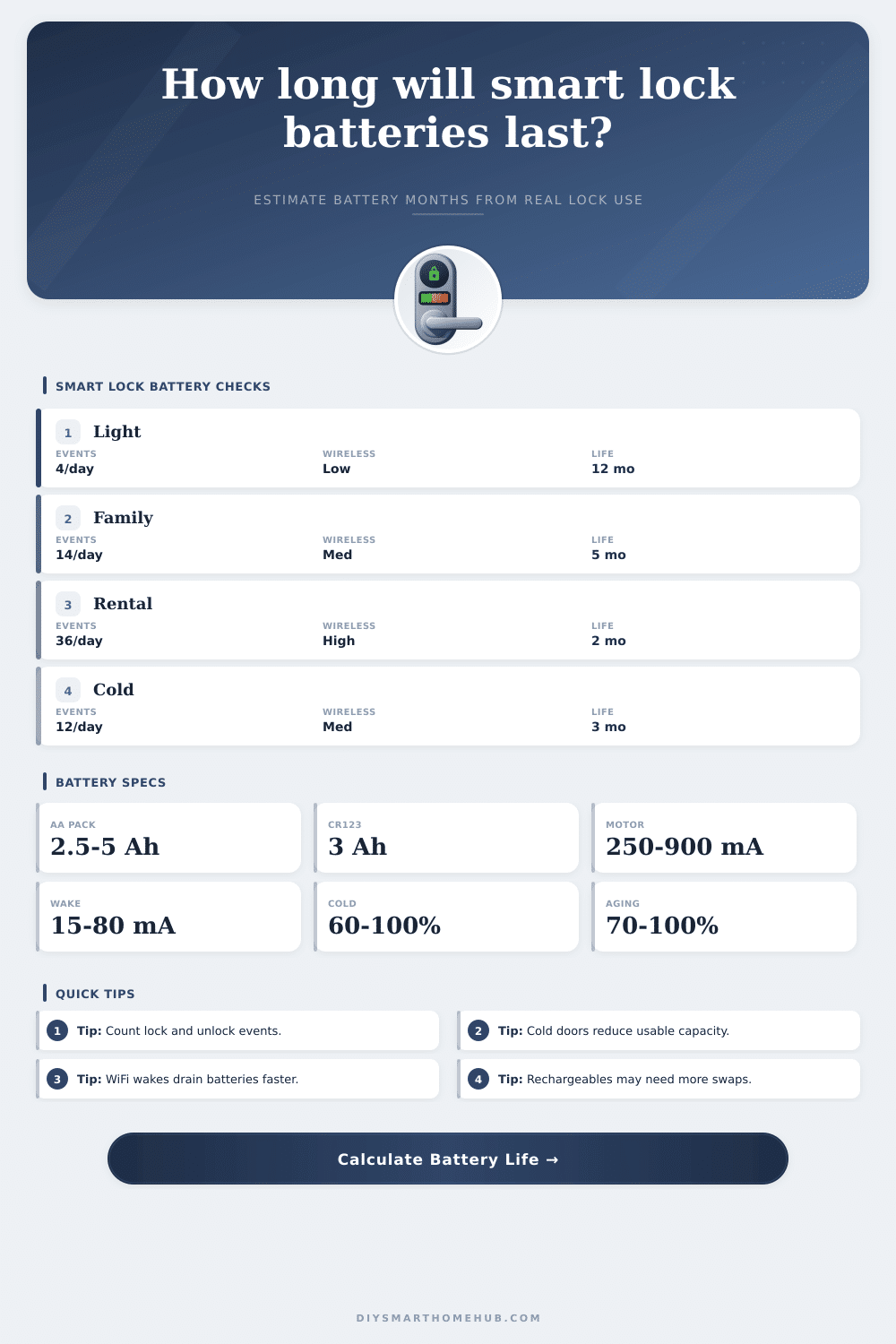
Estimate smart lock battery life from motor cycles, wireless wakeups, keypad and backlight use, standby current, battery pack capacity, cold weather, and battery aging.
🔒Usage presetsPick a real door pattern, then tune the inputs.
⚙Calculator inputsDaily loads are converted to mAh/day.
🔋Live load profileKey specs update from the current inputs.
Battery life results
📋Battery and usage referenceCapacity, load, radio, and scenario tables.
| Battery pack | Nominal Ah | Best fit | Planning note |
|---|---|---|---|
| 4 x AA alkaline | 2.5 Ah | Most deadbolts | Series pack; capacity acts like one AA cell |
| 8 x AA alkaline | 5.0 Ah | Higher drain locks | Often two parallel strings or larger pack |
| 4 x AA lithium | 3.0 Ah | Cold locations | Better voltage under load in winter |
| 4 x AA NiMH | 2.0 Ah | Rechargeable use | Lower voltage can trip early warnings |
| 2 x CR123A | 1.5 Ah | Compact locks | High energy density, smaller pack Ah |
| Load piece | Formula | Typical range | What raises it |
|---|---|---|---|
| Motor event | mA x sec / 3600 | 0.08-0.75 mAh | Stiff bolt, long throw, retries |
| Wireless wake | mA x sec / 3600 | 0.01-0.40 mAh | WiFi, weak signal, app polling |
| Check-in | Wake mAh x count | 0.2-8 mAh/day | Short heartbeat intervals |
| Keypad light | mA x sec / 3600 | 0.02-0.12 mAh | Night use and long LED timeout |
| Standby | mA x 24 | 0.5-7 mAh/day | Always-listening electronics |
| Radio type | Wake current | Standby current | Battery behavior |
|---|---|---|---|
| Bluetooth only | 18-35 mA | 0.03-0.08 mA | Longest life, local control |
| Zigbee / Z-Wave | 25-50 mA | 0.05-0.12 mA | Good life with mesh hub |
| Thread / Matter | 25-55 mA | 0.05-0.15 mA | Efficient if signal is strong |
| Bridge polling | 30-70 mA | 0.08-0.20 mA | Depends on sync frequency |
| Direct WiFi | 80-180 mA | 0.15-0.40 mA | Convenient but high drain |
| Door pattern | Motor events | Wireless wakes | Likely result |
|---|---|---|---|
| Side door | 2-6/day | 10-24/day | Often 9-15 months |
| Family entry | 12-24/day | 24-60/day | Often 4-8 months |
| PIN-heavy door | 16-30/day | 40-90/day | Often 3-6 months |
| Short rental | 30-60/day | 60-120/day | Often 1-3 months |
| Cold garage | 8-18/day | 20-60/day | Cold derate dominates |
🧮Comparison gridHow common choices change battery life.
| Choice | Lower drain | Higher drain | Calculator signal |
|---|---|---|---|
| Battery chemistry | Fresh lithium or alkaline | Aged rechargeable cells | Pack Ah and aging derate |
| Door alignment | Smooth bolt under 2 sec | Rubbing bolt with retries | Motor seconds and retry percent |
| Connectivity | Bluetooth, Thread, or mesh | Direct WiFi and frequent polling | Wake current and check-ins |
| Entry method | App proximity or key | Long keypad/backlight sessions | Keypad entries and LED seconds |
| Location | Indoor conditioned door | Unheated exterior door | Cold weather capacity percent |
💡Battery planning tips
This calculator is for planning battery swaps and comparing usage patterns. Actual life varies with lock firmware, signal strength, battery brand, bolt alignment, cutoff voltage, and weather exposure.
You start your smart lock fully charged and somehow forget to monitor how many times keypad lights up which leads you to being locked out. It’s happened to lots of people. According to the manufacturer, it have an eighteen-month lifespan if everything goes right. You has a strong signal, the door opens and closes easy, and no one unnecessarily uses the app.
In real life, things are messier: maybe the door slams shut so hard it triggers retries from sensors; perhaps you fumble through entering guest code a couple times until it finally take hold. And then there’s cold weather. That kills battery life sooner than you’d see in ads. So knowing exactly how long your battery will last really mean looking at exact load on it every single day.
Why Smart Lock Batteries Die Fast
Enter your habits and the calculator will calculate these numbers for you (without requiring you to guess at conversion factors). In doing so, it show some of the cost of convenience. People think that the biggest draw is the locking mechanism itself. That’s not totally true, there’s a couple-second spike in current when a mechanical bolt gets pulled back into place, but in most homes it might happen less than a dozen times per day.
What usually happens far more frequent are all of the little radios waking up to send and recieve information. Each one of those wake cycles draw a bit of current. Add them all together and soon you’re talking about a lot of total use. This is especially true if your phone check whether the door is locked every time you get within range, or if the hub is periodically checking the door’s status. The tool unpacks this for you so you know exactly what each day of using your preferred connectivity option cost you in milliamp hours.
There’s always a tradeoff between instant access vs. Battery life. For example, Bluetooth locks will last longer since they’ll only come on while you’re within range. Mesh network protocols like Zigbee or Z-Wave work well throughout most homes (unless there is lots of thick walls where your lock needs to transmit at higher power). Direct WiFi locks skip a dedicated hub entirely, but they pay for that convenience with significantly higher standby currents and more frequent wake cycles. Real time app feedback require waking up to report status. That’s a choice that comes with shorter battery life by definition. Nothing is free with low-power electronics.
Battery performance is also heavily influenced by the physical environment. Chemicals have their limits; batteries don’t perform as well in cold weather. Even a cold-climate front door that’s locked and unlocked the same number of times will consume more energy than warm-weather interior door. Because new batteries aren’t the same as old batteries, battery age is factored into the calculation, along with temperature. These environmental factor need to be considered for a proper estimate.
The other wrinkle most people don’t think about until their batteries run out too soon is keypad use. At night, an illuminated keypad can be handy, but you’ll burn through power every second backlight is activated if you don’t get your code right. If you have kids forgetting their codes or if you rent your home for vacations where guests come and go frequent, you’ll really hammer the motor and light. This is why you see such a dramatic reduction in the battery life as you move from a “quiet” door to a “busy” door, based off the reference tables.
The point isn’t just to predict when it’ll fail, but to help you manage your expectations before an emergency occurs. I want to help you manage your expectations before an emergency occurs. By understanding the inputs, you can decide if a direct WiFi lock will be too much of a hassle due to constant battery changes, or if a mesh-based solution would of suit your needs better. Either way, it transforms something unclear and worrisome into something you can act on. You know exactly how long you have until you need to get another one based on real-world use, not wishful thinking.
And yes, eventually you’re going to want the door open for company. Knowing its weakness keeps that door open for them in practice, not just in theory.