Battery Backup Hours Calculator
Estimate backup runtime from battery voltage, amp-hours or watt-hours, load watts, inverter efficiency, depth of discharge, aging, temperature derating, and reserve margin.
⚡Smart Home Backup Presets
🔋Battery And Load Inputs
Battery backup estimate
Calculation breakdown
📊Battery Spec Grid
📋Runtime Reference Tables
| Battery profile | Planning DoD | Aging factor | Best use |
|---|
| Battery size | 25 W load | 75 W load | 200 W load |
|---|
| Derating item | Typical range | Runtime effect | When to use |
|---|---|---|---|
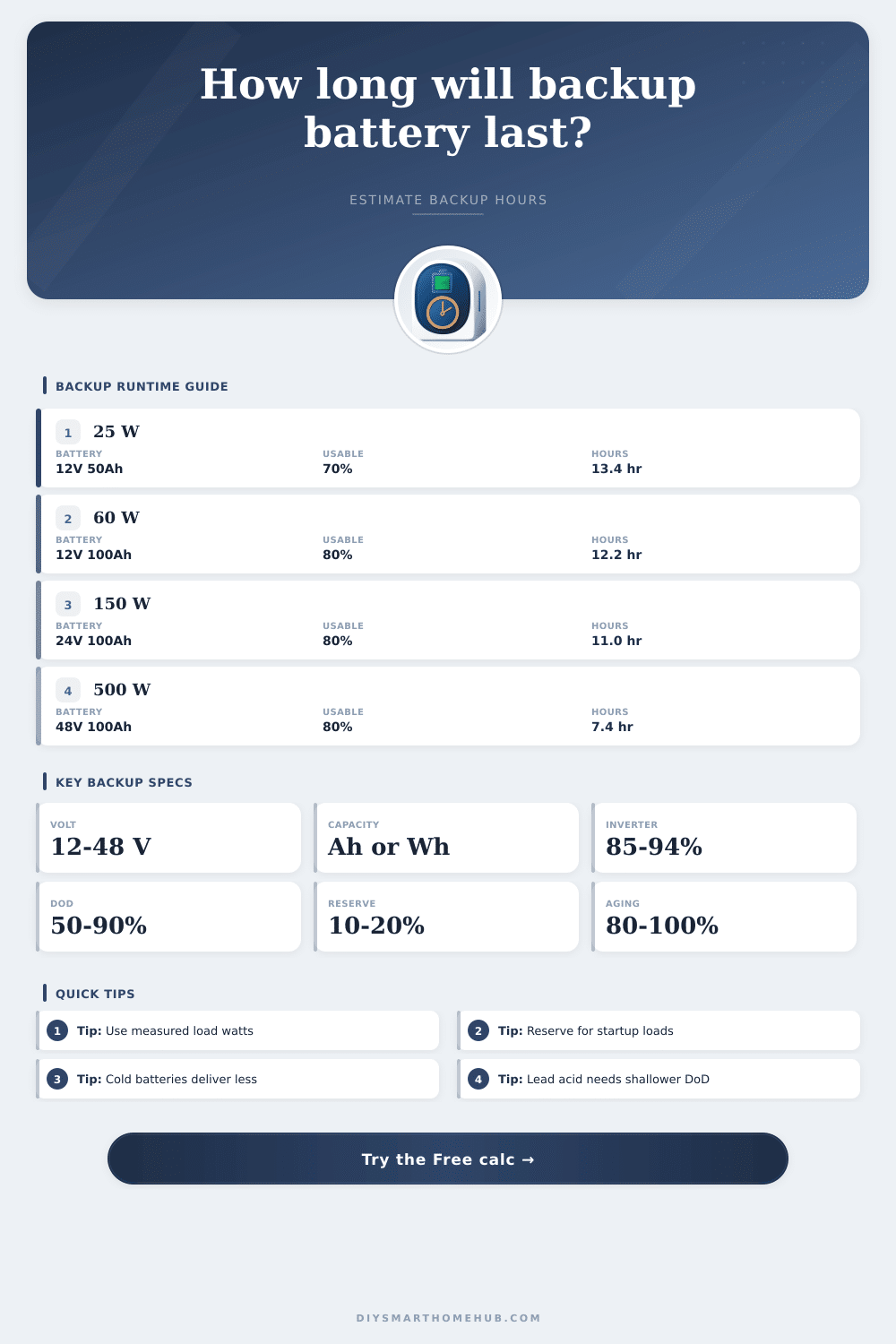
| Inverter efficiency | 85-94% | Reduces AC output energy | Any AC outlet or UPS load |
| Depth of discharge | 50-90% | Limits usable battery energy | Battery life and chemistry planning |
| Aging factor | 80-100% | Models lost capacity over time | Older batteries or conservative designs |
| Temperature derating | 60-100% | Models cold or hot conditions | Garage, attic, outdoor, or winter backup |
| Reserve margin | 10-20% | Holds energy after estimated runtime | Critical smart home network loads |
| Backup scenario | Average load | Battery example | Planning note |
|---|---|---|---|
| Network closet | 25-60 W | 12 V 50-100 Ah | Often runs longest as a direct DC or efficient inverter load. |
| Camera recorder | 80-180 W | 24 V 100 Ah | Count PoE camera draw and recorder drive activity. |
| NAS and router | 90-180 W | 24 V 100 Ah | Use measured idle and active watts for better runtime. |
| Fridge average | 120-250 W | 48 V 100 Ah | Average watts matter more than compressor nameplate watts. |
| Home essentials | 300-700 W | 48 V 100-200 Ah | Reserve margin should cover unexpected cycling loads. |
🔧Battery Backup Tips
Then one Tuesday night, the power grid drop out and you find out all those smart devices is really just an expensive pile of paper weights. Your router dies security cameras turn off, and that mini PC hub serving as your media server becomes quiet.
And it’s worse than you thought; most people estimate their backup time based off nameplate numbers, which sounds good on the box, but tells you absolutely nothing about device’s actual performance under real conditions. How long will your battery last, really?
How to Calculate Real Battery Life
Once you know how many batteries, what voltage they are and what load you want them to handle, the calculator do all the work for you. By putting those numbers into the calculator above, you don’t have to guess how efficient each component is or how much life is being sucked out of battery over time.
What most people stop at is the battery size itself but that’s just the beginning. What really matters are what you take away from that number to get the energy you want. And that’s where depth of discharge comes into play. Lead acid batteries should not be drained completely, which destroys them. Lithium iron phosphate can discharges significantly deeper without any penalty. So choose a number that give you enough power when you need it, but also accounts for keeping your battery healthy longer. Push it too far and you’ll replace the battery earlier then necessary. Be too conservative and you’re paying for capacity you’ll never use.
There’s always loss from an inverter, too, something that people tend not to think about till it bites them. Your battery provide direct current, but your wall outlets require alternating current, and converting one to the other produce waste in the form of heat. Depending on quality of hardware, a typical efficiency rate runs from eighty-five to ninety-four percent. That’s a chunk of power that directly impacts your run time. This takes that into account so you’re not left with a surprise when the lights come on sooner then expected.
You should also factor in temperature. Older battery chemistries such as flooded lead acid and AGM really hates cold weather. In winter their resistance increase internally, meaning they has less available energy when you want it the most, during a storm. Temperature derating isn’t cautionary, it’s physics.
Similarly, age enters into it. A brand new battery may have held as much as its rated capacity, but one that’s been cycled a few times over three years probably doesn’t. You can specify its state of health (as a percentage) in the calculator, and that accounts for loss of capacity with age. Plan on having only 80% capacity instead of hoping for 100%. If you assume more and the grid stays down longer then expected, you will be wrong.
And things could go south. Set aside some extra margin beyond what your estimates showed. This is energy you vow to never use except as an absolute last resort. It compensates for measurement error, unexpected power-hungry loads like compressor kicking on in your fridge, or maybe you just overestimated amount of load you’d need. Ten to twenty percent in reserve will keep you from running dry. A very bad thing for rechargeable batteries.
These figures can be put into context if you look at the reference tables on the page which describe how different battery profile will fare under typical loads. For instance, a tiny pack could last for days powering a simple WiFi router but would drain away in hours powering a home theater set-up. It isn’t a question of peak surge power; it’s one of average wattage. Nameplate ratings tend to be pumped up, so take the time to measure your real-world load with a meter. When your computer’s asleep, that’s no load. And your modem doesn’t draw nearly as much as its adapter claims. Average draw paints a realistic picture of endurance.
In short, backup power is as much about expectation management as it is electron storage. You can’t store infinite energy in a finite space without it costing an arm and a leg. It’s about having just enough juice for the duration of the outages, or long enough to run critical systems while waiting for generators to fire up. Efficiency, temperature, and chemistry play into this equation, and they turn your guesswork from hopeful to informed. That little buffer of reserve power could of mean the difference between a black screen in the dark and staying connected. You should of checked more carefully.